
Vim-R improves Vim's and Neovim's support for editing R scripts.
The plugin was written by Jakson Alves de Aquino, who developed and maintained it for many years. It is now maintained by jcfaria, a co-author of the original project, with the goal of keeping Vim-R working with traditional Vim. Contributions from anyone willing to help with its maintenance are welcome.
... a rose only loses its beauty and its fragrance when it is not tended with loving care ...
Note
We also intend to keep Vim-R working with Neovim, but we make no guarantees. Users who work exclusively in Neovim are advised to consider R.nvim, which is developed specifically for that editor.
Please, read sections Installation and Use of the documentation.
The diagram below shows how the communication between Vim and R works.
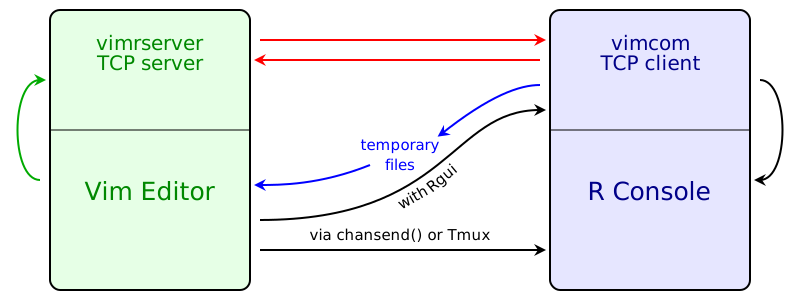
The black arrows represent all commands that you trigger in the editor and that you can see being pasted into R Console. There are three different ways of sending the commands to R Console:
-
When running R in a built-in terminal, the function
term_sendkeys()(Vim) orchansend()(Neovim) is used to send code to R Console. -
When running R in an external terminal emulator, Tmux is used to send commands to R Console.
-
On the Windows operating system, Vim-R can send a message to R (vimcom) which forwards the command to R Console.
The R package vimcom includes the application vimrserver, which is never used by R itself but is run as a Vim job. That is, the communication between vimrserver and Vim is through vimrserver's standard input and output (green arrows). The vimrserver application runs a TCP server. When vimcom is loaded, it immediately starts a TCP client that connects to vimrserver (red arrows).
Some commands that you trigger are not pasted into R Console and do not output
anything in R Console; their results are seen in the editor itself. These are
the commands to do omnicompletion (of names of objects and function
arguments), start and manipulate the Object Browser (\ro, \r= and \r-),
call R help (\rh or :Rhelp), insert the output of an R command
(:Rinsert) and format selected text (:Rformat).
When new objects are created or new libraries are loaded, vimcom sends messages that tell the editor to update the Object Browser, update the syntax highlighting to include newly loaded libraries and open the PDF output after knitting an Rnoweb file and compiling the LaTeX result. Most of the information is transmitted through the TCP connection to the vimrserver, but temporary files are used in a few cases.
-
languageserver: a language server for R.
-
colorout: a package to colorize R's output.
Faria, J. C.
Universidade Estadual de Santa Cruz - UESC
Departamento de Ciências Exatas - DCEX
Ilhéus - Bahia - Brasil