Aren’t you tired of choosing a random movie or book to enjoy?
The objective of this project is to give you daily recommendations on movies and books, depending on the specific day in question. We have celebrities’ birthdays, international days and anniversaries of certain events, such as famous battles.
This project that originates Leisure Time – Movie&Book Recommendation System is based on an NLP model that was specifically searched for the purpose of connecting one description into another one.
- Books.ipynb
- Days.ipynb
- model.ipynb
- Movies_IMDB.ipynb
- Movies_TMDP_API.ipynb
- appimdb.py
- appimdb2.py
- apptmdb.py
- apptmdb2.py
- "01 Queries" folder
- df_birthdays_movies.csv
- df_birthdays_books.csv
- days.csv
- matches'%d%m%Y'_TMDB.csv
- matches'%d%m%Y'_IMDB.csv
- goodreads.csv (downloadable - refer to chapter 5)
- best_books.csv
- TMDB_movies_final.csv
- imdb_movie_fetch.csv
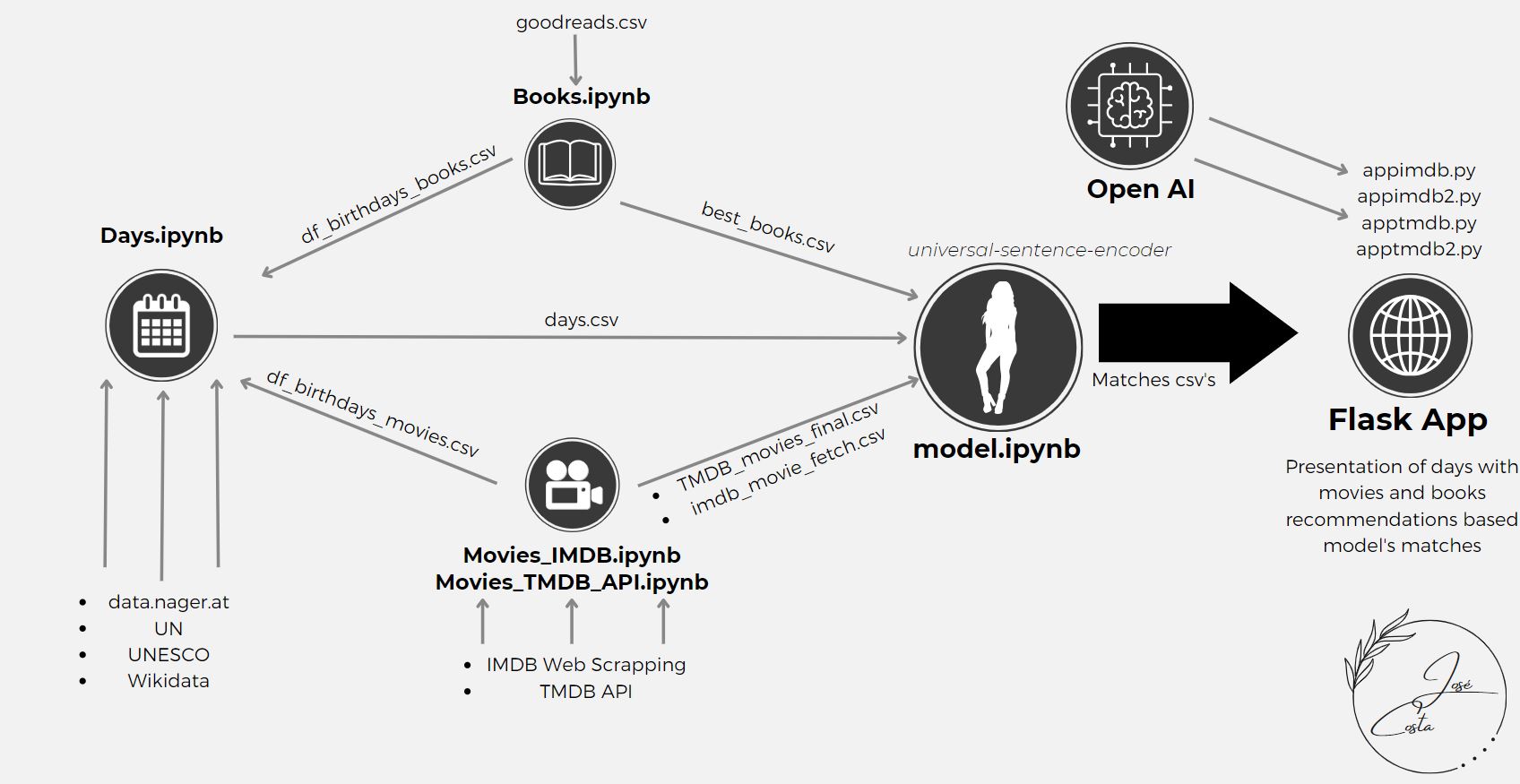
The python book used for dealing with the books dataframe was Books.ipynb. The books dataframe used was from Kaggle, from the following source:
The dataset was cleaned to Latin and English titles, using the langid library. This dataframe was also reduced to the books with a certain minimum rating and votes. In this case, the final dataframe of books has only books with at least 3.5 rating and 1000 votes - best_books.csv. In the end, we get the authors' birthdays by webscraping Wikipedia to add to our Days dataframe - df_birthdays_books.csv.
The focus of this project was the movies, because nowadays we give more focus into television. So there were 2 approaches to get movie data:
-
From TMBD API – using the API from: https://www.themoviedb.org/
-
From IMDB website – using Web Scraping, from IMDB advanced search system Each of the processes takes more than 12 hours to run. Web Scraping can be time-consuming, especially when dealing with big data.
To use TMDB API in Movies_TMDB_API.ipynb the following steps were made to get the correct bearer and API key: https://developer.themoviedb.org/reference/intro/getting-started/*. To get more data, such as actors, budgets, revenues, imdb ids and streams the following source was used: https://github.com/celiao/tmdbsimple/blob/master/README.md.
base_url = "https://api.themoviedb.org/3/discover/movie"
headers = {
"accept": "application/json",
"Authorization": "Bearer YOUR_BEARER" ######### ------------------------- FROM TMDB API
}tmdb.API_KEY = 'YOUR_API_KEY' ######## ------------------- select from your TMDB API KEY
tmdb.REQUESTS_SESSION = requests.Session()In this case, I looped through all the genres with a minimum rating of 5.0 and 3000 votes, using web scraping to get:
- Pages URLs
- Movies URLs
- Web scraping of all the movies URLs to get a dataframe imdb_movie_fetch.csv with:
- URL
- Movie title
- Movie image
- IMDb Rating
- Number of votes
- Movie description
- Movie genres
- Published Date
- Content Rating
- Actors, writers, and directors
- Movie Popularity
- Web scraping Wikipedia to get the actors' birthdates - df_birthdays_movies.csv.
To get the dataframe for the days, in Days.ipynb, research was done to obtain first the international days, and then the anniversaries of certain events, from several sources. Lastly, I gathered up also the anniversaries of authors and actors that were in the movies and books dataframes.
Sources:
- https://date.nager.at/api/ - Web scrapping
- https://www.un.org/en/observances/list-days-weeks/ - Web scrapping
- https://www.unesco.org/en/days/ - Web scrapping
- https://en.wikipedia.org/wiki/ - Web scrapping for days’ descriptions and images
- http://w.wiki/6Zx/ - Manual download of data queries
- Authors and actors birthdays - got from movies and books dataframes
In the end, all the types of days are in the dataframe days.csv.
In model.ipynb, the days, books and movies datasets are loaded and put through the chosen model universal-sentence-encoder.
model = hub.load("https://tfhub.dev/google/universal-sentence-encoder/4")Each type of day can be matched up to 3 movies and 3 books, based on the top similarity ratios calculated by the model. Two matches datasets for today’s events are created, one using TMDB API and the other IMDB web scrapping.
The flask app does the reading of the matches in that day and display them along the web interface, including also snack and drink recommendations for the movies. There are 4 documents that can be used to run the Flask App:
- appimdb.py
- apptmdb.py
- appimdb2.py
- apptmdb2.py
Only the 1st versions appimdb.py and apptmdb.py include the snacks and drinks recommendations for the movies, using Open AI API. So to use them properly the Open AI key needs to be inside those files in:
openai.api_key = "YOUR_API_KEY" ##### -------- input your OpenAI API keyThe 2nd versions can be run without any API key input.
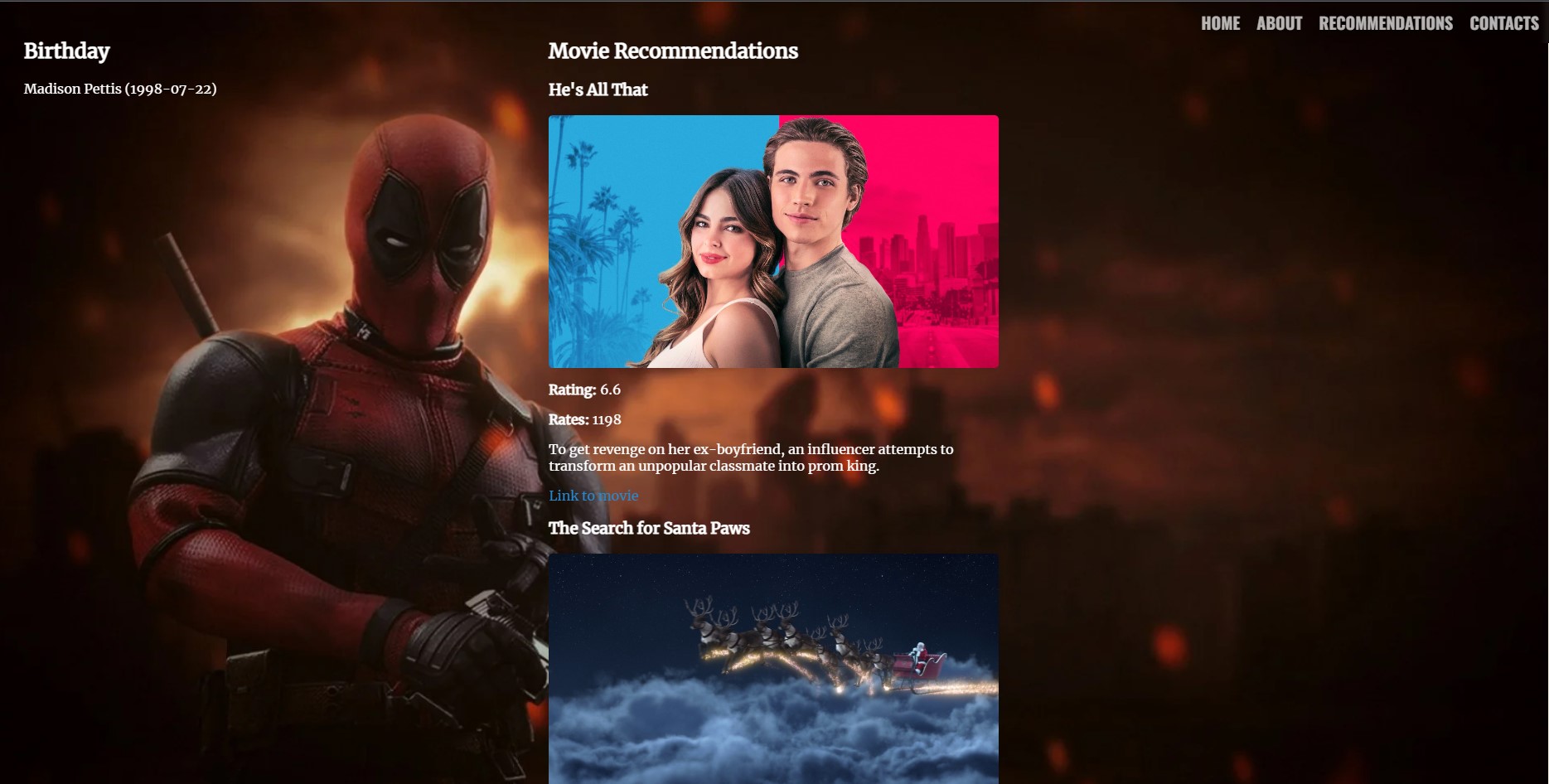
The result Leisure Time from the .html code that is in the “templates” folder gives an overview for one day of each type of days – one international day, one celebrity birthday, and one event anniversary.

- If you want, you can skip to Step 6 and use the already created dataframes for days, movies, books and respective matches (up2date mid Jul23):
- days.csv
- best_books.csv
- TMDB_movies_final.csv
- imdb_movie_fetch.csv
- Run fully Books.ipynb (1st download goodreads.csv as per chapter 5) to get best_books.csv and df_birthdays_books.csv.
- Run Movies_TMDB_API.ipynb to get TMDB_movies_final.csv.
- This process takes several hours – be patient.
- Remember to input your Bearer and API Key in the respective code lines (check chapter 6.1)
- Run fully Movies_IMDB.ipynb to get imdb_movie_fetch.csv and df_birthdays_movies.csv
- This process takes several hours – be patient.
- Run Days.ipynb to get days.csv dataframe.
- Run our model - model2.ipynb – to get the matches of today.
- This model takes roughly 2-3 hours to run for both TMDB and IMDB movies dfs.
- Choose which flask app file .py you want to use:
- appimdb.py – to run with IMDB matched movies (Remember to input your Open AI key)
- apptmdb.py – to run with TMDB matched movies (Remember to input your Open AI key)
- appimdb2.py – to run with IMDB matched movies, without snacks&drinks recommendations for movies (best if you don’t want to use APIs)
- apptmdb2.py – to run with TMDB matched movies, without snacks&drinks recommendations for movies (best if you don’t want to use APIs)
- In GitBash, or another command prompt software, go to the location of your forked repository and type: python “selected_app.py”. Should appear something like this:
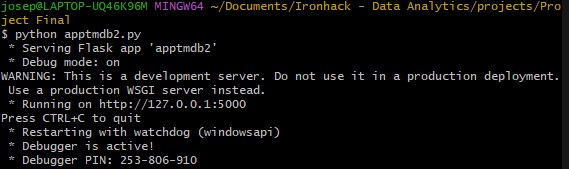
- Now, you just need to go to your internet browser and type the selected host, e.g. http://127.0.0.1:5000 from above.
- Voilà.