Welcome to the Jackson bot user guide! Jackson bot is a task manager which you can interact with using various commands. Below are the contents on how to use the program. Please read them carefully and enjoy using the program!
- How to use
- Jackson bot features
- View all tasks:
list - Add a Todo task:
todo - Add a Deadline task:
deadline - Add a Event task:
event - Mark a task:
mark - Unmark a task:
unmark - Delete a task:
delete - Finding tasks:
find - Exiting the Duke bot:
exit - Uploading data
- Saving data
- View all tasks:
-
Check that Java
11or above installed on your Computer. -
Download the latest version of
Jackson.jarfrom theReleasestab on the right of the repo. -
Move
Jackson.jarto your preferred folder. This will be the home folder of your Duke bot program. -
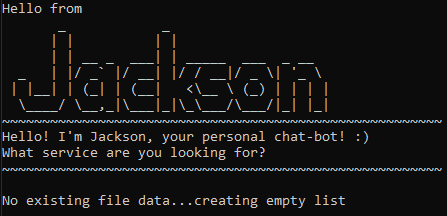
Double-click the jar file to run the program. An interface will be similiar to what you see below:
-
Type your desired command into the interface and press Enter to execute it.
-
Refer to the
Jackson bot featuressection below to get the details for specific commands.
View all the tasks you currently have in your task list
Command: list
Adds a todo task to the list
Command format: todo <description>
- Things to note:
- Task description cannot be empty
e.g. todo Go for CS2113 lecture
Adds a task with deadline to the list
Command format: deadline <description> /by <time>
- Things to note:
- Task description cannot be empty
- Date and time must both be provided
- Date format:
YYYY-MM-DD - Time format:
HH:mm
- Date format:
e.g. deadline Go for CS2113 lecture /by 2022-09-23 16:00
Adds a event with timing to the list
Command format: event <description> /at <time>
- Things to note:
- Task description cannot be empty
- Date and time must both be provided
- Date format:
YYYY-MM-DD - Time format:
HH:mm
- Date format:
e.g. event CS2113 lecture /at 2022-09-23 16:00
Marks the selected task in the list as complete
Command format: mark
- Things to note:
- Task index must be in the list
- index refers to the task ranking on the list
e.g. mark 1
Unmarks the selected task in the list as incomplete
Command format: unmark
- Things to note:
- Task index must be in the list
- index refers to the task ranking on the list
e.g. unmark 1
Deletes the selected task from the list
Command format: delete <index>
- Things to note:
- Task index must be in the list
- index refers to the task ranking on the list
e.g. delete 1
Find all the tasks in the list that includes the given keyword. The respective indexes of the tasks are also included.
Command format: find <keyword>
- Things to note:
- Keyword must not be empty
e.g. find CS2113
Exits the Jackson bot program
Command format: exit
When booting up the program, Jackson will check the current file directory for the data.txt file to load exisitng tasks to the list. If no such file is present Jackson will create a new file.
Note: If you want to add in your own data directly into the data.txt file, ensure that you follow the task format in the data file. If not, Jackson will not be able to understand the task and crash.
Jackson will automatically save and update tasks in the data.txt file as commands are entered. Hence no manual saving of data is needed.