The efficient, reliable, and developer-friendly way to use the Google Patents API.
Actor page: apify.com/johnvc/google-patents-api Input schema: apify.com/johnvc/google-patents-api/input-schema
The Google Patents API searches Google Patents by keyword, inventor, or assignee and returns clean, structured JSON: title, snippet, inventors, assignees, priority/filing/grant/publication dates, publication number, and a PDF link per patent. Every search also returns an AI summary (top assignees, inventors, and CPC classifications with year-range frequencies). Pull full details (claims, citations, family members, CPC) for each result, or fetch a single patent directly. Built for prior-art search, competitive IP research, patent landscaping, and AI agent workflows.
- Python 3.11 or higher
- An Apify account and API key (get a free key here)
-
Clone the repository
git clone https://github.com/johnisanerd/Apify-Google-Patents-API.git cd Apify-Google-Patents-API -
Install dependencies with UV
# Install UV if you do not have it:
curl -LsSf https://astral.sh/uv/install.sh | sh

# Install project dependencies:
uv sync
-
Configure your API key
cp .env.example .env
# Edit .env and add your Apify API key
# Get your free API key at: https://apify.com?fpr=9n7kx3
-
Run the example
uv run python google-patents-api-example.py
export APIFY_API_TOKEN="your_api_key_here"
uv run python google-patents-api-example.pySearch the full corpus. Query by free text, assignee, or inventor across patent offices worldwide (US, EP, WO, JP, KR, CN, and more), with date, status, and type filters.
Structured records. Each patent comes back with title, snippet, inventors, assignees, all four key dates, publication number, and a direct PDF link.
AI summary, free. Every search returns top assignees, inventors, and CPC classes with year-range frequency breakdowns, so you can see the shape of a field at a glance.
Full details on demand. Set include_details to pull claims, citations, patent family, and CPC for each result, or pass a patent_id to fetch one patent directly.
Prior-art friendly. Set scholar to fold in matching Google Scholar literature alongside patents.
Predictable, pay-per-use pricing. Billing is per page (and per details lookup), with no subscription.
- Keyword, assignee, and inventor search with date, status, and type filters
- Single-patent details mode via
patent_id - AI summary of top assignees, inventors, and CPC classes
- Optional full details (claims, citations, family, CPC, PDF)
- Optional Google Scholar results for prior-art workflows
- One item per page, each with a
patentsarray - Inventors and assignees as arrays; four dates per patent
- Publication number and direct PDF link on every record
- Search metadata and total counts echoed on every item
{
  "q": "graphene battery",
  "num": 10,
  "max_pages": 1
}{
"q": "neural network accelerator",
"assignee": "Apple",
"after": "filing:20200101",
"include_details": true
}{
"patent_id": "patent/US11734097B1/en"
}| Parameter | Type | Required | Default | Description |
|---|---|---|---|---|
q |
str |
one of | - | Free-text query. At least one of q, patent_id, assignee, inventor. |
patent_id |
str |
one of | - | Fetch one patent directly, e.g. patent/US11734097B1/en. |
assignee |
str |
no | - | Comma-separated company names to filter by. |
inventor |
str |
no | - | Comma-separated inventor names to filter by. |
country |
str |
no | - | Patent office codes, e.g. US,EP,WO. |
status |
str |
no | - | GRANT or APPLICATION. |
type |
str |
no | - | PATENT or DESIGN. |
before / after |
str |
no | - | Date bounds, e.g. publication:20251231, filing:20200101. |
sort |
str |
no | relevance |
relevance, new, or old. |
num |
int |
no | 10 |
Results per page (10-100). |
max_pages |
int |
no | 1 |
Pages to fetch; 0 = unlimited. Each page is billed. |
include_ai_summary |
bool |
no | true |
Attach the AI summary block to the first item. |
include_details |
bool |
no | false |
Pull full details for each result (capped at 10; each is billed). |
scholar |
bool |
no | false |
Also include matching Google Scholar results. |
A real result for semiconductor cooling (the patents array is trimmed to one item; ai_summary is summarized).
{
  "search_parameters": { "q": "semiconductor cooling", "num": 10, "max_pages": 1 },
  "search_metadata": { "total_results": 123435, "patents_count": 10, "pages_processed": 1 },
  "page_number": 1,
  "patents": [
    {
      "position": 1,
      "patent_id": "patent/US11854937B2/en",
      "title": "Power module apparatus, cooling structure, and electric vehicle or hybrid ...",
      "assignee": ["Rohm Co., Ltd."],
      "inventor": ["Katsuhiko Yoshihara"],
      "priority_date": "2015-12-04",
      "grant_date": "2023-12-26",
      "publication_number": "US11854937B2",
      "language": "en",
      "pdf": "https://patentimages.storage.googleapis.com/3f/b8/ec/5bca660e13f64b/US11854937.pdf",
      "patent_link": "https://patents.google.com/patent/US11854937B2/en"
    }
  ],
  "ai_summary": { "assignees": [ "..." ], "inventors": [ "..." ], "cpc": [ "..." ] }
}
Each patent also carries a snippet, filing_date, publication_date, thumbnail, figures, and country_status. The ai_summary block holds top assignees, inventors, and CPC classes, each with percentage and year-range frequency breakdowns. With include_details enabled, each patent gains its claims, citations, family members, and CPC list.
You can load the Google Patents API as an MCP tool so assistants call it for you. The MCP server URL preloads just this one Actor:
https://mcp.apify.com/?tools=actors,docs,johnvc/google-patents-api
Authenticate with OAuth in the browser when offered, or with your Apify API token (the same APIFY_API_TOKEN used by the Python example). Get a token at https://console.apify.com/settings/integrations and a free Apify account at https://apify.com?fpr=9n7kx3 .
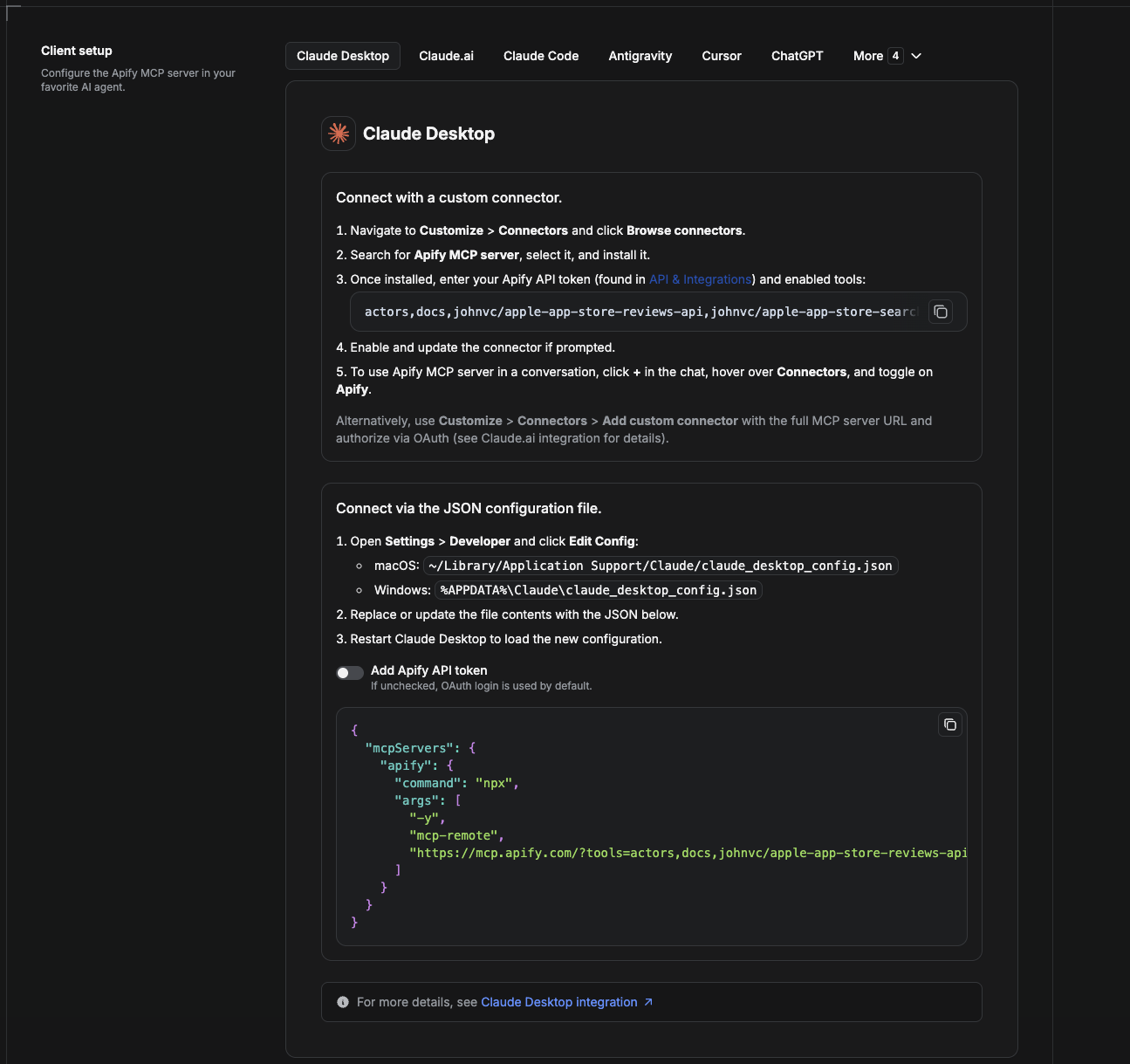
Cowork is the desktop app's automation mode. To give it the Google Patents API as a tool, add the Apify MCP server as a connector.
- Open the Claude desktop app and go to Settings → Connectors (or Settings → Developer → Edit Config to edit
claude_desktop_config.jsondirectly).- macOS:
~/Library/Application Support/Claude/claude_desktop_config.json - Windows:
%APPDATA%\Claude\claude_desktop_config.json
- macOS:
- Add the Apify MCP server, preloaded with only this Actor:
{
  "mcpServers": {
    "apify": {
      "command": "npx",
      "args": [
        "-y",
        "mcp-remote",
        "https://mcp.apify.com/?tools=actors,docs,johnvc/google-patents-api"
      ]
    }
  }
}- Restart the app. When Cowork first calls the tool, complete the OAuth prompt in your browser, or add your Apify API token in the connector settings to skip OAuth.
- In a Cowork chat, confirm the tool is available and ask it to run the Google Patents API.
Download the desktop app and start a free trial: https://claude.ai/referral/uIlpa7nPLg More help: https://docs.apify.com/platform/integrations/claude-desktop
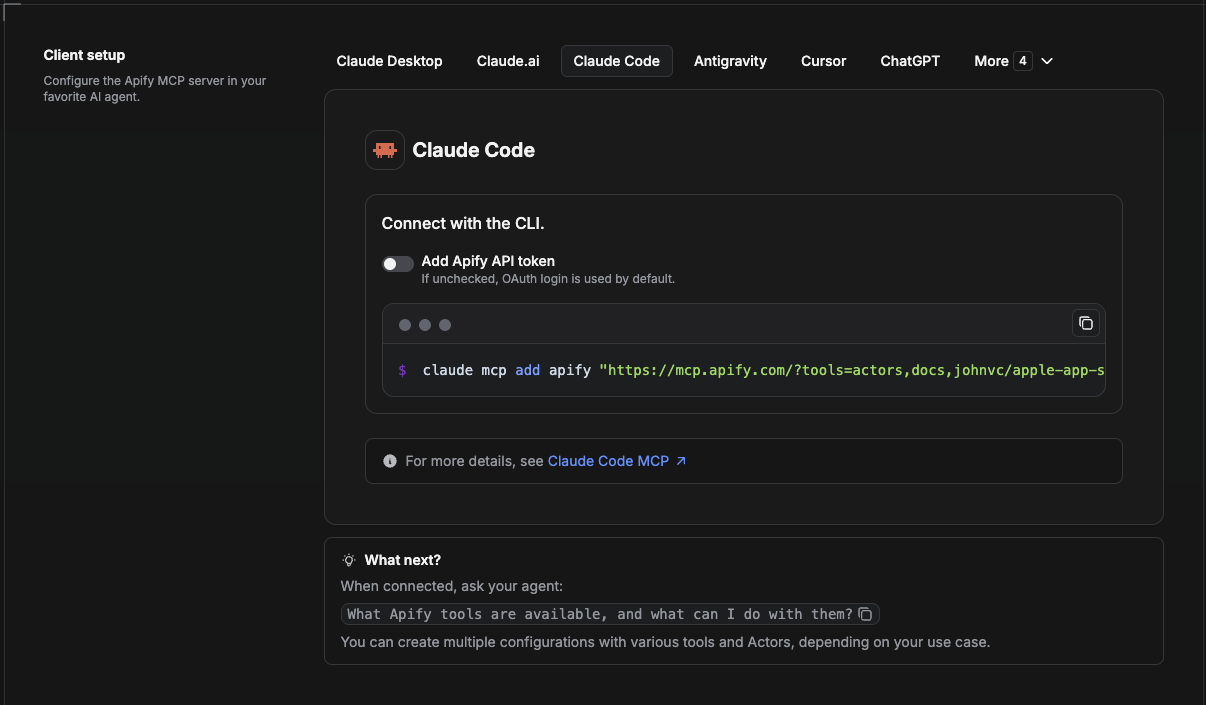
Claude Code is the command-line tool. Add the Actor's MCP server with one command:
claude mcp add --transport http apify \
  "https://mcp.apify.com/?tools=actors,docs,johnvc/google-patents-api"
To use a token instead of browser OAuth:
claude mcp add --transport http apify \
  "https://mcp.apify.com/?tools=actors,docs,johnvc/google-patents-api" \
  --header "Authorization: Bearer YOUR_APIFY_TOKEN"
Then verify with claude mcp list, or run /mcp inside a session. Ask Claude Code to call the Google Patents API.
Try Claude Code free: https://claude.ai/referral/uIlpa7nPLg Claude Code MCP docs: https://code.claude.com/docs/en/mcp
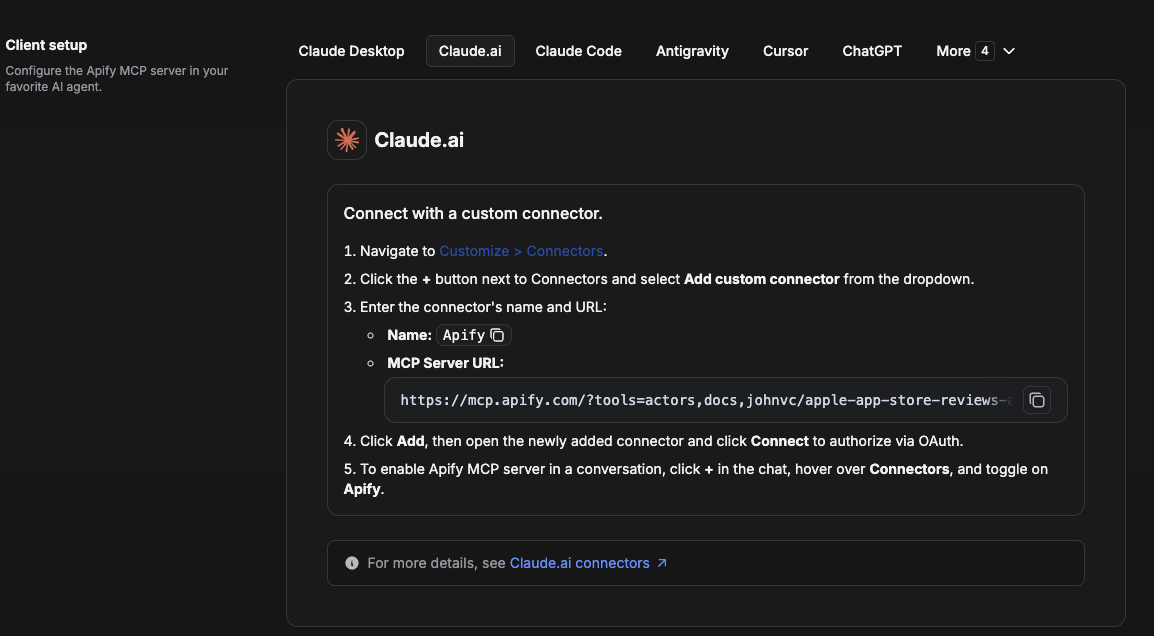
On claude.ai you add Apify as a connector, then enable just this Actor's tool.
- Go to Settings → Connectors → Browse connectors and search for Apify MCP server. Install it (enable or update if prompted).
- When connecting, authenticate with your Apify API token, and enable the tool
johnvc/google-patents-api. - In any chat, open + → Connectors and turn on Apify.
- Alternatively, choose Add custom connector and paste the full MCP URL
https://mcp.apify.com/?tools=actors,docs,johnvc/google-patents-api, using OAuth when prompted. - Ask Claude to run the Google Patents API.
Open Claude on the web: https://claude.ai
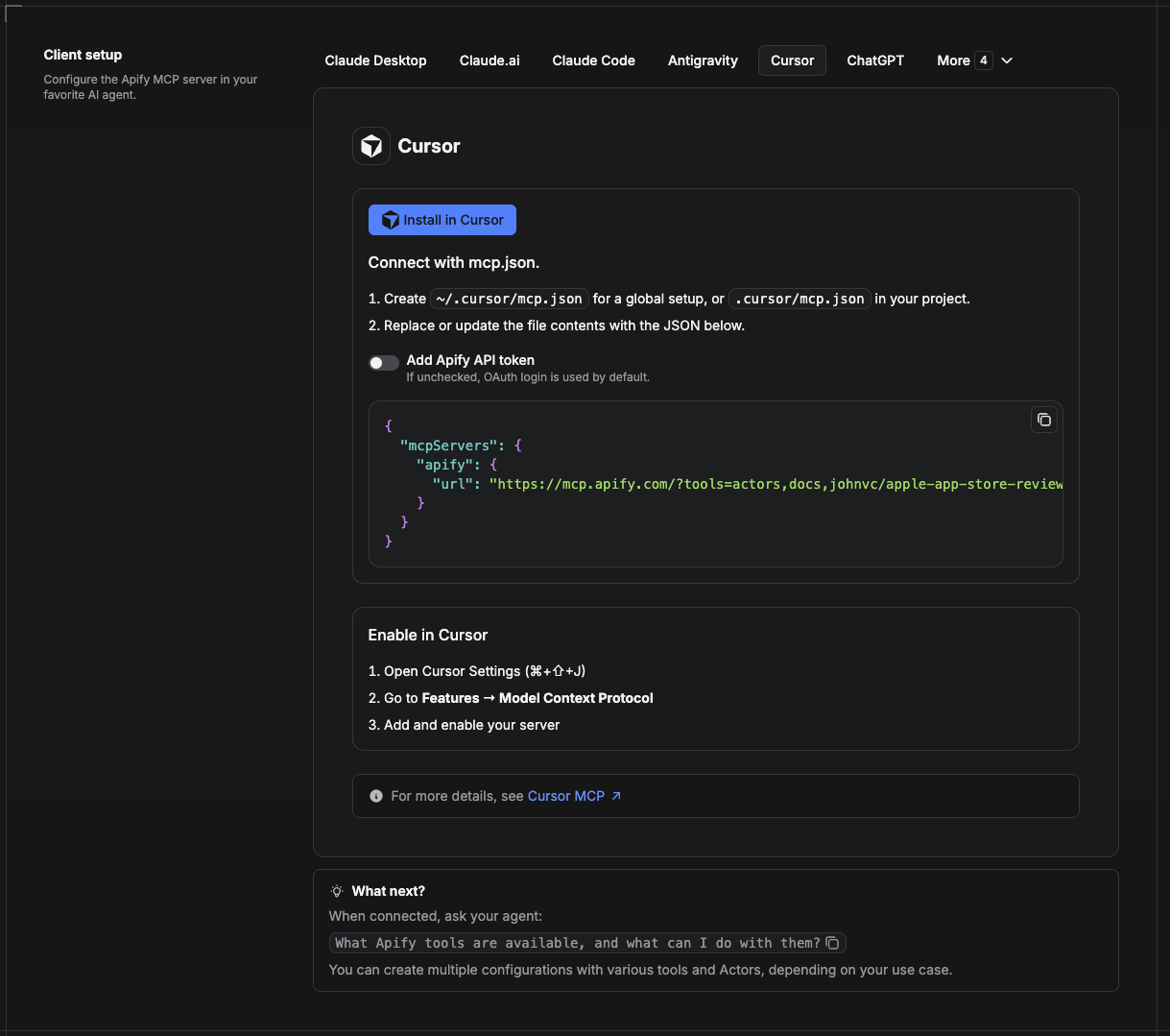
Cursor reads MCP servers from a project file at .cursor/mcp.json.
- In your project, create
.cursor/mcp.json:
{
  "mcpServers": {
    "apify": {
      "url": "https://mcp.apify.com/?tools=actors,docs,johnvc/google-patents-api"
    }
  }
}- If you prefer token auth over browser OAuth, add a header:
{
  "mcpServers": {
    "apify": {
      "url": "https://mcp.apify.com/?tools=actors,docs,johnvc/google-patents-api",
      "headers": { "Authorization": "Bearer YOUR_APIFY_TOKEN" }
    }
  }
}- Open Cursor → Settings → MCP and confirm the apify server is connected (green dot).
- In Composer or Chat, ask Cursor to call the Google Patents API.
New to Cursor? Get it here: https://cursor.com/referral?code=XQP4VBLI3NNX
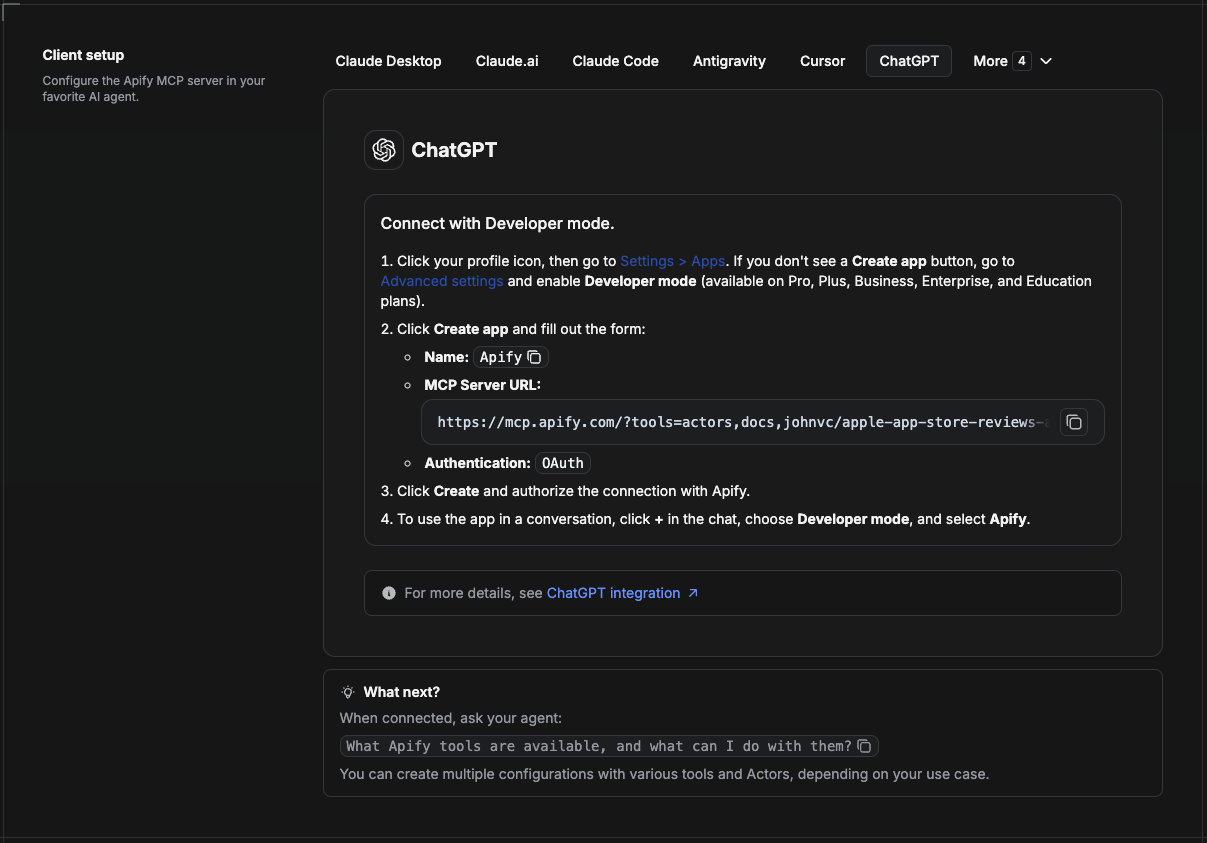
ChatGPT connects to the Apify MCP server through Developer mode (available on ChatGPT Pro, Plus, Business, Enterprise, and Education plans).
- Click your profile icon, then go to Settings > Apps. If you do not see a Create app button, open Advanced settings and enable Developer mode.
- Click Create app and fill out the form:
- Name: Apify
- MCP Server URL:
https://mcp.apify.com/?tools=actors,docs,johnvc/google-patents-api - Authentication: OAuth
- Click Create and authorize the connection with Apify.
- To use the app in a conversation, click + in the chat, choose Developer mode, and select Apify.
More help: https://docs.apify.com/platform/integrations/mcp
Use the Google Patents API to power prior-art search, IP research, and patent landscaping with reliable, structured results.
Last Updated: 2026.05.30