This a copy of a project created as part of the course Software Development in Large Teams. The copy is created for reference purposes. This project was awarded a second place among all of the student projects develop throughout the course.


Link to coverage report:
https://app.codecov.io/gh/LVOL98/YamatomichiApp
- Branching strategy.
- Basic git commands.
- Commit messages
- Project file/folder structure
- Points to be discussed
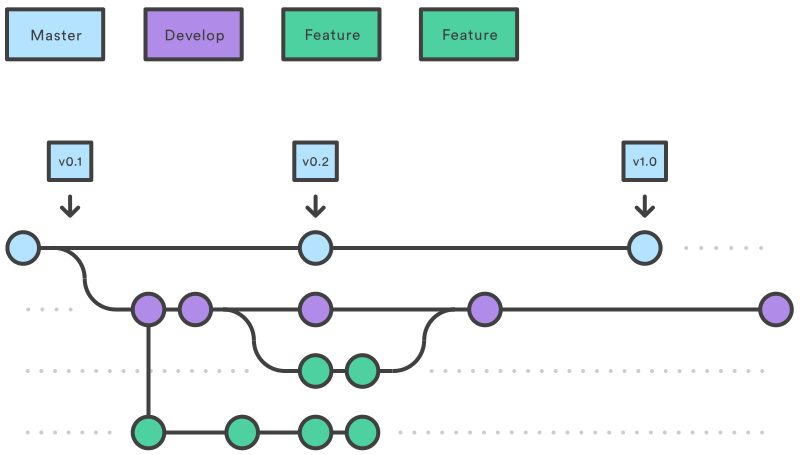
Our branching strategy will utilize the Gitflow Workflow and can be read in further details in the link. Basically we will have 2 main branches and a number of feature branches:
mainbranch - This is the main branch and contains the "production code".developbranch - This is the development branch containing the development code. This code is merged and pushed intomainat the end of each sprint/increment.featurebranches is used to develop specific product features relating to a specific user story and is merged and pushed into the development branch when it adheres to the definition of done (DoD).
.svg?cdnVersion=1472)
- Branches should be branched from
develop - Remember always to pull the newest development branch before creating a feature branch
- Name branches with user story ID's from ClickUp
and a small descriptive tag such as
#epzeny_profileCreation - Experimenting with things is fine but preferably this is best in branches. In
some cases working on a specific user stories more than one it might make sense
to further branch out from the feature branch eg.
#epzeny_profileCreation_juwu
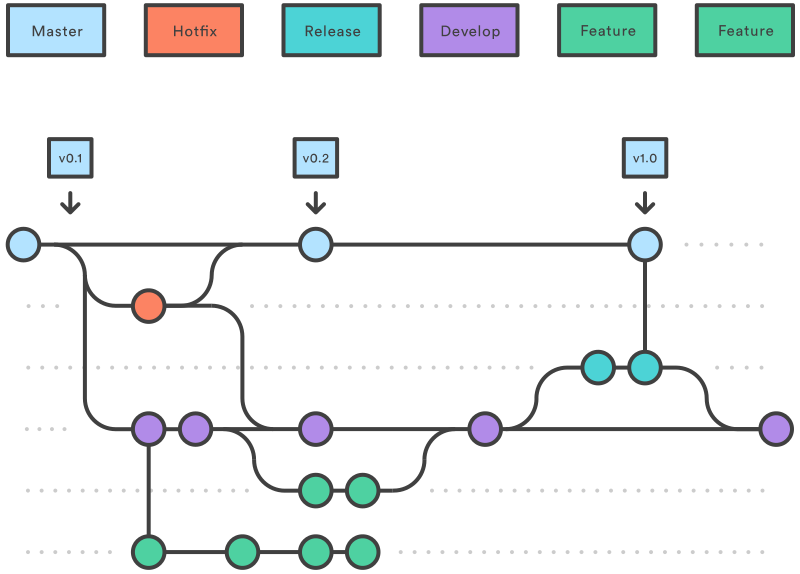
This branching strategy might not be necessary in the beginning but might be usefull in later sprints if bugs are discovered that are easily fixable.
.svg?cdnVersion=1472)
Change branch
git checkout branch_nameCreate a new branch
git checkout -b branch_nameAny convention such as tags? Point to be discussed.
Initial Draft:

See also this medium post
- Should we make code reviews and only merge with pull requests?
- Should we make any commit message conventions?
- Consider the file structure of the project