
A lightweight, real-time CPU temperature monitor with customizable ASCII art. Powered by psutil and rich.
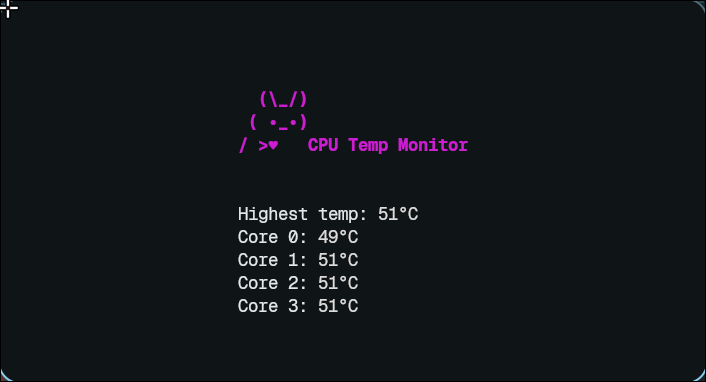
- Real-time CPU temperature monitoring
- Customizable ASCII art banner
- Color-coded temperature display based on thresholds
- Cross-platform compatibility (primarily tested on Linux)
- Python 3.6 or higher
- Python packages:
richandpsutil(install viapip install rich psutil) - Unix-like operating system (e.g., Linux)
- Clone the repository:
git clone https://github.com/quietpulse/c2fetch.git cd c2fetch - Make the setup script executable and run it:
chmod +x setup.sh ./setup.sh- This installs dependencies and sets up the tool.
- To uninstall:
./setup.sh --uninstall
- Clone the repository:
git clone https://github.com/quietpulse/c2fetch.git cd c2fetch - Install system dependencies:
- Debian/Ubuntu:
sudo apt update && sudo apt install -y python3-pip - Fedora:
sudo dnf install -y python3-pip - Arch Linux (alternative):
sudo pacman -Sy python-pip
- Debian/Ubuntu:
- Install Python packages:
pip3 install --user rich psutil - Create an alias for easy access (add to
~/.bashrcor your shell configuration):echo "alias c2fetch='python3 $(pwd)/main.py'" >> ~/.bashrc source ~/.bashrc
Run the tool with optional color customization:
c2fetch [--color COLOR]
--color COLOR: Sets the color of the ASCII art banner (default:magenta). Available colors includecyan,green, etc.
Example:
c2fetch --color cyan
- Temperature Thresholds: Modify the
temp_style()function inmain.pyto adjust color thresholds for temperature displays. - ASCII Art: Update the banner in the
create_ascii_art()function inmain.pyto customize the visual output.
Contributions are welcome! To get started:
- Fork the repository.
- Create a feature branch:
git checkout -b feat/your-feature - Commit your changes:
git commit -am "Add your feature" - Push to the branch:
git push origin feat/your-feature - Open a Pull Request on GitHub.
Please ensure your code follows the project's style and includes relevant tests or documentation updates.
MIT License. See LICENSE for details.
Designed and Crafted with ❤️ & ✨ by ~ Me