
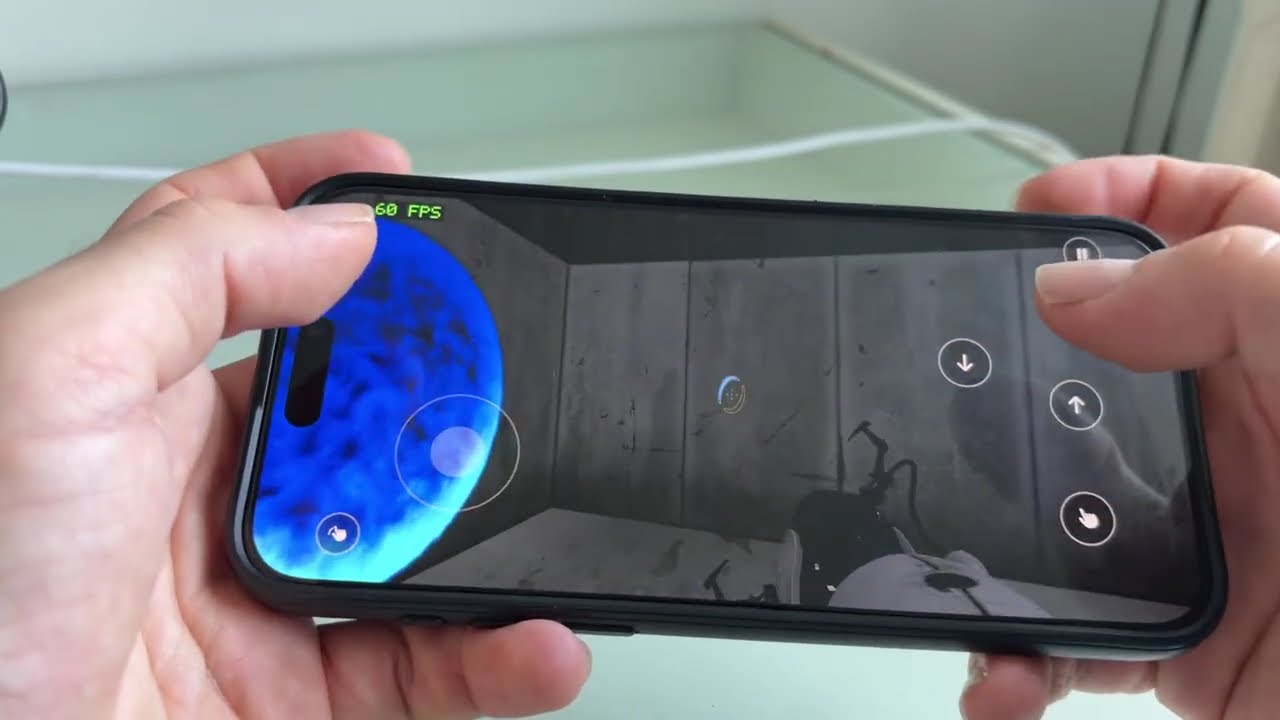
Video: Portal 2 running natively on an iPhone 15 Pro Max.


This project builds native Mac and iPhone apps from your own copies of Portal 2 and Half-Life 2 (with Episode One, Episode Two and Lost Coast). It translates the x86 code of the Linux versions into C, then compiles it for Apple silicon. No emulator, no Wine, no Rosetta.
You must own the games. This repository has no game files and no Valve code: everything is generated on your machine from your own copy. The app and the generated code contain Valve's game, so keep them for yourself and don't share them.
Unofficial fan project, not affiliated with or endorsed by Valve. Portal, Portal 2, Half-Life, Steam and Source are trademarks of Valve Corporation. Provided as is, without warranty.
Portal 2: fully playable.
- Mac: on an M3 Pro, Metal (the default) runs a scene at 122 fps where OpenGL gets 81 (2560×1440, MSAA 4×).
- iPhone: steady 60 fps on an iPhone 15 Pro Max, with touch controls and portals fired by tapping the back of the phone.
- Controllers: work on Mac and iPhone (tested with an 8BitDo SN30 Pro). On Mac, turn Steam Input off for Portal 2.
- Co-op over the local network: a Mac hosts, an iPhone or a second copy on the same Mac joins. Connection and map load are checked; a full co-op course has not been played yet.
Half-Life 2 (experimental), with Episode One, Episode Two and Lost Coast (details):
- Mac: 120 fps with Metal on an M3 Pro at 1280×720. Players report an hour on an M4 Pro with no issue, and mostly 60 fps (dips to 50) on an M4 Air at 2560×1664, maximum settings, with a DualShock 4.
- Episodes and Lost Coast: their first maps load; they have not been played through.
- iPhone: 60 fps on an iPhone 15 Pro Max, with touch controls and gyro aiming, in a short test.
Both games
- Install: the Natif Installer app from the
releases, or one
command,
setup.sh, for either game or both. Only the Xcode command line tools are required. - Multiplayer: only Portal 2's LAN co-op. No Steam invites or online play, and Half-Life 2: Deathmatch is not supported.
tools/elfprep.pyandtools/gameprep.pylay out the Linux ELF modules (engine.so,client.so, ...) at fixed guest addresses, apply their relocations offline and record imports, exports and entry points.tools/lift.pytranslates every x86 function into a C function;clangcompiles the result together with the runtime into one ARM64 executable (build/portal2-native;build/hl2/hl2-nativefor Half-Life 2). Indirect call targets that the static pass misses are collected at run time intoconfig/game-roots.json.- The runtime (
runtime/) implements what the binaries import: libc, pthreads and futexes, SDL2, OpenGL, Direct3D 9 and Steam. Guest threads are real threads serialized by one lock, the guest gate (docs/fast-path.md). - Steam calls are forwarded to Valve's own arm64
libsteam_api.dylib(from Steamworks.NET) through generated i386 → arm64 proxies; there is no Steam emulator (docs/steam.md). - Rendering has two paths. The default is Valve's
shaderapivk.sotalking to mtld3d, a native Direct3D 9 on Metal (docs/d3d9-bridge.md); mtld3d is the project, the library it builds islibd3d9metal. The fallback is Valve'stogl, translating Direct3D 9 to legacy OpenGL 2.1 (docs/gl-audit.md). - On iPhone the OpenGL path goes through gl4es, with every shader rewritten to GLSL ES 3.00 (docs/ios.md); the Metal path is linked statically.
- An Apple silicon Mac on macOS 13 or newer with the Xcode command line tools
(
xcode-select --install, which also brings Python 3.9). SDL2, FreeType, Fontconfig and the Metal renderer come prebuilt from this project's releases (about 4 MB, SHA-256 checked); withbrew install sdl2 freetype fontconfig, Homebrew's are used instead. - Portal 2 on Steam:
- the game folder (the one with
portal2/,platform/andbin/); the Windows version works; - the Linux binaries: open the Steam console (
open steam://open/console) and typedownload_depot 620 661(about 90 MB).
- the game folder (the one with
- And/or Half-Life 2 on Steam:
- the game data (the current version, with
hl2_complete/): install it with Steam, or usedownload_depot 220 221in the Steam console; - the Linux binaries:
download_depot 220 224(about 320 MB). Wait for “Depot download complete” for each download.
- the game data (the current version, with
- Optional: Rust 1.99 or newer from rustup builds the
Metal renderer from source instead of using the prebuilt one; the iPhone
app needs it for Metal (Homebrew's
rusthas no iOS target). - For iPhone: Xcode with your Apple ID (a free account works),
brew install xcodegen cmake ninja, an iPhone on iOS 17 or newer connected by cable with Developer Mode on, and about 12 GB free on it. Tested on an iPhone 15 Pro Max only.
Without Terminal: download Natif-Installer-<version>.zip from the
latest release,
unzip it and open Natif Installer. It is signed; if macOS refuses to
open it, go to System Settings > Privacy & Security and click Open
Anyway. The installer checks the Xcode command
line tools (and offers to install them), finds Portal 2, Half-Life 2 and
their Linux binaries (with the Steam console commands to paste when they are
missing), lets you tick the games to build, then runs setup.sh for you.
Its copy of the code and the builds (about 5 GB per game) live in
~/Library/Application Support/Portal 2 Natif Build, as with the first
Portal 2 installer, so an update rebuilds only what changed; its log is
~/Library/Logs/NatifInstaller.log.
With Terminal:
git clone https://github.com/kanapitsas/source-recomp.git
cd source-recomp
./setup.sh                    # every game found: Portal 2, Half-Life 2 or both
./setup.sh --game hl2         # one game (portal2, hl2), or --game all for both
./setup.sh "/path/to/Portal 2" "/path/to/depot_661"   # folders Steam did not put in the usual place
Without paths, setup.sh looks where Steam usually puts the games and their
Linux binaries, and builds each game it finds complete (./setup.sh --detect
lists them without building). It downloads Valve's libsteam_api.dylib
(from Steamworks.NET, SHA-256 checked), builds each game (about 10 minutes
for Portal 2 and 10 to 20 for Half-Life 2 the first time) and creates
~/Applications/Portal 2 Natif.app and/or Half-Life 2 Natif.app.
Re-running it is safe and quick, and adding the second game later does not
rebuild the first. "Natif" is French for native; the name is kept so
existing installs are updated in place.
Each app contains its own executable and libraries; the game files stay
where Steam put them. After a rebuild or a change to config/local.json, run
python3 tools/make_app.py (--game hl2 for Half-Life 2) to update the app
(--dest for another folder).
Downloads and iOS libraries go to deps/ (P2_DEPS overrides it).
P2_HOST_DEPS=homebrew or bundle forces where the host libraries come
from; P2_APP_DIR puts the app elsewhere than ~/Applications.
First create an Apple Development certificate (Xcode > Settings > Accounts > Manage Certificates > + > Apple Development), then:
./setup.sh --ios # every game found; --game hl2 for one, or paths as on MacIt builds, signs and installs each app and copies the game data (once:
about 11.5 GB for Portal 2, 10 GB for Half-Life 2; tools/ios_device.sh data copies it again after a reinstall). Half-Life 2's iPhone app is
experimental (docs/hl2.md).
On the phone, trust your account in Settings > General > VPN & Device
Management. With a free account, re-run ./setup.sh --ios every 7 days.
P2_TEAM_ID sets the team when it cannot be read from the certificate;
P2_DEVICE picks the iPhone when several are connected.
More in docs/ios.md.
On Mac, open Steam with the account that owns the game, then open
Portal 2 Natif or Half-Life 2 Natif (it starts Steam if needed). The game language follows
your -language argument, P2_LANGUAGE, config/local.json, then Steam
and macOS (details).
On iPhone: left stick to move, right half of the screen to look, buttons to jump, crouch, use and pause, and a tap on the back of the phone (left or right) to fire a portal. Everything is tunable in Settings > Portal 2. The iPhone version has no Steam, but it can join a Mac in LAN co-op. Half-Life 2 has its own touch layout (docs/hl2.md).
Controllers work on both. On Mac, turn Steam Input off for Portal 2 in Steam (Properties > Controller), otherwise Steam keeps the controller to itself (why). On iPhone, the on-screen controls hide themselves when a controller connects.
Co-op works over the local network: a Mac hosts, and an iPhone or a second copy on the same Mac joins by IP address (how). Two separate Macs, Steam invites and play over the internet are not tested.
The game renders with Metal when libd3d9metal is available, and with
OpenGL otherwise. Metal measured about +50 % fps on a Mac and +20–25 % on
an iPhone, and fixes the too-dark image of OpenGL on iPhone.
- If Rust is installed,
setup.shfetches and buildslibd3d9metal(about a minute) from a pinned commit of mtld3d's native host branch. Without Rust it uses the prebuilt library from the same commit (in the host libraries download); if neither works, the game uses OpenGL. If the build fails, a library built by an earlier run is kept as long as its file still exists; otherwise OpenGL.P2_NO_METAL=1 ./setup.shskips it. - The end of
setup.shtells which renderer the Mac app and the iPhone app use. The iPhone library is built separately and can still fall back to OpenGL. P2_RENDERER=openglforces OpenGL; on iPhone, use Settings > Portal 2 > Rendering > Renderer.- F3 on Mac shows the renderer and the frame rate; on iPhone, the counter in the top-left corner does.
Details: docs/d3d9-bridge.md.
./uninstall.shFor each game installed, it asks before moving the app and its log to the Trash, and asks again for the saves; then, on its own yes, the installer's build folder. It never touches the Steam game files or the Linux binaries.
The same recompiler also turns the Linux version of Half-Life 2 (the current Steam build, 20th anniversary update) into a native Mac app. You must own Half-Life 2; as for Portal 2, nothing from Valve is in this repository.
Install Half-Life 2 with Steam, or fetch its game data from the Steam console
with download_depot 220 221. Also fetch its Linux binaries with
download_depot 220 224 (about 320 MB). Wait for “Depot download complete”
for each download. Then tick it in the
installer, or run ./setup.sh (or ./setup.sh --game hl2) in the same
checkout as Portal 2: each game has its own build folder. It creates
~/Applications/Half-Life 2 Natif.app, with its own saves folder.
- Tested: a few hours of the main game on an M3 Pro, at 1280×720:
120 fps with Metal (the display's limit; the default, as for Portal 2) and 91 with
OpenGL (
--releasebuild). - iPhone:
./setup.sh --game hl2 --iosbuilds the app; 60 fps on an iPhone 15 Pro Max in a first short test (docs/hl2.md). - Dark indoors: by design, the maps cap the exposure. Use the flashlight (F) or raise Options > Video > Brightness.
- Episodes and Lost Coast: start them from the main menu (HL2: Episode One, HL2: Episode Two; Lost Coast is under Extras). Their first maps load and render on Metal; they have not been played through.
- Not yet: some indirect call targets are still being found: a crash
ending with
target not recompiledis one more to add (please report it with the log,~/Library/Logs/HalfLife2Natif.log).
Details, manual setup and measurements: docs/hl2.md.
- "Portal 2 game data is incomplete": the game needs
portal2_dlc2/scripts/editoritems.txteven when you only play the campaign. The installer checks for a readable, nonempty file before building, and the app checks again before launching (an empty placeholder file is reported too: the game needs the real item definitions). In Steam, right-click Portal 2 > Properties > Installed Files > Verify integrity of game files; or fetch the complete data withdownload_depot 620 621and selectdepot_621in the installer. No rebuild is needed: the data is read at launch. Automatic detection prefers a complete copy over an incomplete Steam folder. An empty user override can also mask the original; the launch error names the effective file. This check detects missing or empty data, not every possible malformed or modded file. - "Steam is not running": the engine exits without a logged-in Steam client. Open Steam first (the app tries to start it).
- "Failed to create D3D9!":
-vulkanwas passed butlibd3d9metalis missing or failed to initialize. Drop-vulkanor setP2_RENDERER=opengl. - No music or voices:
setup.shwarns whenbin/linux32/mssmp3.asi,mssvoice.asiorbinkawin.asiis missing from the game folder (Miles decodes the MP3 voice lines with them). They come with the Linux game data (download_depot 620 621); a Windows copy may lack them. - iPhone app stops launching after a week: free Apple accounts give
7-day profiles and allow 3 sideloaded apps; re-run
./setup.sh --ios. - Logs: Mac,
~/Library/Logs/Portal2Natif.log(andHalfLife2Natif.log); iPhone,Documents/game.login the app's files once the Journal setting is on (tools/ios_device.sh runpulls it back). - Diagnostics variables: docs/usage.md (Mac) and docs/ios.md (iPhone).
Each game is built and tested against one release of its Linux binaries (Portal 2: depot 661, manifest 8940703274703023246; Half-Life 2: depot 224); another release may need new indirect call roots. iOS has no Steam features (achievements, invites, cloud saves); co-op there is LAN only. A free Apple account allows 3 sideloaded apps and 7-day profiles.
✅ Done · 🚧 In progress · 📅 Planned · 💡 Idea
| Area | Item | Status |
|---|---|---|
| Core | Static recompilation of the Linux x86 binaries into native ARM64 C, no emulator | ✅ |
| Mac | Single player fully playable, 235–280 fps on an M3 Pro (OpenGL) | ✅ |
| Mac | Steam bridge through Valve's official macOS libsteam_api (no Steam emulator) |
✅ |
| Rendering | Metal renderer through mtld3d (about +50 % fps on Mac), OpenGL fallback | ✅ |
| iPhone | Single player at a steady 60 fps, touch controls, Settings page | ✅ |
| iPhone | Portals fired by tapping the back of the phone | ✅ |
| iPhone | Pause in the background, haptic feedback, 30/40 fps caps with auto power saving, MetalFX upscaling | 🚧 |
| Install | One-command install (setup.sh) and the Natif Installer app, for one game or both |
✅ |
| Co-op | LAN co-op: a Mac hosts, an iPhone or a second copy on the same Mac joins by IP address | ✅ |
| Co-op | Find the host automatically on the local network (Bonjour), host/join in the iPhone settings | 🚧 |
| Co-op | Play a full co-op course with two people (only the connection and the map load are checked so far) | 📅 |
| Co-op | Co-op through Steam invites, over the internet and with Windows or Linux players | 📅 |
| iPhone | Record raw back taps from the Settings page | 🚧 |
| iPhone | Learn each player's back taps automatically from those recordings, instead of fixed thresholds | 📅 |
| Saves | Copy saves between Mac and iPhone over the cable (how); an iCloud version would need a paid Apple developer account | 🚧 |
| Controllers | Physical controller on Mac (needs Steam Input off for Portal 2, why) and iPhone, tested with an 8BitDo in Switch mode | ✅ |
| Controllers | A full playthrough with a controller, and other controllers (Xbox, DualSense) | 📅 |
| Controllers | Button prompts and default bindings that match the controller | 💡 |
| Community | Community maps copied by hand, loaded with +map |
📅 |
| Community | Steam Workshop on Mac (needs the UGC part of the Steam bridge) | 💡 |
| Half-Life 2 | Mac app from the same recompiler, installer and checkout as Portal 2, main game played for a few hours | 🚧 |
| Half-Life 2 | iPhone app: 60 fps on an iPhone 15 Pro Max in a first short test (./setup.sh --game hl2 --ios, details) |
🚧 |
| Half-Life 2 | The episodes and Lost Coast: first maps load and render, not played through | 🚧 |
| Rendering | Ray-traced lighting with Metal on M3 and A17 Pro GPUs, in the spirit of Portal with RTX (NVIDIA's RTX Remix is Windows and NVIDIA only, so it cannot be reused) | 💡 |
src/:main.c, the host entry point (--images,--game-dir,--linux-root,--user-dir, then the game's arguments).runtime/: the native runtime (libc, threads, SDL, GL, D3D9, Steam shims);runtime/ios/for the iPhone.tools/: ELF preparation, the lifter, build and run scripts, benchmarks.tests/: Python tests (test_*.py) and C checks (checks_*.c) linked intoabi-smoke.ios/: app shell, Settings bundle, dependency build, signing project.installer/: the Mac installer app (SwiftUI, one file).config/:game-roots.jsonandhl2-roots.json(indirect call roots of Portal 2 and Half-Life 2);local.jsonis yours and ignored by git.docs/: the documents listed below.experiments/: the Steam init probe and the HID controller probe.build/anddeps/: generated, ignored by git. Portal 2 builds inbuild/game(andbuild/ios), Half-Life 2 inbuild/hl2.
make check: Python tests andbuild/abi-smoke, no game files needed.make test INPUT_DIR=/path/to/depot_661/bin/linux32: the full run; the path defaults tolinux_rootinconfig/local.json.make sanitizeis the UBSan variant.P2_STEAM_TESTS=1 make test: live Steam tests, with the client running.- Releases:
tools/build_host_deps.shbuilds the prebuilt host libraries (then updateHOST_DEPS_*insetup.sh),tools/build_installer.shthe installer app and its zip; see docs/usage.md. - CI (
.github/workflows/ci.yml, macos-15): the Python tests,abi-smokeandabi-smoke-ubsan. It cannot build the full game, whose files are not in the repository. - Manual build, run and diagnostics: docs/usage.md. Project rules and bridge conventions: CLAUDE.md.
- docs/usage.md: language, controllers, LAN co-op, manual build, diagnostics
- docs/hl2.md: Half-Life 2 (experimental)
- docs/ios.md: iOS port, controls, settings, back taps
- docs/backtap.md: back-tap detector, recordings and dataset
- docs/d3d9-bridge.md: Metal renderer (Direct3D 9 bridge)
- docs/steam.md: Steam bridge
- docs/fast-path.md: fast memory mode and direct calls
- docs/gl-audit.md: OpenGL audit of togl (25 Oct. 2026)
- docs/lifter-coverage.md: lifter coverage
- STATUS.md: the development log, with every measurement
- mtld3d (zlib) by Alexander Theissen, the Direct3D 9 on Metal behind the Metal renderer; its Wine-free build is discussed in athei/mtld3d#1193.
- gl4es (MIT) by ptitSeb, patched for iOS.
- SDL2 (zlib), FreeType (FTL).
- Steamworks.NET (MIT), whose interface metadata generates the Steam bridge.
- Touch controls inspired by MacNativeGames (MIT).
Built in October and November 2026 by Raphaël Kanapitsas, with AI coding agents (Anthropic's Claude Code and OpenAI's Codex) writing most of the code under his direction. The history and STATUS.md show the whole process.
Copyright (C) 2026 Raphaël Kanapitsas and contributors.
GNU GPL v3.0. It does not cover Portal 2, Half-Life 2 or any Valve material.