
Tool + app for visualizing time series data.
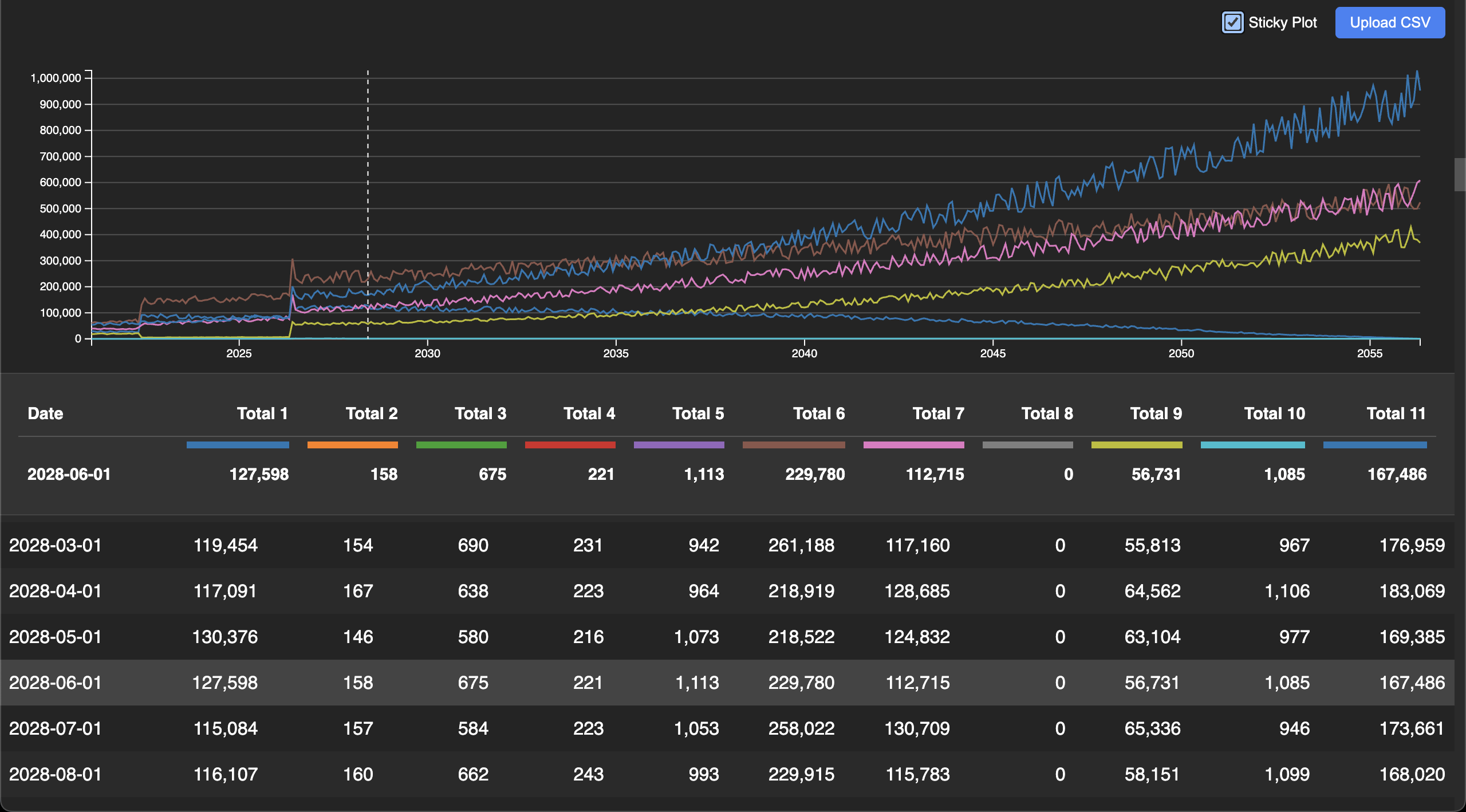
Visit https://aaronstacy.com/plottimeseries
You can pass a CSV file as a query parameter like this.
You can also upload a CSV file using the button in the upper right corner.
Every commit on main publishes prebuilt artifacts to the
latest release.
Neither of them needs npm, a checkout, or a build:
-
plottimeseries.cjs, a single JavaScript file that runs on any stable Node.js:node plottimeseries.cjs path/to/your/file.csv > index.html -
plottimeseries-<platform>.tar.gz, holding the sameplottimeseries.cjsplus two standalone executables that do not need Node.js at all:tar -xzf plottimeseries-linux-x64.tar.gz ./plottimeseries path/to/your/file.csv > index.html ./plottimeseries-compiled path/to/your/file.csv > index.html
All three do the same thing and print the same bytes.
plottimeseriesis a Node.js single executable application: the script above injected into a copy of the Node.js binary, so it is ~126 MB and starts in ~40 ms.plottimeseries-compiledis the same program compiled to native code by scriptc, with no JavaScript engine in it at all, so it is ~1.7 MB and starts in ~4 ms. Bundlingplottimeseries.cjsinto the archive too means one download can fall back from the compiled executable to plainnode, for platforms scriptc can't compile for.
Then open index.html in a web browser.
From a checkout the same thing is npm run build:
- Clone this repository
- Install dependencies:
npm install - Build the assets:
npm run build path/to/your/file.csv > index.html - Open
index.htmlin a web browser
npm run build:standalone builds all three artifacts locally into dist/. Both
executables are built for the platform you run it on: the single executable
application embeds whichever Node.js ran the build, and the compiled one needs
clang on PATH. If scriptc cannot compile, the build says so and carries on
with the other two.
The CLI has to stay inside the subset of TypeScript that scriptc compiles
statically, which is why scripts/cli.ts and everything it imports avoid
throw, regular expressions and DOM types. npm run scriptc:coverage reports
what does not compile, and npm run validate runs it, so drifting out of the
subset fails there rather than quietly dropping the compiled executable
from a release.
The CSV can also be piped in on stdin, and the y scale can be pinned with
--y-max / --y-min (note the -- that stops npm from eating the flags):
npm run build -- --y-max 100 --y-min 0 path/to/your/file.csv > index.html
cat path/to/your/file.csv | npm run build -- --y-max 100 > index.html
The prebuilt artifacts take the same arguments, without the --:
cat path/to/your/file.csv | ./plottimeseries --y-max 100 > index.htmlIn the app the same settings are available as yMax / yMin query parameters.
A column header can carry a style spec in curly braces. Commas inside the braces do not split the CSV field, so all three of these are equivalent:
date,col1{type: decimal, places: 2},col2
date,col1{type:'decimal'\, places: 2},col2
date,"col1{type: decimal, places: 2}",col2| Key | Values | Effect |
|---|---|---|
type |
percent, decimal, integer, currency |
How numbers are formatted, instead of guessing from the data range |
places |
integer 0-20 | Decimal places (decimals also works) |
currency |
ISO code, e.g. eur |
Currency for type: currency, defaults to USD |
color |
any CSS color | Line and legend color, instead of the generated one |
label |
any text | Header text, instead of the prettified column name |
plot |
false |
Keep the column in the tables but leave it off the plot |
For example:
date,ratio{type: percent, places: 2},revenue{type: currency, color: #ff7f0e},id{plot: false, label: 'Trade ID'}
2026-01-01,0.7,1234.5,A-1
Unrecognized keys and values are ignored, so a typo in a spec cannot break the
plot. Column names are matched after the spec is stripped, so col1{...} is
still the column col1 everywhere else.
Do whatever is in .github/workflows/ci.yml, but roughly:
npm installnpm run dev- Open
http://localhost:3000in a web browser
To validate changes, run npm run validate. That is the whole of CI in one
command: npm audit, then lint, typecheck, test and a build of pages-public/,
followed by some smoke checks on the result.
Everything after the audit runs inside a network namespace with no egress
(unshare --net), so a compromised dependency cannot exfiltrate anything while
executing as part of a lint or a test. The sandbox is verified rather than
assumed — the run fails if a test connection succeeds. Without unshare
available, npm run validate warns and continues with the network up; in CI it
fails instead.
The standalone artifacts are built separately, since scriptc and the single executable application need a toolchain rather than a sandbox:
npm run build:standalone./dist/plottimeseries public/data.csv > /dev/null && ./dist/plottimeseries-compiled public/data.csv > /dev/null
The generated report is a single self-contained HTML file with the CSV, styles and bundle inlined, so it can be locked down tightly:
- Content-Security-Policy, generated in
scripts/securityHeaders.tsand emitted as a<meta>tag byscripts/report.ts. It isdefault-src 'none'plus a sha256 hash for each inline<script>and<style>, so nothing runs but the exact bundle that was built.npm run validaterecomputes the hashes from the built page and fails if they and the policy have drifted apart. Because it sits inrenderReport, every artifact emits it —npm run build, the.cjs, the executable and the compiled binary still print the same bytes. It stays inside the scriptc subset for that reason:node:crypto's sha256 compiles statically, so the binary needs no JavaScript engine to produce it. - No
unsafe-eval. CSV parsing usesd3.csvParseRowsrather thand3.csvParse, because the latter compiles a row-to-object function withnew Functionout of the column names — which, for this app, can come from the?csv=query parameter. _headers, written next to the site by--headers-file. GitHub Pages ignores it — it is the Cloudflare Pages / Netlify convention — but it is the only way to deliverframe-ancestors,X-Frame-OptionsandX-Content-Type-Options, so it is generated for the day the site moves to a host that reads it.- Framing. Since GitHub Pages cannot send
X-Frame-Optionsand a<meta>CSP ignoresframe-ancestors, the app refuses to render when it is not the top window (src/frameGuard.ts). That check travels with the file, so it also applies to a report opened from disk. - CI requests no token scopes by default, pins actions to commit SHAs,
checks out without persisting credentials, and installs with
--ignore-scripts.
This is an attempt at using AI, generated with Google's Antigravity.
DESIGN.md was mostly generated from an initial simple prompt:
Create a README.md to design a node.js project that plots time series data from csv input. Use React for all UI, d3.js for all visualizations. Provide a hot-reloading development server that plots csv data from a local development directory in this repository, and provide a single file javascript utility that can be run via node.js that can take a csv file as input and generate the same output as the development server.
The UI was remarkably easy to generate. The logic to make it work either as a CLI or as a web site, and then to get tests and deployment to work on every change was surprisingly manual.