English | 日本語 | 简体中文 | 한국어 | Español | Français | Deutsch | Português | Русский



Generate a Mermaid ER diagram from a live database or a schema dump — no ORM or framework required.
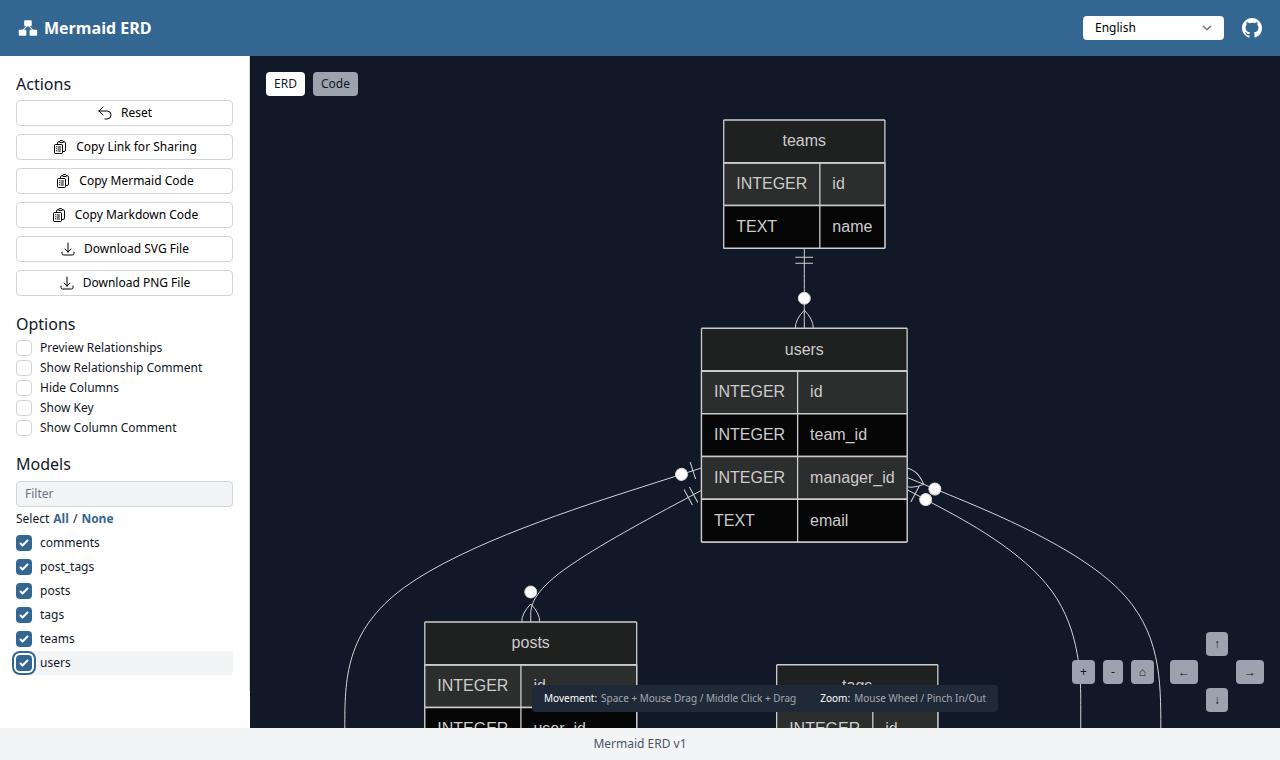
It introspects your schema (tables, columns, primary keys, foreign keys, comments) and can output either:
- a single self-contained HTML viewer (Mermaid, Vue, Tailwind bundled inline, offline-capable) where you pick tables and export SVG/PNG, or
- raw Mermaid text / JSON to stdout, so it composes with other tools.
Relationships are derived from foreign keys: the referenced table is the "one" side
and the table holding the foreign key is the "many" side. A NOT NULL foreign key
renders as a mandatory relation (||--o{); a nullable one renders as optional
(|o--o{).
# Interactive HTML viewer (default → erd/index.html)
npx mermaid-erd-cli --db "postgres://user:pass@localhost:5432/mydb"
npx mermaid-erd-cli --db ./dev.sqlite3
npx mermaid-erd-cli --db ./dev.sqlite3 --serve        # serve over HTTP (random port)
npx mermaid-erd-cli --db ./dev.sqlite3 --serve --port 5173   # serve on a fixed port

# Schema dumps — no database connection needed
npx mermaid-erd-cli --schema ./db/schema.rb           # Rails schema.rb
npx mermaid-erd-cli --schema ./dump.sql               # SQL DDL (CREATE TABLE ...)

# Stream Mermaid / JSON to stdout (pipe into anything)
npx mermaid-erd-cli --db ./dev.sqlite3 --format mermaid           # erDiagram text
npx mermaid-erd-cli --db ./dev.sqlite3 --format mermaid > er.mmd
npx mermaid-erd-cli --schema schema.rb --format mermaid | mmdc -i - -o er.svg
npx mermaid-erd-cli --db ./dev.sqlite3 --format json | jq '.Models[].TableName'
Use --out - to force any format (including HTML) to stdout.
The driver for your database is loaded only when needed, so install just the one you use:
| Source | Driver package |
|---|---|
| PostgreSQL | pg |
| MySQL | mysql2 |
| SQLite | better-sqlite3 |
Schema-dump parsing (--schema) needs no driver at all.
Prebuilt images are published for each release to GitHub Container Registry and Docker Hub. The runtime is a minimal, distroless image that bundles all three database drivers, so live introspection works without installing anything else.
docker pull ghcr.io/koedame/mermaid-erd-cli # or: docker pull koedame/mermaid-erd-cliThe container works in /work; mount the directory you want to read from and
write to there. The examples use the GHCR image — substitute
koedame/mermaid-erd-cli for Docker Hub.
# Schema dump in the current directory -> erd/index.html beside it
docker run --rm -u "$(id -u):$(id -g)" -v "$PWD:/work" \
  ghcr.io/koedame/mermaid-erd-cli --schema schema.rb

# Mermaid / JSON to stdout
docker run --rm -v "$PWD:/work" ghcr.io/koedame/mermaid-erd-cli --schema dump.sql --format mermaid

# Live SQLite file
docker run --rm -v "$PWD:/work" ghcr.io/koedame/mermaid-erd-cli --db /work/dev.sqlite3 --format mermaid
The image runs as a non-root user, so add -u "$(id -u):$(id -g)" when it
writes to a host directory you own (as in the first example); stdout-only
commands don't need it.
To reach a database running on the host, remember that localhost inside the
container is the container itself. Use host.docker.internal (Docker Desktop)
or --network host (Linux):
docker run --rm --network host ghcr.io/koedame/mermaid-erd-cli \
  --db "postgres://user:pass@localhost:5432/mydb" --format mermaid
To serve the viewer, bind to 0.0.0.0 inside the container and publish the
port — it stays reachable only through the port you publish:
docker run --rm -p 8080:8080 -v "$PWD:/work" ghcr.io/koedame/mermaid-erd-cli \
  --db /work/dev.sqlite3 --serve --host 0.0.0.0 --port 8080
# then open http://localhost:8080
To build the image yourself instead of pulling it:
docker build -t mermaid-erd-cli .
docker run --rm -v "$PWD:/work" mermaid-erd-cli --schema schema.rb| Option | Description | Default |
|---|---|---|
--db <url> |
Connection URL or SQLite path | — |
--schema <path> |
Schema dump (.rb Rails schema, .sql DDL) |
— |
--pg-schema <name> |
PostgreSQL schema to introspect | public |
--format <html|mermaid|json> |
Output format (mmd is an alias for mermaid) |
html |
--out <path> |
Output path; - means stdout |
erd/index.html (html); stdout (mermaid/json) |
--serve |
Render HTML and serve it over HTTP | off |
--port <number> |
Port to listen on with --serve |
random |
--host <address> |
Address to bind with --serve. 0.0.0.0 exposes your full schema on every network interface — use only on trusted networks |
127.0.0.1 |
--ignore-tables <patterns> |
Comma-separated regex patterns to exclude | ^schema_migrations$,^ar_internal_metadata$ |
--config <path> |
Config file path | mermaid-erd.yml |
--title <name> |
Title shown in the HTML viewer | Database |
You can also keep ignore patterns in a mermaid-erd.yml:
ignore_tables:
  - "^schema_migrations$"
- "_old$"npm install
npm run build # compile TypeScript to dist/
npm test # unit + integration tests (vitest)
npm run e2e # headless-browser check of the generated viewerThe HTML viewer and the vendored front-end libraries are derived from
rails-mermaid_erd (MIT). This
project keeps the same viewer and SCHEMA_DATA contract, replacing the
Rails/ActiveRecord extraction with direct database introspection and schema-dump
parsing. The bundled Mermaid, Vue, and Tailwind builds are redistributed under
their own MIT licenses; see assets/vendor/LICENSES.md.
MIT — see LICENSE.