
Run a WiFi hotspot on Linux while staying connected to WiFi.




twinfi is a command-line tool and GTK 4 desktop app for Linux that shares your internet over a Wi-Fi hotspot while the same Wi-Fi card stays connected to your Wi-Fi network (AP+STA mode). It works with NetworkManager, hostapd and dnsmasq on Ubuntu, Debian, Fedora, Arch and other distributions.
nmcli device wifi hotspot takes over your WiFi card and drops your
connection. Most modern cards can actually be a client and an access point at
the same time ("AP+STA"). twinfi finds out whether yours can, sets the hotspot
up the right way for it, keeps it healthy, and cleans up completely when you
stop it.

The same output as text
$ twinfi detect

Capability report for wlo1
  →  Driver:   iwlwifi
  →  Chipset:  Intel Corporation Wi-Fi 6 AX200

     ✔  AP mode (hotspot)                    yes
     ✔  STA mode (WiFi client)               yes
     ✔  AP + STA at the same time            yes
     ✘  AP on a different channel than STA   no

Methods
     hostapd  ready
     nmcli    ready

Verdict
  ✔  Your card can run a hotspot while staying connected to WiFi.
  ✔  The hotspot will use the same channel as your WiFi connection.
  →  Next: sudo twinfi start
- Reads the hardware properly: parses the driver's interface combinations to decide whether AP+STA is possible and whether the hotspot must share the WiFi channel.
- Keeps your connection: the hotspot runs on a virtual interface. If
your WiFi's channel can't host (radar/DFS channels, or 5 GHz channels the
card blocks), it runs as a Wi-Fi Direct group on a channel of its own, as
Windows does, on cards that support that. A mode that drops WiFi is used
only if you allow it (
--allow-disconnect). - All-or-nothing setup: every step registers its own undo, so a failure
part-way leaves nothing behind, and
stopremoves exactly whatstartadded. - Stays up: a watcher restarts the hotspot after suspend/resume or a driver reset, moves it when your WiFi changes channel, and steps aside when it would keep your WiFi from reconnecting.
- Works with your firewall: firewalld, iptables (including ufw/docker setups) and nftables. Picks a hotspot subnet that doesn't clash with your networks. DNS goes through your normal resolver, so captive portals and VPN DNS keep working.
- Fast: 802.11n/ac + WMM, and the right regulatory country code.
- Client management (hostapd mode): list, kick, block, and rate-limit clients, or let only the devices you list join.
- Hidden network option, and a QR code to join (
twinfi qror the app). - Safe by default: a random password on first start (never a shared default), passwords never on a command line, a scoped polkit action for the GUI.
- Desktop app (GTK 4/libadwaita) with device management, QR-code sharing and a system tray icon.
One command for any distribution:
curl -fsSL https://raw.githubusercontent.com/krotrn/twinfi/main/get.sh | shIt uses the package below for your distribution (pacman repository, PPA, or
the release .deb on Debian), and installs from source when there is none,
with the dependencies from your package manager. It also installs hostapd
and dnsmasq, and the desktop app's libraries when you're in a graphical
session. Run it again to update. Options go after sh -s --, e.g.
curl -fsSL … | sh -s -- --cli-only: --cli-only, --gui, --source
(skip the packages), --dry-run (show what it would run).
Coming from apsta? twinfi is apsta's new name (since 0.13). Packages and
get.shreplace apsta, and the firstsudo twinficommand moves your settings from/etc/apstaand your boot service. Theapstacommand still works for now and reminds you of the new name. See the changelog for each install route.
Or install it yourself:
sudo add-apt-repository ppa:krotrn/apsta
sudo apt update
sudo apt install twinfisudo tee -a /etc/pacman.conf >/dev/null <<'CONF'
[twinfi]
SigLevel = Optional TrustAll
Server = https://github.com/krotrn/twinfi/releases/download/arch-repo
CONF
sudo pacman -Sy twinfi # or: yay -S twinfi
sudo pacman -S --needed hostapd dnsmasq # recommended (hostapd mode)git clone https://github.com/krotrn/twinfi && cd twinfi
sudo ./install.sh # installs into /usr/local
sudo ./install.sh --uninstall # removes it againsudo twinfi update and sudo twinfi uninstall work the same way it was
installed, whichever route that was: the pacman repository, the PPA, the
.deb, or install.sh.
Runtime requirements: Python ≥ 3.10, NetworkManager, iw, iproute2.
Recommended: hostapd + dnsmasq (needed for client management), and one of
iptables/nftables/firewalld. On Fedora, openSUSE, Alpine and Void, the
Python library jeepney enables the Wi-Fi Direct fallback. Desktop app: see Desktop app.
pipx/pip users:
sudocan't see~/.local/bin. Install system-wide withsudo pipx install --global twinfi(pipx ≥ 1.5), or use the packages above.
twinfi detect                         # what can my card do?
sudo twinfi start                     # start (keeps WiFi when the card allows it)
sudo twinfi start --allow-disconnect  # also allow a mode that drops WiFi
sudo twinfi stop
twinfi status                         # --check: exit code only (0 running, 3 not)

sudo twinfi enable                    # start at boot, recover after sleep (systemd/OpenRC/runit)
sudo twinfi disable

sudo twinfi update                    # update to the latest release (alias: upgrade)
sudo twinfi uninstall # remove twinfi, its settings and its log (--keep-config keeps settings)twinfi config # show the active profile
sudo twinfi config --set ssid=MyHotspot --set band=a
sudo twinfi config --set method=p2p --set channel=149 # own channel, always on 5 GHz 149
sudo twinfi config --password-stdin # prompts; nothing ends up in shell history
sudo twinfi config --generate-password
sudo twinfi config --show-password
sudo twinfi qr # QR code a phone camera can scan to join
twinfi profile list
sudo twinfi profile create travel
sudo twinfi profile use travelSettings:
| Setting | Values | Meaning |
|---|---|---|
ssid, password |
The network's name and password | |
band |
bg (2.4 GHz), a (5 GHz) |
Used whenever the hotspot has a channel of its own |
channel |
auto (default) or a number |
auto picks the least crowded channel the card allows |
method |
auto (default), hostapd, nmcli, p2p, nmcli-single |
How the hotspot runs. p2p (Wi-Fi Direct) always uses your band and channel, at the cost of shared speed (details) |
interface |
auto (default) or a name |
Which WiFi card to use |
hidden |
yes, no |
Stop broadcasting the name; devices type it or scan the QR code |
allowed_macs |
MAC list | Only these devices may join (see below) |
On most laptop cards a normal hotspot has to share your WiFi's channel, so
band and channel can't always be followed. twinfi never ignores them
silently: twinfi start, twinfi status and the app's Why it runs this way
section say what it chose and why, and so does /var/log/twinfi.log.
Configuration lives in /etc/twinfi/ and passwords in the root-only
/etc/twinfi/secrets.json.
twinfi clients                               # connected stations with IP/hostname
sudo twinfi clients disconnect phone         # by hostname, IP or MAC
sudo twinfi clients disconnect phone --block # and keep it out
sudo twinfi clients unblock aa:bb:cc:dd:ee:ff
sudo twinfi clients limit 192.168.42.17 8000 # Kbps, upload and download
sudo twinfi clients unlimit 192.168.42.17
To let only your own devices join, list their MAC addresses. Anyone else is refused even with the password. This needs hostapd mode; twinfi won't start a hotspot it can't restrict.
sudo twinfi config --set allowed_macs="aa:bb:cc:dd:ee:ff, 11:22:33:44:55:66"
sudo twinfi config --set allowed_macs=      # anyone with the password again
Phones often use a random MAC per network: look up the one they use for your hotspot (Android: Wi-Fi → your hotspot → Privacy, or set it to the device MAC; iPhone: Private Wi-Fi Address).
status, detect, config, clients and start accept --json. See
docs/json-output.md for the keys and exit codes.
twinfi status --json | jq -r '.clients[].ip'
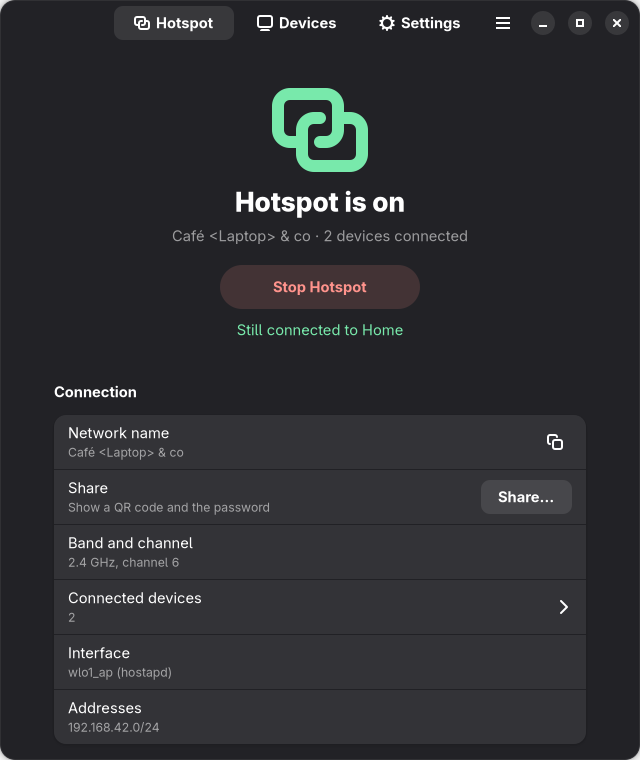
Open Hotspot (twinfi) from your app menu, or run twinfi-gtk.
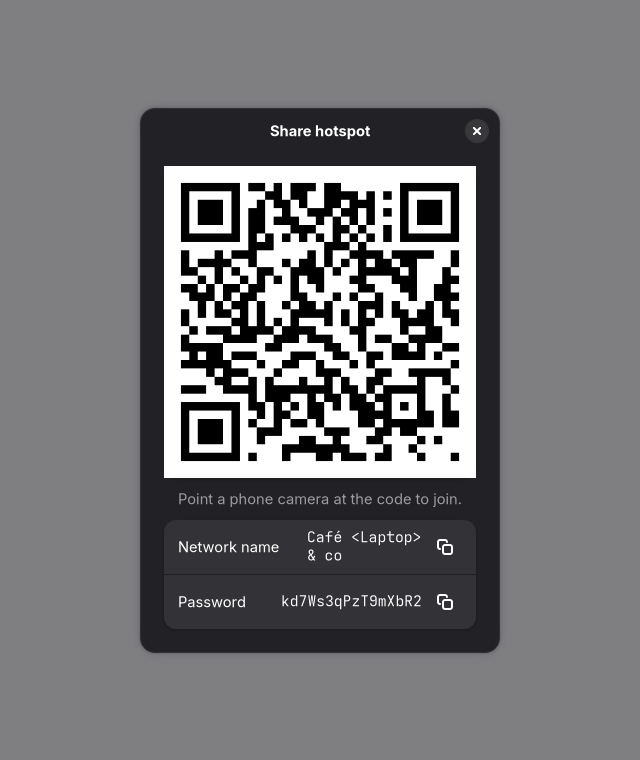
- Hotspot: one button to start/stop, whether you're still connected to your WiFi, connection details, a profile switcher, and Share: a QR code phones can scan, plus the password.
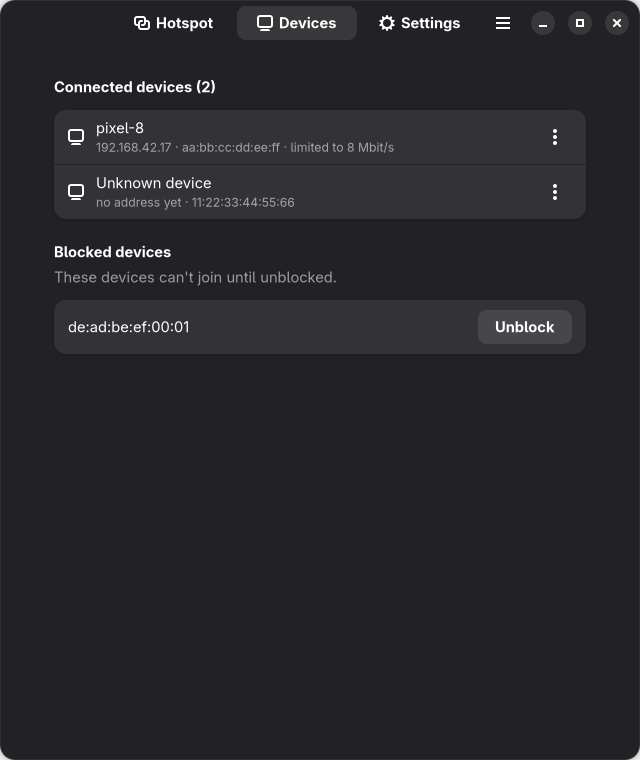
- Devices: everything connected, with a menu per device to limit its speed, disconnect it, or block it. Blocked devices can be unblocked here.
- Settings: network name, password, band, interface, profiles, Start automatically (boot + recovery after sleep), Show in the tray at login, and what your WiFi card supports.
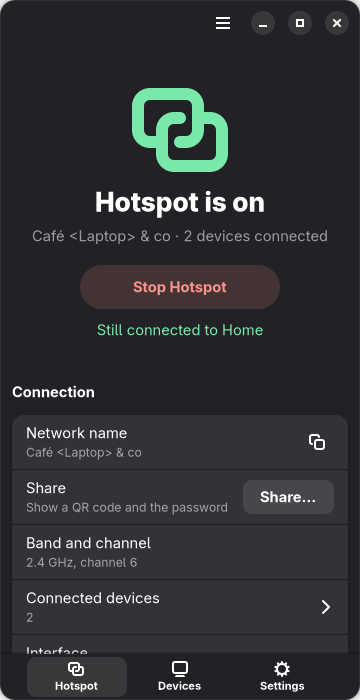
The window adapts to its size (tabs move to the bottom on narrow windows), and follows your light/dark preference. Shortcuts: Ctrl+R or F5 refresh, Ctrl+Q quit.
System tray. While the app runs, an icon in the panel shows whether the hotspot is on (faded and struck through when it's off, with a "!" when twinfi can't report its status) and, in its tooltip, how many devices are connected. Right-click it to start or stop the hotspot, share it, open the device list, switch profile or band, turn Start automatically on or off, or open Settings. Clicking the icon shows or hides the window, and closing the window keeps the app in the tray. Turn on Hide tray icon while the hotspot is off to let the panel tuck it away until the hotspot starts (KDE Plasma moves it into the hidden icons; waybar and some other bars hide it completely).
The icon belongs to the desktop app, not to the hotspot service, so it is
there only while twinfi-gtk runs. Turn on Show in the tray at login in
Settings (or run twinfi-gtk --background) to start straight into the tray.
That setting adds an XDG autostart entry, which desktops such as KDE Plasma,
GNOME and Xfce run at login. Window managers usually don't: on Hyprland (unless
started through uwsm), Sway or i3, start it from your config instead, e.g.
exec-once = twinfi-gtk --background in hyprland.conf or
exec twinfi-gtk --background for Sway and i3. It works wherever the panel supports
StatusNotifierItem: KDE Plasma, Xfce, Cinnamon, MATE, Budgie, LXQt, waybar and
other Wayland bars, and GNOME with the AppIndicator extension (included in
Ubuntu). Bars that only support the old XEmbed tray, such as i3bar and polybar,
need snixembed. Without a tray, the app
works as before: closing the window quits it.
Starting, stopping and changing settings ask for your password through polkit. It's remembered for a few minutes, so you aren't asked on every click.
Requirements. The packages above install everything. From source, install your distribution's GTK bindings:
| Distribution | Packages |
|---|---|
| Ubuntu / Debian / Mint | python3-gi gir1.2-gtk-4.0 gir1.2-adw-1 python3-qrcode |
| Fedora | python3-gobject gobject-introspection gtk4 libadwaita python3-qrcode |
| Arch | python-gobject gtk4 libadwaita python-qrcode |
It works with libadwaita 1.1 / GTK 4.6 and newer, and uses newer libadwaita
features when your system has them. CI checks it on Ubuntu 22.04, Debian 12,
Ubuntu 24.04, Fedora and Arch. python3-qrcode is optional; without it,
Share shows the name and password only.
The Arch and Debian/Ubuntu packages and install.sh install completions for
bash, zsh and fish. To install them yourself (for example after pip install),
pick your shell (install -D creates the folder when it doesn't exist yet):
twinfi completion bash | sudo install -Dm644 /dev/stdin /etc/bash_completion.d/twinfi
twinfi completion zsh  | sudo install -Dm644 /dev/stdin /usr/local/share/zsh/site-functions/_twinfi
twinfi completion fish | sudo install -Dm644 /dev/stdin /etc/fish/completions/twinfi.fish
Then open a new terminal. zsh caches completions; if twinfi <Tab> still
does nothing, run rm -f ~/.zcompdump* and open another one.
twinfi start picks the first method that works on your machine:
| Method | When | WiFi stays up | Client management |
|---|---|---|---|
hostapd |
card supports AP+STA, hostapd installed | yes | yes |
nmcli |
card supports AP+STA | yes | list/kick |
p2p |
WiFi's channel can't host; card can run Wi-Fi Direct on a second channel | yes (speed shared) | list/kick |
nmcli-single |
card supports AP only | no | list/kick |
flowchart LR
    S(["sudo twinfi start"]) --> H{"AP+STA card and<br/>hostapd installed?"}
    H -- "yes" --> HA["hostapd ✔<br/>WiFi stays up"]
    H -- "no / failed" --> N{"AP+STA card?"}
    N -- "yes" --> NM["nmcli ✔<br/>WiFi stays up"]
    N -- "no / failed" --> P{"Wi-Fi Direct on a<br/>second channel?"}
    P -- "yes" --> PG["p2p ✔<br/>WiFi stays up, own channel"]
    P -- "no / failed" --> D{"WiFi not connected, or<br/>--allow-disconnect?"}
    D -- "yes" --> NS["nmcli-single ✔<br/>WiFi drops"]
    D -- "no" --> E(["Explains why, suggests a fix"])
A method that fails part-way is rolled back completely before the next one is tried.
On single-channel cards (most laptop chips) the hotspot has to use the same
channel as your WiFi. twinfi reads it from the live connection. Some channels
can't host a hotspot: radar (DFS) channels 52–144, 6 GHz, and 5 GHz channels
the card's firmware blocks. On cards that can run a Wi-Fi Direct group on a
second channel (most Intel cards) twinfi then gives the hotspot a channel of
its own; the radio switches between the two, so they share its speed. See
docs/wifi-direct.md for which cards and distributions
support it. On other cards twinfi refuses with an explanation; see
docs/5ghz-wifi.md.
The hotspot follows the connection when it changes channel (on systemd,
also when started with twinfi start or the GUI).
New to this? docs/how-it-works.md explains it in plain language, with the common problems and fixes. For the design, see docs/ARCHITECTURE.md.
- Won't start while connected to a 5 GHz network (e.g. a phone hotspot
or a campus network on a DFS channel)? Your card can't host on that channel
and has no Wi-Fi Direct fallback (
twinfi detectshows whether it does, and what's missing). Switch the network to 2.4 GHz, or see docs/5ghz-wifi.md for why and the other fixes. TWINFI_DEBUG=1 sudo twinfi startprints every step; privileged runs also log JSON lines to/var/log/twinfi.log.- The service's own log:
journalctl -u twinfi. - In hostapd mode,
journalctl -u twinfi-hostapd -u twinfi-dnsmasqshows the daemons' own logs. - Wrong verdict from
twinfi detect? Please open an issue withtwinfi detect --jsonandiw phy phy0 info.
Desktop app:
- "No polkit authentication agent is running": your session has no agent to
ask for the password. GNOME, KDE, Cinnamon, MATE and Xfce start one; on
i3/sway/Hyprland start one yourself, e.g.
polkit-gnomeorlxpolkit. - "Not authorized": your account isn't an administrator (not in
sudo/wheel). - "twinfi is not installed" window: the desktop app can't find the
twinficommand. Install the CLI (it's in the same package) or put it onPATH. - Settings changes apply to the next start; stop and start the hotspot.
- No tray icon: your panel needs StatusNotifierItem support. On GNOME,
install and turn on the AppIndicator and KStatusNotifierItem Support
extension; on i3bar or polybar, run
snixembed. Window managers such as Hyprland and Sway have no tray of their own: use a bar with one (waybar'straymodule). Without a tray the app still works, it just quits when you close the window. - No tray icon after login: Show in the tray at login uses an XDG
autostart entry, which window managers usually ignore. Start
twinfi-gtk --backgroundfrom your window manager's config. - Tray icon hidden while the hotspot is off: Hide tray icon while the hotspot is off is on. Turn it off in Settings if your bar hides the icon completely.
If your card can't do AP+STA, twinfi recommend suggests USB adapters with
in-kernel drivers that can (MediaTek mt7921au, mt7612u, mt7610u, mt7925u).
| Keeps your Wi-Fi connected | Picks a mode for your card | Own channel when Wi-Fi is on a DFS / "no IR" channel | Undoes a failed start | GUI | |
|---|---|---|---|---|---|
| twinfi | yes, when the card supports AP+STA | yes (twinfi detect) |
yes, as a Wi-Fi Direct group (most Intel cards) | yes, step by step | GTK 4 |
nmcli device wifi hotspot / GNOME Settings hotspot |
no, the card becomes the hotspot | no | no | n/a | GNOME Settings |
| create_ap | yes, with a virtual interface | partly | no | partly | no (archived in 2021) |
| linux-wifi-hotspot | yes, with a virtual interface | partly | no | partly | GTK 3 |
| hostapd + dnsmasq by hand | if you set it up | you decide | you set it up | no | no |
twinfi also handles firewalld, iptables and nftables, picks a subnet that doesn't clash with your networks, follows your Wi-Fi when it changes channel, and survives suspend/resume.
Any card whose driver reports an AP+STA interface combination can run a
hotspot while staying connected. twinfi detect tells you for your card.
| Card / chipset | Driver | Status |
|---|---|---|
| Intel Wi-Fi 6 AX200, AX201 | iwlwifi (iwlmvm) |
AP+STA on the Wi-Fi channel; Wi-Fi Direct fallback tested on AX201 |
| Other Intel Wi-Fi 5/6/6E (7260 … AX211) | iwlwifi (iwlmvm) |
Expected to work like the AX201 |
| Intel Wi-Fi 7 (BE200 …) | iwlwifi (iwlmld) |
Unknown, reports welcome |
| MediaTek USB: mt7921au, mt7925u, mt7612u, mt7610u | mt76 family |
AP+STA (suggested by twinfi recommend) |
| Realtek, Qualcomm/Atheros, Broadcom | various | Depends on the driver; run twinfi detect |
Tried twinfi on a card that isn't listed? Please
open a hardware report
with twinfi detect --json.
Install twinfi and run sudo twinfi start. If your card supports AP+STA, the
hotspot runs on a second, virtual interface and your Wi-Fi connection stays
up. twinfi detect tells you beforehand whether your card can.
NetworkManager's hotspot turns the card itself into an access point, so it can no longer be a client. twinfi adds a separate access-point interface next to the client one instead.
Run twinfi detect. It reads the driver's interface combinations (the same
data as iw phy phy0 info) and says whether AP and client can run at the
same time, and whether they must share a channel.
On most laptop cards the hotspot must use the same channel as your Wi-Fi, so it's 5 GHz when your Wi-Fi is on 5 GHz. Radar (DFS) channels and channels the firmware blocks can't host a hotspot; on those, twinfi uses a Wi-Fi Direct group on its own channel when the card supports it. See 5 GHz Wi-Fi.
Any Linux distribution with NetworkManager, iw and iproute2, and
Python 3.10 or newer. There are packages for Ubuntu and Pop!_OS (PPA) and
Arch Linux, a package on PyPI, and an installer for everything else. CI
tests Ubuntu 22.04 and 24.04, Debian 12, Fedora and Arch.
Yes. While the desktop app runs it shows an icon in the panel: the menu starts and stops the hotspot, shares it, switches profile or band and opens Settings. Turn on Show in the tray at login in Settings to have it there after every login. It works on KDE Plasma, Xfce, Cinnamon, MATE, Budgie, LXQt, waybar and other Wayland bars, and on GNOME with the AppIndicator extension.
Yes. create_ap was archived in September 2021 and is no longer maintained. twinfi covers the same use case (a hotspot from a Wi-Fi card that stays connected) and adds capability detection, a Wi-Fi Direct fallback, full rollback and a desktop app.
Contributions are welcome. See CONTRIBUTING.md. The test suite runs without root or WiFi hardware.
Security issues: see SECURITY.md.
MIT
