
One operator CLI for the Modal Toolkit: standalone GPU/research packages that work alone or together: embeddings, LLM inference, vision, LoRA fine-tune, and the hosted vault + MCP memory plane, plus the eval harness that starts the lifecycle.



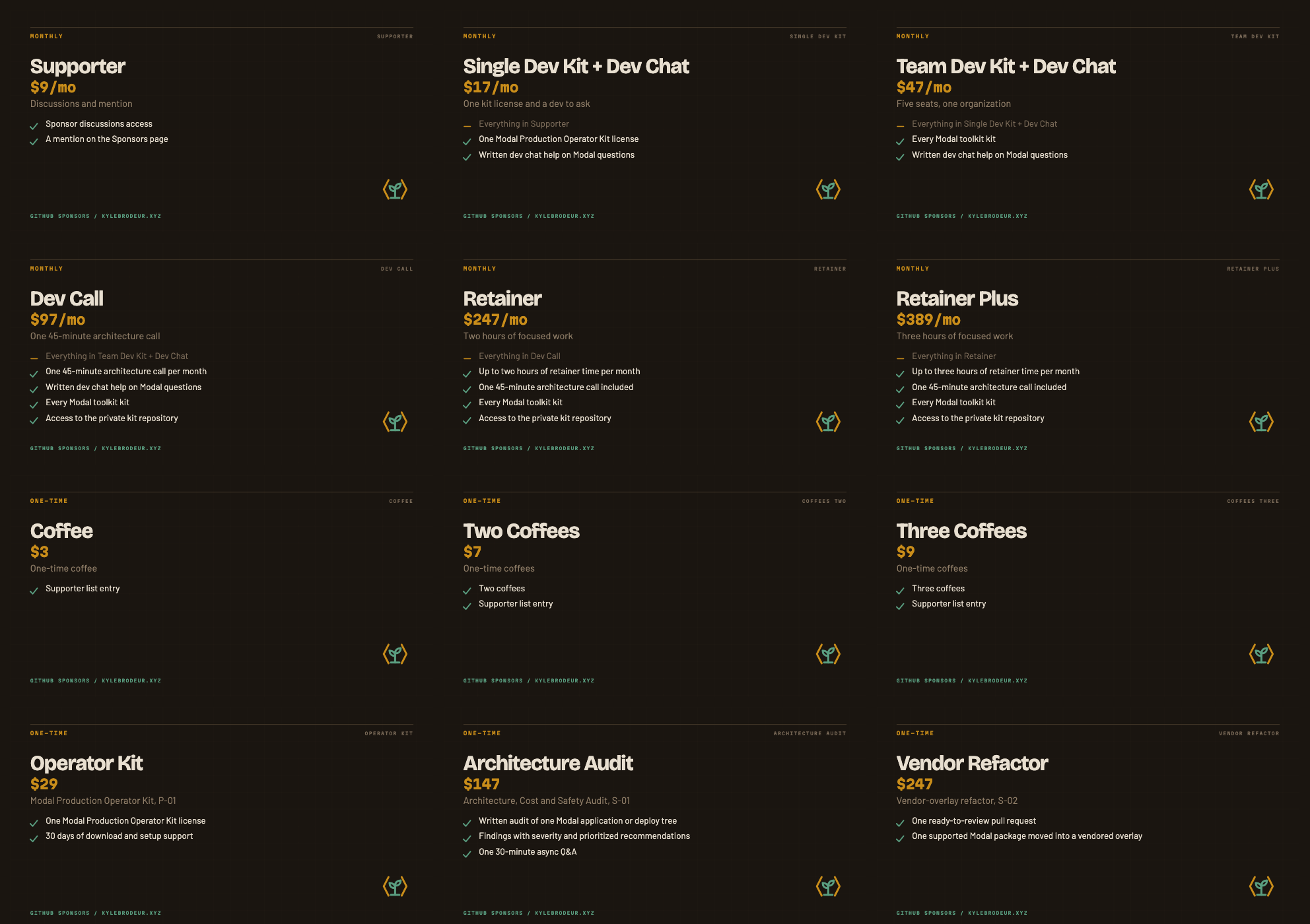
The Modal Toolkit projects remain open-source and free to use. For production deployments and team operations, these commercial options are available:
- Modal Production Operator Kit ($29): A version-locked vendor installer, a real
mtkoverlay example, retrieval and fine-tune data recipes, a dated cost worksheet, and a Modal Vault MCP client installer. - Modal Architecture, Cost & Safety Audit ($147): A written audit of one Modal application or deploy tree, with prioritized findings and recommendations.
- Modal Vendor-Overlay Refactor ($247): One ready-to-review pull request that moves one supported Modal package into a vendored overlay.
- GitHub Sponsors ($9-$389/mo or one-time): Monthly support, kit licenses, architecture calls, and retainer hours. Every tier's exact benefits are on that page.
- Quickstart: the project flow (init, pull, deploy) with the overlay file format.
- Runbook: the fleet-level operator surface (doctor, warm, shutdown, cost, the vault lane, troubleshooting).
This CLI orchestrates the packages; each is its own standalone repo and can be used without the toolkit:
- modal-embedding-server: GPU-backed embeddings with a monotonic sync protocol for private-first search.
- modal-inference-server: OpenAI-compatible LLM inference with hot-set routing and scale-to-zero.
- modal-vision-server: Generic vision classification: pick your model (open_clip or transformers weights), your segmenter (SAM 2.1 or none), and your fast gate (self, cheap CLIP, deterministic script, or external endpoint). The BioCLIP plant stack ships as the example card.
- modal-vault-server: Hosted Obsidian vault + MCP memory plane: server-side clone via Headless Sync, searchable by MCP-speaking agents.
- modal-finetune-server: Profile-driven LoRA fine-tune and GGUF pipeline with an honest eval gate.
- modal-victoriametrics-server: The metrics store: single-node VictoriaMetrics on Modal, CPU-only, scale-to-zero, Basic-Auth-gated. Every endpoint is protected; the
mtk metricswriter's drop-in target. - modal-toolkit: One operator CLI (
mtk) that runs the fleet:doctor,secrets,warm --all,shutdown --all,cost,flow,dashboard. - modal-shared-libs: the family's shared library home: the lifecycle hooks seam (
libs/hooks.py) vendored verbatim into every package, refreshed bymtk libs sync. - embed-eval-on-your-vault: the eval-first pattern (benchmark embedding models on your own data before you deploy) as a single-file, zero-dependency harness.
A single entry point for fleet-level commands that don't belong in any one package:
| Command | Purpose |
|---|---|
mtk setup |
Write the shared config (~/.config/modal-toolkit/config.json, mode 600) |
mtk config |
Inspect + validate the shared config |
mtk status [--no-net] |
One table: configured/enabled/secrets/reachable per package (--no-net = config-only glance) |
mtk doctor [--pkg ... --json] |
Health + drift across the packages you are running (mark per package: ok / unhealthy / unreachable / cold / repo / not-configured) |
mtk warm [--pkg ... --all] |
Cold-start a package's GPU worker |
mtk shutdown [--pkg ... --all] |
Scale GPU(s) to zero now (the vision package's path is a real modal app stop - undeploy, not scale-to-zero - and is arm-gated: typed confirmation, or --force + MTK_ALLOW_APP_STOP=1) |
mtk cost |
Per-package + blended always-on GPU-hour view |
mtk flow |
The ecosystem flowchart, rendered against live state |
mtk dashboard deploy | stop | logs | url |
The fleet dashboard: one CPU app, a card per GPU-serving package |
mtk secrets |
Fleet-level Modal Secrets: check (drift diff), create, rotate |
mtk metrics |
Push app events/rates to VictoriaMetrics (or InfluxDB) from any package or Modal app; stdlib-only writer + test command |
mtk libs sync | check |
Vendor the family's shared stdlib modules (modal-shared-libs) verbatim into each package; check is the md5 parity gate CI runs |
Per-package deep work is declared by each repo's own command manifest
(server/mtk-commands.toml); mtk mounts one command group per repo that
ships one, so adding a command is a repo-side edit:
| Command | Purpose |
|---|---|
mtk embedding sync | reindex |
Wrapper for the embedding server's own commands |
mtk inference <command> ... |
Passthrough to the inference repo's own modal-inference CLI |
mtk vision deploy | warm |
Wrapper for the vision server's own commands |
mtk finetune train | eval | gguf |
Wrapper for the finetune pipeline's own commands |
mtk vault status | sync | pull-only | ... |
Passthrough to ob inside the vault container (never local sync) |
The groups above mount only when the package's repo is present in the
workspace (and mtk doctor lists what each declares); a toolkit-only clone
offers just the fleet-level commands.
One CPU-only Modal app (mtk dashboard deploy) that shows the GPU
packages (embedding, inference, vision, finetune) plus the metrics store
(vm) as cards, one adapter
each. Each adapter answers two questions: an unauthenticated
health probe for the state pill and one authenticated read for the
headline. The probes differ per card, matching what each server
actually exposes:
- embedding: unauth
/health, thenGET /statsfor the headline (collections count + loaded models). - inference: no
/healthexists: the adapter probes unauth/api/tagsfirst and falls back to unauth/v1/models; the headline is the served-alias list (the hot set) from the authed read. - vision: unauth
/health, then the authed headline comes from the same/healthpayload (model + segmenter + fast gate); the identify surface is POST-only and never probed. - finetune: a job package with no server and no
/health: the card states that nature and makes no remote probe.
Each config entry can carry an optional card_type field, so multiple
instances of one package type (two independent modal-inference-server
deployments, for example) each render as their own card under a
distinct key instead of colliding. Omit it and the pre-existing
contract is unchanged: the entry's own key is its card type.
Session auth is its own bearer credential
(MODAL_TOOLKIT_DASHBOARD_TOKEN, hash-fragment autologin supported).
Billing is fleet-wide: metered month/today, workspace billed vs
credits, per-app split, and a workspace-disabled banner.
modal secret create modal-toolkit-dashboard-secret MODAL_TOOLKIT_DASHBOARD_TOKEN=$(openssl rand -hex 32)
mtk dashboard deploy   # builds + deploys the CPU app (config Volume reads dashboard-config.json if present)
# open the printed URL ... or visit /_toolkit/login#key=<credential>
mtk dashboard stop     # undeploys the dashboard app (modal app stop); arm-gated - typed confirmation or --force + MTK_ALLOW_APP_STOP=1
Deploying and keying the dashboard is per-operator: create your own secret, deploy under your own workspace. Nothing in the packages depends on this app existing.
The dashboard is read-only across packages (single-writer per package) and links to each package's own deep surface (the inference dashboard keeps runtime tuning, catalog, and slot telemetry).


mtk doctor against a live, warmed fleet (77s, silent):

More recordings, including the fleet dashboard, are in docs/demo with their tapes.

Install from PyPI (needs uv and git; the Modal CLI is
needed for deploys: uv tool install modal then modal setup):
uv tool install modal-toolkit # or: uvx --from modal-toolkit mtk --helpThen set up once, create a project, and deploy a package from it:
mtk setup --repos-root ~/repos     # shared config; token entered at the prompt
mtk init my-project                # scaffold a project; checks prerequisites and your account
cd my-project
mtk pull vault                     # clone the package repo into ~/repos
mtk deploy vault                   # preflight the overlay, confirm secrets, deploy
mtk doctor                         # health across the fleet
The full walkthrough, including the overlay file format, is in docs/quickstart.md. Each server has its own quickstart and how-to, linked from the packages list above, and the metrics store too: modal-victoriametrics-server quickstart and how-to.
One file, one section per package. Tokens are never printed by any mtk command.
~/.config/modal-toolkit/config.json
{
  "embedding":  {"base_url": "...", "token": "...", "model": "...", "dim": 768},
  "inference":  {"base_url": "...", "token": "...", "alias": "...", "dashboard_url": "...", "dashboard_token": "..."},
  "vision":     {"base_url": "...", "token": "...", "model": "...", "gpu": "T4"},
  "finetune":   {"base_model": "...", "adapter_repo": "...", "hf_user": "..."},
  "coding":     {"base_url": "...", "token": "...", "alias": "..."},
  "vault":      {"base_url": "...", "token": "..."},
  "vm":         {"base_url": "...", "auth": "user:password"},
  "repos":      {"root": "/path/to/your/repos-dir"}
}
Override anything via env (no config edit required):
MODAL_TOOLKIT_CONFIG: use a different config file pathMODAL_TOOLKIT_REPOS: where the sibling package repos liveMODAL_BASE_URL,MODAL_PROXY_TOKEN: the standard per-package overridesMODAL_VISION_GPU,MODAL_VISION_MODEL,MODAL_FINETUNE_BASE,MODAL_FINETUNE_ADAPTER, etc.
MODAL_BASE_URL and MODAL_PROXY_TOKEN are SHARED: one name, several
packages. They only reach a package you have claimed (the config file
names it, or one of its dedicated env vars is set). Otherwise one export
would make embedding, inference, and vision all look configured at the
same address, and the doctor would probe that one lane three times. The
dedicated vars (MODAL_VAULT_BASE_URL, MODAL_TOOLKIT_VM_URL, ...) claim
their package outright.
mtk doctor, mtk status, and mtk flow report on the packages you are
running and stay silent about the rest. See the RUNBOOK's "Daily state
checks" section.
mtk vault status | sync | pull-only | sync-on-write | mirror-remote | continuous | list-remote | list-local | config | logs | exec is an
operator passthrough to ob running INSIDE the modal-vault-server
container. The ob binary, its login state, and the clone all live in
that container, Volume-backed at /vault: every command uses
modal container exec against a modal-vault-server container id
(waking the scale-to-zero app first) and never syncs, clones, or holds
vault state on the local machine. pull-only switches the clone to
pull-only mode; sync is the bidirectional mode. One gate applies to
every command: the vault section's base_url in the toolkit config.
Modal bills for GPU time, by the second, never per token. mtk cost reports always-on burn per package and the fleet total, using Modal's published GPU rates (per-second list prices at modal.com/pricing, converted to an hourly figure; read 2026-10-22):
H200: $4.54/hr    B200: $6.25/hr    H100: $3.95/hr
L40S: $1.95/hr    A10G: $1.10/hr    L4:   $0.80/hr    T4: $0.59/hr
These are list prices, not a quote: Modal's rates change, and a regional multiplier can apply. The actual cost depends on how long containers stay warm; the toolkit's job is to make that visible in one call (and mtk shutdown --all the escape hatch).
| Example | What it shows | Run it |
|---|---|---|
lifecycle-example.py |
the full lifecycle as a worked reference: setup → doctor → warm → use → shutdown, with the command for each step | read it; it is the flight path in one file |
modal_cost_discipline_fleet.py |
the fleet view: the two Modal primitives behind mtk doctor and mtk shutdown --all, so you can write your own fleet commands in one file |
modal run examples/modal_cost_discipline_fleet.py |
One GPU app is easy to keep clean. A fleet of four is where idleness hides, which is why the fleet example is the capstone: it shows the always-on burn per app and the fleet total, and then stops everything at once.
Upstream repos are SOURCE, never deploy targets. A project vendors a tag-pinned copy of each package and deploys it from its own overlay:
<project>/vendor/<pkg>-server/       code: git checkout detached at a release tag (read-only, guarded)
<project>/vendor/<pkg>-server/.mtk-vendor.json   provenance: repo, tag, commit
<project>/deploys/<pkg>-server/      decisions: deploy.json (app name, knobs, secret NAMES), deploy.sh, seed.json
- The rule that matters: the vendored copy is never edited (any drift
refuses a deploy;
--allow-local-changesis the recorded override). All operator state lives in the overlay. - Secret-name invariant:
deploy.json's secret NAMES must match the vendored repo'sserver/secrets.tomlmanifest - the manifest is the source of truthmtk secretsacts against, so overlays never invent names. - Reference implementation:
writing-duo/deploys/embedding-server/(private instance of modal-embedding-server, deployed + verified).
See CONTRIBUTING.md for ground rules and workflow.
Seven repos in the same family: the packages this CLI orchestrates (links in "The packages" above), plus the family's other members listed there too.
These packages run on Modal, the serverless GPU platform. If you build something with them, share it in the Modal Slack community (#show-and-tell). Issues and PRs welcome here on GitHub.
Apache-2.0: see LICENSE.
Built by Kyle Brodeur · Model-selection deep-dive: Choose the Right Embedding Model for Your Data