release workflow
This document outlines our release schedule, workflows/automations, repository conventions and standards
- All new features, fixes and updates happen via pull request to
master - After a PR is merged, the
versionin the package.json will automatically be bumped by it's patch value (unless the PR already updated the version) - Whenever the
versionis updated, a new git tag and also Docker tag is created and pushed - If the major or minor version (not patch version) was bumped, then a release is also drafted
The tagging process is managed via GitHub actions, using our tag.yml workflow.
This workflow can also be manually triggered by a maintainer to make and push a new tag (either specify tag version, or leave blank for auto-bump of patch version).
Only repository maintainers can publish releases. The process typically happens automatically whenever the major or minor version is updated (via tag workflow). But a release can also be triggered manually via the release.yml workflow's manual dispatch, by passing it an (already existing, not yet released) tag version. Note that the bot only creates a Draft Release, so you'll then need to head to the releases tab, review it looks correct, and hit Publish.
Typically Dashy has multiple patch versions per week, bi-weekly minor releases, and quarterly major releases.
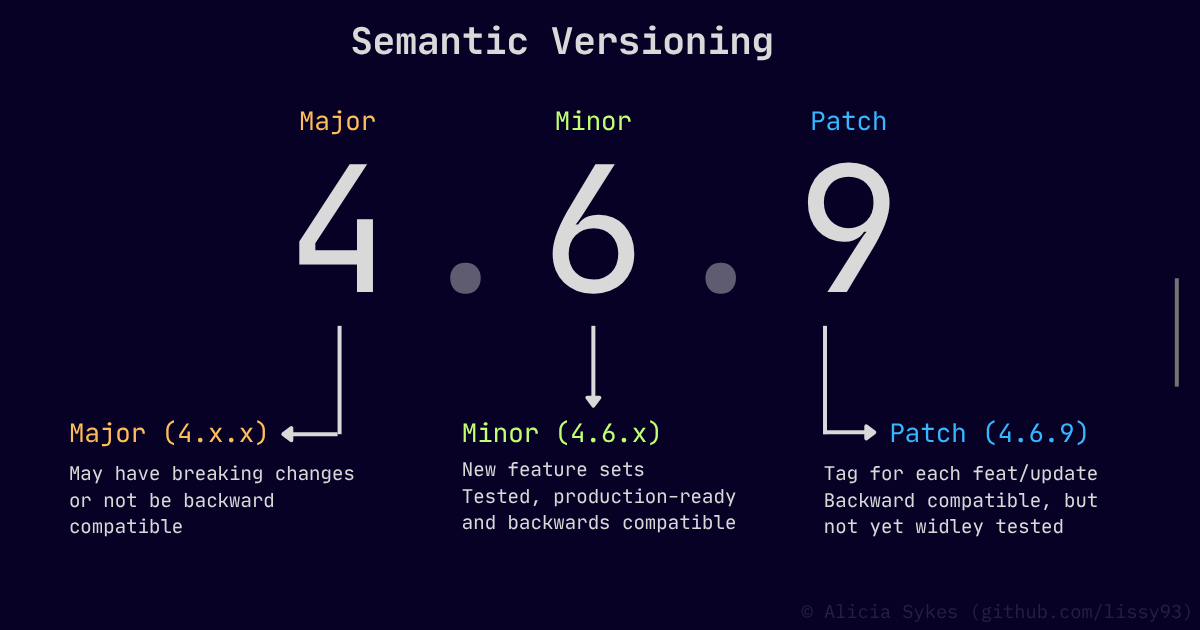
Dashy uses a form of semantic versioning (semver), whereby we push a:
- Patch (e.g.
4.6.9) - New patch version published for every change - Minor (e.g.
4.7.0) - New minor version published for groups of features - Major (e.g.
5.0.0) - Large releases, possibly not backward compatible
You can view a list of recent changes at dashy.to/updates or subscribe to the rss.xml feed.
Likewise, on GitHub you can view all of our Tags and Releases
Runs checks on pull request to catch obvious/critical issues
This runs a series of checks against the PR. A path-filter step first works out what changed, so most checks only run when their relevant files were modified (the rest are skipped):
-
Lint - Confirms the code is clean and consistent, with ESLint
- Runs when: source or config changes
-
Typecheck - Confirms TypeScript types are valid, with
vue-tsc- Runs when: any code or config changes
-
Test - Runs the unit test suite
- Runs when: every PR
-
Locale check - Validates the translation files are complete and well-formed
-
Runs when: any languages or locale content (
src/assets/locales) is updated
-
Runs when: any languages or locale content (
-
Spellcheck - Catches typos in the source strings (
en.json)- Runs when: English locale file is updated
-
Build check - Builds Dashy and checks the
distoutput is all good- Runs when: every PR
-
Docker smoke test - Builds the Docker image and checks it starts and serves correctly
- Runs when: every PR
-
Dependency audit - Scans dependency changes for known vulnerabilities (fails on moderate+)
-
Runs when: Package is added/updated in
yarn.lock
-
Runs when: Package is added/updated in
-
Secret scanning - Scans the PR diff for committed secrets/keys/credentials, with TruffleHog
- Runs when: every PR
-
Workflow audit - Lints and security-audits the GitHub Actions, with actionlint + zizmor
-
Runs when: a workflow file changes (
.github/workflows/**)
-
Runs when: a workflow file changes (
| Workflow | ci.yml |
| Status |  |
| Triggers | Pull request (PR opened/updated on master) |
| Inputs | None |
| Outputs | None |
The Docker workflow builds and publishes the Docker image.
Uses our Dockerfile. This is a multi-arch (amd64, arm64, armv7) with each run as a matrix. The image is published to both GHCR (ghcr.io/lissy93/dashy) and DockerHub (lissy93/dashy). It also runs a trivy security scan, and if critical issues are present the scheduled job will fail, and results published under the Security tab. The job also attests both the build provenance and SBOM, which are published alongside the image. The Docker tags are computed from the values in the Dockerfile.
| Workflow | docker.yml |
| Status |  |
| Triggers | Tag creation, schedule, manual dispatch |
| Inputs | Tag (optional, inferred from git tag) |
| Outputs | SHA, manifest, digest, SBOM, attestation |
Builds the app and drafts a GitHub release with the packaged tarball
Triggered by a major/minor (X.Y.0) tag push, or by manual dispatch against an existing tag. It builds Dashy, packages a release tarball (the built dist plus the server files needed to run it), then generates a SHA256 checksum and an SLSA build-provenance attestation. Finally it drafts a GitHub release with auto-generated notes (diffed against the previous X.Y.0 tag). The release is only a draft - a maintainer reviews it and hits Publish.
| Workflow | release.yml |
| Status |  |
| Triggers | Major/minor tag push (*.*.0), manual dispatch |
| Inputs | Tag (required on manual dispatch, must already exist) |
| Outputs | Draft release, tarball, SHA256 checksum, provenance attestation |
Bumps the version and pushes a new git tag
When a PR with code changes is merged into master, this bumps the patch version in the package.json (unless the PR already bumped it), commits the change, then creates and pushes a git tag for the new version. That tag push is what kicks off the Docker and Release workflows downstream. It also labels and comments on any issues referenced in the PR, and pings the docs site to rebuild. It can also be triggered manually - either pass a specific version, or leave it blank to auto-bump the patch.
| Workflow | tag.yml |
| Status |  |
| Triggers | PR merged to master, manual dispatch |
| Inputs | Version (optional, leave blank to auto-bump patch) |
| Outputs | Version-bump commit, git tag, issue labels/comments |
Mirrors the repo over to our Codeberg instance
Pushes a full copy of the repo to our Codeberg mirror, over at codeberg.org/alicia/dashy, so the project isn't solely hosted on GitHub. Runs weekly. Uses the lissy93/repo-mirror-action action for keeping mirrors in-sync.
| Workflow | mirror.yml |
| Status |  |
| Triggers | Schedule (weekly, Sun 03:30 UTC), manual dispatch |
| Inputs | None |
| Outputs | None |
Keeps the docs site and GitHub wiki in sync with the
/docsdirectory
Mirrors the markdown content from /docs to the WEBSITE/docs-site-source, where it's then formatted and the Docusaurus site is re-built and deployed to dashy.to. Runs whenever docs are updated on master.
| Workflow | update-docs-site.yml |
| Status |  |
| Triggers | Push to docs/** on master, schedule (weekly), manual dispatch |
| Inputs | None |
| Outputs | Updated docs on the WEBSITE/docs-site-source branch |
We use gitmoji for commits (because it's fun!). Whereby each commit message starts with an emoji which indicates the change type.
Most branches are named with their type, followed by short description.
E.g. feat/adds-awesome-feature, ref/language-deduplication, fix/resolves-missing-icons.
Like most Git repos, we are following the Github Flow standard.
- Create a branch (or fork if you don't have write access)
- Code some awesome stuff, then add and commit your changes
- Create a Pull Request, filling in the template
- Follow up with any reviews on your code
- Merge 🎉