CopyRight (C) 2017 - Leonardo Soares e Silva - lsoaresesilva@gmail.com
Creating user interfaces for busines apps on Corona can be hard task if you compare to Android Activity Design, for example.
This library was inspired on Android and JavaFX user interface creation, and enables the creation of user interfaces through XML files.
*** Support for Corona components: buttons, textfields, textbox, texts and images.
Create corona components directly through XML.
*** Layout organizations horizontaly and verticaly with left and center aligns.
Corona components can be organized horizontaly and verticaly with left and center aligns.
*** Support for nested layouts.
Supports for layouts, with diferents organizations, inside other layouts
*** Defining components listeners through XML.
Define component listeners without needing to call :addEventListener manualy.
*** Support for css-like stylishing of components.
Stylish components using a css-like syntax. You can even reuse definitions in many components.
*** Support for one-way binding between lua variables and corona components.
You can define a bind between a variable and a input component like textfield. Everytime this component changes it values the variable will also change.
*** Support for binding xml to components in lua
Every component added to layout will automatically create a reference as a lua variable. Kind of a dependency injection.
*** Support for minimal input field validation
You can define which input fields (Text Fields or box) cannot be empty and if it is empty a message will be shown to user.
Copy view.lua and libs folder to your project folder. Import view.lua to use it.
Example:
-- in your main.lua
local viewLoader = require("view")
local view = viewLoader:setView("layout.xml")
-- Create a file with .xml extension in your project's folder, example:
<LinearLayout id="layoutLinear" orientation="vertical" align="center" paddingX="10">
    <Text id="txtUsername" x="10" y="10" text="Username"  />
    <TextField />
    <Text id="txtPassword" x="10" y="50" text="Password" />
    <TextField />
    <Button label="Login" />
</LinearLayout>
And it is done.
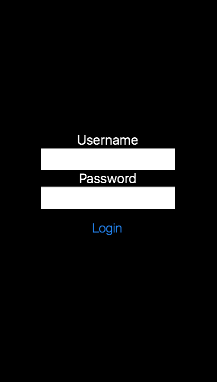

-- in your main.lua
local widget = require("widget")

local viewLoader = require("view")
local view = viewLoader:setView("layout.xml")
local layout = view:findLayoutById("layoutLinear")
local recoverPasswordButton = widget.newButton({label="Recover"})
layout:insert(recoverPasswordButton)-- in your main.lua
local widget = require("widget")
local viewLoader = require("view")
local view = viewLoader:setView("layout.xml")
local textUsername = view:findLayoutById("txtUsername")
textUsername.text = "New Text!"-- in your scene.lua
local composer = require("composer")
local viewLoader = require("view")
local view = viewLoader:setView("layout.xml")
local scene = composer.newScene()
function scene:create( event )
local sceneGroup = self.view
-- Code here runs when the scene is first created but has not yet appeared on screen
sceneGroup:insert(view)
end
return scene
- A XML file with layout definition.
<!-- An calculator example -->

<LinearLayout id="layoutLinear"  orientation="vertical" align="center">
    <TextField id="txtField"/>
    <BlankSpace width="10" height="20"/>
    <LinearLayout id="layoutFirstRow"  orientation="horizontal" align="center">
        <Image filename="btn_1.png" width="50" height="50" touch="pressButton"/>
        <Image filename="btn_2.png" width="50" height="50" />
        <Image filename="btn_3.png" width="50" height="50" />
        <Image filename="btn_sum.png" width="50" height="50" />
    </LinearLayout>
    <BlankSpace width="10" height="20"/>
    <LinearLayout id="layoutSecondRow"  orientation="horizontal" align="center">

        <Image filename="btn_4.png" width="50" height="50" />
        <Image filename="btn_5.png" width="50" height="50" />
        <Image filename="btn_6.png" width="50" height="50" />
        <Image filename="btn_minus.png" width="50" height="50" />
    </LinearLayout>

</LinearLayout>- In your lua file.
controller = {}
function controller.doLogin(event)
     -- will be called when button is touched!
end

local viewLoader = require("view")
local view = viewLoader:setView("layout.xml", controller)- A XML file with layout definition.
<LinearLayout id="layoutLinear"  orientation="vertical" align="center">
    <Button touch="doLogin" label="Login"/>
</LinearLayout> This resource is based on CSS principles and you can define a css 'class' like with properties to stylish your elements. Actually only text component can be stylished.
You have to create a file named style.lua inside your main folder. A lua table will be used to define the stylish of your components. Each property inside this table must be a lua table and will have properties to stylish our components.
-- style.lua

styles = {
    myTextStyle = {
        color = "00bfd0",
        fontSize = "20"
    }
}

return styles- A XML file with layout definition.
[..]
<LinearLayout id="layoutLinear"  orientation="vertical" align="center">
    <TextField id="txtField" class="myTextStyle"/>
    <TextField id="otherField" class="myTextStyle"/>
[..]
</LinearLayout> controller = {
login = "",
password = ""
}
function controller.login(event)
if event.phase == "ended" then
print(controller.login)
print(controller.password)
end
end
local viewLoader = require("view")
local view = viewLoader:setView("layout.xml", controller)<LinearLayout id="layoutLinear" orientation="vertical" align="center">
<Text id="txtLogin" text="Login" class="alterandoCores"/>
<TextField model="login" />
<Text id="txtPassword" text="Password" class="alterandoCores"/>
<TextField model="password" />
<BlankSpace height="30" width="100"/>
<Button touch="login" label="Login"/>
</LinearLayout><LinearLayout id="layoutLinear" orientation="vertical" align="center">
<Text id="txtLogin" text="Login" class="alterandoCores"/>
</LinearLayout>controller = {}
local viewLoader = require("view")
local view = viewLoader:setView("layout.xml", controller)
-- Use the id defined to have access for the component in your controller
print(controller.txtLogin.text) -- will print "Login"-- View functions
-- Loads a layout from XML and displays on screen.
-- @param layout : XML file within layout declaration (required)
-- @param controller : A Lua table which contains listeners functions. (optional)
-- @return : A Lua table within all elements extracted from layout.
setView(layout, [controller])
-- Searchs if there is a layout with the specified identifier.
-- @param id : String which contains the layout's identifier we want to search.
-- @return : If a layout is found, returns it. If not returns nil.
findLayoutById(id)
-- Searchs if there is a component with the specified identifier.
-- @param id : String which contains the component's identifier we want to search.
-- @return : If a component is found, returns it. If not returns nil.
findComponentById(id)
- 0.3.5 - 23/03/2017
** Added a dependency injection like to map components defined in XML into lua variables for easy access.
- 0.3 - 22/03/2017
** Minor modifications on BlankSpace component, still backward compatibility. ** Added one-way binding between lua variables and corona components. ** Improved the README.
- 0.2 - 15/03/2017
** Added support for nested/inner layouts; ** Added support for a css-like style (experimental); ** Added support for listeners definition through XML (works for tap, touch and userinput events); ** Added a two new components: Image and BlankSpace (inserts a blank space in yout layout); ** Refactored the function to position components on screen, its much better now :)