An AI coding agent built from scratch — inspired by Claude Code CLI and Gemini CLI — featuring full multi-tool orchestration, streaming responses, sub-agent delegation, MCP server integration, dynamic lifecycle hooks, safety approval policies, and a styled Rich terminal UI with gradient ASCII branding.
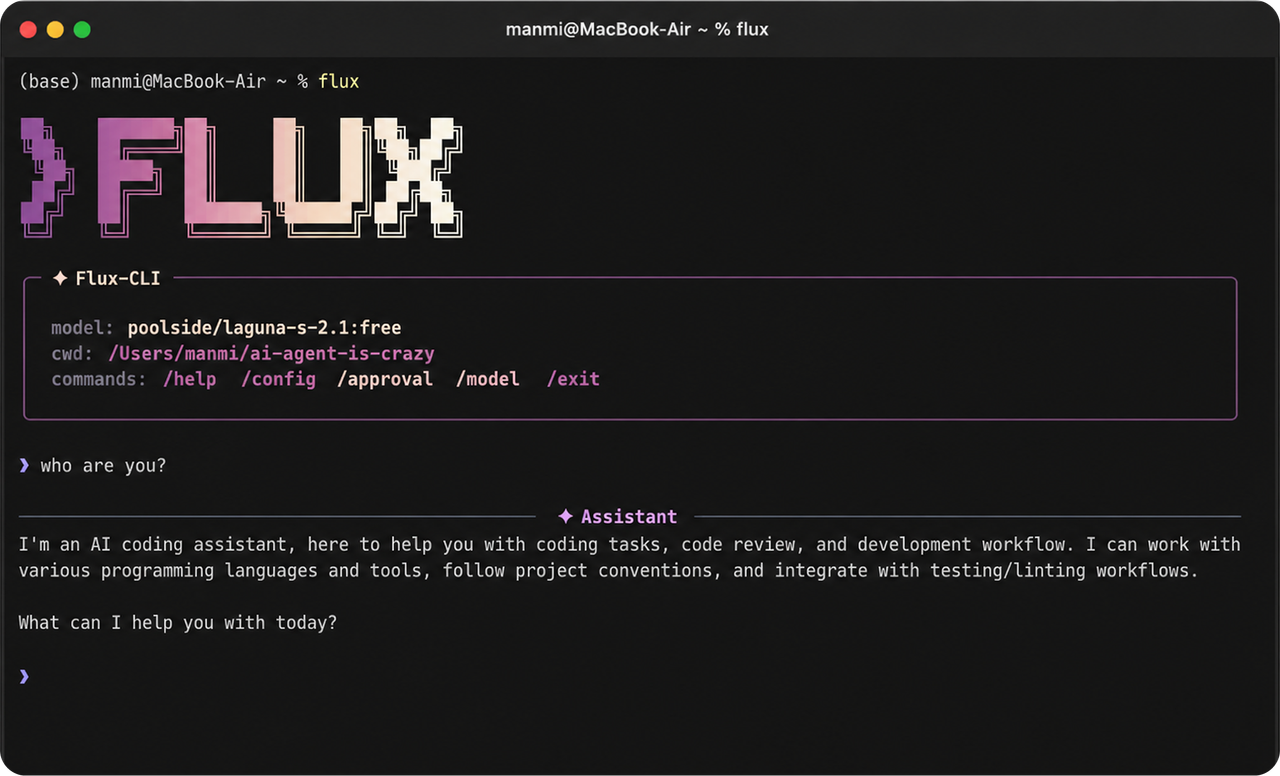
This project is a learning initiative designed to understand and implement core concepts behind intelligent coding agents:
- How AI agents reason about problems and select appropriate tools
- Multi-tool orchestration — deciding which tools to use and in what order
- Iterative refinement — analyzing code, identifying issues, and autonomously refactoring
- Streaming capabilities — real-time response generation and token consumption
- Lifecycle Hook System — shell-based event triggers (
on_start,on_success,on_error,pre_tool_use,post_tool_use,on_compaction) - Safety & Approval Policies — user confirmation for mutating operations (
on-request,auto,yolo) - Error handling & resilience — retry logic, exponential backoff, graceful degradation
- Context management — intelligent conversation history with automatic compression
- Extensible tool system — plugin architecture with built-in, sub-agent, and MCP tools
- Async OpenAI client with lazy initialization
- Support for streaming and non-streaming responses
- Stream event architecture (
StreamEvent,TextDelta,TokenUsage) - Tool call streaming — incremental
TOOL_CALL_START,TOOL_CALL_DELTA,TOOL_CALL_COMPLETEevents - Error handling with retry logic:
- Rate limit handling with exponential backoff
- Connection error recovery
- API error catching and reporting
- Configurable API key via
.envor system config - Support for different LLM providers (OpenRouter, OpenAI, local models via configurable base URL)
- Event-driven architecture with
AgentEventandAgentEventType - Lifecycle:
AGENT_START->TEXT_DELTAx N ->TOOL_CALL_START/COMPLETEx N ->TEXT_COMPLETE->AGENT_END - Error propagation through event system (
AGENT_ERROR) - Full agentic loop with multi-turn tool calling
- Maximum turns enforcement with graceful error reporting
- Configurable event hooks via
.flux-cli/config.toml - 6 Trigger Points:
on_start: Triggered when an agent turn beginson_success: Triggered when an agent successfully finisheson_error: Triggered on exceptions, API failures, or tool execution errorspre_tool_use: Triggered before a tool executespost_tool_use: Triggered after a tool completeson_compaction: Triggered when context compression occurs
- Environment Variable Context: Passes
FLUX_HOOK_EVENT,FLUX_MODEL,FLUX_CWD,FLUX_TOOL_NAME,FLUX_TOOL_ARGS,FLUX_TOOL_SUCCESS,FLUX_TOOL_OUTPUT,FLUX_AGENT_RESPONSEto hook processes - Cross-Platform Execution: Windows
shlex.quotebash/cmd execution support with clean process tree cleanup (taskkill /F /T /PID)
- Pydantic-validated
ApprovalPolicyenum:ON_REQUEST,AUTO,YOLO - Interactive confirmation modal for mutating operations (
write_file,edit,shell) - File diff preview inside approval requests
Sessionclass orchestrating client, tools, context, and MCP- Multi-level TOML configuration loading: System Config -> Project Config -> CLI Overrides
- Auto-detection of
AGENT.mdfiles for custom developer instructions - Persistent user memory across sessions stored in OS user data directory
ContextManagerwith token tracking (viatiktoken)- System prompt construction with identity, environment, tool guidelines, security
- Automatic context compression trigger at 80% of context window limit
ChatCompactorchild LLM summarization with structured continuation prompts- Smart tool output pruning (protects recent outputs, prunes older ones)
| Tool | Kind | Description |
|---|---|---|
read_file |
READ | Read text files with line numbers, offset/limit, binary detection |
write_file |
WRITE | Create/overwrite files with automatic parent directory creation |
edit |
WRITE | Precise surgical text replacement with uniqueness checks |
shell |
SHELL | Command execution with timeout, blocked command safety, environment control |
list_dir |
READ | Directory listing with hidden file toggle |
grep |
READ | Regex search across files with case-insensitive option |
glob |
READ | File pattern matching with recursive ** support |
web_search |
NETWORK | DuckDuckGo web search integration |
web_fetch |
NETWORK | HTTP fetch with automatic fallback to proxy on 403/5xx |
todos |
MEMORY | Session-scoped task tracking (add/complete/list/clear) |
memory |
MEMORY | Persistent user memory stored across sessions |
SubAgentTool: Spawns isolated child agents (codebase_investigator,code_reviewer)MCPManager: Model Context Protocol integration with stdio and SSE transport support
- Multi-stop color gradient horizontal ASCII logo renderer (
#e7aafb->#a191f8->#8bcefc->#7fe4eb) - Windows UTF-8 reconfigure and VT100/ANSI legacy rendering support
- Rich theme styling (
AGENT_THEME) with custom tool panels, status indicators, syntax highlighting (dracula), and diff rendering - Interactive slash command dashboards (
/help,/config,/model,/approval,/stats,/tools,/mcp,/clear,/exit)
flux/
├── main.py                      # CLI entry point, Click commands, interactive REPL loop
├── agent/
│   ├── agent.py                # Agent orchestrator with multi-turn agentic loop & hook triggers
│   ├── events.py               # AgentEvent & AgentEventType definitions
│   └── session.py              # Session lifecycle (Client, Registry, Context, MCP, Hooks)
├── client/
│   ├── llm_client.py           # AsyncOpenAI client wrapper with streaming & retries
│   └── response.py             # StreamEvent, TextDelta, TokenUsage, ToolCall models
├── config/
│   ├── config.py               # Pydantic Config, ModelConfig, HookConfig, MCPServerConfig
│   └── loader.py               # Multi-level TOML loader & AGENT.md detection
├── context/
│   ├── compaction.py           # ChatCompactor context summarization engine
│   └── manager.py              # ContextManager history, token tracking, tool pruning
├── hooks/
│   ├── hook_system.py          # Cross-platform process execution & environment builder
│   └── manager.py              # HookManager event router
├── prompts/
│   └── system.py               # Dynamic system prompt builder
├── safety/
│   └── policy.py               # ApprovalPolicy enum (on-request, auto, yolo)
├── tools/
│   ├── base.py                 # Tools ABC, ToolInvocation, ToolResult, FileDiff, ToolKind
│   ├── registry.py             # ToolRegistry with built-in & MCP lookup
│   ├── discovery.py            # Custom tool discovery from .flux-cli/tools/
│   ├── subagent.py             # SubAgentTool & pre-defined sub-agents
│   ├── builtin/                # Core built-in tools (read, write, edit, shell, grep, glob, etc.)
│   └── mcp/                    # MCP client & tool adapters
├── ui/
│   └── tui.py                  # Rich TUI, gradient banner, tool panels, command dashboards
├── utils/
│   ├── errors.py               # AgentError, ConfigError
│   ├── paths.py                # Path resolution & binary file detection
│   └── text.py                 # Token counting (tiktoken) & text truncation
├── pyproject.toml              # PyPI package manifest & executable entry points
├── requirements.txt            # Project dependencies
├── ARCHITECTURE.md             # Detailed technical architecture guide
└── README.md
- Python 3.10+
- OpenRouter API key (or any OpenAI-compatible provider)
# Clone the repository
git clone https://github.com/manmit-s/flux-cli.git
cd flux-cli

# Create and activate virtual environment
python -m venv .venv

# On Windows:
.venv\Scripts\activate
# On macOS/Linux:
source .venv/bin/activate

# Install dependencies
pip install -r requirements.txt# Recommended for CLI tools:
pipx install flux-cli-ai
# Or via standard pip:
pip install flux-cli-ai
# Launch directly from anywhere in your terminal:
fluxCreate a .env file in your workspace:
API_KEY=your_api_key_here
BASE_URL=https://openrouter.ai/api/v1  # Optional, default for OpenRouter
Or configure your global settings at ~/.config/flux-cli/config.toml (macOS/Linux) or %APPDATA%\flux-cli\config.toml (Windows):
[model]
name = "nvidia/nemotron-3-super-120b-a12b"
temperature = 0.7
context_window = 128000

max_turns = 50

[approval]
policy = "on-request"

[hooks]
enabled = true
on_start = "echo 'Agent starting...'"
on_error = "echo 'Agent encountered an error'"

[shell_environment]
exclude_patterns = ["*KEY", "*TOKEN", "*SECRET"]While in interactive mode (flux), you can run:
| Command | Action |
|---|---|
/help |
Show interactive help dashboard |
/config |
Show current active configuration |
/model <name> |
Switch LLM model at runtime |
/approval <mode> |
Change safety approval policy (on-request, auto, yolo) |
/stats |
View session token usage & turn metrics |
/tools |
List all registered built-in and MCP tools |
/mcp |
View MCP server connections |
/clear |
Clear active conversation history |
/exit or /quit |
Exit the CLI session |
Inspired by and learning from:
- Rivaan Ranawat — Educator and open-source agent innovator
- Claude Code CLI & Gemini CLI — Design aesthetics & agent orchestration inspiration