BenchtopWeb is a lightweight, deployable web application that allows users to view web app containers from a single dashboard. Imagine a docker web gui without the hassle of convoluted deployments, fully featured, and totally offline after installation.
Web deployables were invented in 2025 by Matthew Benchimol in Gainesville, Florida, United States. There are many types of dockers, including dockers that utilize the web but they deploy entire operating systems before you can start using them. BenchtopWeb was developed to provide instant deployment of web deployables to your web browser, allowing immediate use of sophisticated tools with no operating system installation, leveraging ubiquitous browser technologies.
Imagine you work in a corporate environment and they allow you to use things like Notepad or Sticky Notes from your Windows OS. Notepad is searchable but it is not indexed so a control + f is your best bet. Sticky Notes is searchable and indexed but bloated so its slow with a complicated user interface. With BenchtopWeb, you can download the BenchtopWeb.html file to your Windows machine and select tools from our store catalog, installing them, allowing you to quickly use web deployables so you can be more productive. Your IT management teams already allow you to use a browser on your operating system so web deployables do not flag cybersecurity protocols, as they have been cleared by your cybersecurity teams as secure, leveraging the same technologies they already let you use. Your corporate IT teams can even make tools hosted locally or on the web, giving you the link, allowing you to add them to your catalog for installation as your needs demand it.
Web deployables are the next re-evolution of the web. Browsers are applications and applications are generally sandboxed by your operating system, blocking hackers from accessing their files. With web deployables, you are protected from hackers that compromise your file system and try to ransom your files back to you, as the files and data are stored in the browser application instead of in your file folder.
Accounts on browsers like Firefox, Chrome, and Safari do not sync IndexedDBs to your account, the mechanism web deployables use to store your files and data. This means even if account features exist on your browser, you do not have to worry about potential compromises of your data to unauthorized cloud accounts. Browsers run the web and major corporations develop and maintain these browsers. Even though they can be compromised, hacking an IndexedDB is incredibily difficult. In fact, there are no listed hacking methods to compromise a secure IndexedDB when it is used locally (See Limited Google AI Result Below) and a hacker does not have physical device access.
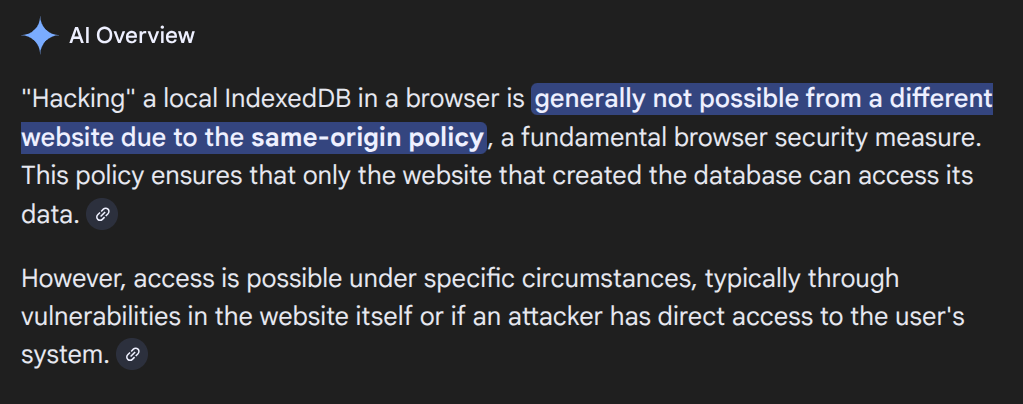


Note: Before using any software technology, you should research your threat vectors to ensure you are secure. BenchtopWeb supplements best cybersecurity practices but does not replace them. If any corporate teams use BenchtopWeb or any of my other projects for their company, please message me on LinkedIn. As always, please make sure you adhere to the listed license.
- Add more to Dash
- Add more Settings
Seem me a pull request.