em is a command-line tool for Event Modeling. You write a
model in a small, slice-first DSL and em renders it as a clean, deterministic diagram.
Because the source is plain text — diff-able, reviewable, unambiguous — it's as easy for an
AI to write and edit as it is for a person, and em validate keeps either one honest.
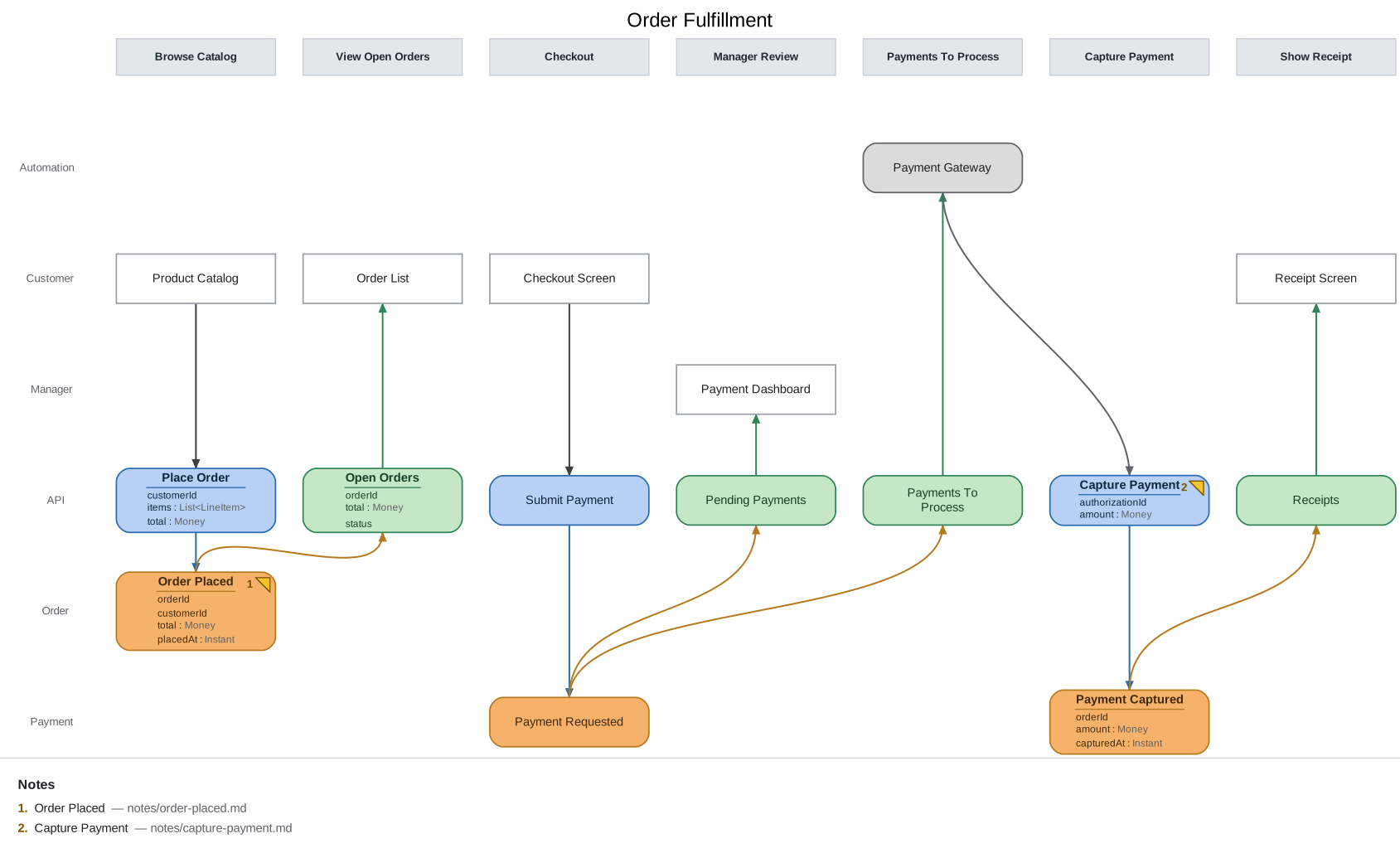
The source for that diagram is about 70 lines of text.
npm install -g @milehimikey/emRequires Node ≥ 18. SVG and PNG rendering are fully self-contained (Graphviz runs as bundled WebAssembly); nothing else to install. PDF is optional — see docs/dependencies.md.
em init model.em          # scaffold a starter model
em render model.em        # -> model.svg  (open it in a browser)
em watch model.em --serve # live browser view, re-renders on every save
em validate model.em      # check event-modeling rules
Once a model is real and committed, em keeps working on it over time:
em export model.em        # versioned JSON, for agents and tooling
em diff model.em --from HEAD~1   # what this change did to the model
em changelog model.em     # the model's git history as a business ledger
A model is a list of slices — vertical time steps, read left to right — whose elements land in swimlane rows:
model "Order Fulfillment"

persona Customer
context Order

slice "Browse Catalog" {
  ui Product Catalog @Customer
  command Place Order
  event Order Placed @Order
}

slice "View Open Orders" {
  view Open Orders from "Order Placed"
  ui Order List @Customer
}
The tutorial builds a complete model from an empty file in about twenty minutes, and docs/workflow.md picks up where it leaves off: how a model gets specified, gated in CI, handed to implementation, and checked against the code that implements it.
em ships a Claude Code skill that runs a facilitated Event Modeling session: the AI asks
the questions, you supply the domain, and the model renders live as it grows.
em skill install # copy the skill into .claude/skills/event-modeling/Then run /event-modeling in Claude Code. The same skill also runs the reverse direction:
extract derives a model from a system that already exists, and conform checks a model
against the code implementing it and reports where they've drifted. See
docs/ai-workflow.md for the phases and what a session produces, and the
em-with-ai repository for a ~50-slice model
built this way.
| Doc | What it answers |
|---|---|
| docs/tutorial.md | Learn the tool by building a model from scratch |
| docs/workflow.md | The model lifecycle: specify, gate, hand off, track change, detect drift |
| docs/patterns.md | The four Event Modeling patterns and their DSL shapes |
| docs/dsl.md | Full DSL reference: keywords, from, again, fields, notes |
| docs/cli.md | Every command and flag |
| docs/validation.md | Every rule em validate checks, and the fixes |
| docs/ci.md | Copy-paste CI recipes: validate .em changes, run conformance on a schedule |
| docs/timeline.md | The Two Laws of the Timeline |
| docs/ai-workflow.md | The Claude Code skill: install, phases, artifacts |
| docs/dependencies.md | What's bundled vs. what needs a system install |
| docs/architecture.md | How rendering works; why Graphviz, not PlantUML |
| docs/roadmap.md | What's planned |
npm install
npm run build          # produces dist/, exposes the `em` bin
npm test               # vitest
npx tsx src/cli.ts <command> ... # run straight from sourceMIT © milehimikey