Implements a deterministic, data-centric, Computer Vision Engine. Currently the engine is applied for the Real-Time Detection of Sonic The Hedgehog Retro Games.
This is the CV engine for a local Python C/C++ interoperability tech talk.
Development Status: Maintained until the Python interoperable engine is finished. Consider this engine to be the pure C/C++ implementation. I do not forsee adding new features to it, the engine meets the required 30 FPS performance target for the talk. It can still be improved in terms of performance but there are other projects (Linux drivers and game engine development) that I would love to start working on them as soon as possible.
During the Caribe Tech Hackathon I discovered that despite the rise of AI generated code there are developers that still have a genuine interest in learning how computers work. They are as eager to follow the latest trends in development with AI while having great interest to learn low-level programming.
I was talking to one of the mentors of the event about game development and he talked about his experience in hackathons at a time where you are expected to write the code yourself. That eventually brought me to talk about my own game engine and he said that it would be nice if I could prepare a talk about interfacing low-level code written in C/C++ with Python. I gladly accepted the request to give a talk about that in the next local Python conference.
So instead of preparing a talk about pointers that probably has been done many times I decided to first build an engaging demo, and there's nothing more relatable and engaging than a video game. Now instead of talking about building a game engine that can be called from Python, it is more practical to write a Computer Vision engine that detects where the player is. Even though everyone enjoys games, it is better to showcase a demo that has broader applications such as text and pattern recognition.
Why talk about interfacing with C/C++ instead of Rust? Because I like to have a good idea of how the code I am writing maps to assembly and that is starkly difficult with Rust but manageable otherwise with C/C++ (as long you don't overdo it with templates). And why interface with C/C++ at all? For many reasons really. If you are developing code in a zero trust environment, you cannot just pull code from any open-source project without jeopardizing the security of the application and the organization. You are expected to write it yourself. Now the moment that you have to introduce branching logic and/or loops you know that the code won't scale unless you can express it entirely with numpy arrays, which is the way of writing performant code natively from Python without having to worry about managing memory yourself which is the core strength of Python.
When you know that you can write code that executes close to the bare metal you can leverage that skill to boost your Python application. I know this is not new, many developers have done this and there are probably many approaches you could take but my opinion is if you can avoid altogether the passing of data at the boundary entirely do that. But if you have and you own the C/C++ code you can do it so that all that you need is a pointer to the base memory address where the engine will work on. And this is what I am going to focus on this project. Now this repository will only host the C/C++ engine code, it does not matter from where you call it because all that it needs is a memory address.
Another point I want to stress in the talk that I hope this project supports my point is that you can afford to write simple C/C++ code and still get a substantial performance boost when compared to the pure Python implementation. Now, I do not intend to implement the engine in Python to demonstrate that; but instead, if the unoptimized engine manages to hit a 30 FPS it is enough for me to recommend that you don't need to be an expert C/C++ developer to write code that performs. And "simple" is somewhat ambiguous because it all boils down to your experience. If you have never written C/C++ code before, even code that I consider simple might look daunting to you. So by simple I mean that even if your implementation leverages mostly conditionals and loops then maybe that's good enough (of course it varies from problem to problem but this one is not trivial so I will have to wait and see).
This week was characterized by putting the initial pieces in place so that the engine could process a framebuffer from an X11 client window application (retro game or any other app really).
- command-line interface: added the command-line interface so that the engine can query the X11 server the current frame of the game window by passing it the window resource id. Instead of hardcoding the game window resource id, which is dynamic, or reading it from a file I decided to pass it as an argument to the engine. This is useful for simplifying the development experience particularly the resource id can easily be passed as part of the arguments to the GNU debugger (
gdb). - framebuffer: leverages
XGetImage()to get at the framebuffer data of the game or any X11 client window application for that matter. So instead of developing right from the beginning with the game framebuffer the code is processing static images such as squares to test the clustering logic. Later we can extend the engine to the game window images at a constant framerate to detect the player in real-time. The choice ofXGetImage()has been deliberate also since now it is not the time to try to optimize the frame capturing code (so for now the code does not leverage Xlib's shared-memory extension). - visual characteristics: leveraged the Xlib's visual structure to know the RGB masks so that the engine can extract the Red Green and Blue 8-bit values of the pixels with bitwise operations. Without this we cannot possibly differentiate the player (which usually has distinctive colors) from the background or other game entities. We cannot even start to process anything without the visual information because we are processing raw bytes and because it varies from visual to visual and so the right approach is to get that information at runtime.
- partitioning: wrote the initial partitioning code to link pixels that belong to the player which from now on I am going to refer to them as clusters. The algorithm uses a basic grouping strategy, if the clusters are next to one another in a scanline then the lower-indexed cluster is the parent of the other one (which becomes a node or child of the cluster).
- extendable memory mapping: decided that it would be best to start working with a base pointer to the memory region that is going to be used by the engine. Wrote the initial code needed to request the Linux kernel for a memory mapping that we can grow later if needed. This is the base pointer that the engine is going to pass during initialization to the Python code (the orchestrator).
- cluster structure: introduced the cluster data structure for fast cluster merging, essentially we are creating a linked-list of clusters tailored for this engine. It is better than the partitioning array because it does not only tells us about the cluster size it also gives us a way for merging clusters and to get at the nodes of the cluster. We differentiate between the nodes of the cluster and linked-clusters for performance and convenience. So in practice this translates to the pixel that belongs to the player at the head of the scanline is the cluster and whatever else that follows that belongs to the player are the nodes. So when we process data we are working on the clusters rather than the individual pixels. And last but not least, the use of the linked-list has been driven by performance considerations not just limited to fast cluster-merging but also traversal. We don't need to do lookups at random places instead we only need to traverse the clusters in their natural order and so we never hit the performance issue of linear search
O(n).
This week has been mostly concerned with the core engineering task of exploring the problem space to design the cluster-merging algorithm. There has been non-linear development, debugging, fixing, rewriting, and iterating on ideas based on crafted data sets.
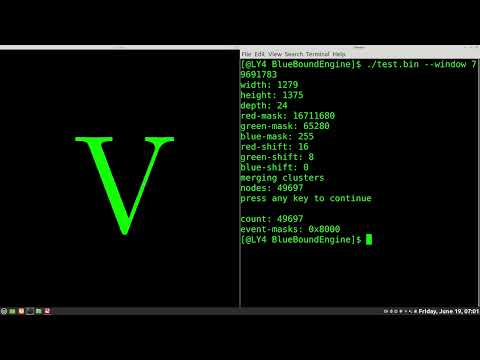
- cluster-merge algorithm: as mention previously we group pixels (that belong to the player) that are next to each other into a cluster. Then we start merging those clusters into a super-cluster structure. The merge algorithm is able to group overlapping squares into a single super-cluster, which is the expected result. The code has also been used to merge the pixels that comprise the letter V, this letter has been chosen deliberately because it is not until the very end that the algorithm determines that a merge is needed due to the convergence point (or vertex).
- renders super-structure: the code renders the merged super-structure in a separate X11 client window. The merged pixels are shown in green to make it easier to inspect visually what was detected by the computer vision engine.
https://youtu.be/0rTqrAbqRI8
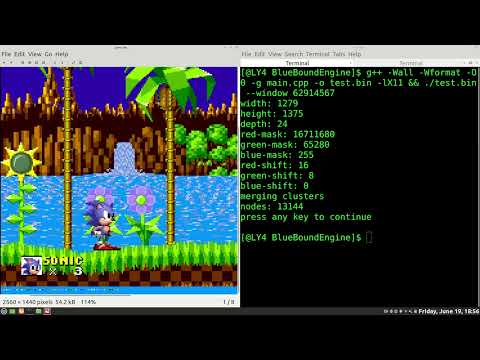
- sonic detection: have successfully detected some of the pixels that belong to sonic while excluding the background and so the engine is getting closer to the goal of doing this in real-time. Having the code process a sonic image has enabled me to address new edge-cases such as needed to swap the
leftandrightiterators when the iterators reach the common scanline between them. If we don't the merge fails because the id ordering (smallest to largest) is not realized. The defensive programming that the code already had enabled me to tackle this problem quickly. - deferred rewriting: the logic that handles the merge of a cluster in a scanline shall be worked on later. This part of the algorithm was written before I introduce the
superdata member that stores the id of the super-cluster and so any links made between them would cause problems later on becausesuperis uninitialized. This is why the computation has been disabled. At least I know that the merge between scanlines (harder to get right) is working.
Have succeeded in tracking the player real-time, the engine does not crash, does not leak memory, and runs at roughly 10 FPS. Not great though there are obvious performance considerations that should be considered. However profiling will tell where the performance bottlenecks are.
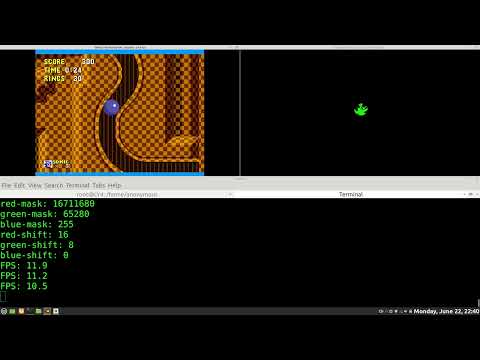
-shared memory: have begun to use the shared-memory extension to improve the performance of the engine. So far the engine shares the framebuffer of the game with the XServer. I still have to use the shared-memory extension for the engine framebuffer. Have yet to reach the desired target of 30 FPS.
-assertions: instead of enforcing runtime assertions that are useful for debugging the code these have been expressed in an Assertion macro function that only exist when compiling the source code in development mode. See the build info below for more details about that.
-event-loop filter: we only check for key-press events for the output window instead of processing all events.
-framebuffer transfer optimization: by having the engine send to the XServer just the pixels that comprise the player we have improved the performance of the engine. We just instruct the XServer to clear the framebuffer and then send the pixels that comprise the player over the Unix socket.
-CPU cache optimization: by taking advantage of the fact that each cluster is a collection of pixels next to each other we access them in order to improve CPU cache utilization.
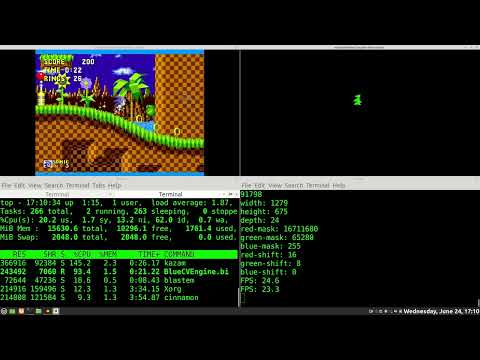
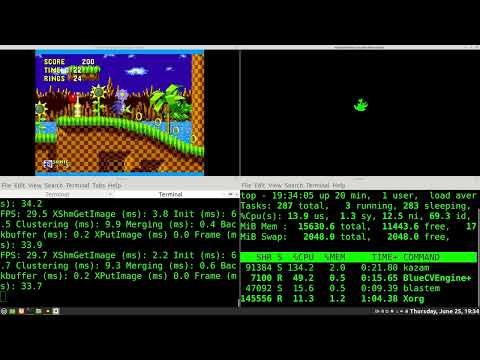
-profiling: profiling the engine loop demonstrated that the bottleneck happens during the initialization of the struct cluster data structure. For that reason the size of this structure has been halved. The other larger bottleneck was the zeroing of the entire memory map, since we don't really need to do that the time spent on initialization has been reduced significantly (nearly 4x improvement). The video below shows the leaner version of the engine hitting the target framerate of 30 FPS.
To obtain a development build use the following command-line string:
g++ -DDEVBUILD=1 -Wall -Wformat -O0 -g main.cpp -o BlueCVEngine.bin -lX11 -lXextif you want to disable runtime assertions do not define DEVBUILD or set it to zero.
For production builds use this command-line string:
g++ -O2 -g main.cpp -o BlueCVEngine.bin -lX11 -lXextBefore doing this step you need to be running a retro sonic game and gets the resource ID of the window where it is running it.
xwininfoxwininfo: Please select the window about which you
would like information by clicking the
mouse in that window.
xwininfo: Window id: 0x5600001 "GNU/Linux-Xlib-Game-Dev"
Absolute upper-left X: 0
Absolute upper-left Y: 12
Relative upper-left X: 0
Relative upper-left Y: 24
Width: 2560
Height: 1440
Depth: 24
Visual: 0x21
Visual Class: TrueColor
Border width: 0
Class: InputOutput
Colormap: 0x20 (installed)
Bit Gravity State: ForgetGravity
Window Gravity State: NorthWestGravity
Backing Store State: NotUseful
Save Under State: no
Map State: IsViewable
Override Redirect State: no
Corners: +0+12 -0+12 -0--12 +0--12
-geometry 2560x1440+0+-12
based on this we know that the window resource ID is 90177537 (or 0x5600001)
now you can run the engine by providing this way:
./BlueCVEngine.bin --window 90177537In a future revision we could modify the engine so that you won't need to convert the resource id to decimal.