Cross-platform system open source messaging system, integrate applications together by using exchanges and queues (Advanced Message Queue or AMQP protocol). RabbitMQ server is written in the Erlang programming language (designed for telecoms industry by Ericsson), Erlang supports distributed full torrent applications, thus ideal to build a messaging system, it has client libraries that support many different programming environments (. NET, JAVA, Erlang, Ruby, Python,PHP, Perl, C, and C++, Node.js...)
The RabbitMQ server is a message broker that acts as a message coordinator for the applications that integrate together. i.e. a common platform for sending and receiving messages.
RabbitMQ features :
-
reliability : message broker built on top of a solid, high-performance, reliable, and durable foundations, this includes Messages can be persisted to disk to guard from loss when a server is restarted, and message delivery acknowledgements from receiver to sender to ensure that the message has been received and stored.
-
routing: messages passes through exchanges before they are stored in a queue, There are different exchange - a complex routing scenarios by binding exchanges together
-
clustering and high availability: several servers together on a local network, which forms a single, logical message broker. Queues can also be mirrored across multiple servers in a cluster so that in the event of a server failure, we won't lose any messages.
-
management web user interface: manage users and their permissions, exchanges, and queues.
-
command line interface: offer the same level of administration as the web user interface, we can incorporate RabbitMQ administration into scripts
paid support plan with a company called Pivotal, who runs and maintains the RabbitMQ open source project
Messaging protocol that allows applications running on separate servers and processes to communicate in a fail safe manner. The queue is a temporary storage location which messages can be sent and received reliably when destination is reachable. This enables communication across networks and between computers running Windows only which may not always be connected (versus sockets and other network protocols assure we that direct connections always exist). The Microsoft Distributed Transaction Coordinator(MS DTC)allows multiple operations on multiple queues to be wrapped in a single transaction.
- Centralized vs decentralized message broker : messages are stored on a central server or cluster of servers, client sends messages to that central server, and then a subscriber can then retrieve that message (VS MSMQ is decentralized : each machine has its own queue)
- Multi-platform messaging broker versus Windows only: integration with these different platforms
- Standards versus no standards: AMQP versus own proprietary messaging format
It provides a browser-based user interface to administer the message broker, as well as a HTTP-based API for the management and monitoring of the RabbitMQ server:
- declare, list, and delete exchanges, queues, bindings, users, virtual hosting permissions,
- monitoring queue length, message rates, and data rates per connection
- sending and receiving messages
- monitoring the Erlang processes, file descriptors, and memory use,
- force closing connections and purging queues.
Go to http://localhost:15672 and then guest/guest go to exchange create a TestExchange, go to Queue and create Testqueue back to exchange and publish "hello in TestExchange" and back to queue and select Testqueue and then get message. if we don't want the messages to be requeued then in Testqueue => Ack Mode: Ack message requeue false { Nack message requeue true, Ack > message requeue false, Reject requeue true,Reject requeue false}
RabbitMQ is built on top of the AMQP protocol; a network protocol that enables client's applications to communicate with the compatible messaging system.
a message protocol works by receiving messages from a client or publisher and broker routes a message to a receiving application or consumer via an exchange, which acts as a mailbox, it sends a message to a queue by using different rules called bindings (direct routing, fanout, topic, headers) all within the message broker which delivers the message from the queue to a consumer.
The consumer (subscriber to the queue) pulls out the queue when a message is published, a publisher can specify various different messaging attributes which will be used by the message broker.

The AMQP protocol has a mechanism for message acknowledgements (ACK) to deal with network unreliability and app failures; when a message is delivered to a consuming application, the consumer notifies the broker, either automatically, or as soon as the app developer decide so. When message ACK are used, the message broker will only remove the message from the queue when it receives a notification for that message. If a user messages are routed by the routing key (acts like a filter), it cannot be routed anywhere, it can either be returned to the sender, dropped, or if configured, be placed on a dead letter queue which is monitored.
Exchanges :
-
They are AMQP entities where messages are sent to the message broker.
-
They take a message and then route it to one or more queues.
-
The type of routing depends on the exchange type used in different exchange rules (bindings).
Types of exchanges:
-
Direct exchanges: queue binds to the exchange using a routing key, ideal for publishing a message onto just one queue (message and queue keys must match)
 e.g. used to distribute messages between multiple work processes in a round robin manner
 -
Fanout exchanges: routes messages to all queues that are bound to it (routing key is ignored = broadcast), ideal for the broadcast
 e.g sync online game scores, weather updates, chat sessions between groups of people
 -
Topic exchanges: one or many queues based on pattern matches between the message routing key
 e.g. multi-card/wild carded routing key of messages to different queues. If * hash are used in binding then topic exchanges = fanout exchanges, if not used then topic exchanges = direct exchanges
 -
Header exchanges: routing of multiple attributes that are expressed in headers (i.e. routing key/queue is ignored = only express one piece of information)
 Header exchanges looks like a supercharged direct exchanges, as the routing is based on header values (also used as direct exchanges when routing key is not string)


Each exchange is declared with a set of attributes :
- name: name of the exchange,
- durability flag: whether or not the messages sent to the exchange survive a broken server or restart by persisting the messages to disk.
- auto-delete flag: if the exchange is deleted when all the other queues are finished using it
- arguments: arguments that message broker dependent on.
The AMQP message brokers contain a default exchange (pre-declared) that is a direct exchange with no name (empty string); useful for simple app where the queue that is created it is bound to it with a routing key, which is the same as the queue name. e.g declaring a queue with the name 'payment requests', the message broker will bind it to the default exchange by using the 'payment request' as the routing key. i.e. the default exchange makes it looks as it directly delivers messages to queues (not technically happening).
Queues, Bindings, and Consumers first-in first-out basis, it must be declared. If the queue doesn't already exist, it will be created. If the queue already exists, then re-declaring the queue will have no additional effect on the queue that already exists
Queues have additional properties over exchanges
-
Name : name of the queue (255 char max), can be picked by the app, or it can be automatically named by the broker that generates it.
-
Durable, whether the queue and messages will survive a broker or a server re-start,queue is persisted to disk. This makes only the queue persistent, and not the messages, durability means the queue will be re-declared once the broker is re-started. If we want the messages to be also persisted, then we have to post persistent messages. Making queues durable does come with additional overhead => decide if the app can't lose messages or not.
-
Exclusive: is used by only one connection, and the queue will be deleted when that connection closes.
-
Auto Delete: is deleted when a consumer or subscriber unsubscribes.
bindings are defined when we need to define rules that specify how messages are routed from exchanges to queues, they may have an optional routing key attribute that is used by some exchange types to route messages from the exchange to the queue.

If an AMQP message cannot be routed to any queue (e.g. missing valid binding from the exchange to that queue) then it either dropped, or returned to the publisher, depending on the message attributes the publisher has set.
From systems that consume messages perspective, storing messages in queues is good, provided that there are apps on the other side of the queues to consume those messages.
Consumers/subscribers with a set of queues Let assume an apps will register as consumers/subscribers to a set of queues, a common scenario will be to balance a load of apps feeding from the queues in a high volume scenario. When a consuming application acts on a message from the queue, it is possible that a problem could occur and lead into a message lose, further, when an app acts on a message, that message is removed from the queue, but we need to make sure that the message has been successfully processed before that to happen.

The AMQP protocol gives a set of options to remedy that situations (i.e. when a message is removed from the queue):
- The message is removed once a broker has sent the message to the application.
- Or, the message is removed once the application is sent an acknowledgement message back to the broker.

With an explicit acknowledgement, it is up to the app to decide when to remove the message from that queue (received a message, or finished processing it.

If the consuming app crashes before the acknowledgement has been sent, then a message broker will try to redeliver the message to another consumer. When an app processes a message, that processing may or may not succeed. If the processing fails for any reason(e.g. database time outs), then a consumer app can reject the message. The app then can ask the broker to discard the message or re-queue it.
If there's only one consumer app subscribed to the queue, we need to make sure that we don't create an infinite message delivery loop by rejecting and re-queuing the message from the same consumer.
We need to install the RabbitMQ client library for dot net. to develop software against RabbitMQ. API guide to client library API
Install Package RabbitMQ.ClientRabbitMQ client library is an implementation of the AMQP client library for C#. The client library implements the AMQP specifications. The API is closely modeled on the AMQP protocol specification, with little additional abstraction.
The core API interface and classes are defined in the RabbitMQ.Client namespace. The main API interface and classes are:
-
IModel: represents AMQP data channel, and provides most of the AMQP operations.
-
IConnection: AMQP connection to the message broker
-
ConnectionFactory : constructs IConnection instances.
Other useful classes include:
-
ConnectionParameters: used to configure the connection factory
-
QueuingBasicConsumer: receives messages delivered from the server.
//Connecting to a message Broker
ConnectionFactory factory = new ConnectionFactory {
			HostName = "localhost", UserName = "guest", Password = "guest" };
IConnection connection = factory.CreateConnection;
IModel channel = connection.CreateModel;
//Exchanges and queues are Idempotent
//Idempotent operation : if the exchange/Queue is already there
//it won't be created, otherwise it will get created.
var ExchangeName = channel.ExchangeDeclare ("MyExchange", "direct");
channel.QueueDeclare("MyQueue");
channel.QueueBind("MyQueue", ExchangeName ,"");using client API we have one producer posting the payment message onto a "StandardQueue" queue, and one consumer reading that message from the "StandardQueue" queue. It looks like the producer posts directly onto the "StandardQueue" queue, instead of using an exchange.

What happens is under the covers we are posting to the default exchange; RabbitMQ broker will bind "StandardQueue" queue to the default exchange using "StandardQueue" (name of the queue) as the rooting key. Therefore a message publishes to the default exchange with the routing key "StandardQueue" will be routing to "StandardQueue" queue.
Declaring the queue in RabbitMQ is an idempotent operation, i.e. it will only be created if it doesn't already exist.
Generally speaking, an item hosting operation is one that has no additional effect if it is called more than once, with the same input parameters.
string QueueName = "StandardQueue";

_factory = new ConnectionFactory { HostName = "localhost", UserName = "guest", Password = "guest"};
_connection = _factory.CreateConnection();
_channel = _connection.CreateModel();

//tells the broker the queue is durable. i.e. that queue is persisted to disk and will survive,
//or be re-created when the server is restarted.
//Exchanges and queues are Idempotent
//Idempotent operation : if the exchange/Queue is already there it won't be created,
//otherwise it will get created.
 _channel.QueueDeclare(queue:QueueName, durable:true, exclusive:false, autoDelete:false, arguments:null);
//Send message
//payment.Serialize(): converts payment message instances into a compressed bytes[] to a json representation
 channel.BasicPublish(exchange: "", routingKey: QueueName, basicProperties: null, body: payment.Serialize());
//receive message
_channel.BasicConsume(queue: QueueName, noAck: true, consumer);
//DeSerialize is user-defined extension method
var message = (Payment)consumer.Queue.Dequeue().Body.DeSerialize(typeof(Payment));Consumers last so long as the channel they were declared on, or until the client cancels them.
The idea is that messages from the queue are shared between one or more consumers, it commonly used when we want to share the load, between consumers when processing higher volumes of messages.

string QueueName = "WorkerQueue_Queue";

_factory = new ConnectionFactory { HostName = "localhost", UserName = "guest", Password = "guest"};
_connection = _factory.CreateConnection();
_channel = _connection.CreateModel();

//tells the broker the queue is durable. i.e. that queue is persisted to disk and will survive,
//or be re-created when the server is restarted.
 _channel.QueueDeclare(queue:QueueName, durable:true, exclusive:false, autoDelete:false, arguments:null);
//Send message
//payment.Serialize(): converts payment message instances into a compressed bytes[] to a json representation
channel.BasicPublish(exchange: "", routingKey: QueueName, basicProperties: null, body: payment.Serialize());//(Spec method) Configures Quality Of Service parameters of the Basic content-class.
channel.BasicQos(prefetchSize: 0, prefetchCount: 1, global: false);
var consumer = new QueueingBasicConsumer(channel);
//we want to expect an acknowledgement message (noAck: false)
channel.BasicConsume(queue: QueueName, noAck: false, consumer: consumer);
while (true)
{
	var ea = consumer.Queue.Dequeue();

	//once we have the message, and have acted on it, we will send a delivery acknowledgement next
	var message = (Payment)ea.Body.DeSerialize(typeof(Payment));

    //This tells the message broker that we are finished processing the message,
    //and we are ready to start processing the next message when it is ready.
	//the next message will not be received by this consumer, until it sends this delivery acknowledgement.
	//acknowledgement sent to the RabbitMQ server, meaning we've finished with that message,
	//and it can discard it from the queue
	channel.BasicAck(deliveryTag: ea.DeliveryTag, multiple: false);
}
prefetchCount: 1 (load balancing among workers) means that RabbitMQ won't dispatch a new message to a consumer, until that consumer is finished processing and acknowledged the message, if a worker is busy (noAck) RabbitMQ will dispatch a message on the next worker that is not busy.
The messages are sent from the exchange to all consumers that are bound to the exchange. i.e. the messages are not picked up by multiple consumers to distribute load, but instead all subscribed consumers with interest in receiving the messages. Unlike the previous example where we defined the queue directly which's use a default exchange (with routingKey = queue_name) behind the scenes, here we will set up an explicit Fanout exchange. A fanout exchange routes messages to all of the queues that are bound to it(i.e. routing key is ignored).

If queues are bound to a fanout exchange, when a message is published onto that exchange a copy of that message is delivered to all those queues.
string ExchangeName = "PublishSubscribe_Exchange";
_factory = new ConnectionFactory { HostName = "localhost", UserName = "guest", Password = "guest" };
_connection = _factory.CreateConnection();
_channel = _connection.CreateModel();

//Idempotent operation : if the exchange/Queue is already there
//it won't be created, otherwise it will get created.
_channel.ExchangeDeclare(exchange: ExchangeName, type: "fanout", durable: false);

//We are publishing directly to an and exchange any queues
//that have been bound to that exchange will receive the message
//No need for routingKey Vs Default exchange (which bears the name of the queue!)
_channel.BasicPublish(exchange: ExchangeName, routingKey: "", basicProperties: null, body: message.Serialize());string ExchangeName = "PublishSubscribe_Exchange";
_factory = new ConnectionFactory { HostName = "localhost", UserName = "guest", Password = "guest" };
using (_connection = _factory.CreateConnection())
{
using (var channel = _connection.CreateModel())
{
//Idempotent operation : if the exchange/Queue is already there
//it won't be created, otherwise it will get created.
channel.ExchangeDeclare(exchange: ExchangeName, type: "fanout");
//this uses a system generated queue name such as amq.gen-qVC1KT9w-plxzpV9MVId9w
var queueName = channel.QueueDeclare().QueueName;
channel.QueueBind(queue: queueName, exchange: ExchangeName, routingKey: "");
_consumer = new QueueingBasicConsumer(channel);
//consumer has created its own queue, and subscribed itself to the exchange
//It will receive all messages that are sent to the exchange ("PublishSubscribe_Exchange")
//noAck: true => No waiting for a message acknowledgement before receiving the next message.
//We don't need to as our subscriber application is reading from its own queue
//it takes msg as it can deal with, no work split no load balancing each
//subscriber will receive the same msg copies
channel.BasicConsume(queue: queueName, noAck: true, consumer: _consumer);
while (true)
{
var ea = _consumer.Queue.Dequeue();
var message = (Payment)ea.Body.DeSerialize(typeof(Payment));
//no need to send message acknowledgement to tell RabbitMQ that we're finished with a message,
//because we want all messages to be sent to every consumer, otherwise get removed from the queue
//channel.BasicAck(deliveryTag: ea.DeliveryTag, multiple: false);
}
}
}The routing key will be used, so direct messages to a specific consumer (Vs fanout exchange where routing key would be ignored). In this example, the producer app will post two different types of messages, card payment and purchase order messages posted to the exchange, each using specific routing key. We create two different consuming apps one looking out for card payments, and the other is only interested in purchase orders. They pick up their messages based on that routing key.

string ExchangeName = "DirectRouting_Exchange";
string CardPaymentQueueName = "CardPaymentDirectRouting_Queue";
string PurchaseOrderQueueName = "PurchaseOrderDirectRouting_Queue";

_factory = new ConnectionFactory { HostName = "localhost", UserName = "guest", Password = "guest" };
_connection = _factory.CreateConnection();
_channel = _connection.CreateModel();

 //type: direct exchange
 //Queues an exchanges are idempotent
_channel.ExchangeDeclare(exchange: ExchangeName, type: "direct");

//durable: true=> queues are persisted to disk, if the server ever crashes or resets,
//the queue will be persisted and come back to life.
_channel.QueueDeclare(CardPaymentQueueName, durable: true, exclusive: false,
					autoDelete: false, arguments: null);
_channel.QueueDeclare(PurchaseOrderQueueName, durable: true, exclusive: false,
					  autoDelete: false, arguments: null);

//Binding: exchange name, the queue name and the routing key
//routingKey: determines what queue the message is routed to.
_channel.QueueBind(queue: CardPaymentQueueName, exchange: ExchangeName, routingKey: "CardPayment");
_channel.QueueBind(queue: PurchaseOrderQueueName, exchange: ExchangeName, routingKey: "PurchaseOrder");

_channel.BasicPublish(exchange: ExchangeName, routingKey: routingKey, basicProperties: null, body: message);
string ExchangeName = "DirectRouting_Exchange";
string CardPaymentQueueName = "CardPaymentDirectRouting_Queue";

_factory = new ConnectionFactory { HostName = "localhost", UserName = "guest", Password = "guest" };
using (_connection = _factory.CreateConnection())
{
    using (var channel = _connection.CreateModel())
    {
        //Queue binding to exchange and listen to CardPayment messages
		//Queues an exchanges are idempotent
		channel.ExchangeDeclare(exchange: ExchangeName, type: "direct");
        channel.QueueDeclare(queue: CardPaymentQueueName, durable: true,
							exclusive: false, autoDelete: false, arguments: null);
        channel.QueueBind(queue: CardPaymentQueueName, exchange: ExchangeName,
						  routingKey: "CardPayment");

		//tells RabbitMQ to give one message at time per worker,
		//i.e. don't dispatch any message to a worker until it
		//has processed and acknowledged the previous one.
		//otherwise it will dispatch it to the next worker that is not busy
        channel.BasicQos(prefetchSize: 0, prefetchCount: 1, global: false);


		//queuing basic consumer is created
        var consumer = new QueueingBasicConsumer(channel);

		//and basic consumer is called to start reading from the queue
		//noAck: false => we care that the messages are safe
		//on the queue and we want the message to be acknowledged
		//in case of the consumer crashes, the message is put
		//back into the queue and eventually later
		//dispatched to the next idle worker.
		//in case of the consumer succeeds Ack is sent back to the broker,
		//message (successfully processed) is discarded
		//from the queue and worker is ready to process another one.
        channel.BasicConsume(queue: CardPaymentQueueName, noAck: false, consumer: consumer);

        while (true)
        {
			var ea = consumer.Queue.Dequeue();
			var message = (Payment)ea.Body.DeSerialize(typeof(Payment));
			var routingKey = ea.RoutingKey;

			channel.BasicAck(deliveryTag: ea.DeliveryTag, multiple: false);
        }
    }
}
string ExchangeName = "DirectRouting_Exchange";
string PurchaseOrderQueueName = "PurchaseOrderDirectRouting_Queue";
_factory = new ConnectionFactory { HostName = "localhost", UserName = "guest", Password = "guest" };
using (_connection = _factory.CreateConnection())
{
   //Queue binding to exchange and listen to PurchaseOrder messages
   //Queues an exchanges are idempotent
   channel.ExchangeDeclare(exchange: ExchangeName, type: "direct");
   channel.QueueDeclare(queue: PurchaseOrderQueueName, durable: true, exclusive: false,
						autoDelete: false, arguments: null);
   channel.QueueBind(queue: PurchaseOrderQueueName, exchange: ExchangeName,
					routingKey: "PurchaseOrder");

   //tells RabbitMQ to give one message at time per worker,
   //i.e.  don't dispatch any message to a worker until it has processed and acknowledged the previous one.
   //otherwise it will dispatch it to the next worker that is not busy
   channel.BasicQos(prefetchSize: 0, prefetchCount: 1, global: false);


   //queuing basic consumer is created
   var consumer = new QueueingBasicConsumer(channel);

   //and basic consumer is called to start reading from the queue
   //noAck: false => we care that the messages are safe on the queue and we want the message to be acknowledged
   //in case of the consumer crashes, the message is put back into the queue and eventually later
   //dispatched to the next idle worker.
   //in case of the consumer succeeded, a Ack is sent back to the broker, message
   //(successfully processed) is discarded from the queue and worker
   //is ready to process another one.
   channel.BasicConsume(queue: PurchaseOrderQueueName, noAck: false, consumer: consumer);

   while (true)
   {
       var ea = consumer.Queue.Dequeue();
       var message = (PurchaseOrder)ea.Body.DeSerialize(typeof(PurchaseOrder));
       var routingKey = ea.RoutingKey;

       // a Ack is sent back to the broker, message (successfully processed) is discarded
       //from the queue and worker is ready to process another one.
       channel.BasicAck(deliveryTag: ea.DeliveryTag, multiple: false);
        }
}-
They are components used for inter-process communication or for inter-thread communication within the same process. They use a queue for messaging, which is passing data between systems.
-
They provides an asynchronous communications protocol. The sender and the receiver of the message do not need to interact with the message queue at the same time. Messages placed onto the queue are stored until the recipient retrieves them.
Next, a few considerations that can have substantial effects on transactional semantics, system reliability, and system efficiency.
-
Durability: messages may be kept in memory, written to disk, or even committed to a database if the need for reliability indicates a more resource-intensive solution.
-
Security policies: we define which application should have access to the same messages.
-
Message purging policies: where queues or messages may have a time-to-live, which defines when they will be automatically deleted.
-
Message filtering: where some systems support filtering data so a subscriber may only see messages matching some pre-specified criteria of interest.
-
Delivery policies: where we define the need to guarantee that a message is delivered at least once or no more than once.
-
Routing policies: where in a system with many queue servers, what server should receive a message or a queue's messages.
-
Batching policies: this is where we define if messages should be delivered immediately or should the system wait a bit and then try to deliver many messages at once.
-
Queueing criteria: determines when should a message be considered unqueued, when one queue has it or when it's been forwarded to at least one remote queue or to all queues
-
Notification: when a publisher may need to know when some or all of the subscribers have received a message.
-
Decoupling: introducing a layer between processes, message queues create an implicit interface that both processes implement. This allows we to extend and modify these processes independently by simply ensuring that they adhere to the same interface requirements.
-
Redundancy: Sometimes processes fail when processing data. Unless that data is persisted, it's lost forever. Queues mitigate this by persisting data until it has been fully processed. The put, get, delete paradigm, which many message queues use, requires a process to explicitly indicate that it is finished processing a message before that message is removed from the queue, ensuring that data is kept safe until we are done with it (i.e. message acknowledgements).
-
Scalability: message queues decouple the processes, it's easy to scale up the rate which messages are added to the queue or processed simply by adding another process. No code needs to be changed, no configurations need to be tweaked. Scaling up is as simple as adding more processes to the backend solution.
-
Resiliency: when part of the architecture fails, it doesn't need to take the entire system down with it. Message queues decouple processes. So if an application that is processing messages from the queue fails, messages can still be added to the queue to be processed when the system recovers. This ability to accept requests that will be retired or processed at a later date is often the difference between an inconvenienced customer and a frustrated customer.
-
Delivery guarantees: The redundancy provided by message queues guarantees a message will be processed eventually so long as a process is reading the queue. No matter how many processes are pulling data from the queue, each message will only be processed a single time. This is made possible because retrieving a message reserves that message, temporarily removing it from the queue till it has been acknowledged. Unless the client specifically states that it is finished with that message, the message will be placed back onto the queue to be processed after a configurable amount of time.
-
Ordering guarantees: the order of which a data is processed is important. Message queues are inherently ordered and capable of providing guarantees that the data will be processed in a specific order. Message queuing such as RabbitMQ guarantee that messages will be processed using a first-in, first-out order. So the order in which messages are placed onto a queue is the order in which they'll be retrieved from it.
-
Buffering: In any system, there might be components that require different processing times, e.g. it might take less time to upload an image than it does to apply a set of filters to it. Message queues help the set tasks operate at peak efficiency by offering a buffering layer. The process writing to the queue can write as fast as it is able to instead of being constrained by the readiness of the process reading from the queue. This buffering helps control and optimize the speed in which data flows through the system.
-
Asynchronous communication: sometimes, we don't want only to process a message immediately. Message queues enable asynchronous processing, which allows us to put a message onto the queue without processing it immediately, queue up as many messages as we like and then process them at the leisure.
The system should be able to cope with change as well as minor or major disruptions.
The power or ability to return to the original form or position after being bend, compressed or stretched => cope with problems and not be hardened against failure (elasticity).
The capacity to recover quickly from difficulties => fast recovery of systems more explicitly.
The ability of a system to cope with change=>comes from supply chain background and is more about keeping a system running.
a synchronous communication, a call is made to a remote server. We send blocks until the operation completes (easy to reason about),while asynchronous communication, the caller doesn't wait for the operation to complete before returning. It may not even care whether or not the operation completes at all.
These two different modes of communication that can enable two different styles of collaboration:
-
request and response: a client initiates a request and waits for the response, This model clearly aligns well to synchronous communication, but can work for asynchronous communication as well. We might kick off an operation and register a callback asking the server to let us know when my operation is completed.
-
Event-based collaboration where we invert flow, instead of the client initiating requests asking for things to be done, it instead says that something has happened and expects other parties to know what to do.
- Event-based systems by their nature are asynchronous. This means that the processing of these messages doesn't need to be centralized in any one place. Instead, we can have many consumers to process messages. e.g. we have multiple consumers working on the messages.
- Event-based collaboration is also highly decoupled. The client that emits an event doesn't have any way of knowing who or what will react to it, which also means that you can add new subscribers to the event without the client ever needing to know.
#open cmd or powershell
rabbitmq-plugins enable rabbitmq_managementThe direct message exchange type use routing key to route messages to different consumers or subscribers, The topic exchange is similar and more powerful to use. Messages sent on topic exchange don't just have an arbitrary routing key as before. The routing key must be a list of words separated by "." and eventually a wild card ('star'), the words (limit of 255 bytes) can be anything that specifies some features connected to the message.

A message sent by a particular routing key will be delivered to all the queues that are bound with a matching key; Two important special cases for binding keys :
- 'star' can be substituted for exactly one word,
- 'hash' can be substituted for zero or more words.
payment.* : consumer is interested in any message that starts with payment.
An example is when we post the message onto a queue, a consumer act on the message, and then a reply is posted back via the queue to the original producer application.
The sample project is split into:
-
A client, which is our web API : The client application posts messages directly onto a queue. For each message that gets posted, the application waits for a reply from a reply queue. This essentially makes this a synchronous process.
-
server which is the consumer: When a message is posted to the server from the client, a correlation ID is generated and attached to the message properties. The same correlation ID is put onto the properties in a reply message. This allows us to easily tie together the replies in the originating messages if you store them for retrieval later.

The client posts a message to the RPC queue that has a correlation ID of 12345. This message is received by the server and a reply is sent back to the client on a reply queue with the same correlation ID of 12345.
application where everything is contained in a single program using one technology.
Benefit of a monolith
-
Ease of deployment
-
Most programmed applications in the world, and tend to be simple in architecture (Junior developers kick in)
-
No external dependencies
-
Easy to test as a whole, and setting up multiple environments should be fairly straightforward
-
Project is easily shared among developers through a source control.
Monolithic problems
-
Components are called synchronously, i.e. longtime before the user sees some result
-
Tight horizontal coupling going on between the components in a synchronous way
-
It's common to use one same database for each of the components which could lead to potential integration through database.
-
How to manage roll back : user retry, or should the system retry?
-
The risk of overloading the server is substantial (chaining problem)
-
Difficult to have multiple teams doing each component separately due tight coupling between components (a component changes, the whole application has to be retested)
-
Over time, features are added to the solution until the architecture can't support all the features anymore, then a rewrite is required.
-
When application grows it becomes complex, brittle and hard to maintain.
-
Most likely performance becomes an issue, because components are called synchronously after each other’s.
-
Monolith is limited to one technology stack.
applications or software that runs on multiple computers within a network at the same time and can be stored on servers or with cloud computing
Important concepts to keep in mind :
-
High cohesion: the pieces of functionality that relate to each other should stick together in a service and unrelated pieces should be pushed outside.
-
Loose coupling:in order to talk to the other services we must hide as much complexity as possible within the service and expose as less as possible through an interface (or Contract), e.g. ability to change some logic within one service without disrupting other services, avoiding to redeploy them as well.
Domain Driven Design help us to find boundaries through the Bounded contexts.
Coupling is the way different services depend on each other:
-
Platform coupling: a service can only be called by an app built with the same technology, e.g. ties all current and future development within an organization to one particular platform.
-
Behavioral coupling: a caller has to know exactly the method name (+ any possible parameters) it's calling, e.g. change the way the service is called and all surrounding services have to be re-adjusted and redeployed.
-
Temporal coupling: refers to an SOA app as a whole can't function when one (or several) service is down. e.g. calls are handled synchronously and server is waiting for response and services architecture rely on each other services to be up & running, it brings the following issues :
- How is the user notified of the error
- how do we roll back the other services
- how do we handle retries
Note that this has nothing to do with synchronous or asynchronous code, like the async and wait syntax in C#, using that pattern, resources for the web server for instance are made available for other requests while servers do their work, but the user still has to wait for them all to complete!
The Eight Fallacies of Distributed Computing by Peter Deutsch:
1. The network is reliable
2. Latency is zero
3. Bandwidth is infinite
4. The network is secure
5. Topology doesn't change
6. There is one administrator
7. Transport cost is zero
8. The network is homogeneous
-
Service-Oriented Architecture (SOA) : where many of the components in an application are services - implementation could be a web application that calls a web service, that calls another web service, ...
-
Microservices (aka SOA 2.0 or SOA done properly): complex applications where the services are small, dedicated and autonomous to do a single task or features of the business, they neither share implementation code, nor data. Every microservice has its own database or data store suitable to a particular kind of service. They communicate using language-agnostic APIs, The services are loosely coupled and don't have to use the same language or platform.
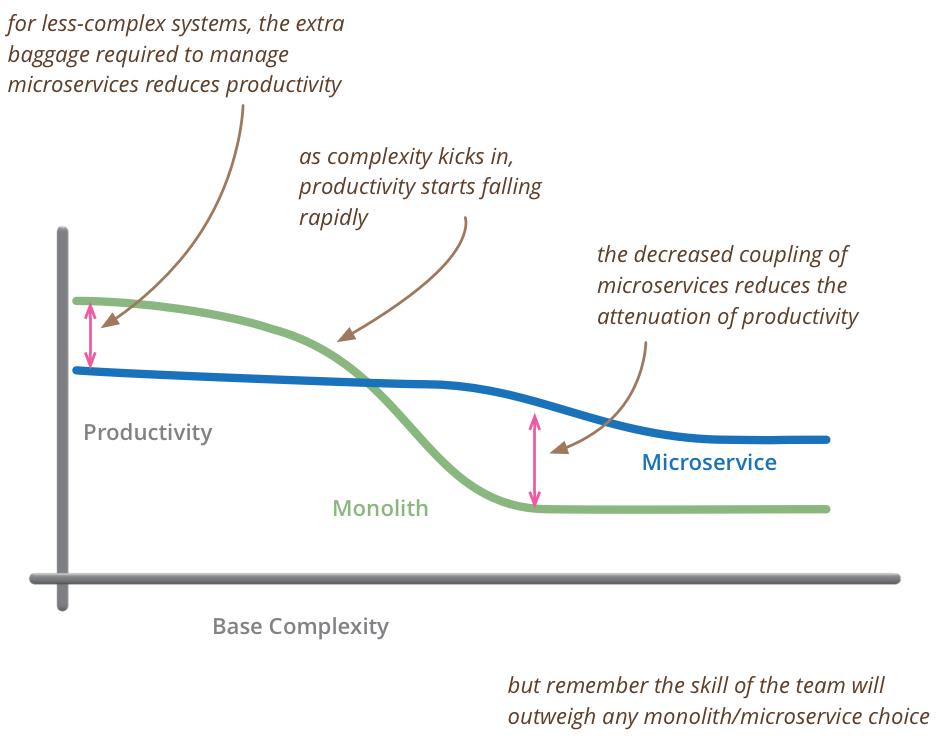
Properties of microservices:
-
Maintainable: easier to maintain, very loosely coupled and have a high cohesion, team work separately, the overall architecture is more complex, but an individual microservices architecture is probably not complex.
-
Versioning: new version of the service could run side-by-side with an old version, it is also possible to let one microservice has multiple messaging process endpoints, each supporting different versions.
-
Each their own: technology best suited for the service, e.g. language, framework, platform, and database suited to the service.
-
Hosting: flexible. Physical machines or virtual machines in the cloud or docker container that could be scaled out.
-
Failure Isolation: app as a whole keeps functioning, the message sticks in the queue, and can be picked up as soon as the service is running again.
-
Observable: each service on a separate VM or Docker container are highly observable, because CPU and memory can be monitored for each service individually, and will become immediately apparent what service should be fixed or optimized.
-
UI: each autonomous service should have and expose its own user interface. That way from a UI perspective, when one service fails, all UI elements are still shown, except for the UI from that one service (SPA).
-
Discovery: services to discover each other in the form of name IP address resolution, for example, it prevents a tight coupling between the service and its URI (product like Consul or ZooKeeper).
-
Security: security mechanism such as OAuth 2 and OpenID Connect.
-
Deployment: a team can work on one microservice, and also deploy it separately, Continuous deployment, essentially deployment after each check in is very straight forward to implement.
Microservice architecture solves a lot of problems, but it also introduces complexity, security, UI, discoverability, hosting, and messaging infrastructure, and monitoring, all become much more complex than programming a monolithic application.
-
RPC (Remote Procedure Call) : is a way to call a class' method over the wire, different programming platforms each develop their own way RPC (.NET Remoting and Java RMI and later WCF based on more standardized SOAP or Simple Object Access Protocol using WSDL).
- High degree of behavioral (proxy classes) and temporal coupling
- Although ** WSDL** allows methods discovery so many programming frameworks and languages can consume the servers, it tends to be implemented slightly different by the different platforms, so there is still slight platform coupling.
-
REST (Representational State Transfer): is using the semantics of the transport protocol, commonly used protocol is HTTP. One of the properties is that the methods in the service are not directly exposed, all resources like data are available as specific URIs, and want to do with it is partly determined by how the call to the URI is made (HTTP verb such as Get, Post, Put, Delete).
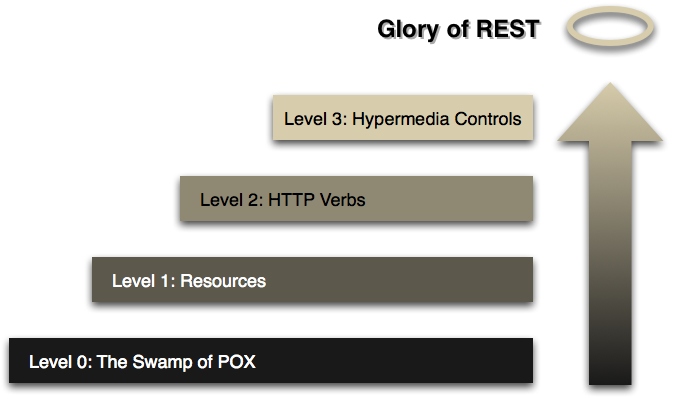
Swamp of POX, where POX stands for Plain Old XML which refers to RPC with SOAP, where RPC is mostly ignoring the underlying protocol such TCP.
Hypermedia controls is a way to get the URIs from the service, and a consumer knows where a certain resource is located, e.g. in the REST model, when creating data with a Post call, the response returns the unique URL where the new resource is located.
Rest and Coupling
-
Lower platform coupling
-
Behavioral coupling is still present but can get very low (Uri's or resource location).
-
Temporal coupling because REST services still have to be up to do their jobs, and consumers still have to wait for the response.
- Asynchronous Messaging: using a service bus (set of classes around the sending and receiving of messages) enables different services to send and receive messages in a loosely-coupled way, every service has an endpoint with which can receive and send messages. The messaging system should be dumb pipes and contain no business logic (Vs ESB such as MS BizTalk), every domain logic should be in the service itself. The messaging system only routes the message to the inbox of another service, or multiple services in the case of a published event, If the receiving service is up, it will be notified via the service bus that a new message has arrived, and if processed successfully, it will be deleted from the queue, after which the service can process the next one. Each endpoint is connected to one particular queue, but one service can contain multiple endpoints.
Microservice and Coupling
-
Loose platform coupling: with the exception the inability for some platform to connect to the message queue.
-
Loose Behavioral coupling: Only message with some data VS RPC and REST where the behavior is dictated by the caller which should have some knowledge about the request that handled by the receiver. Whereas in Microservices, how the request is handled is entirely determined by the service that has to process it.
-
Loose Temporal coupling: When sending a command or receiving an event, the service doesn't have to be up, because the message is safe in a queue until the service becomes available.
Fallacies of distributed computing still apply: network dependency, latency or security, ...
Asynchronous Messaging system uses eventual consistency which need to be managed efficiently.
It's a .NET Framework that enables us to implement communication between apps using messaging in microservice style architecture. It's part of a suite called the Particular Service Platform. The framework lies on top of messaging backends or transports, i.e. an abstraction of the messaging backends. NServiceBus started out as a framework supporting only MSMQ, but nowadays is also supporting transports like RabbitMQ and Azure and even SQL Server, the transport is a simple config detail.
NServiceBus is very pluggable and extensible, It comes in different NuGet packages supporting dependency injection frameworks and databases...
The example here are based on "eCommerce" project
The core of NServiceBus consists of:
-
NServiceBus - Required: contains the complete framework (NuGet packages) that support transports such as MSMQ, RabbitMQ, Azure, SQL Server which come in separate NuGet packages each.
-
NServiceBus.Host (Deprecated) - Optional : self-host different app styles such as ASP. NET MVC and WPF. Self-hosting is optional, but we can create a DLL containing this service, and let NServiceBus do the Hosting. This package contains an executable that behaves as a command line application for debugging, and it can be easily installed as a Windows service.
-
NServiceBus.Testing: help with unit testing specially with sagas.
- Commands : are messages or C# class containing data in the form of properties, they can have multiple senders, but always have one receiver, either they should be derived from ICommand interface,or implemeted using an Unobtrusive mode. As a convention, commands Names in the imperative e.g. ProcessOrder or CreateNewUser
 await endpoint.Send(message: new ProcessOrderCommand
            {
                OrderId = Guid.NewGuid(),
                AddressFrom = order.AddressFrom,
                AddressTo = order.AddressTo,
                Price = order.Price,
                Weight = order.Weight
}).ConfigureAwait(continueOnCapturedContext: false);- Events : are implemented as C# interfaces. They are different because they always have one sender and multiple receivers (i.e. commands opposite). Events implement the publish/subscribe pattern, so receivers interested in a specific event must register themselves with the sender. NServiceBus stores the subscriptions in the configured storage and we must mark all event classes with the IEvent marker interface. Events are in the past tense like OrderProcessedEvent or NewUserCreatedEvent.
Under the cover, NServiceBus will create the implementing class, we provide the content of the message by specifying the Lambda.
...
public async Task Handle(ProcessOrderCommand message, IMessageHandlerContext context)
        {
           ...
            await context.Publish<IOrderProcessedEvent>(messageConstructor: e =>
             {
                 e.AddressFrom = message.AddressFrom;
                 e.AddressTo = message.AddressTo;
                 e.Price = message.Price;
                 e.Weight = message.Weight;
             });
        }
NServiceBus uses a built-in IoC container, which is a lean version of Autofac contained in the core, IoC inject NServiceBus-related types into objects managed by NServiceBus, such as a class implementing IHandleMessages, ICommand, IEvent,... etc,
At Endpoint startup NServiceBus does the Assembly Scanning to find all types that need such as ICommand, IEvent (or Unobtrusive mode) and IHandleMessages, and registering all the types it needs.
If we want to inject IBus instances into MVC controllers, etc., we can plug in virtually any existing container...
If we don't want to scan all assemblies, the scanning can be limited in the config file to scan only certain assemblies.
-
To send command to the same endpoints we use a routing option config instead of specific endpoint name as a string in the send method.
-
For events we have to specify where the endpoint should register the subscription.
There are 2 choices for routing :
- config file: xml file config
<configuration>
  <configSections>
    <section name="MessageForwardingInCaseOfFaultConfig"
			type="NServiceBus.Config.MessageForwardingInCaseOfFaultConfig, NServiceBus.Core"/>
    <section name="UnicastBusConfig" type="NServiceBus.Config.UnicastBusConfig, NServiceBus.Core"/>
    <section name="AuditConfig" type="NServiceBus.Config.AuditConfig, NServiceBus.Core"/>
  </configSections>
  <MessageForwardingInCaseOfFaultConfig ErrorQueue="error"/>
  <UnicastBusConfig>
    <MessageEndpointMappings>
	 <!-- Option 1 -->
     <!--<add Assembly="eCommerce.Messages" Endpoint="eCommerce.Order"/>
	 <!--Option 2-->
     <!--<add Assembly="eCommerce.Messages" Namespace="eCommerce.Messages" Endpoint="eCommerce.Order"/>-->
	 <!--Option 3-->
     <add Assembly="eCommerce.Messages" Type="eCommerce.Messages.ProcessOrderCommand"
		  Endpoint="eCommerce.Order"/>
    </MessageEndpointMappings>
  </UnicastBusConfig>
  <AuditConfig QueueName="audit"/>
  <startup>
    <supportedRuntime version="v4.0" sku=".NETFramework,Version=v4.6.1" />
  </startup>
</configuration>- routing API : NServiceBus is moving more to that option
Commands example
var transport = endpointConfiguration.UseTransport<MyTransport>();
var routing = transport.Routing();

//Option 1 : route all messages in the assembly were the ProcessOrderCommand 'classes'
//in are routed to the "eCommerce.Order" endpoint
//XML :  <add Assembly="eCommerce.Messages" Endpoint="eCommerce.Order"/>
routing.RouteToEndpoint(
    assembly: typeof(eCommerce.Messages.ProcessOrderCommand).Assembly,
    destination: "eCommerce.Order");

//Option 2:  limit that to a certain namespace in that assembly, e.g. "eCommerce.Messages"
//XML : <add Assembly="eCommerce.Messages" Namespace="eCommerce.Messages" Endpoint="eCommerce.Order"/>
routing.RouteToEndpoint(
    assembly: typeof(ProcessOrderCommand).Assembly,
    @namespace: "eCommerce.Messages",
    destination: "eCommerce.Order");

//Option 3: limit routing for one messageType "ProcessOrderCommand"
//XML:<add Assembly="eCommerce.Messages" Type="eCommerce.Messages.ProcessOrderCommand"
// Endpoint="eCommerce.Order"/>
routing.RouteToEndpoint(
    messageType: typeof(eCommerce.Messages.ProcessOrderCommand),
    destination: "eCommerce.Order");
Subscriber Event example
Here the publisher endpoint is "eCommerce.Order"
var transport = endpointConfiguration.UseTransport<MyTransport>();

var routing = transport.Routing();

//Option 1
routing.RegisterPublisher(
    assembly: typeof(eCommerce.Messages.IOrderProcessedEvent).Assembly,
    publisherEndpoint: "eCommerce.Order");

//Option 2
routing.RegisterPublisher(
    assembly: typeof(eCommerce.Messages.IOrderProcessedEvent).Assembly,
    @namespace: "eCommerce.Messages",
    publisherEndpoint: "eCommerce.Order");

//Option 3
routing.RegisterPublisher(
    eventType: typeof(eCommerce.Messages.IOrderProcessedEvent),
    publisherEndpoint: "eCommerce.Order");
a routing for a command is obvious, i.e. we route the message to the endpoint point which should receive the message. For events, the routing must point to the publisher of the event, i.e. where the subscription should be registered.
Note events are only interfaces that are shared between publisher and subscriber, they are not concrete classes.
- The configuration of NServiceBus relies on defaults.
- The configuration can be a combination of code and the config file
- IConfigureThisEndpoint: Classes implementing this interface are picked up when NServiceBus scans the assemblies, and they are called first when NServiceBus starts up.
public class EndpointConfig : IConfigureThisEndpoint
{
    public void Customize(EndpointConfiguration configuration)
    {
        // use 'configuration' object to configure scanning
		configuration.UsePersistence<InMemoryPersistance>();
		configuration.SendOnly();
    }
}
when endpoint is not specified, its name is taken from the namespace the configuration class resides in.
-
INeedInitialization interface: assembly with one or more classes implementing this interface could define company defaults and conventions, and then reference the assembly from all projects that use NServiceBus. In that way, IConfigureThisEndpoint can be used to just override these if necessary.
-
SendOnly Endpoint: only send messages and not receive them. NServiceBus will not waste processing and resources on the receiving of messages if we create the bus as SendOnly.
NServiceBus has to serialize the message classes. The serialized classes form the body of the message in the underlying transport(XML/JSON).
configuration.UseSerialization<JsonSerializer>Other serialization types supported out of the box are BSON and Binary, or you can write our own if needed.
NServiceBus features a built-in logging mechanism, we can also install logging framework by downloading a supporting NuGet package for it. The default logging contains 5 logging levels.
NServiceBus-hosted mode, all logging messages are outputted to the console, they're also written to the trace object, which we configure the output using standard. NET techniques.
The rolling file is also supported, and has a default maximum of 10 MB per file, and 10 physical log files. The default log level threshold for messages going to trace and the file is info, but it can be adjusted in the config file.
The features of the transport define what NServiceBus should store:
-
Write you own : Not a good idea
-
MSMQ : doesn't support subscriptions, so the handling of that must be done separately.
-
State of sagas has to be stored
-
No default persistence: need to be defined otherwise NServiceBus will throw an exception at startup.
-
use InMemoryPersistence (out of the box) as core assembly built-in by Particular Software, this more suitable for testing and demo purposes.
-
NHibernate Persistence (SQL service, Oracle): some persistent classes might require an additional NuGet package and additional config is needed such as connection string in the connection.
-
when installers are enabled, NServiceBus will automatically create the schemas necessary when they are not present (has permission to do so).
-
RavenDbPersistence , Azure Storage & Azure Service fabric Persistence
-
Multiple persistence mechanisms : NServiceBus could use separate storages for subscriptions, sagas, and saga timeouts in the Outbox feature
endpointConfiguration.UsePersistence<NHibernatePersistence, StorageType.Outbox>();
endpointConfiguration.UsePersistence<NHibernatePersistence, StorageType.Sagas>();
endpointConfiguration.UsePersistence<InMemoryPersistence, StorageType.GatewayDeduplication>();
endpointConfiguration.UsePersistence<InMemoryPersistence, StorageType.Timeouts>();

// This one will override the above settings
endpointConfiguration.UsePersistence<RavenDBPersistence>();-
MSMQ (Windows server native - limited to Windows): works in a decentralized way, i.e. nothing between the service; every server has its own queues stored locally. When a message is sent, it is placed in an outgoing queue local for the server, then the MSMQ system is delivering the message to the incoming queue of another server (store and forward), once a message is sent, it will arrive at the destination and when the sender of the message goes down right after sending the message, or the receiver is down, the message will stick the queue until it can be delivered. Events with publish subscribe are not supported in MSMQ, NServiceBus has its own mechanism which use its persistent setting, i.e. every time the message is sent, the persistent storage is checked if there are any subscribers.
-
RabbitMQ : cross-platform broker, supports AMQP (standard protocol for messaging).It is centralized (need to be clustered in a production due to single point of failure for the app), i.e. one server or cluster running RabbitMQ on which the messages and queues reside. When a message arrives at RabbitMQ, it is processed by an exchange, which will route the message to one or more queues. RabbitMQ has a much better built-in config routing (NServiceBus uses this routing mechanism).
-
SQL Server: Messages are placed in a table when sent, and the receiving side is polling the table to look for new messages. When it processes one successfully, it just deletes the message from the table. The table can be on the separate SQL instance or the same one the application uses. NServiceBus uses a back off strategy to do the poling. When no messages are in the queue, it will wait longer and longer before trying again, up to a maximum of a configurable amount of time. The default maximum is 1 second.
-
Microsoft Azure: NServiceBus can support it and use its internal routing :
- Azure Storage Queues: simple storage mechanism (low cost) that supports the queuing and dequeuing of messages. .
- Azure Service Bus : more advanced and costly but enables bigger messages and lower latency among more options on the message level.
NServiceBus is an abstraction of the underlying transport, e.g. as long as the project is small, we start with SQL Server as Transport, and when more messages are flowing through the system, we can switch (which's a mere config detail) to more robust transport as RabbitMQ.
Each transports architecture tends to be different, we need to choose the more suitable to the business operation.
They are built into NServiceBus, e.g. create the queues in MSMQ upon startup, or create the schema when using a relational database as a persistence mechanism.
public class MyInstaller : INeedToInstallSomething
{
    public Task Install(string identity)
    {
        // Code to install something

        return Task.CompletedTask;
    }
}
Installs behave depends on how we're using this service:
- Debugging: installers will run by default every time we start a debugging session, unless we override this in the config.
- Custom installers classes should check if what we about to install is already there.
- self hosting outside the debugger, the running of installers depends on the endpointConfiguration.EnableInstallers setting.
endpointConfiguration.EnableInstallers();

// this will run the installers
await Endpoint.Start(endpointConfiguration)
.ConfigureAwait(false);The fallacies of distributed computing suggests that software and infrastructure will fail, and we want to protect ourselves against that. NServiceBus protects us against data loss and boost our system resiliency.

Happy Path flow
- Peeking is looking at a message without actually dequeing it.
- If there is a message, a transaction is started, and the message is actually dequeued. NServiceBus makes sure only one thread receives the message.
- The message is deserialized
- The handlers (witten by us) are invoked and also everything that is rounded in the form of NServiceBus infrastructure code.
- successful result: the transaction is committed.
Issue with de-serialization

- the message is in a format that can't be deserialized : no chance that this kind of error will ever go away by itself, the message is immediately sent to the error queue
Issue with Handlers

- In case of handlers transient error, i.e. which could go away by itself, e.g. called service is temporarily down, or not reachable, or a deadlock occurs in the database. NServiceBus' retry sub-process starts

First NServiceBus re-invokes the handler the configured number of times (i.e. immediate retries), e.g. 5 times is the default (i.e. everything is configurable) which might be quick for some errors. If immediate retries don't resolve the problem, delayed retries kick in. The message is moved to a special retry queue, and NServiceBus schedules the re-processing of the message in 10 seconds with five retries in a row. If the problem not solved, NServiceBus will wait 20 seconds, and again do the immediate retries 5 times, and then after 30 seconds. When all of this fails, the message is sent to the error queue.
if the error is indeed transient, then it won't show up in the error queue, we have to check the NServiceBus logs to see it, it will take at least a minute by default before the failed message actually appears in the error queue.
The error queue holds messages that can't be processed, and keeps them out of the way of the normal message flow in the queues.
Moving the message back into the active queue can be done manually or by another process, other members of the Particular Software Suite such as ServersInsight and ServicePulse might be of some help.
This pattern sends a message with the send method, but waits for a response message to come back, this is against the nature of NServiceBus which handled natively everything asynchronously. It reintroduces temporal coupling which is an anti-pattern.
a better alternatives is using sagas with SignalR for instance.
Example
   public class PriceResponse: IMessage
    {
        public int Price { get; set; }
    }
note that IMessage derived from ICommand and IEvent.
 public class PriceRequestHandler: IHandleMessages<PriceRequest>
    {
        public async Task Handle(PriceRequest message, IMessageHandlerContext context)
        {
		await context.Reply(new PriceResponse {Price = await PriceCalculator.GetPrice(message)})
		.ConfigureAwait(false);
        }
}var priceResponse = await endpoint.Request<PriceResponse>(
new PriceRequest { Weight = order.Weight }
);The NServiceBus context, a saga's purpose is to coordinate the message flow in a way the business requires it. Sagas are long-running business processes modeled in code. They support a certain workflow with steps to be executed. The saga itself maintains state in the form of an object we define until the saga finishes.

As long as the saga runs, it persists its state in a durable storage. The way sagas implementation in NServiceBus is a very open design.
To define a saga we use the Saga base class contained in the NServiceBus core. Saga is a generic class, it needs the type of the object that we wrote to maintain the state of the saga, as long as it's running. This object is persisted along the way. Define which message triggers the creation of a new saga by using the IAmStartedByMessages (e.g. ProcessOrderCommand) interface. As a generic parameter, the message type is supplied, so when the saga receives the StartOrder message, it starts the workflow. A new state object is created and persisted (e.g. ProcessOrderSagaData), but only when no existing saga data can be found for the message. Other messages are handled in the same way using the IHandleMessages interface (e.g IOrderPlannedMessage & IOrderDispatchedMessage). The ending of the saga is not a requirement, it can potentially run forever.
    public class ProcessOrderSaga : Saga<ProcessOrderSagaData>,
	//a new Saga is started when ProcessOrderCommand message
	//arrives from originator (RestApi/WebMVC Client),
	//its implementation below : i.e. Handle(ProcessOrderCommand message,
	//IMessageHandlerContext context)
        IAmStartedByMessages<ProcessOrderCommand>,
        IHandleMessages<IOrderPlannedMessage>,
        IHandleMessages<IOrderDispatchedMessage>
    {
	//...
	}
To end a Saga use MarkAsComplete. This signals NServiceBus to throw away the data object in the storage. All messages that arrive after MarkAsComplete is called are ignored.
   public async Task Handle(IOrderDispatchedMessage message, IMessageHandlerContext context)
        {
         //...
            MarkAsComplete();
        }
An abstract method ConfigureHowToFindSaga in a saga class tells NServiceBus what saga belongs to what messages, matching between all messages that are received by the saga and the data object that the saga has persisted.
ConfigureHowToFindSaga
//configure how NService bus find the saga data storage using mapping between received command
//(ProcessOrderCommand) and ProcessOrderSagaData storage
        protected override void ConfigureHowToFindSaga(SagaPropertyMapper<ProcessOrderSagaData> mapper)
        {
            //Select s.OrderId from ProcessOrderSagaData s where s.OrderId = message.OrderId
			//(i.e. ProcessOrderCommand.OrderId )
			//Read the OrderId property from ProcessOrderCommand
			//and matched with OrderId property from the saga data store
            mapper.ConfigureMapping<ProcessOrderCommand>(
                    msg => msg.OrderId //ProcessOrderCommand part
                )
                .ToSaga(
                    s => s.OrderId //ProcessOrderSagaData part
                );
        }
In the example OrderId property has to be unique
Using this mapping, a query is constructed to the underlying data store to fetch the object. If it doesn't exist, it is assumed that no saga exists for the message. If we want to handle that in code, see the IHandleSagaNotFound interface.
In the saga context, The request/response pattern previously explained, it is also used in the handlers of messages the saga sends to services. It will reply directly to the saga. NServiceBus knows where to send it, because the saga details are invisibly present in the message. We don't need to specify a mapping for the message in ConfigureHowToFindSaga, because the details of how to find the saga are also known.
public void Handle(RequestDataMessage message, IMessageHandlerContext context){
	var response = new DataResponseMessage
	{
		 OrderId = Message.OrderId,
		 String = message.String
	};
	await context.Reply(response).ConfigureAwait(false);
}
ReplyToOriginator
The saga abstract base class also contains the adverse of the originator. The Originator is a service that started the saga. By using the ReplyToOriginator method in the saga class, you can reply directly to the originator without the need for routing.
 public async Task Handle(IOrderDispatchedMessage message, IMessageHandlerContext context)
    {
    logger.Info(message: $"Order {Data.OrderId} has been dispatched. Notifying originator and ending Saga...");

//When the IOrderDispatchedMessage comes back, we want to let the APPLICATION that causes saga to instantiate
//KNOW that the order has been processed => so we use the ReplyToOriginator
//method of the saga (no routing needed!)
            await ReplyToOriginator(context: context, message: new OrderProcessedMessage()
            {
                AddressTo = Data.AddressTo,
                AddressFrom = Data.AddressFrom,
                Price = Data.Price,
                Weight = Data.Weight
            })
                // prevent the passing in of the controls thread context into the new
                // thread, which we don't need for sending a message
                .ConfigureAwait(continueOnCapturedContext: false);

            //tell the saga it's done with the MarkAscomplete method
            //The saga will throw away the data object in the configured storage
            MarkAsComplete();
    }
Sagas are designed to coordinate the message flow and make decisions using business logic. The actual work is delegated to services using the messages:
- Messages that start the saga might be more than one
- Messages won't always arrive in the same order (e.g. service is delayed because a server is down)
- bear in mind the eight fallacies of distributed computing when designing a saga
-
command pattern : message or messages come in that start a saga instance, then a command is being sent to the service , When a confirmation comes back in the form of an event, a new command is sent executing the next step, and so on. Meantime, there could be some decision making going on like what command to send with what data. That's perfectly fine to implement in a saga, as long as the heavy lifting is done by the services themselves.

-
observer pattern where saga waits until all steps are done by the different services. In the example, the saga makes sure the order is approved and picked. Only when both events generated by other services have been received, it sends out the command to ship to the shipping service.
 We could also use an enum in the saga data to keep track of the step or state the saga is in. And only when a ceratin step is reached, listen for certain events and send certain commands.

-
routing slip: Some process decides what steps have to be taken for a certain order. The steps to take are contained in the message. So when, for example, an order comes in that only has the pick step, the approval step will be skipped.

-
multiple sagas : If picking an order is a process by itself that involves multiple microservices, we just create a saga for it. The saga could then be activated by the same pick order message, and report back with a message or event when it's complete.


- RavenDB : data object of the message can be serialized and stored as a document. NServiceBus will create an index based on the property that is marked with a unique attribute in the data class. NServiceBus will fetch the document using this index, so it doesn't have to go through all the documents to find the right one.
Note that NServiceBus V6+ doesn't require anymore the unique attribute.
-
NHibernate : persistence supports relational databases. We should know that child objects in the saga's data object are serialized and put in one column. And each collection use is going to result in extra tables, the more tables, the more chance locks will occur. By marking the properties in the data object as virtual, a derive class is created behind the scenes that checks if the data from the extra tables is really needed.
-
Azure saga persistence is a storage mechanism built on Azure table storage. It is very low cost and easy to set up in Azure. It supports the storgage of any type table storage can handle.
-
SQL Persistence which uses json.net to persist saga's in a standard single data base such as SQL Server and MySQL.
-
Azure Service Fabric is one of the newer technologies supported
-
several other options developed by the community.
Timeouts are a powerful feature of sagas that are like a reminder we get of an agenda entry. When we set a timeout, a message is sent to NServiceBus' internal Timeout Manager. With the sending of the message, we specify a certain time span like in 2 hours, or an absolute time like August 8 at 7:00 PM. When it's time, the Timeout Manager sends the same message back to the saga which requested a timeout.
This way we can, for example, send a registered user an email after a certain amount of time when he forgot to confirm his email address. When the saga has been completed in the meantime, the timeout message, like all messages for the saga, are ignored.
Let's say we have somebody who has to approve of an order, that person will receive an email with the request to approve. But persons tend to forget things, so we want to remind the person to approve in two days. In the saga, we can use the RequestTimeout method. The method uses a class that represents a message that is eventually sent back to the saga. In the first overload of RequestTimeout, we don't specify any properties for ApprovalTimeout. It might be the saga data already contains everything we need, and we just need to be reminded.
//The only parameter we pass into a RequestTimeout is the absolute time at which we want the message back
await RequestTimeout<ApprovalTimeout>(DateTime.AddDays(2));

//we don't need to use generics, because we're creating a new instance of ApprovalTimeout ourselves
//..filling the SomeState property
await RequestTimeout(DateTime.AddDays(2), new ApprovalTimeout{SomeState = state});

//We use generics and an action delegate to fill the ApprovalTimeout instance
await RequestTimeout<ApprovalTimeout>(TimeSpan.FromDays(2, t=> t.SomeState = state);
To handle the timeout being sent back to the saga, we implement the IHandleTimeouts generic interface.
public class ProcessOrderSaga : Saga<ProcessOrderSagaData>,
	//a new Saga is started when ProcessOrderCommand message arrives from originator (RestApi/WebMVC Client),
	//its implementation below : i.e. Handle(ProcessOrderCommand message, IMessageHandlerContext context)
        IAmStartedByMessages<ProcessOrderCommand>,
        IHandleMessages<IOrderPlannedMessage>,
        IHandleMessages<IOrderDispatchedMessage>
        IHandleTimeouts<ApprovalTimeout>
{
	//...

	public void Timeout(ApprovalTimeout state, IMessageHandlerContext context)
	{
		//Here we take the action needed when the time is up. In this case,
		//send the approval person a reminder message.
	}
}NServiceBus follows a certain path to process a message. We will focus on start transaction and commit transaction.
A transaction makes sure that everything in message handler either succeeds as a whole or fails as a whole if an exception occurs in the handler (* i.e. default behavior, it can't be switched off*).

In Happy Path the transaction gets committed in the end. i.e. the record in a database gets committed, and the outcome command message sent via the bus is actually sent. When an exception is thrown in the handler, everything done in the handler (before the exception occurred) gets rolled back, after which NServiceBus' "retry mechanism" kicks in.

To answer the question how NServiceBus knows that when we inserted the record we need to do a rollback?. We elaborate on two mechanisms than NServiceBus relies on :
- DTC:
NServiceBus knows that when we inserted a record, for instance a SQL Server has to be contacted to commit a rollback using the DTC (Distributed Transaction Coordinator), which natively presents in Windows OS and used by default with the MSMQ transport (often not correctly configured, and that's why the "NServiceBus platform installer" automatically configures it in the right way).
We don't need to know about the DTC to work with it, because NServiceBus takes care of this for us behind the scenes. Internally the DTC works with pre-registered resource managers, that know about the resources participating in a distributed transaction, e.g. For each distributor transaction, a number of resource managers are in play. There is a resource manager responsible for the inserting of the SQL record, and there's a resource manager sending an MSMQ message. If it's time to commit, the DTC will ask all resource managers if everything went ok and ready. Only when all resource managers give the green light, it will tell all of them to commit. If not, the DTC will give the rollback command to all resource managers eventually.
- Outbox for Transport not supporting DTC :
NServiceBus has the Outbox feature which is not tied to any particular transports or OS (transports run on). The end result of Outbox is the same as DTC, but Outbox achieves the result in a different way. It uses Deduplication of the incoming messages in the handler.

Outbox needs a data storage with a history of messages. This database/"data storage" must be the same database as the business data resides in, because only then both business data manipulation and updating message history can be executed as one transaction. The deduplication records are kept for a default of 7 days, and the purging process runs every minute (all are configurable). Outbox is enabled by default for the RabbitMQ transport. For all other transports, we have explicitly to enable it.
Once Outbox is enabled, when a message comes in, Outbox checks in the data store if this message was already processed; if not, the handler logic is executed. During that phase, other messages are likely processed by the handler and ready to be sent, those messages instead of sending them immediately are placed in the data store, this occurs in the same transaction as the database interaction logic in the handler.
The messages in the data store are called the outbox of the handler. When the handler is done with everything else, NServiceBus will send the messages in the outbox (handler's data store).
For the incoming message. If NServiceBus detected (using the outbox) that the message was already received by the handler, the handler logic will be skipped, and if needed, Outbox will send messages that have not been sent yet.
Message expiration
When a message isn't handled within a timeframe, it is no longer relevant, e.g. message containing traffic jams after the road situation has changed, and likely another message has been generated replacing the old one. Or maybe there are lots of messages flying around in the system, and we don't want them in the way after a certain timeframe.
We can control the lifespan of unhandled messages with the TimeToBeReceived attribute. When the message isn't processed within the given timeframe, it will be deleted by the transport.
[TimeToBeReceived("00:05:00")] //Discared after 5 min
public class TheMessage:IMessage{}
Messages in the error and audit queue are considered handled, so these messages will not be deleted.
Handler Order
When a service contains multiple handlers for the same message, they are not executed in a particular order by default, but we can specify an order using the configuration object. For the handlers that we don't specify in the sequence, we still don't know when they are going to run. It could run before or after the sequence.
endpointConfiguration.ExecuteTheseHandlersFirst(
		typeof(HandlerB),typeof(HandlerA),typeof(HandlerC));
Stopping, Deferring, and Forwarding Messages
To stop a message from being processed further by the current handler and all handlers that come after :
	//context object that's passed into the handle methods
	context.DoNotContinueDispatchingCurrentMessageToHandlers();
The message is still treated as successfully processed, and a transaction is committed, meaning that, for example, all database changes we've done this far are committed as well.
To handle a message later, we can use :
	//sendOptions object that we specify when sending a message
	sendOptions.DoNotDeliverBefore(TimeSpan delay);
	sendOptions.DoNotDeliverBefore(DateTime time);
NServiceBus' Timeout Manager handles this, which should put the message back in the queue when it's time. In both cases, the handler transaction is committed.
We can also forward a message to another queue :
	endpointConfiguration
			.ForwardCurrentMessageTo(string destination);
This will not stop the current handler from executing further.
Property Encryption
Property encryption is feature of NServiceBus used if a property contains sensitive data. This data will be encrypted so that the data isn't visible when sent over the wire and stored in the transport queue. Instead of specifying the string as the data type for the property, we use WireEncryptedString.
It's also needed to configure the encryption in the config file or in code. The Rijndael algorithm is used by default. Rijndael is a symmetrical algorithm. That means the key for encryption and decryption is the same, and therefore has to be known at the sender side, as well as the receiver side. Although possible, it's probably not wise to configure the key in the config file of each microservice. Shared configuration is recommended here by using the IProvideConfiguration interface in a shared DLL, for example. In the shared class, we then pull the key out of some secured storage. If we don't want to use Rijndael, we can implement our own encryption by using the IEncryptionService interface, and configure NServiceBus to use the custom algorithm.
public class ProvideConfiguration :
    IProvideConfiguration<RijndaelEncryptionServiceConfig>
{
    public RijndaelEncryptionServiceConfig GetConfiguration()
    {

		//consists of a key property containing the current key and a collection of ExpiredKeys.
        return new RijndaelEncryptionServiceConfig
        {
            Key = "gdDbqRpQdRbTs3mhdZh9qCaDaxJXl+e6",
            KeyIdentifier = "2015-10",
            KeyFormat = KeyFormat.Base64,
            ExpiredKeys = new RijndaelExpiredKeyCollection
            {
                new RijndaelExpiredKey
                {
                    Key = "abDbqRpQdRbTs3mhdZh9qCaDaxJXl+e6",
                    KeyIdentifier = "2015-09",
                    KeyFormat = KeyFormat.Base64
                },

		//If decryption of the property fails, NService will try the keys and ExpiredKeys to decrypt.
                new RijndaelExpiredKey
                {
                    Key = "cdDbqRpQdRbTs3mhdZh9qCaDaxJXl+e6"
                }
            }
        };
    }
}
All properties that have the WiredEncryptedString type will be encrypted using the current key, but lingering messages might be arriving at this endpoint that were encrypted using an older key, and the older keys are in the ExpiredKeys collection. If decryption of the property fails, NService will try the keys and ExpiredKeys to decrypt.
DataBus: Supporting Large Messages
We might come across the need to handle large messages with some transports, there is a maximum allowed message size( max 4 MB for MSMQ). Further, handling large messages might be a bad idea because of potential performance problems and resource consumption.
Properties large in size can be stored in a location that is accessible by both the sender and the receiver of the message. The contents of the large property is stored at that location, and the message travels with a pointer to the data location instead of the data itself.
We use a wrapper around the type of the property that has to use Databus and activate DataBus in the configuration by using the UseDataBus method on the configuration object and As a generic parameter, we have to specify a Databus type.
Out of the box DataBuses are :
- FileShareDataBus that needs a path to a share.
- AzureDataBus using Azure Blob Storage : NuGet package for the Azure transport.
- Create our own DataBus by implementing IDataBus and registering it with NServiceBus.
	//TimeToBeReceived: The FileShareDataBus doesn't throw away the data in
	//the DataBus automatically,because it has no way of knowing when the
	//message has been received by all endpoints consuming the message.
	[TimeToBeReceived("00:05:00")] //Discared after 5 min
	public class TheMessageWithLargePayload:IMessage {
		public string MyProperty {get; set;}
		public DataBusProperty<bytes[]> largeData {get; set;}
	}
Unobtrusive Mode
To be able to use a message in NServiceBus we must implement interfaces such as IMessage, ICommand, and IEvent which all reside inside the NServiceBus core assembly. There are some drawbacks to that approach :
- We need to have reference to that assembly.
- A new version of NServiceBus, the assembly has to be kept up to date.
- We won't be able to use a pure POCO from our domain knowledge.
NServiceBus allow us to define conventions in a configuration of the endpoint, e.g. we could tell NServiceBus that every class with a name that ends with Command and resides in a certain namespace is a command (i.e. no need to implement ICommand).
In the same way, we could also specify which messages use TimeToBeReceived without using the attribute. The convention feature also operates at property level for DataBus without the DataBus property wrapper (e.g. configure it to use DataBus for every property which has a name that ends with DataBus), and encryption without a WiredEncryptedString type.
	var conventions = endpointConfiguration.Conventions();
	conventions.DefiningCommandsAs(
		type =>
		{
		//defining all classes with a name that ends with Commands
		//and is in a namespace called MyNamespace
			return type.Namespace == "MyNamespace.Messages.Commands";
		});
	conventions.DefiningEventsAs(
		type =>
		{
			return type.Namespace == "MyNamespace.Messages.Events";
		});
	conventions.DefiningMessagesAs(
		type =>
		{
			return type.Namespace == "MyNamespace.Messages";
		});
	conventions.DefiningDataBusPropertiesAs(
		property =>
		{
			return property.Name.EndsWith("DataBus");
		});
	conventions.DefiningExpressMessagesAs(
		type =>
		{
			return type.Name.EndsWith("Express");
		});
	conventions.DefiningTimeToBeReceivedAs(
		type =>
		{
			if (type.Name.EndsWith("Expires"))
			{
			//specifying a time span of 30 seconds for messages that endwith the word Expires.
			//All other messages will have a time span of basically forever.
				return TimeSpan.FromSeconds(30);
			}
			return TimeSpan.MaxValue;
		});
Auditing Messages
Microservices are harder to debug because of their asynchronous nature. It would be better to configure an audit queue on the endpoints. This will send a copy of all messages processed by that endpoint to a separate queue. It is also recommended that this queue is on another central machine, so the different endpoints can have the same audit queue. An audit queue is also a requirement for the particular platform tools we can use to monitor your messages.
We can configure auditing using the IProvideConfiguration interface or by using the Configuration object. If we use MSMQ as a transport, we can specify the queue on another system by using the @ symbol, followed by the machine name. There's also an option to override the TimeToBeReceived setting that could be already on the message.
endpointConfiguration.AuditProcessedMessagesTo("audit");Scheduling Messages
In sagas, there is a timeout functionality, but if we only want to execute a task every 5 minutes we could do it outside the saga using the Schedule object, which can be injected in our handler class. The task we specified is stored in an in-memory dictionary together with a unique ID. It's in memory, so the schedule entry won't survive an endpoint restart.
Therefore, a message is sent to the TimeoutManager, when the time is up, the message is sent back to the endpoint, and the task is looked up in a dictionary and executed. If the schedule entry be not present in the dictionary anymore, the message is ignored, but the log entry is made.
// To send a message every 5 minutes
await endpointInstance.ScheduleEvery(
        timeSpan: TimeSpan.FromMinutes(5),
        task: pipelineContext =>
        {
            // use the pipelineContext parameter to send messages
            var message = new CallLegacySystem();
            return pipelineContext.Send(message);
        })
    .ConfigureAwait(false);

//Name a schedule task and invoke it every 5 minutes
await endpointInstance.ScheduleEvery(
        timeSpan: TimeSpan.FromMinutes(5),
        name: "MyCustomTask",
        task: pipelineContext =>
        {
            log.Info("Custom Task executed");
            return Task.CompletedTask;
        })
    .ConfigureAwait(false);
Polymorphic Message Dispatch
Let's say we've created a serviceV1 using the IOrderPlannedEvent. It turns out that the timestamp indicating when the order was placed exactly is necessary. So we create serviceV2 using an interface that is derived from OrderPlannedEvent with the extra property added.
namespace V1.Messages
{
    public interface IOrderPlannedEvent :
        IEvent
    {
        int SomeData { get; set; }
    }
}
namespace V2.Messages
{
public interface IOrderPlannedEvent :
V1.Messages.IOrderPlannedEvent
{
DateTime PlacedAt { get; set; }
}
}This fits the polymorphic message dispatch feature in NServiceBus. we could just publish the new IOrderPlannedEvent as normal in the publishing service. All other services using the old interface in the handler will receive the event as well. Using microservice architecture, we probably have a number of services running that handle the old version of IOrderPlannedEvent, but we don't want to update all handlers in all services with a new version at once. So initially we just update the publish service, and all other services will continue to get the event in their handler with the old version. Therefore we can update the services gradually or only when needed.
Another feature is polymorphic event handling. Let's assume that for VIP customers we have to create an IOrderPlannedVipEvent deriving from IOrderPlannedEvent. For non-VIP users, you could then publish IOrderPlannedEvent, which will only trigger handlers for the specific event, and for VIP users, publish the derive one, which will trigger handlers handling IOrderPlannedVipEvent and IOrderPlannedEvent. So the handlers with IOrderPlannedEvent could run the logic needed for every user, and the IOrderVipEvent handlers could run the extra logic needed for VIPs.
 public Task Handle(IOrderPlannedEvent event, IMessageHandlerContext context)
    {
        //Run business logic for normal customers
    }
public Task Handle(IOrderPlannedVipEvent event, IMessageHandlerContext context)
{
//Run only extra business logic for VIP customers,
//common customer logic is already run by the previous handler.
}Note that interfaces support multiple inheritance. If we inherit event interface from multiple other event interfaces that have handlers, we can enable even more interesting features and scenarios.
The Message Pipeline
NServiceBus message pipeline is a series of steps NServiceBus executes when a message comes in or a message goes out. A step has pipeline awareness, it knows where to fit in the pipeline and when to execute. A step always contains behavior that is executed when it's the steps turn.
For incoming message pipeline, the first step is executed. The behavior class contained in this step has an Invoke method. The two parameters of the Invoke method are context, used to communicate with other behaviors, and an action delegate called 'next'. When 'next' is called, the behavior of the next step is triggered. So one behavior can do something before or after the underlying steps with behaviors are executed. When the last step in the line calls next, NServiceBus walks back in the stack to execute all the logic that comes after the call to next.
public class SampleBehavior :
    Behavior<IIncomingLogicalMessageContext>
{
    public override async Task Invoke(IIncomingLogicalMessageContext context, Func<Task> next)
    {
        // custom logic before calling the next step in the pipeline.

        await next().ConfigureAwait(false);

        // custom logic after all inner steps in the pipeline completed.
    }
}
The default NServiceBus pipeline consists of a number of steps, and there's a different pipeline for incoming and outgoing messages.
We cherry picked a few :
- Incoming : DeserializeMessages, MutateIncomingMessages, InvokeHandlers.
- Outgoing : SerializeMessage, MutateOutgoingMessages, DispatchMessageToTransport.
There's a step that serializes and deserializes messages, one that takes care of executing the registered mutators for incoming and outgoing messages, and the registered unit of work object. There's a step that takes care of invoking the handlers in the incoming messages pipeline, and the DispatchMessageToTransport to take care of delivering a message to the transport in the outgoing message pipeline.
Implementing Custom Behaviors
The pipeline can be changed. We can insert new steps with behaviors in the existing pipeline or replace steps. First of all, to make a new behavior we can create a class that derives from behavior. Behavior is generic, and we have to specify if this behavior is for the incoming or outgoing pipeline by using the right (e.g. IIncomingLogicalMessageContext) interface.
public class SampleBehavior :
    Behavior<IIncomingLogicalMessageContext>
{
    public override async Task Invoke(IIncomingLogicalMessageContext context, Func<Task> next)
    {
		using(vardataContext= new DataContext())
		{
		context.Extensions.Set(dataContext);
		return next();
		}
    }
}
Next, we implement the Invoke method, which has a chosen context object and a func of task called 'next' as parameters. Behaviors are great if we want to create a disposable object such as data context and dispose it after all other behaviors down the pipeline are done with it.
To let the other behaviors access the data context, we put it in the context by calling the set method on the Extensions object. Other behaviors can pull it out using the get method.
Next register the step in the pipeline. We just have to use the endpointConfiguration object for that, calling Register on the pipeline object, by specifying an instance of the behavior and a description.
	//Creating a New Step
	endpointConfiguration.Pipeline.Register(new SampleBehavior(), "A sample pipeline step");
Or derive a class from RegisterStep, and pass an ID, the typeof the behavior, and a description to the base constructor.
	public class Registration: RegisterStep
	{
		public Registration() : base(
					"id",
					typeof(SampleBehavior),
					"A sample pipeline step") { }
	}
A class deriving from RegisterStep will automatically be picked up by NServiceBus when the endpoint is created, because of its assembly scanning capability. If we don't want a new step, but we want to replace an existing one, we just have to create a new behavior, and then replace using the Replace method on the pipeline object.
	//Replacing the Behavior of a Step
	endpointConfiguration.Pipeline.Replace("existing step id", typeof(SampleBehavior), "Description");
This time we have to tell it what the ID is of the step we want to replace.
Message Mutators
A message mutators is used to manipulate a message before it hits the handler for incoming messages, and before it's handed over to the transport for outgoing messages. Mutators are also used internally by NServiceBus.
Features like the data bus and property encryption make use of them. Applicative message mutators do their work after deserialization in a incoming scenario and before serialization in an outgoing scenario, but the message is still available as an object.
A good use case for applicative message mutators is if we want to do validation on the message. we can program implicative message mutators for the incoming or the outgoing pipeline (e.g. interfaces IMutateIncomingMessages, IMutateOutgoingMessages), or use IMessageMutator that inherits from both the other interfaces.
Transport mutators are kicked off before deserialization for the incoming pipeline and after serialization in the outgoing pipeline. We have access to the raw byte array of the message (i.e. ideal to use program compression and decompression of messages). We use IMutateIncomingTransportMessages to create a mutator just for incoming messages or IMutateOutgoingTransportMessages for outgoing messages. IMutateTransportMessages is used both for incoming and outgoing.
Last, we have to register a mutator with NServiceBus using the RegisterComponents method that accepts a delegate with a parameter that has the Component object on which you can call ConfigureComponent.
	//Registering a Message Mutator
	endpointConfiguration.RegisterComponents(components =>
		{
			components.ConfigureComponent<ValidationMessageMutator>
			//Here a new mutator object is created every time it's needed
				(DependencyLifecycle.InstancePerCall);
		});
The generic parameter is your message mutator type. You can also specify what the lifecycle of the mutator object should be.
Unit Of Work
A unit of work allows us to execute code when a message begins processing in the pipeline in the Begin method and after it ends processing in the end method. For that to work, we need implement the IManageUnitsOfWork interface.
When an exception occurs in the pipeline, it is passed to the End method.
	public class MyUnitOfWork: IManageUnitsOfWork
	{
		public Task Begin(){}
		public Task End(System.Exception ex = null){}
	}
Unit of works are are easier to work with than custom behaviors but less powerful, i.e. we can't wrap the begin method and end method in a using statement. Unit of works are great to execute code that always has to be executed with every message (to avoid DRY in every handler) => e.g SaveChanges on an ORM or database Context object.
Units of work must be registered in the same way as mutators.
Headers
NServiceBus itself relies heavily on headers to do its magic, headers are:
- Secondary information about the message that is not directly related to its business purpose.
- Similar to HTTP headers
- Should contain metadata only : e.g. data needed for the infrastructure or security token used by a security mechanism like OAuth2.
- Can be written and read in behaviors, mutators and handlers.
A part from handlers, the header collection of a message can be manipulated and read in behaviors and mutators, so the header logic can be easily shared.
Message Interaction Headers
-
NServiceBus.MessageId : Every message gets a unique MessageId
-
NServiceBus.CorrelationId : used when using the Bus.Reply method. It contains the Id of the message that triggered the reply, but the receiver of the reply knows what the original message was
-
NServiceBus.MessageIntent : can be sent, publish, subscribe, unsubscribe, or reply
-
NServiceBus.ReplyToAddress : ReplyToAddress is the explanation behind the magic of Bus.Reply. It contains the address of the endpoint to reply to, so no routing is needed
Audit Headers
When sending messages to the audit queue and also the error queue, certain headers are added by NServiceBus:
- NServiceBus.ProcessingStarted: information about when the handling of the message started.
- NServiceBus.ProcessingEnded: information about when the handling of the message ended.
- NServiceBus.ProcessingEndpoint: information about the endpoint name.
- NServiceBus.ProcessingMachine: information about the endpointthe machine.
To read a header in the handler, we get the header dictionary by accessing the MessageHeaders property on the MessageHandler context. You can then read an NServiceBus header by using the headers helper type, or just we use a string if it's a custom header.
	public async Task Handle(MyMessage message,
		IMessageHandlerContext context)
	{
		IDictionary<string, string> headers =
					context.MessageHeaders;
		string nsbVersion= headers[Headers.NServiceBusVersion];
		string customHeader= headers["MyCustomHeader"];
	}
Mutators Example
	public class MutateIncomingMessages :
    IMutateIncomingMessages
	{
		public Task MutateIncoming(MutateIncomingMessageContext context)
		{
			// the incoming headers
			var headers = context.Headers;

			// the incoming message
			// optionally replace the message instance by setting context.Message
			var message = context.Message;

			return Task.CompletedTask;
		}
	}
behaviors Example
	public class SkipSerializationForInts :
		Behavior<IOutgoingLogicalMessageContext>
	{
		public override Task Invoke(IOutgoingLogicalMessageContext context, Func<Task> next)
		{
			var outgoingLogicalMessage = context.Message;
			if (outgoingLogicalMessage.MessageType == typeof(int))
			{
				var headers = context.Headers;
				headers["MyCustomHeader"] = outgoingLogicalMessage.Instance.ToString();
				context.SkipSerialization();
			}
			return next();
		}

		public class Registration :
			RegisterStep
		{
			public Registration()
				: base(
					stepId: "SkipSerializationForInts",
					behavior: typeof(SkipSerializationForInts),
					description: "Skips serialization for integers")
			{
			}
		}
	}
To set a header, we use the sendOptions class, which has a SetHeader method, IMessageHandlerContext.
	public void Handle(MyMessage message,
						IMessageHandlerContext context)
	{
				SomeOtherMessage someOtherMessage = newSomeOtherMessage();
				var sendOptions = new SendOptions();
				sendOptions.SetHeader("MyCustomHeader", "My custom value");
				await context.Send(someOtherMessage, sendOptions); }
For behaviors, we just write directly to the dictionary you get from context.Headers, and for mutators, we write to the dictionary we get from accessing the OutgoingHeaders property of the context object.
Gateway: Multi-site Messaging
Enterprises often have multiple physical sites, e.g. headquarters and sales are in different locations that have their own IT infrastructure. The obvious solution to send messages across is to use VPN, but if that for some reason isn't an option, we can use NServiceBus' gateway feature. Gateway is for sites that are logically different, so it's not meant for replication. We could use the regular way to replicate within the IT infrastructure such as send snapshot, SQL Server, or RavenDB replication.
When using gateway, we're going to write messages that are specifically meant to cross the gateway using a special method on the bus object. This is designed intentionally with the fallacies of distributed computing in mind.
Events use the publish subscribe mechanism, which is not supported, because that is meant to be used within one site. As a channel, gateway uses HTTP with SSL out of the box, but it's also possible to create custom channel support.
gateway setup example

There is a Headquarters site, and a SiteA (sales). Each endpoint has gateway enabled, which has its own 'in' and 'out' queue, by which receiving and sending of messages to the outside world is possible.
Once a message is received, it is put into the right queues to be handled by the handlers of the endpoint.
Note that In NServiceBus version 5 and above, the gateway is provided by the NServiceBus.Gateway NuGet package, More....
1- We specify the different sites by using a key. Each site has an address and a channel it should use.
	var gatewayConfig = endpointConfiguration.Gateway(new InMemoryDeduplicationConfiguration());
	gatewayConfig.AddReceiveChannel("http://localhost:25899/Headquarters/");
	gatewayConfig.AddSite("RemoteSite", "http://localhost:25899/RemoteSite/");
2- We enable the gateway in each endpoint using it by using the EnableFeature method on the Configuration object.
endpointConfiguration.Gateway();3- Now We're ready to send the message. We Use the SendToSites method for that, It accepts an array of site keys and the message.
	await endpoint.SendToSites(new[]
	{
		"SiteA",
		"SiteB"
	}, new MyMessage()).ConfigureAwait(false);
Gateway has the following features :
- Automatic retries.
- Deduplication of incoming messages.
- SSL.
- data bus support.
- gateway can listen to multiple channels of different types at the same time.
- although there's only HTTP support out of the box, we can create our own channels.
Performance Counters Windows comes with a built-in performance counter system. We can view them in Computer Management > System Tools > Performance > Monitoring Tools, and then Performance Monitor.
On the screen we'll see a realtime graph showing one or more performance counters. An obvious one is, for example, CPU load. Performance counters cannot only be read by humans, but also by software because they're exposed with something called Windows Management Instrumentation or WMI. The. NET class library contains classes to read from them and write to them.
MSMQ has a lot of performance counters to monitor things like number of messages in queues, but they're not focused on performance.
MSMQ is not the only transport that can be used by NServiceBus; for these reasons, NServiceBus has its own performance counters, they are automatically installed when we run the setup for the Particular Software Suite, but we can also install them with a PowerShell command.
	endpointConfiguration.EnableCriticalTimePerformanceCounter();
	var performanceCounters = endpointConfiguration.EnableWindowsPerformanceCounters();
	performanceCounters.EnableSLAPerformanceCounters(TimeSpan.FromMinutes(3));
Performance counters for NServiceBus exist for every queue individually, and they are automatically used if present. It includes (measure the rate of messages per second):
-
Successful message processing rate.
-
queue message receive rate.
-
failed message processing rate.
-
Critical time : measures the time it takes from the sending from the client machine, until the successful processing of the service is done. This way we can monitor if our architecture adheres to SLAs, for example. This counter is automatically used when using NServiceBus hosting. With self hosting, it has to be enabled by configuration.
-
SLA violation countdown: acts an early warning system to warn we if the SLA is danger of being breached. It tells we the number of seconds left until the SLA is violated. It is also enabled by default using NServiceBus hosting, but requires explicit activation with self hosting.
Scaling Services
If the service is overloaded (using performance counters) in the sense that it takes too long for a message to process because of a queue that is becoming too full. If the cause of this is the processing by the service that is slow and not the infrastructure, then you can scale your service. Scaling up is upgrading the hardware or virtual hardware it runs on, or placing the service on the server with more power.
We will focus on Scaling out which is placing the same service on multiple machines. How to scale out depends on what transport we're using:
-
If we're using a broker style transport like RabbitMQ or SQL Server Transport, we have just to deploy the service to multiple servers, and we're done. Because the transport is centralized in nature, all services will use the same queue, and NServiceBus will take care of the fact that a message is only processed by one instance of the service.
-
MSMQ, queues are on the machines the services run on, (i.e. just placing another instance of the service on multiple machines won't work). The sender-side distribution feature helps out. We put multiple instances on the server on different machines. These instances are called workers. Then there are two parts of configuration to do.
1- Map a specific message to a logical endpoint, which is like a virtual endpoint.
2- Map the logical endpoints to multiple physical machines.
The sending service will just loop through the list of configured machines to determine the destination of the message. There's no feedback on the availability of workers, so when one worker is down, messages for that worker will just pile up into its queue.
	//configure the logical endpoints.
	//We do this at the time you configure the transport for the endpoint.
	//We can get a routing object by calling Routing on the transport object.
	var transport = endpointConfiguration.UseTransport<MsmqTransport>();
var routing = transport.Routing();//configure a logical endpoint for a message by calling RouteToEndpoint on the routing object.
routing.RouteToEndpoint(
assembly: typeof(AcceptOrder).Assembly,
destination: "Sales");//To map the logical endpoints to physical machines, use the instance-mapping.xml file.
//In it we use the name of the logical endpoint to map to multiple physical machines.
<endpoints>
<endpoint name="Sales">
<instance machine="VM-S-1"/>
<instance machine="VM-S-2"/>
<instance machine="VM-S-3"/>
</endpoint>
</endpoints>Unit Testing of Sagas and Handlers
Unit testing of NServiceBus handlers and sagas is hard without any help from NServiceBus. How do you test what message should come out of ahandler when sending in a command, for example? It wouldn't be possible without touching the bare metal of the transport. NServiceBus helps us with the NServiceBus.Testing NuGet package. It makes the unit testing of handlers and sagas a breeze, and there is no specific testing framework required to make use of it.
using eCommerce.Dispatch; using eCommerce.Order; using eCommerce.Messages; using Microsoft.VisualStudio.TestTools.UnitTesting; using NServiceBus.Testing;
using eCommerce.Dispatch;
using eCommerce.Order;
using eCommerce.Messages;
using Microsoft.VisualStudio.TestTools.UnitTesting;
using NServiceBus.Testing;
namespace eCommerce.Tests
{
    [TestClass]
    public class DispatchOrderHandlerSpecs
    {
        [TestMethod]
        public void Send_DispatchOrderCommand_receive_IOrderDispatchedMessage()
        {
            Test.Handler<DispatchOrderHandler>()
                .ExpectReply<IOrderDispatchedMessage>(m => true)
                .OnMessage<DispatchOrderCommand>();
        }
    }
}
using eCommerce.Messages;
using eCommerce.Saga;
using Microsoft.VisualStudio.TestTools.UnitTesting;
using NServiceBus.Testing;


namespace eCommerce.Tests
{
    [TestClass]
    public class ProcessOrderSagaSpecs
    {
        [TestMethod]
        public void Send_ProcessOrderCommand_when_PlanOrderCommand_sent()
        {
            Test.Saga<ProcessOrderSaga>()
                //Expected result first!
                .ExpectSend<PlanOrderCommand>()
                //is used when the message is a concrete type and not an interface.
                .When((saga, context) => saga.Handle(new ProcessOrderCommand(), context));
        }

        [TestMethod]
        public void Send_DispatchOrderCommand_when_OrderDispatchedMessage_received()
        {
            Test.Saga<ProcessOrderSaga>()
                //Expected result first!
                .ExpectReplyToOriginator<OrderProcessedMessage>()
                //WhenHandling is used when the message is an interface and not a concrete type.
                .WhenHandling<IOrderDispatchedMessage>()
                .AssertSagaCompletionIs(true); //we all done we expect the saga to be complete
        }
    }
}
ServiceControl (aka. The Spider in the Web) It's an application that gathers information about messages flowing through the application and its endpoint. It can also do custom checks which we can create ourself. All the data ServiceControl gathers is stored in an embedded version of RavenDB. If we've installed the entire Particular Platform Suite, ServiceControl is already active and installed as a Windows service. The data is exposed via a REST API that ServiceControl offers.
ServiceControl is also an endpoint exposing messages as events. We can respond to these events in our own handlers.

Our Endpoints (are on top of ServiceControl) generate messages and can report their health to ServiceControl. ServiceControl sponges up all the data and offers a REST API to other members of the particular platform, ServicePulse and ServiceInsight.
REST API ServiceControl is an endpoint which publishes events where we can subscribe to with our own endpoint, and we can make use of the REST API ourself.
//Default Url for ServiceControl
http://localhost:33333/api
{
	"endpoints_error_url":"http://localhost:33333/api

//specify {name} endpoint where to see the errors.
//paging also supported
//there's also a URL that gives we a list of endpoints
	/endpoints/{name}/errors/{?page,per_page,direction,sort}"
}
additional information on ServiceControl :
- ServiceControl only stores messages that are sent to the audit queue and the error queue. The configuration of an error queue is compulsory, but the audit queue is not (i.e. intentionally done so to enable the audit queue on our endpoints if needed).
- ServiceControl stores is by default retained for 30 days, and the purging process runs every minute (all configurable and preferably if run centralized on the cluster).
- ServiceControl installed with a platform installer, it is configured to use MSMQ as a transport. If we use another transport, we have to deinstall it, download additional DLLs, and reinstall it using a different transport type.
In order to be notified if messages go to the error queue and since ServiceControl is an endpoint publishing event, we can create own endpoint that subscribes to these events.
We created a self-hosted commandline service Monitoring.
1- install the NuGet package ServiceControl.Contracts, which contains the event classes.
2- add routing which registered subscribers with a ServiceControl endpoint(i.e. subscription for all events in the ServiceControl.Contracts assembly).
3- The event classes are not marked with IEvent, so we need to enable unobtrusive mode, i.e. The configuration code that tells NServiceBus that all classes in the ServiceControl.Contracts namespace are events. Note that also we configured the endpoint to use JsonSerialization, since ServiceControl serializes using JSON.
namespace eCommerce.Monitoring
{
    using System;
    using System.Threading.Tasks;
    using NServiceBus;
    using NServiceBus.Logging;

    class Program
    {
        static void Main()
        {
            AsyncMain().GetAwaiter().GetResult();
        }

        static async Task AsyncMain()
        {
            Console.Title = "eCommerce.Monitoring";
            LogManager.Use<DefaultFactory>()
                .Level(LogLevel.Info);

            var endpointConfiguration = new EndpointConfiguration(endpointName: "eCommerce.Monitoring");
            endpointConfiguration.UseTransport<MsmqTransport>();

            //Step3: need to configure the endpoint to use JsonSerialization, since
			//ServiceControl serializes using JSON.
            endpointConfiguration.UseSerialization<JsonSerializer>();

            endpointConfiguration.UsePersistence<InMemoryPersistence>();
            endpointConfiguration.EnableInstallers();
            endpointConfiguration.SendFailedMessagesTo(errorQueue: "error");
            endpointConfiguration.AuditProcessedMessagesTo(auditQueue: "audit");

            //Step2: Since event classes are not marked with IEvent we need to enable unobtrusive mode.
            //this convention tells  NServiceBus that all classes in the ServiceControl.Contracts
            //namespace are events (type of IEvent).
            endpointConfiguration.Conventions()
                .DefiningEventsAs(t =>
                    //ServiceControl.Contracts Assembly contains also other events (than MessageFailed)
                    //that let us respond to heartbeats that stop
                    //and restart, and custom checks that fail or succeed.
                    t.Namespace != null && t.Namespace.StartsWith("ServiceControl.Contracts"));

            //Step1: add routing in the config file, which registered subscribers with
			//a ServiceControl endpoint.
            //Here a subscription is created for all events in the ServiceControl.Contracts assembly.
            //<add Assembly="ServiceControl.Contracts" Endpoint="Particular.ServiceControl"/>
            endpointConfiguration.CustomCheckPlugin(serviceControlQueue: "particular.servicecontrol");


            var endpointInstance = await Endpoint.Start(endpointConfiguration)
                // prevent the passing in of the controls thread context into the new
                // thread, which we don't need for sending a message
                .ConfigureAwait(continueOnCapturedContext: false);
            try
            {
                Console.WriteLine("Press any key to exit");
                Console.ReadKey();
            }
            finally
            {
                await endpointInstance.Stop()
                    // prevent the passing in of the controls thread context into the new
                    // thread, which we don't need for sending a message
                    .ConfigureAwait(continueOnCapturedContext: false);
            }
        }
    }
}
4- Create handler : The MessageFailed handler that handles the MessageFailed event. The type is present in the ServiceControl.Contracts assembly.
using System.Threading.Tasks;
using NServiceBus;
using ServiceControl.Contracts;

namespace eCommerce.Monitoring
{
    //Final step: MessageFailedHandler handles the MessageFailed event.
    //The type is present in the ServiceControl.Contracts assembly.
    //code to send a notification.
    public class MessageFailedHandler: IHandleMessages<MessageFailed>
    {
        public async Task Handle(MessageFailed message, IMessageHandlerContext context)
        {
		//Servicecontrol passes in the ID as the message, as well as the exception that
		//caused the message to end up in the error queue.
            string failedMessageId = message.FailedMessageId;
            string exceptionMessage = message.FailureDetails.Exception.Message;

            //here code to send a notification
        }
    }
}
ServiceControl.Contracts contains also other events that let us respond to heartbeats that stop and restart, and custom checks that fail or succeed.
Implementing CustomChecks
1- Add a class (e.g. RestServiceHealthCustomCheck) to the monitoring class library we've created previously. 2- Add the ServiceControl custom checks NuGet package to it (we need a specific one for the NServiceBus version we're using).
2- Derive our class from CustomCheck : by default, it will run every time our services start, but we can also optionally indicate a time interval, the check will run continuously with the indicated timebetween runs.
3- Implement the actual check in the PerformCheck method.
//Custom checks are registered automatically by the assembly scanning NServiceBus does.
using System;
using System.Threading.Tasks;
using ServiceControl.Plugin.CustomChecks;

namespace eCommerce.Monitoring
{
    //Implementing CustomChecks
    //1- add RestServiceHealthCustomCheck
    //2- add ServiceControl.Plugin.Nsb6.CustomChecks nuget package
    //3- RestServiceHealthCustomCheck derive from CustomCheck base class
    //4- it will run every time your services start, but optionally indicate a time interval
    //The check will run continuously with the indicated time between runs
    //5-Implement the actual check in the PerformCheck method


    public class RestServiceHealthCustomCheck: CustomCheck
    {

	//we call the base constructor, giving the CustomCheck an ID,
	//a category, and we specify the time interval (e.g. 5 minutes).
     public RestServiceHealthCustomCheck():
            base("RestServiceHealth", //giving the CustomCheck an ID
                "RestService", // a category
                TimeSpan.FromSeconds(5)) //specify the time interval
        { }

//We programmed the actual check in the override of the abstract methodPerformCheck.
        public override Task<CheckResult> PerformCheck()
        {
            //code: try Ping service


            //CheckResult.Pass or CheckResult.Failed with an indicator of why it failed
            //so can see the custom check failing on the ServicePulse dashboard

			//return either CheckResult.Pass or CheckResult.Failed
			//with an indicator of why it failed.
            return CheckResult.Failed("REST service not reachable");
        }
    }
}
using System;
using System.Threading.Tasks;
using NServiceBus;
using ServiceControl.Contracts;

namespace eCommerce.Monitoring
{
    public class CustomCheckFailedHandler: IHandleMessages<CustomCheckFailed>
    {
        public async Task Handle(CustomCheckFailed message,
								IMessageHandlerContext context)
        {
            //notify
        }
    }
}when we run the services and open up ServicePulse, we can see the custom check failing on the dashboard. When we click on the indicator, we can find out the details of what went wrong. we can see that the REST service could not be reached.
ServiceInsight
It is a desktop application that lets us visualize message flows in detail. ServiceInsight will connect to the default ServiceControl URI, but we can also connect to another ServiceControl instance by going to Tools > Connect To Service Control...
It lists messages with columns with the ID, and the type of message, as well as the time it was sent, its critical time, the processing time, and the delivery time.
The Saga service needs to have the appropriate Saga audit NuGet package installed that sends additional information to ServiceControl so we could see detailed information about the saga lifetime all messages involved. More...