Files and instructions for fixing Quixel Bridge connection with newer version of 3ds Max.
Quixel Bridge's official plugin has significant compatibility issues with newer versions of 3ds Max, particularly versions 2024 through 2027. This repository provides updated connection files and an optional automated Assistant application to completely address these issues.
This project is licensed under the MIT License, granting full freedom to use, modify, and distribute this work.
I hope Quixel will officially address these platform updates soon, and they are completely welcome to utilize my simple structural code in any way they see fit.
Get in touch with me Mohammadreza Mohseni
-
Version Limitations & Hardcoded Blocks:
- The official plugin version file caps compatibility out-of-the-box, preventing automatic deployment for newer versions like 3ds Max 2024, 2025, 2026, or 2027.
-
API & Python Runtime Shifts:
- Starting with 3ds Max 2023,
MaxPluswas completely deprecated and removed. - 3ds Max 2025 transitioned to PySide6 capabilities.
- 3ds Max 2027 updated its internal foundation to Python 3.13, which instantly crashes legacy
exec(open().read())file executions used by Quixel due to internal namespace scoping updates.
- Starting with 3ds Max 2023,
-
High-DPI Layout Failure:
- The official UI fails to handle high-resolution layouts properly, rendering microscopic or completely distorted checkboxes and menus on 4K and multi-monitor screens.
-
Code Duplication:
- The original internal plugin files contain heavy code duplication and legacy blocks which remained completely unoptimized.
- Targeted Refactoring: Significantly minimized redundant code loops and optimized performance.
- Unified Cross-Version Stability: Built a modern framework ensuring fluid asset transmission for 3ds Max 2022 up through 2027[cite: 2].
- Dynamic Canvas Scaling: Re-engineered the plugin UI to look sharp and comfortable at high resolutions (e.g., 200% High-DPI or 4K setups), capping the window layout cleanly at 660 pixels wide.
- Modern Macro Execution: Shifted startup logic to use native
python.ExecuteFiledefinitions, resolving Python 3.13 breaking restrictions flawlessly.
You have two options to fix your setup:
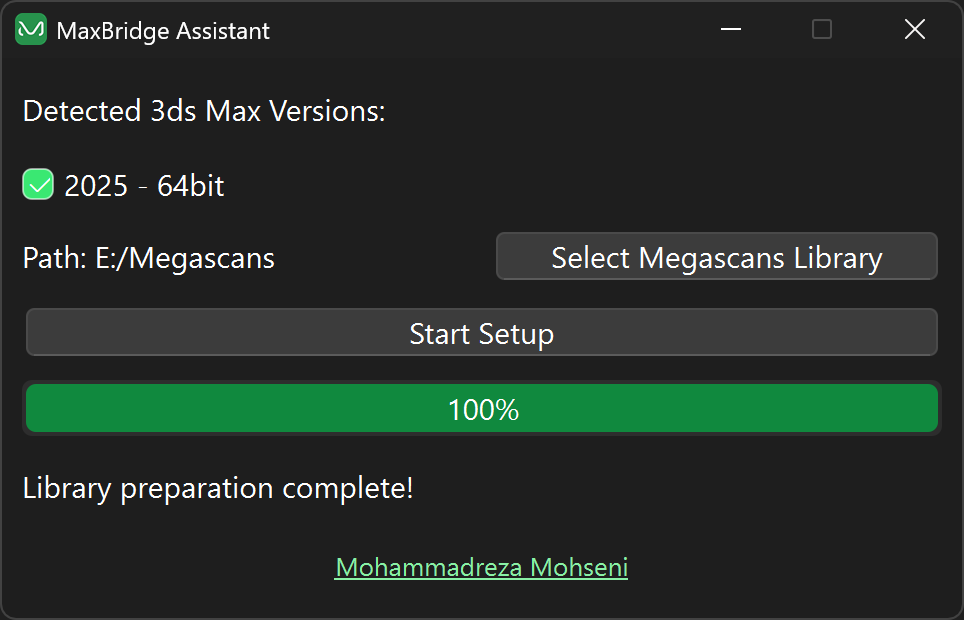
- MaxBridge Assistant App (Highly recommended, fast, and completely automated)[cite: 2].
- Manual Process (Slightly more involved file dropping)[cite: 2].
-
Completely close Quixel Bridge and 3ds Max[cite: 2].
-
Download the compiled production binary from the Releases section:
👉 DOWNLOAD LATEST PRODUCTION VERSIONNote on Operating Systems: From v2.0 onward, the assistant clears hidden system-restricted directory folder locks natively. Windows 11 (24H2+) sometimes tags
%localappdata%paths with administrative flags that block standard 3ds Max scripts from accessing plugin profiles[cite: 2]. This application safely corrects that. -
Run the portable app (no installation required)[cite: 2].
-
Check the specific 3ds Max versions you intend to use with Quixel Bridge[cite: 2].
-
Click "Select Megascans Library" and point it to your storage path[cite: 2] (must match your exact path setting inside Quixel Bridge)[cite: 2].
-
Click "Start Setup"[cite: 2].
-
Reopen your software and resume creating[cite: 2]!
-
Close Quixel Bridge and 3ds Max[cite: 2].
-
Navigate to your global Megascans Library folder location, then jump to:
<Megascans Folder Library>\support\pluginsExample: If your path is D:\Megascans, open D:\Megascans\support\plugins[cite: 2]
-
Delete or rename the
"plugin_versions_12.json"file.- Replace it with the version from this repository:
modified > plugin_versions_12.json -
Delete or rename the
"max"folder (if it exists). -
Open
Quixel Bridgethen go to"Edit" > "Manage Plugins"menu and download the official plugin.- This step will reinstall the plugin and create the necessary connector script, even for 3ds Max 2025+.
-
Replace the following folder on your system:
<Megascans Library Folder>\support\plugins\max\5.6\MSLiveLink\
with the modified version in this repository.
file you need to download is inside the zip file
modified > max > 56.zip
then extract the file and replace the folder
files
loggingLogging.pyandMS_API.pymodified and alsoRequestLibraryfolder has been deleted since it use obsolete version of the library which is not working with python 3.13 that 3ds Max 2027 uses.
- Reopen
"Quixel Bridge"and"3ds Max"and continue your workflow as usual.
This project is licensed under the MIT License. Feel free to use, modify, and distribute.
I hope this project helps you restore functionality between Quixel Bridge and newer 3ds Max versions. If you encounter any issues or have suggestions, feel free to contact me.