English · 简体中文

Give AI coding agents a workflow that survives the chat.
Keep requirements, designs, tasks, changes, and acceptance evidence local, traceable, and recoverable.





Demo · Install · Why SpecStamp · Workflow · Documentation · Community
SpecStamp is a Python CLI that brings spec-driven development to Codex, Claude Code, and other AI coding agents. It combines an AI agent workflow, requirements management, task planning, change control, and acceptance evidence in structured project files, so development does not depend on one conversation or one agent.
One product, different entry points: SpecStamp is the product. In a terminal, run
specstamp .... In Codex, invoke the bundled$sdlc-*skills, such as$sdlc-initand$sdlc-next. In Claude Code, use/sdlc-*. Thesdlc-*skill names andcodex-sdlcCLI entry point are retained for compatibility; they are part of SpecStamp, not a separate product.
Status: Beta. SpecStamp supports Python 3.10–3.13 on macOS, Linux, and other POSIX systems. Windows is not currently supported.
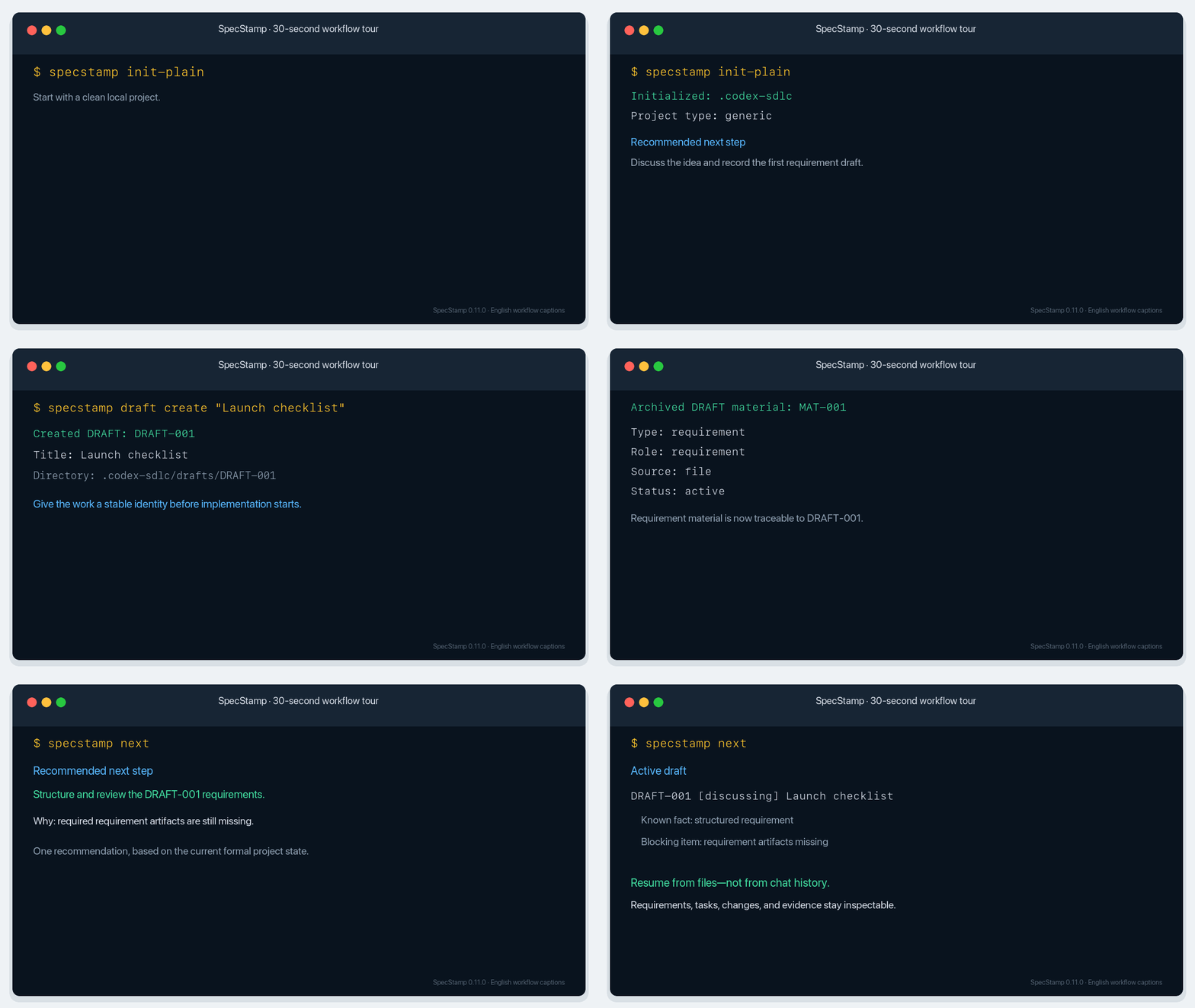
The 30-second tour initializes a clean project, preserves the original requirement material, and returns one state-aware next step instead of asking you to reconstruct context in a new chat. Its concise English captions represent the same verified 0.11.0 workflow without changing CLI behavior.
Install SpecStamp from PyPI in a Python 3.10+ virtual environment, then initialize a disposable project:
python3 -m venv .venv
source .venv/bin/activate
python -m pip install specstamp
mkdir specstamp-demo && cd specstamp-demo
specstamp init-plain
specstamp next
This trial stays inside .venv and specstamp-demo; it does not write to global Agent directories. specstamp next reads the current formal state and recommends the next workflow step.
Ready to use it with an Agent? Follow the 10-minute Quick Start to synchronize skills for Codex, Claude Code, or shared Agent directories.
| Common problem | Chat-only workflow | With SpecStamp |
|---|---|---|
| A model or session changes | Context must be explained again | Resume from formal project state |
| Requirements change midway | Design, tasks, and acceptance drift apart | Apply an explicit, versioned change |
| An agent says a task is done | The claim is difficult to verify | Record commands, exit codes, files, and hashes |
| Source material is scattered | Requirements, code, and tests lose their links | Preserve references from source material to acceptance |
- Local first: project data lives in
.codex-sdlc/; no cloud account or automatic upload is required. - Cross-agent: synchronize one versioned skill set to Codex, Claude Code, and shared Agent directories.
- Traceable: keep source material, decisions, designs, tasks, and changes under stable identifiers with SHA-256 evidence.
- Evidence-based completion: require real commands, integer exit codes, source files, hashes, and acceptance results before completion.
- Recoverable: continue after a new session, branch switch, pause, or restored backup without reconstructing the project from chat history.
- Developers and small teams using Codex, Claude Code, or other coding agents.
- Projects adopting spec-driven development, requirements management, or auditable delivery.
- Long-running work that needs requirements, design, tasks, tests, and acceptance to remain connected.
SpecStamp is not a cloud collaboration platform and does not provide real-time multi-user editing.
idea → source material → reviewed requirements → integrated design → formal version
→ task plan → implementation and evidence → acceptance → explicit changes
| Stage | Terminal examples | Result |
|---|---|---|
| Initialize and orient | specstamp init, specstamp status, specstamp next |
Establish project state and identify the next step |
| Requirements | specstamp material, specstamp discuss, specstamp capture |
Preserve source material, structured requirements, and decisions |
| Design and formalize | specstamp design, specstamp draft, specstamp start --file |
Create a reviewed requirement and design version |
| Plan and execute | specstamp tasks, specstamp plan, specstamp task |
Define task scope, dependencies, tests, and acceptance |
| Verify and finish | specstamp task-evidence, specstamp task-done, specstamp regression |
Complete work with reproducible evidence |
| Change and recover | specstamp change-plan, specstamp backup, specstamp restore |
Handle change explicitly and resume interrupted work |
specstamp agent-sync --dry-run   # preview without writing
specstamp agent-sync --confirm   # synchronize managed entries
specstamp agent-sync --check     # verify the result without writing
After synchronization, use the entry point for the client you are currently in:
In Codex
$sdlc-init
$sdlc-next
In Claude Code
/sdlc-init
/sdlc-next
The terminal commands, Codex skills, and Claude Code commands all drive the same SpecStamp workflow. Shared Agent directories receive the same managed skill source.
Files are more durable than chat history. Reproducible evidence is more reliable than an agent's claim. Explicit changes are safer than silent drift. Agents may change; project facts should not.
Read Philosophy and Inspiration for the full rationale and project boundaries.
- Ask usage questions and share workflows in GitHub Discussions.
- Report reproducible problems through GitHub Issues.
- Read the contribution guide before opening a pull request.
- Report security-sensitive issues through private vulnerability reporting.
If SpecStamp improves your AI coding workflow, consider starring the repository and sharing what you built with it.
SpecStamp is licensed under Apache-2.0. See the changelog for release history.