We believe that small efforts everyday can accumulate to yield life-changing results. Armed with this core belief, our team created Daily Dash to empower users across all walks of life to achieve their goals — whether its to become skilled at public speaking or to adopt a healthier diet.
Featuring a fun, games-like points and awards system, push notifications, and a database of common goals from which users can draw inspiration, Daily Dash encourages, excites, and engages users every step of the way.
Dynamically-rendered forms, the ability to complete any task in less than 5 taps, and the perfect shade of aqua green (#46BFAC!), meticulously selected, all lend to a user-interface that's intuitive, inviting, and most importantly, inclusive.
With the game-like motivators appealing to younger audiences, the uncomplicated user-interface geared towards older users, and the flexible forms and push notifications attracting busy, highly self-motivated users, Daily Dash suits any and all lifestyles. Even more, users can choose either 12-hour time or 24-hour time mode!
Never again will New Year's Resolutions be left unfulfilled!
After logging in, users are greeted with their dashboard, which lists all the sub-goals users need to complete for that day. At the time listed, users will receive a real-time push notification regarding their goal. As users check off completed goals, their number of goals completed increase and reflects on the profile screen. As users complete goals, they accumulate awards and level-up. Below the user's name on the profile screen is their latest award earned! On the profile screen, users can also select their preferred time mode - 12 hour time or 24 hour time.
Profile Screen Home Screen All Goals Screen


From the goals screen shown above, users can add a new goal, browse the catalog of common goals, and press on a goal to view its subgoals. The catalog of common goals lists common goals from which users can draw inspiration. Users can easily add a common goal to their personal repertoire by selecting a common goal and pressing "Add Goal".
Add Goal Screen Catalog of Common Goals Common Goal Detail Screen


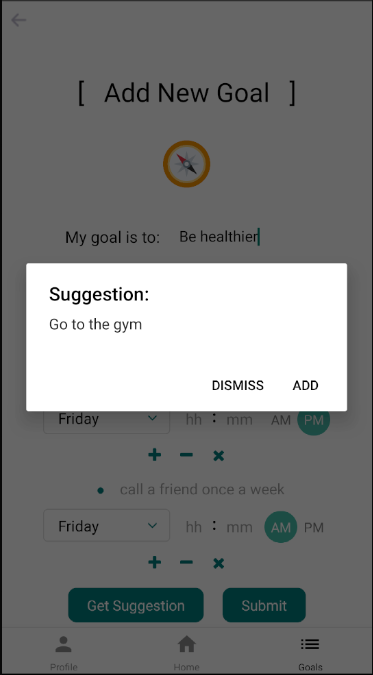
From the goals screen, users can also press on a goal to see its details. From the goal detail screen, users can edit or delete the selected goal. Both the edit and add goal pages also have a "Get Suggestion" button, which, when pressed, offers users a sub-goal suggestion, generated using a complex cosine-similarity algorithm in the backend.
Goal Detail Screen Delete Goal Edit Goal Screen Get Suggestion


From the profile screen shown in the first row, users can access their awards and log out. Logging out will redirect users to the welcome screen and sign in screen where users can sign in using Google Authentication.
Awards Screen Welcome Screen Sign In Screen


Some Encouraging Messages ...


Demo
Games-like points and awards system: https://youtu.be/iuNTMkbetOY
Daily Dash demo: https://youtu.be/8UGDtaAyM-g
- MongoDB
- NodeJS
- ExpressJS
- Docker
- Google Firebase
- AWS EC2 Instance
- React Native
- Ignite CLI
- TypeScript
- Android
- Mobx State Tree
Users can …
- Add and edit goals and their associated sub-goals.
- View and select from a database of common goals and their associated sub-goals.
- Sign-in to save their progress using Google Authentication.
- Receive real-time push notifications reminding them to do their daily tasks.
- Accumulate awards, and level-up upon the completion of sub-goals
- Receive suggestions for how to achieve their goals via non-trivial backend logic.
Non-Functional Requirements:
- Database queries and updates should take less than 2 seconds.
- Backend endpoints should be secure if they contain user information.
- Jest
- Detox UI Testing
- Codacy
- Travis CI