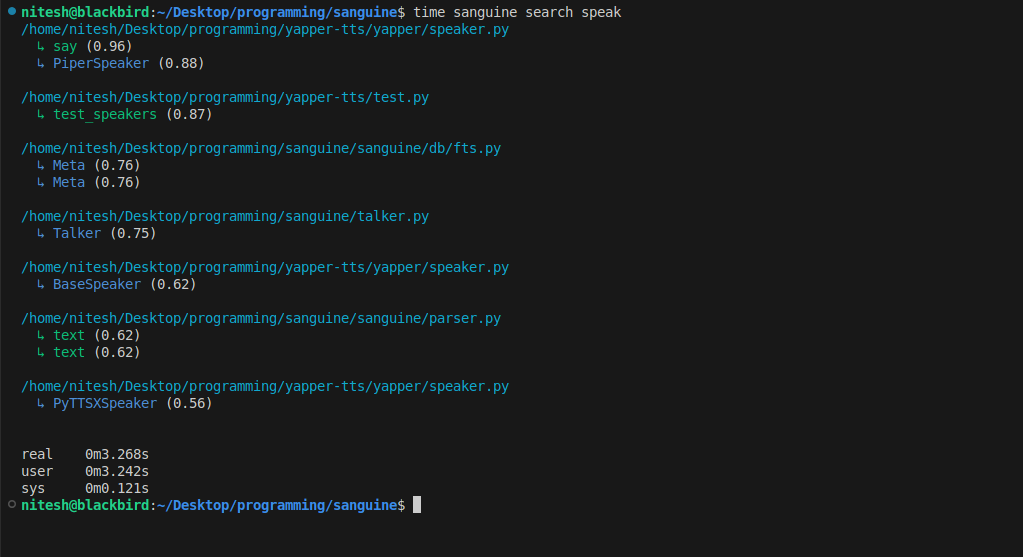
You know when you have to write code that you vaguely remember having written somewhere before? It's annoying to have to look into dozens of files to find a function, I have gone through it, that's why I made this contraption.
Sanguine is a CLI tool that automatically indexes declarations from your code repositories and lets you search for them later. It integrates seamlessly with Git to automatically index code changes on every commit.
- 🚀 Automatic Indexing: Integrates with Git post-commit hooks to automatically index code changes
- 🔍 Smart Search: Find functions and classes using natural language queries (synonyms, short descriptions)
- 🌐 Cross-Repository Search: Search across all your indexed codebases at once, or narrow to specific repositories
- 📊 Multi-Language Support: Works with ~all popular programming languages
- 🎨 Interactive Mode: Provides an interactive search interface for exploratory code navigation
- 🔧 Flexible Filtering: Search by name, path, or entity type (function/class)
- ⚡ Fast Performance: Quick search results even in large codebases
Install Sanguine using pip:
pip install sanguineOr if you have a CUDA-capable GPU:
pip install sanguine[gpu]Or install from source:
git clone https://github.com/n1teshy/sanguine.git
cd sanguine
pip install .Navigate to your Git repository and install the post-commit hook:
cd /path/to/your/repo
sanguine install
This will automatically index your code after every commit.
Index all files in your current repository:
sanguine index --all-filesOr index a specific file:
sanguine index --file path/to/file.pySimple search:
sanguine search "user authentication"Interactive search mode, use this when multiple search calls are needed:
sanguine search --interactiveInstall the post-commit Git hook for automatic indexing.
sanguine installRemove the post-commit Git hook.
sanguine uninstallIndex code from commits, files, or entire repository.
Index last commit (default):
sanguine indexIndex specific commit:
sanguine index --commit-id abc123Index specific file:
sanguine index --file src/main.pyIndex all files (respects .gitignore):
sanguine index --all-filesList indexed repositories with the number of entities extracted from them:
sanguine lsSearch indexed code entities (functions and classes).
Basic search:
sanguine search "query"Search with options:
# Limit results
sanguine search "database" --count 20

# Filter by path
sanguine search "handler" --path src/api

# Filter by type (function or class)
sanguine search "user" --type function

# Combine filters
sanguine search "model" --path src/models --type class --count 15
Interactive mode:
sanguine search --interactive
# In the REPL:
>> query --count 10
>> another query --path src
>> :q # to quitDelete indexed entities based on filters.
Delete by name:
sanguine delete --name "test_"Delete by path:
sanguine delete --path src/deprecatedDelete with type filter:
sanguine delete --name "old" --type functionForce delete without confirmation:
sanguine delete --name "temp" --yesRefresh the HNSW vector index. Use this when you see warnings about stale entries.
sanguine refreshUse your GPU to acclerate embedding model inference (faster index/search/delete/refresh). --cuda flag works for every command other other than install, uninstall.
sanguine index --all-files --cuda
sanguine search "setup" --cudaSanguine automatically indexes your code as you work:
- Automatic Indexing: After installing the Git hook, Sanguine indexes changes every time you commit
- Manual Indexing: You can also manually index specific files, commits, or your entire codebase
- Smart Search: Search uses both text matching and semantic understanding to find relevant functions and classes
- Fast Results: Results are ranked by relevance and returned instantly
Sanguine supports multiple programming languages:
- Python
- JavaScript / TypeScript
- Java
- C / C++
- Go
- Rust
- Ruby
- PHP
- And more...
Sanguine stores its index data in platform-specific directories:
- Linux/Mac:
~/.local/share/sanguine/ - Windows:
%LOCALAPPDATA%\sanguine\
Important: All indexed code from all repositories is stored in a single database. This means you can search across all your projects at once! Use the --path flag to narrow searches to a specific repository when needed.
The index is stored locally on your machine and is separate for each user. No data is sent to external servers.
Sanguine will warn you if the index needs refreshing. When you see warnings about stale entries (>30% stale), run:
sanguine refreshThis rebuilds the index and improves search quality.
For large codebases:
- Initial indexing with
--all-filesmay take a few minutes - After that, automatic indexing on commits is fast
- Use path filters (
--path) to narrow search scope when searching - Use type filters (
--type) to search only functions or only classes
# Initial setup in a new project
cd my-project
sanguine install
# index all files (if repo has files from previous commits)
sanguine index --all-files

# Set up other projects too
cd ../another-project
sanguine install
# index all files (if repo has files from previous commits)
sanguine index --all-files

# Automatic indexing on commits
git commit -m "Add new feature"
# Sanguine automatically indexes changes

# Search across ALL your indexed projects
sanguine search "authentication" --type function

# Search within a specific project only
sanguine search "authentication" --path /path/to/my-project

# Interactive exploration across all projects
sanguine search -i
>> user management
>> "login handler" --path my-project
>> :q

# Clean up old code references
sanguine delete --path old-code

# Maintain index health
sanguine refresh- Python 3.7 or higher
- Git (for automatic indexing features)
Make sure you're in a Git repository directory when running sanguine install or sanguine index (without flags).
- Make sure you've indexed your code first with
sanguine index --all-files - Check if the files you're looking for are in a supported language
- Try broader search terms
- Verify the hook is installed:
ls .git/hooks/post-commit - Try reinstalling:
sanguine uninstallthensanguine install - Make sure Python is accessible from your Git environment
- Report Issues: https://github.com/n1teshy/sanguine/issues
- Questions: Open a GitHub issue
Keep your codebase searchable. Keep it D.R.Y with Sanguine.