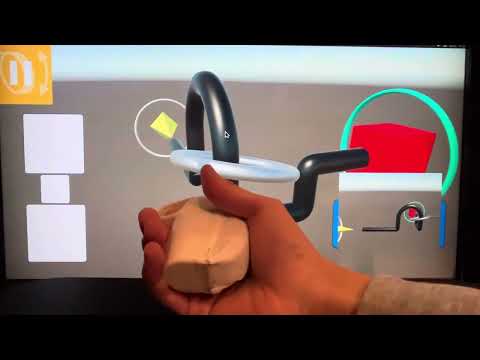
2024/12/27に桃山大学テック部主催で開催されたハッカソンに出展した作品 Gricon のコントローラー側プログラムです(2024/12/28 時点)。
このArduinoプログラムは、IMU(姿勢センサ)、曲げセンサ、モーターを統合し、姿勢推定・屈曲検出・振動出力を通じて新しい入力体験を提供します。
公式サイト:https://gricon.netlify.app/

-
🎮 ゲーム側のプログラム(Unity)
https://github.com/kdix-23-240/NewControllerProject-MomoyamaHack -
📄 作品に関する情報・ソースコードの解説・開発の流れの説明(Notion)
https://flossy-band-678.notion.site/Gricon-Arduino-Unity-16a9ff2ca96c8032b9a5cc3768512383?pvs=4
- 9軸IMUセンサ(LSM9DS1) によるピッチ・ロール・ヨーの推定
- Madgwickフィルタ による高精度な姿勢推定
- 曲げセンサ を使ったアナログ入力処理と平滑化
- 加速度のグローバル変換・振動検出 によるリアクティブ入力対応
- 振動モーター出力 を通じたハプティクスフィードバック
- シリアル通信 による外部機器(ゲーム)との双方向連携
- Arduino Nano 33 BLE Sense または LSM9DS1 搭載の互換ボード
- 曲げセンサ(アナログ入力:A7)
- 振動モーター(デジタル出力:D9)
- 外部通信:Serial1(9600bps)
以下は、本デバイスの回路図です(Arduino Nano 33 BLE + 曲げセンサ + モータ + Bluetooth構成):

コントローラは以下のフォーマットでバイナリ形式のデータを送信します。
[S][pitch (2 bytes)][roll (2 bytes)][yaw (2 bytes)][bend (1 byte)]
S: データ開始を示すヘッダ(1バイト)pitch,roll,yaw: 姿勢角(各2バイト、0.1°単位)bend: 曲げセンサ値(0〜20の範囲にクランプ)
シリアル経由で以下の1文字コマンドを送ることで、モーターの振動出力パターンを変更可能:
| コマンド | 周波数 (Hz相当) | デューティ比 | 内容 |
|---|---|---|---|
'1' |
約25Hz | 40% | 弱い振動 |
'2' |
約50Hz | 20% | 中程度の振動 |
'3' |
約100Hz | 12.5% | 強い振動 |
'4' |
約125Hz | 90% | 連続振動 |
| その他 | - | 0% | モーター停止 |
プログラム開始時に自動実行され、地磁気・ジャイロのオフセットや曲げセンサの初期値を取得・補正します。
- 処理周期:1msごとのループ実行(約100Hz)
- 各種センサ値に対してフィルタ係数を用いた平滑化処理あり
- 姿勢角の推定には Madgwick フィルタを使用
void setup() {
  Serial.begin(9600);       // デバッグ用
  Serial1.begin(9600);      // 外部機器との通信
  pinMode(motorPin, OUTPUT);
  initializeIMU();
  delay(100);
}| ライブラリ名 | 説明 | インストール方法 |
|---|---|---|
| Arduino_LSM9DS1 | IMU(加速度・ジャイロ・地磁気)センサ用 | Arduino IDE → ライブラリマネージャから検索して導入 |
| MadgwickAHRS | 姿勢推定アルゴリズム | Arduino IDE → ライブラリマネージャから検索して導入 |
このプロジェクトは MIT License のもとで公開されています。
This repository contains the controller-side program for Gricon, a project exhibited at a hackathon hosted by the Momoyama University Tech Club on December 27, 2024 (status as of December 28, 2024).
This Arduino program integrates an IMU (inertial measurement unit), a flex sensor, and a vibration motor to provide a new input experience through orientation estimation, bend detection, and haptic feedback.
Official site: https://gricon.netlify.app/
-
🎮 Game-side program (Unity)
https://github.com/kdix-23-240/NewControllerProject-MomoyamaHack -
📄 Project details / source code explanation / development process (Notion)
https://flossy-band-678.notion.site/Gricon-Arduino-Unity-16a9ff2ca96c8032b9a5cc3768512383?pvs=4
- 9-axis IMU (LSM9DS1) for estimating pitch / roll / yaw
- High-accuracy orientation estimation using the Madgwick filter
- Analog flex sensor processing with smoothing
- Global-frame acceleration conversion & vibration detection for reactive input
- Haptic feedback via vibration motor output
- Bidirectional communication with external devices (e.g., a game) via serial
- Arduino Nano 33 BLE Sense or a compatible board with LSM9DS1
- Flex sensor (analog input: A7)
- Vibration motor (digital output: D9)
- External communication: Serial1 (9600 bps)
Below is the circuit diagram for this device (Arduino Nano 33 BLE + flex sensor + motor + Bluetooth configuration):
The controller sends data in the following binary format:
[S][pitch (2 bytes)][roll (2 bytes)][yaw (2 bytes)][bend (1 byte)]
S: 1-byte header indicating the start of a packetpitch,roll,yaw: Euler angles (2 bytes each, in 0.1° units)bend: flex sensor value (clamped to 0–20)
You can change the vibration output pattern by sending a single-character command over serial:
| Command | Frequency (approx.) | Duty Cycle | Description |
|---|---|---|---|
'1' |
~25 Hz | 40% | Weak vibration |
'2' |
~50 Hz | 20% | Medium vibration |
'3' |
~100 Hz | 12.5% | Strong vibration |
'4' |
~125 Hz | 90% | Continuous vibration |
| Other | – | 0% | Motor off |
Calibration runs automatically at startup to obtain and compensate:
- Magnetometer / gyroscope offsets
- Initial baseline for the flex sensor
- Loop cycle: executed every 1 ms (≈ 100 Hz)
- Sensor values are smoothed using filter coefficients
- Orientation estimation uses the Madgwick filter
void setup() {
  Serial.begin(9600);       // For debugging
  Serial1.begin(9600);      // Communication with external device
  pinMode(motorPin, OUTPUT);
  initializeIMU();
  delay(100);
}
📚 Libraries Used Library Description Installation Method Arduino_LSM9DS1 IMU (accel / gyro / magnetometer) library Arduino IDE → Library Manager → search & install MadgwickAHRS AHRS orientation estimation algorithm Arduino IDE → Library Manager → search & install 📝 License
This project is released under the MIT License: https://opensource.org/licenses/MIT