






sharpconsoleui — documentation, controls and showcase
Get started · Controls · Showcase
A Terminal Application Framework for .NET — the terminal, as an application surface.
Build complete applications with overlapping windows, a real compositor, and reactive
component UI, rendered efficiently to any modern terminal. (The runtime ships as the
SharpConsoleUI NuGet package.)
A single UI thread owns rendering and input; work that must not block it goes on a per-window background task, with built-in marshalling back to the UI thread. A DOM-based layout engine measures, arranges, and paints a tree of controls, including responsive panes and flexible grids with fixed, auto-sized, and proportional tracks, spans, and splitters. The compositor merges per-window buffers with per-cell alpha blending, so overlapping windows, animated backgrounds, and tween/easing animations all composite cleanly. A portal system for dropdowns, overlays, and toast notifications. 30+ controls (including an embedded PTY terminal that runs a real shell, a video player, data tables, tree views, and markdown), a plugin architecture, and NativeAOT-ready.

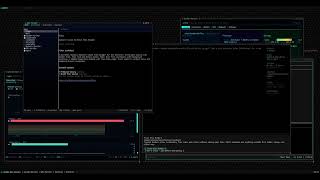 cxshell — a desktop in the terminal Start menu, taskbar, app manager, and other TUI apps running live inside its windows. |
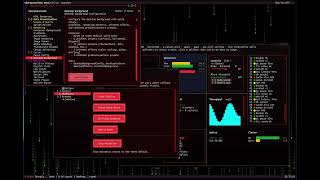 DemoApp showcase Windows, controls, markup, compositor effects and dialogs. |
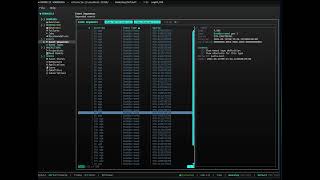 Cratis Chronicle Workbench A third-party product built on SharpConsoleUI. |
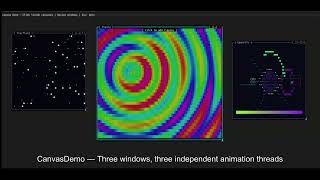 Examples in action A walkthrough of the example projects. |
SharpConsoleUI gives each window its own CharacterBuffer. A compositor merges
them — with occlusion culling, per-cell Porter-Duff alpha blending, and a
Measure→Arrange→Paint layout pipeline. A single UI thread owns rendering and
input; work that must not block it goes on a per-window background task.
Gradient backgrounds propagate through every transparent control automatically.
Because rendering goes through a diff-based cell buffer rather than writing directly to stdout, the output is equally clean over a local terminal or an SSH connection — latency and flicker are determined by what actually changed, not by a full-screen repaint.
This architecture makes things possible that other .NET terminal libraries don't do: transparent windows that blend with whatever is under them, animated desktop backgrounds, and compositor hooks for blur, fade, and custom effects. It is also what the exotic controls are built on: a canvas with a half-block pixel surface you draw into in memory, an HTML control that renders real web pages with images, video playback with Kitty graphics and cell-based fallbacks, and a terminal control with a real shell running inside it.
Everything it draws ends at a console driver: the layer that turns
cells into bytes and terminal bytes back into keys and mouse events. One drives a real
terminal; one drives nothing at all. That second one is not a stub — HeadlessConsoleDriver
runs the full system with no terminal and no pty, which is what makes an app
scriptable in CI, and what lets WebHost run the demo
unmodified in a browser: every frame rendered to PNG, every click and keystroke coming back
as real input. The interface is public, so a third driver is yours to write.
A running application can also be inspected and driven from outside, over a local
socket: read the screen as text or as a PNG, read what the layout engine believes, ask why a
control is the size it is, then send real keys and clicks. cxdbg
is the debugger that speaks it — dotnet tool install -g cxdbg — and the wire protocol
underneath it is documented in Debugging, so a script or an agent can
talk to an app directly.
It's also NativeAOT-compatible — the full control set runs as a self-contained native binary, verified on every push by a publish-and-run CI gate.
| Capability | Built on | More |
|---|---|---|
| Overlapping windows with drag, resize, minimize, maximize | Per-window buffers merged by a compositor | Windows |
| Transparent windows and translucent controls | Per-cell alpha blending between window buffers | Alpha Blending |
| Blur, fade and custom post-processing | PreBufferPaint / PostBufferPaint hooks |
Compositor Effects |
| Hidden regions cost nothing to render | Occlusion culling in the compositor | Rendering Pipeline |
| Dropdowns and overlays that escape their window | Portal system | Portals |
| A per-window background task | A UI thread model with marshalling | Threading & Async |
| A real shell running inside a control | PTY-backed terminal emulator | Examples |
| Video playback, not still frames | Kitty graphics with cell-based fallback | Video Playback |
| Animated desktop backgrounds | Gradient and pattern compositing | Desktop Background |
| Themes, controls, windows and services as plugins | Plugin architecture | Plugins |
| The composed desktop is a buffer, not a stream of escapes | ConsoleBuffer sits between the compositor and the device, so the app never writes to a terminal directly |
Rendering Pipeline |
| Anything that accepts cells can be the display | IConsoleDriver — a terminal, a headless buffer, or a browser canvas |
Drivers · WebHost |
| The same app with no terminal at all | Headless driver + a hosted or background loop | Drivers |
| Inspect and drive a running app from outside | Diagnostics socket — text, PNG, layout tree, real input | Debugging |
| Export a window, a region or the desktop | ICellSurface → PNG, TGA, JPEG, ANSI or markup |
Screen Export |
What makes this work is where the blending happens: between per-window buffers, during compositing, rather than inside a single shared one. That is what overlapping translucent windows and compositor effects are built on, and it is the reason they cost nothing until a cell actually changes. Why SharpConsoleUI explains the architecture, and is candid about what the framework is not.
| Platform | Minimum version |
|---|---|
| .NET | 8.0 or later |
| Windows | Windows 10 (1511+) / Server 2016+ |
| Linux | Any modern distribution with a terminal supporting 24-bit color |
| macOS | macOS 10.15+ |
dotnet add package SharpConsoleUIusing SharpConsoleUI;
using SharpConsoleUI.Builders;
using SharpConsoleUI.Drivers;
using SharpConsoleUI.Panel;
var windowSystem = new ConsoleWindowSystem(
new NetConsoleDriver(RenderMode.Buffer),
options: new ConsoleWindowSystemOptions(
BottomPanelConfig: panel => panel
.Left(Elements.StartMenu())
.Center(Elements.TaskBar())
.Right(Elements.Clock())
));
var window = new WindowBuilder(windowSystem)
.WithTitle("Hello")
.WithSize(60, 20)
.Centered()
.WithBackgroundGradient(
ColorGradient.FromColors(new Color(0, 20, 60), new Color(0, 5, 20)),
GradientDirection.Vertical)
.Build();
window.AddControl(Controls.Markup()
.AddLine("[bold cyan]Real compositor. Full alpha blending.[/]")
.AddLine("[#FF000080]This text has 50% alpha — composited over the gradient.[/]")
.Build());
windowSystem.AddWindow(window);
windowSystem.Run();Work that must not block the UI thread goes on a per-window background task:
var clockWindow = new WindowBuilder(windowSystem)
    .WithTitle("Digital Clock")
    .WithSize(40, 12)
    .WithAsyncWindowThread(async (window, ct) =>
    {
        while (!ct.IsCancellationRequested)
        {
            var time = window.FindControl<MarkupControl>("time");
            time?.SetContent(new List<string> { $"[bold cyan]{DateTime.Now:HH:mm:ss}[/]" });
            await Task.Delay(1000, ct);
        }
    })
.Build();dotnet new install SharpConsoleUI.Templates
dotnet new tui-app -n MyApp # Starter app with list, button, notification
dotnet new tui-dashboard -n MyDash # Fullscreen dashboard with tabs and live metrics
dotnet new tui-multiwindow -n MyApp # Two windows with master-detail pattern
cd MyApp && dotnet runPackage your app so end users can double-click to launch — no terminal knowledge required.
dotnet tool install -g SharpConsoleUI.Host
schost init        # Initialize terminal config
schost run         # Launch in a configured terminal window
schost pack --installer  # Package as portable zip + optional installer
See the schost guide for details.

Give it a goal in plain language: it reads your files, works out what to change, and changes them — with permission-gated file, shell and HTTP tools, sub-agent reports, and a live session panel. Bring your own model (Ollama, any OpenAI-compatible endpoint, or Anthropic). github.com/nickprotop/cxagent

Start menu, taskbar, system tray, movable windows and an app store, with built-in apps for files, settings and a terminal. Other TUI apps run inside its windows — above, LazyDotIDE, cxtop and cxgpu are each hosted live in their own window. Made for SSH: a real desktop on a remote machine without a single pixel of X11. github.com/nickprotop/cxshell
Read and edit a running Caddy server through its admin API: routes, handler chains, TLS certificates, upstream health and a visual routing map. Every change is atomic and snapshotted first, so nothing is one-way. github.com/nickprotop/lazycaddy

Multi-account IMAP/SMTP, conversation threading, HTML rendering, attachments, offline cache. github.com/nickprotop/cxpost

htop/btop-inspired. Hardware identity dashboard, sparkline graphs, process management. Cross-platform. github.com/nickprotop/cxtop

Live download/upload Braille waveforms, session peaks and daily totals, per-interface pickers, a speed-reactive border — over an alpha-blended, animated desktop background. Cross-platform. github.com/nickprotop/cxnet

NVIDIA and AMD side by side. Live gauges with Braille sparkline history, a multi-GPU fleet dashboard, a process tree with signal actions, throttle detection, and Prometheus metrics. github.com/nickprotop/cxgpu

LSP-powered IntelliSense, built-in PTY terminal, git integration. Works over SSH and in containers. github.com/nickprotop/lazydotide

14 monitoring widgets. Real-time CPU, memory, disk, network, Docker, systemd. github.com/nickprotop/ServerHub

Explorer-style three-pane layout with folder tree, file list, and detail panel. Tabs, image preview with Kitty graphics protocol, properties dialog, trash support. github.com/nickprotop/cxfiles

lazygit-inspired. Browse, update, install, search NuGet.org. Cross-platform. github.com/nickprotop/lazynuget
Interactive TUI dashboard for the Chronicle event-sourcing platform. Live-updating views for observers, jobs, projections, event types, failed partitions, and more. Invoked via cratis chronicle workbench.
github.com/Cratis/cli
Interactive CLI for managing skills across AI coding tools (Codex, Claude Code, GitHub Copilot, Gemini). By ManagedCode. github.com/managedcode/dotnet-skills
Cross-platform TUI client for MUSH/MUCK/MUD worlds: telnet negotiation, ANSI/MXP/Pueblo parsing, Lua scripting, and inline Kitty-protocol graphics. Split panes, tabs and resizable windows on SharpConsoleUI; renders its own documentation screenshots through the HeadlessConsoleDriver. By SharpMUSH.
github.com/SharpMUSH/SharpMUTerm
Cross-platform database client bringing a Navicat-like management workflow to the terminal. A heavy user of the data-grid surface: ITableDataSource virtualization, modal dialogs, portals, and the result-grid filter. By dameng324.
github.com/dameng324/CxSql
Assembler for 6502 based systems with an interactive monitor: a file tree, a tabbed source editor with its own 6502 syntax highlighter and a listing gutter, and a RAM pane fed by emulator write watchpoints rather than polling. Drives Mesen2 and MesenCE over a Lua bridge. By CodewinBzn. github.com/CodewinBzn/WinASM65
Keyboard-driven .NET 10 console for taking HuggingFace models onto a Qualcomm Snapdragon X2 Elite NPU via the geniex runtime — find, convert, pull, chat, serve, and benchmark. Self-contained win-arm64/x64 releases, built on compositor windows, dialogs, toasts, and markup. By Forrest Technologies.
github.com/Forrest-Technologies/geniex-qairt-tools
30+ built-in controls including:
Input: Button, Checkbox, Prompt, MultilineEdit (syntax highlighting, ~64 languages), Slider, RangeSlider, DatePicker, TimePicker, Dropdown, Menu, Toolbar
Display: MarkupControl (Spectre-compatible markup everywhere), FigleControl, LogViewer, SpectreRenderableControl, Chart, LineGraph, SparklineControl, BarGraph
Layout: NavigationView (WinUI-inspired, responsive), TabControl, HorizontalGrid, ScrollablePanel, ScrollbarControl (standalone, can drive multiple views), SplitterControl, StatusBarControl
Drawing: CanvasControl (30+ cell primitives, plus PixelSurface for half-block pixel art at double vertical resolution), ImageControl (Kitty graphics protocol + half-block fallback),
VideoControl (FFmpeg — Kitty graphics + half-block/ASCII/braille fallbacks), TerminalControl (PTY, Linux)
Images decode as PNG, JPEG, BMP, GIF and TGA, identified by content rather than by file extension. TIFF is not decodable at all: images often arrive from somewhere the application does not control, and TIFF decoders have carried two heap out-of-bounds writes and a header that never terminates, so no TIFF decoder is linked into the library.
Selection: ListControl, TableControl (virtual data, 10k+ rows, sort, filter, inline edit), TreeTableControl (nested rows, tree-aware sort and filter), TreeControl
Full reference: nickprotop.github.io/ConsoleEx/docfx/_site/CONTROLS.html
| Get Started | Fluent builder API reference |
| Tutorials | Three step-by-step tutorials |
| Controls | All 30+ controls |
| Examples | 20+ runnable example projects |
| Alpha Blending | Transparent windows & TransparencyBrush |
| Rendering Pipeline | The layers a frame passes through: DOM layout, compositor, buffers, driver |
| Compositor Effects | PreBufferPaint / PostBufferPaint |
| Video Playback | VideoControl reference |
| Panel System | Taskbar, Start Menu, Clock |
| Desktop Background | Gradients, patterns, animations |
| Plugins | Extending the framework |
| State Services | All 11 built-in services |
| Notifications | Corner toasts (ToastService) + modal notifications |
| Dialogs | Standalone Confirm / Prompt / Progress dialogs + file and system dialogs |
| Composable Flows | Multi-step wizards + FlowContext over the dialog primitives |
| Debugging | Inspect and drive a running app over a socket — snapshot, PNG, layout tree, real input |
| Drivers & Render Modes | The driver, buffered rendering, and running headless |
| Screen Export | A window, a region or the desktop, as an image or text |
| Threading & Async | The UI thread model, async events, and the unresponsive watchdog |
| NativeAOT | AOT compatibility, the CI smoke gate, and the HtmlControl caveat |
| Clipboard, Copy & Paste | OSC 52 remote copy (works over SSH), bracketed paste, and configuration |
| Benchmarks | Headless BenchmarkDotNet regression suite + baseline (distinct from the live BenchmarkApp showcase) |
| Themes | Built-in and custom themes |
| Why SharpConsoleUI | What it is, what it is not |
| API Reference | Full API docs |
MIT — Nikolaos Protopapas, a .NET Foundation member.
SharpConsoleUI is an independent project.
Contributors
- @changlv — CJK and wide-character handling, theme derivation and control colour roles, markup and CollapsiblePanel behaviour
- @DerPeit — TreeTableControl and the extensible TableControl it stands on, scrolling, focus and panel fixes, a private security report
- @OzeroHAX — MarkupControl parse-cache lifetime: obsolete documents are released when content is replaced, which is what streaming Markdown does on every token
- @joezearing — mouse input decoding, column sizing, scrollbars
- @3x0dv5 — LogViewerControl auto-follow, no-colour terminal handling
- @HarryCordewener — TabControl header overflow: the active tab stays visible when the header row runs out of room
- @nanov — macOS ARM64 ioctl crash fix
Prior art and analysis
- Spectre.Console integration via SpectreRenderableControl
- Unix raw I/O approach inspired by Terminal.Gui v2
- The caret-tracking root-cause analysis — that
ControlContentBoundsis refreshed only by mouse events, so the text cursor froze once a window had seen one — came from the SharpMUTerm project
SharpConsoleUI was initially developed manually with core windowing functionality and double-buffered rendering. The project evolved to include modern features (DOM-based layout system, fluent builders, plugin architecture, theme system) with AI assistance. Architectural decisions and feature design came from the project author, while AI generated code implementations based on those decisions.