This is the Android skeleton project that I use when I start a new project. It built on Kotlin with ViewModel, DataBinding, Coroutines, Dagger 2, Room Persistence and Retrofit. I think this skeleton project can help you minimize your time for setup and build templating code. Start your app with this project!
StartApp uses MVVM architecture pattern with repositories. Base of MVVM is ViewModel, DataBinding and LiveData from Arch Components
Several reason why:
- decouples the application from the data sources
- provides data from multiple sources (DB, API) without clients being concerned about this
- isolates the data layer
- single place, centralized, consistent access to data
- testable business logic via Unit Tests
- easily add new sources
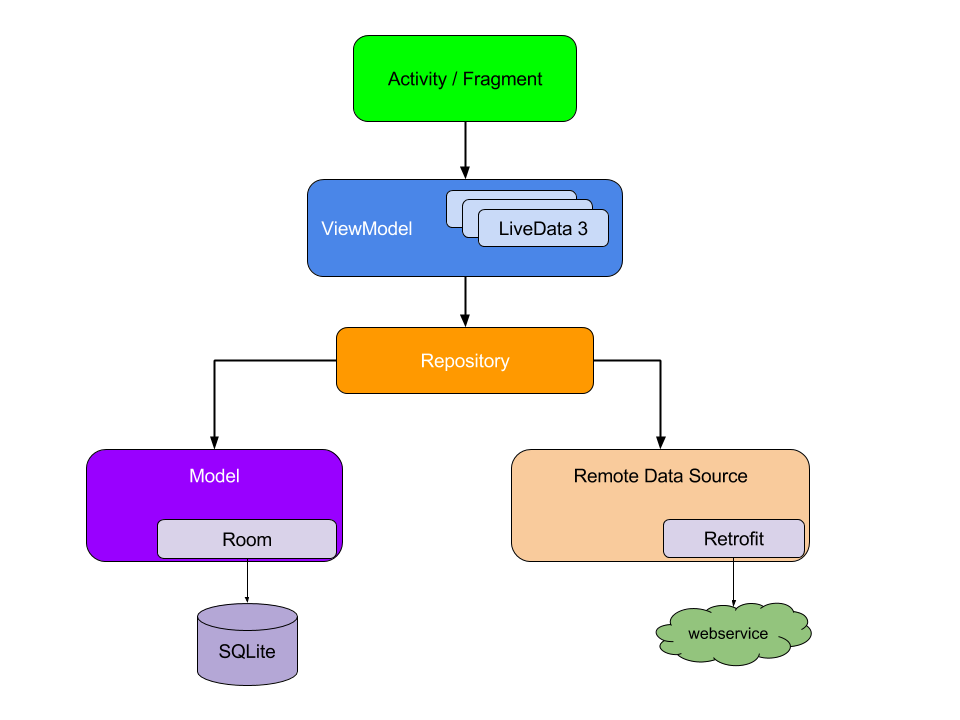
Room Persistence is layer over SQLite database, which do work with database more simply and intuitively
Initializing
@Database(entities = [Entity::class], version = 1, exportSchema = false)
abstract class AppDatabase : RoomDatabase() {

    abstract fun getEntityDao () : EntityDao

    companion object {
        var INSTANCE: AppDatabase? = null

        fun getAppDataBase(context: Context): AppDatabase? {
            if (INSTANCE == null){
                synchronized(AppDatabase::class){
                    INSTANCE = Room.databaseBuilder(context.applicationContext, AppDatabase::class.java, "app.db").build()
                }
            }
            return INSTANCE
        }

        fun destroyDataBase(){
            INSTANCE = null
        }
    }
}
Working with entity DAO
@Dao
interface EntityDao {

    @Query("SELECT * from Entity ORDER BY date DESC")
    fun getAll(): MutableList<Entity>?

    @Query("SELECT * from Entity where id = :id LIMIT 1")
    fun get(id : String): Entity?

    @Insert(onConflict = REPLACE)
    fun insertOrUpdate(entity: Entity) : Long

    @Insert(onConflict = REPLACE)
    fun insertAll(entities: List<Entity>?) : List<Long>

    @Query("DELETE from Entity")
    fun deleteAll()
}
Pull project for more information about Room Persistence
I use Retrofit for remote data source. Initializing and interface for getting data
interface NetworkService {

    @get:GET(".")
    val getEntities: Call<MutableList<Entity>>

    companion object Factory {

        private var authRetrofitService: NetworkService? = null

        fun getAuthRetrofitService(baseUrl: String): NetworkService? {
            if (authRetrofitService == null) {
                val client = initOkHttpClient()
                val converter = GsonBuilder()
                    .excludeFieldsWithoutExposeAnnotation()
                    .create()
                val retrofit = getRetrofit(client, converter, baseUrl)
                authRetrofitService = retrofit.create(NetworkService::class.java)
            }
            return authRetrofitService
        }

        private fun initOkHttpClient(): OkHttpClient {
            val interceptor = HttpLoggingInterceptor()
            interceptor.level = HttpLoggingInterceptor.Level.BODY
            val builder = getHttpBuilder(interceptor)
            return builder.build()
        }

        private fun getRetrofit(client: OkHttpClient, converter: Gson, baseUrl: String): Retrofit {
            return Retrofit.Builder()
                .baseUrl(baseUrl)
                .client(client)
                .addConverterFactory(GsonConverterFactory.create(converter))
                .build()
        }

        private fun getHttpBuilder(interceptor: HttpLoggingInterceptor): OkHttpClient.Builder {
            return OkHttpClient.Builder()
                .readTimeout(30, TimeUnit.SECONDS)
                .connectTimeout(30, TimeUnit.SECONDS)
                .writeTimeout(30, TimeUnit.SECONDS)
                .retryOnConnectionFailure(true)
                .addInterceptor(interceptor)
        }
    }
}I have base EntityRepository interface and class which implements it. EntityRepository implementation has database and network source, which are constructor injected with Dagger 2. All resource-intensive operations are performed asynchronously with coroutines.
interface EntityRepository {
    fun getEntities(isConnected : Boolean) : LiveData<Result<MutableList<Entity>>>
}
class EntityRepositoryImpl @Inject constructor(
var network: NetworkService,
var database: AppDatabase
) : EntityRepository {
var availableEntities: MutableList<Entity>? = null
override fun getEntities(isConnected : Boolean): LiveData<Result<MutableList<Entity>>> {
val resultLivaData = MutableLiveData<Result<MutableList<Entity>>>()
val result = Result<MutableList<Entity>>()
if (availableEntities == null) {
val job = CoroutineScope(Dispatchers.Main).launch {
try {
val list = if(isConnected) retrieveEntitiesFromNetwork() else retrieveEntitiesFromDatabase()
availableEntities = list
result.data = availableEntities
} catch (e: Exception) {
result.error = e
} finally {
resultLivaData.value = result
}
}
} else {
result.data = availableEntities
resultLivaData.value = result
}
return resultLivaData
}
private suspend fun retrieveEntitiesFromNetwork(): MutableList<Entity>? {
return withContext(Dispatchers.IO) {
val response = network.getEntities.execute()
val list = if (response.isSuccessful) response.body() else mutableListOf()
saveEntitiesToDatabase(list)
list
}
}
private suspend fun retrieveEntitiesFromDatabase(): MutableList<Entity>? {
return withContext(Dispatchers.IO) {
database.getEntityDao().getAll()
}
}
private suspend fun saveEntitiesToDatabase(entities: MutableList<Entity>?) {
withContext(Dispatchers.IO) {
database.getEntityDao().insertAll(entities)
}
}
}Method getEntities always returns Result object with data or error in LiveData
class Result<T> {
    var data: T? = null
    var error: Exception? = null
}I use base ObservableAndroidViewModel for work with context and Data Binding
open class ObservableAndroidViewModel(application: Application) : AndroidViewModel(application), Observable {

    private val callbacks: PropertyChangeRegistry by lazy { PropertyChangeRegistry() }

    override fun addOnPropertyChangedCallback(callback: Observable.OnPropertyChangedCallback) {
        callbacks.add(callback)
    }

    override fun removeOnPropertyChangedCallback(callback: Observable.OnPropertyChangedCallback) {
        callbacks.remove(callback)
    }

    /**
     * Notifies listeners that all properties of this instance have changed.
     */
    @Suppress("unused")
    fun notifyChange() {
        callbacks.notifyCallbacks(this, 0, null)
    }

    /**
     * Notifies listeners that a specific property has changed. The getter for the property
     * that changes should be marked with [Bindable] to generate a field in
     * `BR` to be used as `fieldId`.
     *
     * @param fieldId The generated BR id for the Bindable field.
     */
    fun notifyPropertyChanged(fieldId: Int) {
        callbacks.notifyCallbacks(this, fieldId, null)
    }
}
I needed to inject Repository into ViewModel and ViewModel into Activity. So, i used Factory class for custom creating ViewModel. I injected Repository into Factory and inject Factory into Activity. Activity uses injected Factory for create ViewModel or get it from Provider if it need. This is helps ViewModel still alive after activity destroying. ViewModel helps restore data and view state after activity destroying.
class MainViewModel constructor(val app: Application, var entityRepository: EntityRepository) :
    ObservableAndroidViewModel(app) {

    fun getEntities(): LiveData<Result<MutableList<Entity>>> {
        return entityRepository.getEntities(NetworkUtil.isConnected(app.baseContext))
    }

    class Factory @Inject constructor(
        var application: Application,
        var entityRepository: EntityRepository
    ) : ViewModelProvider.Factory {
        override fun <T : ViewModel> create(modelClass: Class<T>): T {
            return MainViewModel(application, entityRepository) as T
        }
    }

}
class MainActivity : AppCompatActivity(), LifecycleOwner {
@Inject
lateinit var vmFactory: MainViewModel.Factory
lateinit var viewModel: MainViewModel
override fun onCreate(savedInstanceState: Bundle?) {
super.onCreate(savedInstanceState)
AndroidInjection.inject(this)
setContentView(R.layout.activity_main)
initViews()
viewModel = ViewModelProviders.of(this, vmFactory)[MainViewModel::class.java]
retrieveEntities()
}
}For more information please pulls project with full code or contacts me