- [ Trojan and V2ray xray one-click installation script ](#installation-installation method)
- Install latest and LTS Linux kernels, BBR and BBR Plus kernels
- One-click installation of wireguard, solve the problem of avoiding pop-up Google human-machine verification and Netflix restrictions
- One-click installation script for V2Ray-Poseidon or soga on V2board server side
- PVE Proxmox VE virtual machine Synology NAS installation tool script
- One-click installation script for FRP intranet penetration tool
- Acute angle cloud automatically installs PVE tool script
- Support the installation, upgrade and uninstallation of trojan, trojan-go, v2ray, xray. No trace will be left after uninstallation, which is convenient for repeated installation.
- Support the coexistence of trojan or trojan-go and v2ray, nginx fully supports TLS1.3 to ensure security, and supports SNI shunt
- Only trojan or v2ray can be installed, and nginx can not be installed. It is convenient to coexist with the pagoda panel or existing websites.
- Support v2ray and xray custom ports, passwords and WS Path, and support listening to additional ports to facilitate transfer between transfer machines.
- Support the new vless protocol of v2ray and xray, and support v2ray as the front-end listening port 443 while forwarding trojan and websocket.
- Support trojan-go websocket mode, you can choose whether to support CDN (websocket)
- More than 10 user accounts will be created by default, and passwords with specified prefixes can also be created for user convenience.
- Trojan and v2ray visual management panel installation.
- One-click installation of wireguard to solve the problem of avoiding pop-up Google human-machine verification and streaming media website restrictions such as Netflix Youtube, and v2ray supports corresponding configuration
- Support one-click installation of the server-side V2Ray-Poseidon or soga of the v2board panel
- This script does not have web pages that steal away server traffic or other restrictions that block bt traffic. The default web page is only the simplest template for bootstarp
- Except for 443 and 80, the ports used in this script are randomly generated to ensure security, while other scripts are hard-coded and fixed ports are easy to be detected
- This script does not recommend the coexistence of various v2ray protocols. The more protocols, the lower the security, and it will not improve the speed. It is strongly not recommended to use other scripts to install multiple protocols at the same time
- Install V2Ray or Xray using VLESS or VMess, support all condition: VLESS+TCP+TLS / VLESS+Websocket+TLS(CDN) / VMess+TCP+TLS / VMess+Websocket+TLS(CDN)
- Using Trojan or Nginx or v2ray-core / Xray-core as frontend listening port 443
- Install trojan or trojan-go and V2Ray or Xray on the same server to support all protocols.
- Support Debian9+, Ubuntu 16+ and CentOS 7+ operation systems
- install wireguard and wgcf to avoid Google reCAPTCHA and unlock Netflix ip geo-restriction
- Easily switch Linux kernel version, 5.11, 5.10 LTS, 5.4 LTS, 4.19 LTS, 4.14 LTS
curl -O https://raw.githubusercontent.com/jinwyp/one_click_script/master/trojan_v2ray_install.sh && chmod +x ./trojan_v2ray_install.sh && ./trojan_v2ray_install.shwget --no-check-certificate https://raw.githubusercontent.com/jinwyp/one_click_script/master/trojan_v2ray_install.sh && chmod +x ./trojan_v2ray_install.sh && ./trojan_v2ray_install.sh


wget --no-check-certificate https://raw.githubusercontent.com/jinwyp/one_click_script/master/install_kernel.sh && chmod +x ./install_kernel.sh && ./install_kernel.sh-
This step can be omitted. If you are using Google Cloud Google cloud server, you cannot log in with the root account by default. You can select 32 to enable root user login. It is recommended to use the root user to run the script. Root permissions are required to install bbr plus, and root is considered to be used by default Execution, non-root users please manually add sudo to execute
sudo ./tcp.shandsudo ./trojan_v2ray_install.shscripts. (Note that the certificate application also needs to use the root user and is not recommended sudo acme.sh documentation ). -
Install BBR plus (or BBR) network acceleration. Run the script
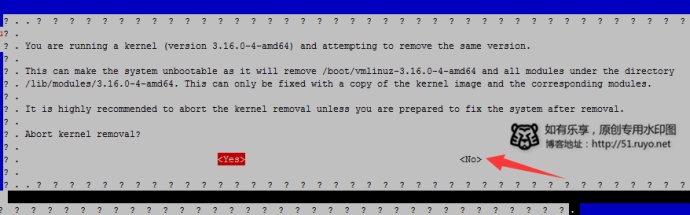
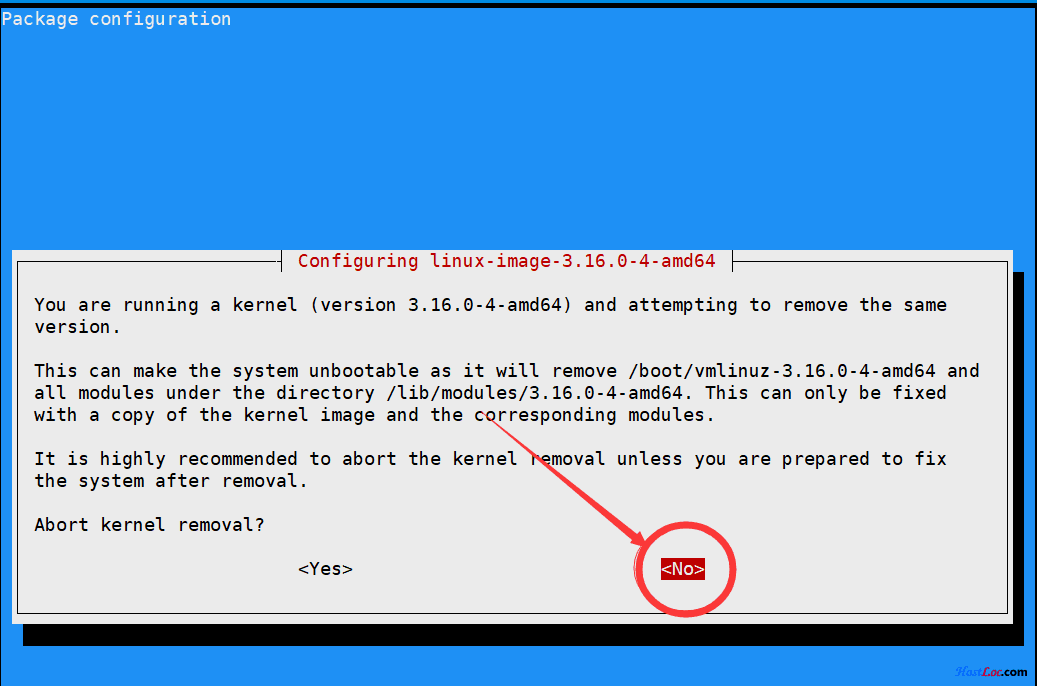
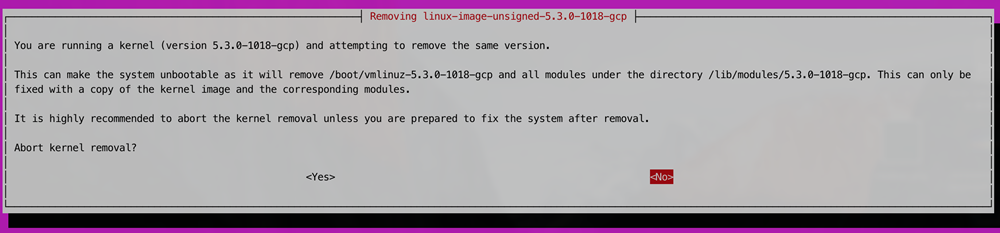
./trojan_v2ray_install.shselect 1 and then select 31 to install the original BBRplus 4.14, version 129 kernel, pay attention to the large box in English that will pop up during the installation process Prompt (there is an example picture below) "Installing the linux kernel is risky whether to terminate", you must choose "NO" not to terminate. The VPS will restart after the installation is complete -
Use the BBRplus version of network acceleration. After re-login to the VPS, re-run the script
./trojan_v2ray_install.shselect 1 and then select 3 to use BBRplus acceleration. -
This step can be omitted. Select 31 to install oh-my-zsh. In this way, there will be a command prompt after login, which is convenient for novices to operate. After the installation is complete, please exit the VPS, the command is
exit. Re-login to the VPS and continue Operate below. -
Install trojan or v2ray. Re-run the script
./trojan_v2ray_install.shchoose 2 to install trojan, or choose 5 to install trojan-go, or choose 11 to install v2ray, or choose 21 to install both trojan and v2ray , or choose 24 to install trojan-go and v2ray at the same time. Strongly recommend: If the VPS line speed can be guaranteed, CDN is not required, it is strongly recommended to choose 12 to install only xray or only install 5 trojan-go (trojan-go is already very fast) If you need CDN, you can choose 11 to install V2ray. The more protocols are installed, the lower the security, and it will not increase the speed. It is best to install one of the software that suits you. There is no need to use an all-in-one script to install multiple at the same time. protocol -
When the first step is to install BBR plus, the prompt "Do you want to stop deleting the kernel" please select "NO". It means to uninstall the current kernel.


- On a new machine that has not installed any trojan and v2ray (that is, step 5 has not been executed, and you can choose to uninstall it), select 29 to enter the submenu to install trojan or v2ray visual management panel. (If it has been installed through other scripts before, it is very easy to cause problems when installing the visual management panel)
- Select 29 and then select 1 to install the trojan-web visual management panel (centos7 system is recommended). After entering the domain name according to the prompts, continue to select 1. Let's Encrypt certificate according to the prompts. After the certificate is successfully applied, continue to select according to the prompts 1. Install the docker version of mysql (mariadb). After ariadb starts successfully, continue to enter the account password of the first trojan user according to the prompts, and press Enter to display "Welcome to the trojan management program". You need to press enter without entering a number, and continue in this way Install nginx until it is completed. If the nginx installation is successful, it will display the URL of the visual management panel, please save it. If the URL of the management panel is not displayed, it means that the installation failed.
- Select 29 and then select 6 to install the v2ray-ui visual management panel. After the installation is successful, you can run this script again. Select 29 and select 11 to apply for a domain name SSL certificate. Then add a vless account or trojan account to the visual management panel, fill in Enter the certificate file path to support trojan and v2ray at the same time.
- If there is already nginx or existing website service on the machine, or it is used together with the Pagoda panel, you can run the script and select 30, and then install the version without nginx separately. Select 30 and then select 15, then V2ray will run on ports other than 80 and 443 (ports can be customized) without encryption, and then modify the configuration on the pagoda panel or nginx to make nginx serve on port 443 https, according to the specified url path Forward to the V2ray port for encryption.
- Select 30 and then select 12-14 to install trojan or trojan-go, so that trojan or trojan-go can serve on port 443 https and coexist with the existing nginx or website. Nginx needs to modify the configuration to only listen to port 80. https ssl encryption is provided by trojan or trojan-go.
- After selecting 30, select 13 or 14 to install only trojan-go. You must ensure that port 80 of the local machine is listening, otherwise trojan-go cannot be started. This is a fallback function of trojan-go, and non-trojan protocol traffic will Forward to remote_addr and remote_port to specify the address of this HTTP server. Trojan-Go will test whether this HTTP server is working properly, if not, Trojan-Go will refuse to start. [ Refer to trojan-go official document ](https://p4gefau1t .github.io/trojan-go/basic/config/)
- Select 30 and then select 16-24 to install V2ray or Xray, so that the Vless protocol of V2ray or Xray serves on port 443 https (port can be customized), and coexist with the existing nginx or website, nginx needs to modify the configuration to only listen Port 80 is fine. https ssl encryption is provided by V2ray or Xray's Vless protocol. It is recommended to choose Xray Xtls-direct mode of 20 for the fastest speed
- Select 30 and then select 15-24 to install V2ray or Xray, you can customize the port, password and websocket path path, the default is random password and random path. At the same time, you can add an additional listening port to use with the main port at the same time , it is convenient for the transfer machine that does not support port 443 to transfer to the target host.
- You can choose whether to apply for a certificate for the above installations. If you already have a certificate, you don’t need to apply for it during the installation process, or you don’t need to apply again if you install this script multiple times. The certificate location is /root/website/cert/fullchain.cer and /root/website/cert/private.key, which can be placed manually
- After running the script, select 1 to enter the linux kernel installation menu, and follow the prompts to install linux kernel 5.10 or 5.11.
- After replacing the kernel and restarting, select 1 to enter the linux kernel installation menu, select 2 to use BBR acceleration
- After restarting, choose 1, then choose 6 to install Wireguard and cloudflare Warp.
- After confirming that Wireguard starts successfully, run the script and select 11 or 12 or other options to install v2ray or xray. During the installation process, select netflix and google human-machine verification to unlock according to the prompts, and you can also choose to unlock more video sites.
- You can use freenom for free domain name. When registering freenom, you need to use a US IP, otherwise you will not be able to pass the registration email verification. Please search for tutorials by yourself .
- Please turn off the CDN when using the script to install. On the DNS setting page of cloudflare.com, set the secondary domain name to DNS only to turn off the CDN. After installing v2ray or trojan-go, you can turn on the CDN and set it to Proxied. Trojan is currently not available Support CDN, the default installation setting of trojan-go is not to support CDN, you can choose to support CDN during the installation process.

- The following is the worker acceleration script of Cloudflare CDN, please replace the domain name with the domain name of your vps. Then create a new worker in Cloudflare and add it. You can choose one of the following 3 tools, [ CFIP ][better-cloudflare- ip], CloudflareScanner, CloudflareSpeedTest, run on your own client machine, find out the CDN IP of cloudflare that is the fastest distance from you, and fill in this IP in the configuration of v2ray or trojan-go supporting CDN .
addEventListener(
"fetch", event => {
let url = new URL(event.request.url);
url.hostname = "yourdomain.xxx.xx";
url.protocol = "https";
let request = new Request(url, event.request);
event.respondWith(
fetch(request)
)
}
)
This script uses acme.sh to apply for a free Let's Encrypt certificate. Renewal is required for three months. This script automatically completes the renewal through cron without user operation. But Let's Encrypt has some restrictions on applying for certificates, as follows:
Frequency limit of Let's Encrypt certificate application
- The same main domain name can only apply for 50 certificates within a week
- The number of application verification failures per hour for each domain name under each account is 5 times
- Only 5 duplicate certificates can be created per week, even through different accounts
- Each account with the same IP address can create up to 10 certificates every 3 hours
- Each multi-domain (SAN) SSL certificate (not a wildcard domain certificate) can only contain a maximum of 100 subdomains
- There is no limit to the number of times to update the certificate, but the update certificate will be limited by the above-mentioned duplicate certificates
- If it prompts that the certificate application fails, you can try to change the domain name and try again (adding or changing a different second-level domain name is also considered a new domain name)
- The same IP address, if you apply for a certificate too frequently in a short period of time, it will also be restricted. At this time, changing the domain name will not be successful, you can only wait for a period of time, or change the IP.
- Script thanks to https://github.com/sprov065/v2-ui
- Script thanks to https://github.com/Jrohy/trojan
- Script thanks to https://github.com/v2fly/v2ray-core
- Script thanks to https://github.com/XTLS/Xray-core
- Script thanks to https://github.com/trojan-gfw/trojan
- Script thanks to https://github.com/p4gefau1t/trojan-go
- Script thanks to https://github.com/ylx2016/Linux-NetSpeed
- The script thanks to Qiushui Yibing, Atrandys, V2ray official and Bozai for sharing, etc.
- The script thanks to JCNF's blog https://ybfl.xyz/111.html
curl -O https://raw.githubusercontent.com/jinwyp/one_click_script/master/linux_install_software.sh && chmod +x ./linux_install_software.sh && ./linux_install_software.shwget --no-check-certificate https://raw.githubusercontent.com/jinwyp/one_click_script/master/linux_install_software.sh && chmod +x ./linux_install_software.sh && ./linux_install_software.sh