




Operational continuity for AI coding agents.
AICTX helps Codex, Claude, GitHub Copilot and other coding agents continue work across sessions by preserving the last useful execution state: active work, next actions, decisions, failures, validation evidence and repo context.
The next agent does not start from zero. It resumes from what actually happened.
It also makes continuity shared across agents. Codex can finalize work into .aictx/, then Claude Code, GitHub Copilot, or another compatible agent can resume from the same repo-local facts instead of relying on one provider's chat history.
Website: https://aictx.org
PyPI package: https://pypi.org/project/aictx/
CLI: aictx
It is a repo-local CLI/runtime layer for agent continuity. It stores inspectable artifacts under .aictx/ and exposes continuity through CLI commands, local MCP tools/resources/prompts, and generated agent instructions.
AICTX is Codex-first, GitHub Copilot-aware, Claude-aware, and generic-agent compatible.
Quickstart · Installation · Continuity View · Demo · Technical overview · Official project
Coding agents are powerful, but most sessions still start cold:
- they rediscover the same repository structure;
- they reopen broad docs before the relevant source or test;
- they repeat failed commands or stale assumptions;
- unfinished work depends on chat history instead of repo-local state.
AICTX makes that continuity repo-local, inspectable, and reusable.
Install AICTX, then initialize the repository:
pip install aictx
aictx install
aictx init
aictx --version
If ~/.codex/ already exists, aictx install detects Codex and installs/updates AICTX-managed global Codex integration by default. Interactive installs ask for confirmation; aictx install --yes applies the detected setup automatically.
After that, keep using your coding agent.
The generated repo instructions and hooks guide supported agents to call AICTX automatically. The normal user experience is:
install -> init -> use your coding agent
See Installation and Quickstart.
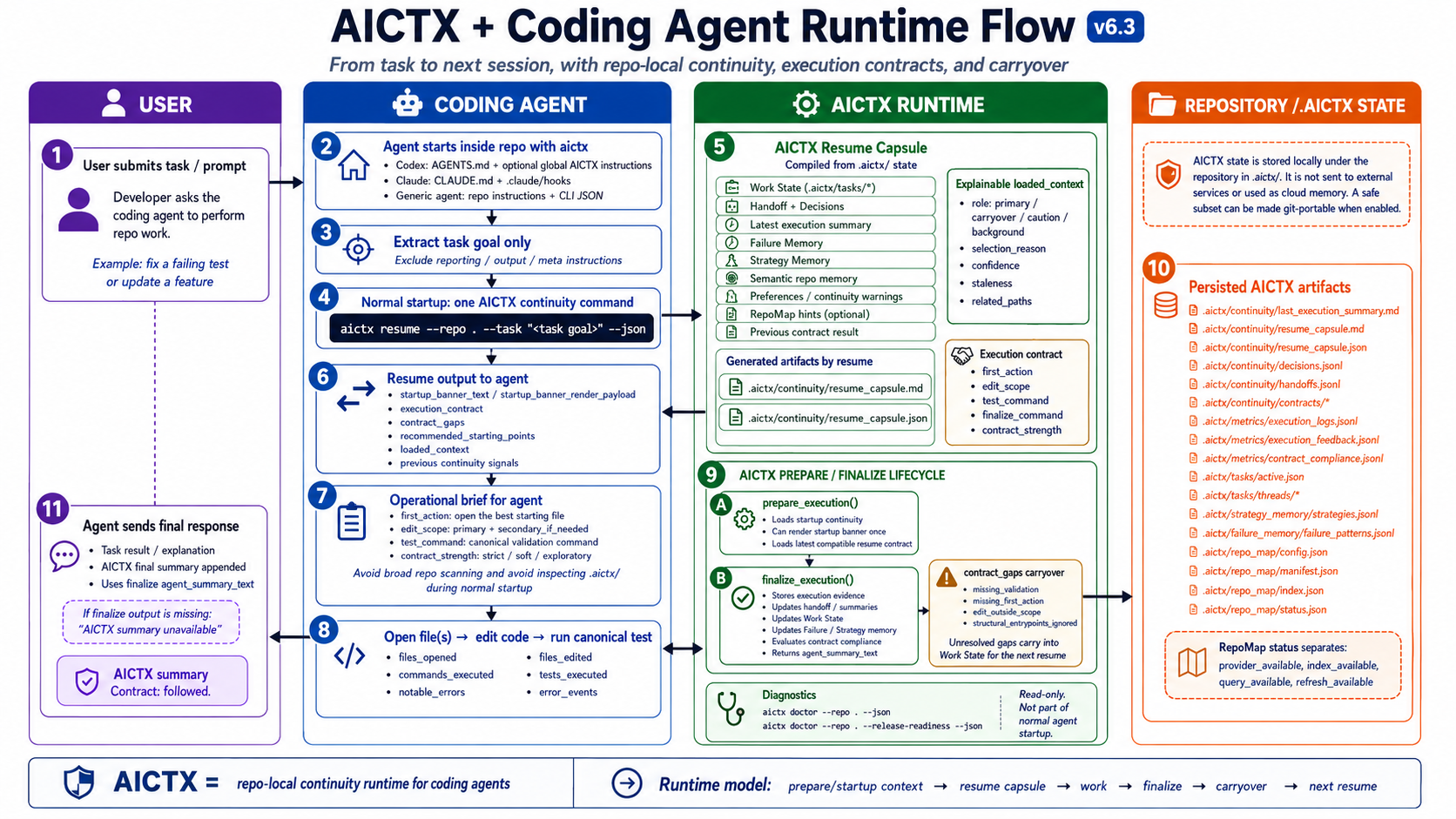
resume useful context -> do the work -> finalize evidence -> next session continues
AICTX stores continuity locally under .aictx/, so it is inspectable, reviewable and not dependent on hidden chat history.
That continuity is agent-neutral:
Codex finalize -> .aictx continuity -> Claude/Copilot/other agent resume
This is useful when a team or solo developer alternates between coding agents. The repo carries the operational handoff: what was tried, what failed, what passed, what remains, and where the next agent should start.
Start lifecycle work with aictx resume --task "..." and close it with aictx finalize. For on-demand task planning outside the startup lifecycle, AICTX can also compile a bounded read-only Task Context Pack:
aictx prepare "fix the parser bug" --repo . --jsonprepare is not a replacement for resume / finalize; use resume to start lifecycle work, and use prepare only for focused read-only context outside that startup path.
AICTX can expose repo-local continuity as local MCP tools, resources and prompts.
Compatible agents can launch:
aictx mcp-server --repo . --profile fullThe default aictx install / aictx init flow prepares AICTX MCP runtime metadata and repo-local MCP config through AICTX-managed, reversible setup. Sensitive client config is written as a managed <AICTX> block where the format supports comments, and as AICTX-managed JSON metadata in .mcp.json / .vscode/mcp.json. aictx clean / aictx uninstall remove only those managed entries and preserve user-authored MCP servers. Agents should prefer MCP tools when available and fall back to CLI commands otherwise.
See MCP.
AICTX also ships Claude Code and Codex plugin artifacts.
The plugins are MCP-first and CLI-fallback: compatible agents should call AICTX MCP tools such as aictx_resume, aictx_finalize, and aictx_view; when MCP is unavailable they fall back to the AICTX CLI.
See Plugins.
A new agent session starts cold.
It scans README, docs, Makefile and source files.
It rediscovers decisions.
It may repeat failed commands.
It asks for context that already existed.
The agent runs one resume command.
It sees active work, next action, known failures and validation path.
After work, it finalizes factual evidence for the next session.
AICTX turns disconnected agent sessions into a continuous operational workflow, even when the next session uses a different coding agent.
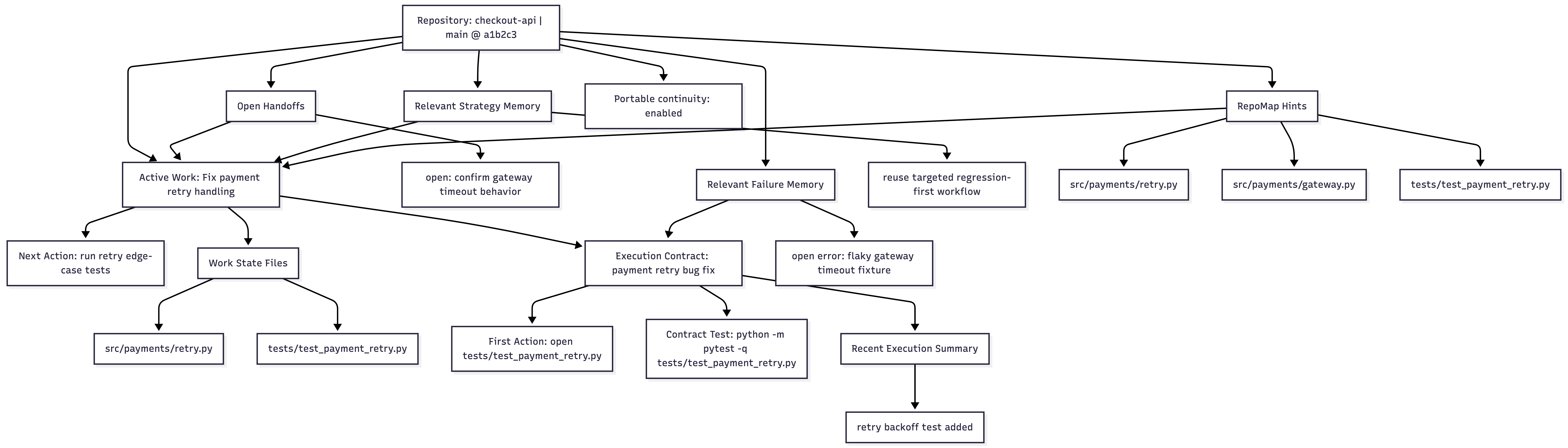
aictx view --repo .AICTX can render the current operational state of a repository as local Markdown and Mermaid:
.aictx/reports/continuity-view.md
.aictx/reports/continuity-map.mmd
Not hidden memory. Reviewable operational continuity, with quality signals for stale, missing, demoted, or unverified context.
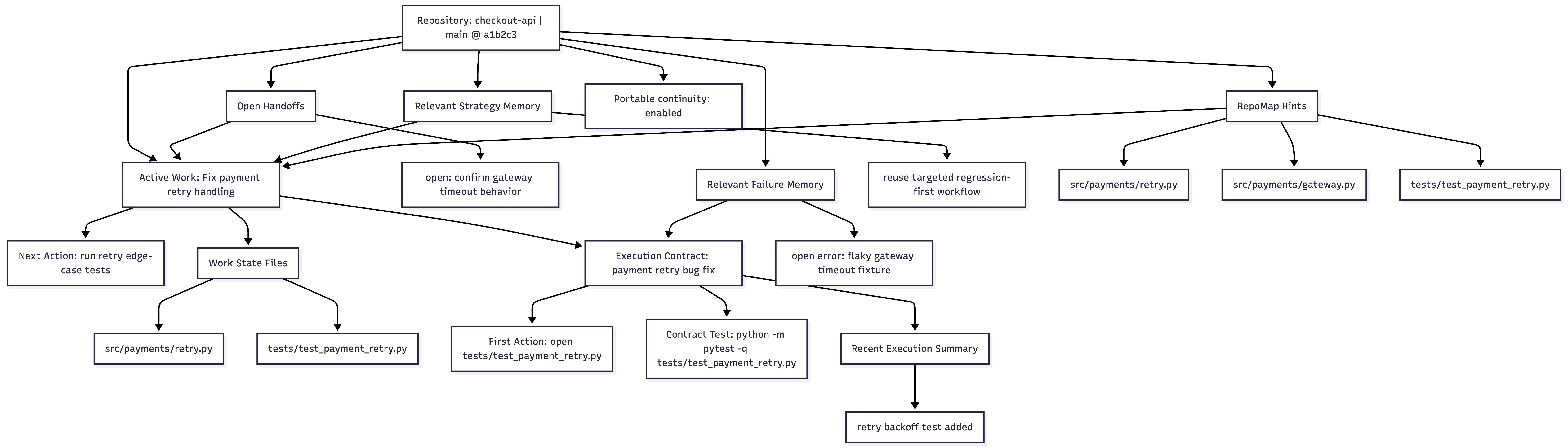
Continuity View documentation · Image asset
AICTX focuses on operational facts that help the next agent continue useful work:
- active Work State and next action;
- execution summaries and handoffs;
- explicit decisions;
- known failures and resolved failure patterns;
- strategy hints from successful prior work;
- execution contracts and contract-compliance signals;
- optional RepoMap structural entry points;
- continuity quality signals for stale, missing, demoted, obsolete, or unverified context;
- read-only Task Context Packs for focused task-specific context;
- lifecycle diagnostics for incomplete or unfinalized sessions;
- optional Git-portable continuity for small teams.
AICTX is not an autonomous coding agent, a cloud memory service, a vector database, a dashboard, a replacement for human review, or a guarantee of correctness, productivity gains or token savings.
It is a repo-local operational continuity layer used by cooperating coding agents.
| Capability | What it does | Why it matters |
|---|---|---|
| Work State | Preserves active task, hypothesis, files, next action, risks, and verification state | The next session knows what was in progress |
| Failure Memory | Stores observed command/test/build/type/lint failures as structured patterns | Agents can avoid repeating known mistakes |
| RepoMap | Optional Tree-sitter structural map of files and symbols | Agents get compact structural entry points for “where should I look first?” |
| Strategy Memory | Reuses successful prior execution patterns | Known-good approaches can be suggested again |
| Handoff / Decisions | Keeps operational summaries and explicit project decisions | Architecture and intent survive session boundaries |
| Execution Summary | Captures what happened at finalize time | The next session starts from factual continuity |
| Cross-agent continuity | Stores continuity in the repository instead of one agent's chat history | Codex, Claude Code, GitHub Copilot, and generic agents can hand off through the same .aictx/ state |
| Continuity View | Generates .aictx/reports/continuity-view.md and .aictx/reports/continuity-map.mmd from repo-local continuity |
Users and agents can inspect active Work State, handoffs, failures, contracts, summaries, RepoMap hints, and portability in one deterministic Markdown/Mermaid view |
| Continuity Quality | Scores repo-local continuity freshness and flags stale, missing, demoted, obsolete, or unverified context | Agents can avoid trusting old memory blindly and treat weak continuity as background evidence |
| Task Context Pack | Compiles focused read-only context for a supplied goal through aictx prepare or aictx_prepare_task_context |
Agents can ask for bounded task-specific context without mutating lifecycle state |
| Lifecycle Diagnostics | Tracks resume, Work State writes, and finalize events as best-effort local diagnostics | Users can see incomplete or unfinalized sessions without AICTX blocking work |
| Contract Compliance | Audits first action, edit scope, validation, and structural alignment | Gaps can carry over into Work State instead of disappearing |
| Doctor | Read-only repo/runtime diagnostic with aictx doctor --repo . --json; add --release-readiness for strict aictx release-gate checks |
Support uses a general repo diagnostic while releases keep stricter checks |
| Resume capsule | Compiles continuity into one agent brief | Agents do not need to discover AICTX internals at startup |
AICTX is runner-aware, not runner-locked.
- Codex-first:
AGENTS.md, optional global Codex setup, CLI/runtime JSON contract, MCP support, and Codex plugin artifacts. - Claude-aware:
CLAUDE.md,.claude/settings.json, hooks, MCP support, and Claude Code plugin artifacts. - GitHub Copilot: best-effort instruction hardening through
.github/copilot-instructions.md,.github/instructions/aictx.instructions.md, optional prompt files, and VS Code MCP config when supported. - Generic fallback: any agent that can read repo instructions, run CLI commands, consume JSON/Markdown, or connect to a local MCP server.
Start here:
Core concepts:
- AI coding agent memory
- Repo-local continuity
- Operational continuity
- Failure memory for coding agents
- Work State
- RepoMap
- Failure Memory
- Strategy Memory
- Handoffs and Decisions
- Execution Summary
- Execution Contracts and Compliance
- Doctor diagnostics
Use cases and comparisons:
- Shared continuity across coding agents
- Codex operational continuity
- Claude Code operational continuity
- GitHub Copilot operational continuity
- Comparing coding-agent continuity approaches
- AICTX vs AGENTS.md
- AICTX vs long context
- AICTX vs vector databases
- AICTX vs chat history
Operations and trust:
AICTX improves continuity only when agents or integrations cooperate with the runtime contract. File access, commands, tests, and failures are strongest when passed explicitly or captured through wrapped execution.
AICTX does not claim measured productivity gains, guaranteed speedups, or automatic correctness.
It makes operational continuity visible, inspectable, and reusable.