[!IMPORTANT]
We've replaced the Website Contacts Scraper with the new Business Enrichment API—same features, plus more:
- Social Links & Emails (same as before)
- AI-Recommended Emails for Sales Outreach
- Email Verification
- Phone Carrier Info
- Place Sales Summary
If you're on the old Website Contacts Scraper:
- Cancel your subscription at Subscriptions Page
- Request a refund for this month at Payments Page
- Switch to the new API at Business Enrichment API
Questions? WhatsApp us here




We created Google Maps Scraper with two visions:
- Every founder should have access to data to find their first customers.
- Every student should have access to data to complete their college research projects.
Let's begin.
This Google Maps Scraper is provided for educational and research purposes only. By using this Google Maps Extractor, you agree to comply with local and international laws regarding data scraping and privacy. The authors and contributors are not responsible for any misuse of this software. This tool should not be used to violate the rights of others, or for unethical purposes.
We take concerns about the Google Maps Extractor Project very seriously. For any concerns, please contact Chetan Jain at chetan@omkar.cloud. We will promptly reply to your emails.
Google Maps Extractor helps you find Business Profiles from Google Maps. It's a great tool with 2400+ stars on GitHub, trusted by thousands in the community to complete their academic research projects or find customers.
- Searches for lifetime — One-time purchase, no recurring fees. 200 searches free, yes 200 searches free every month.
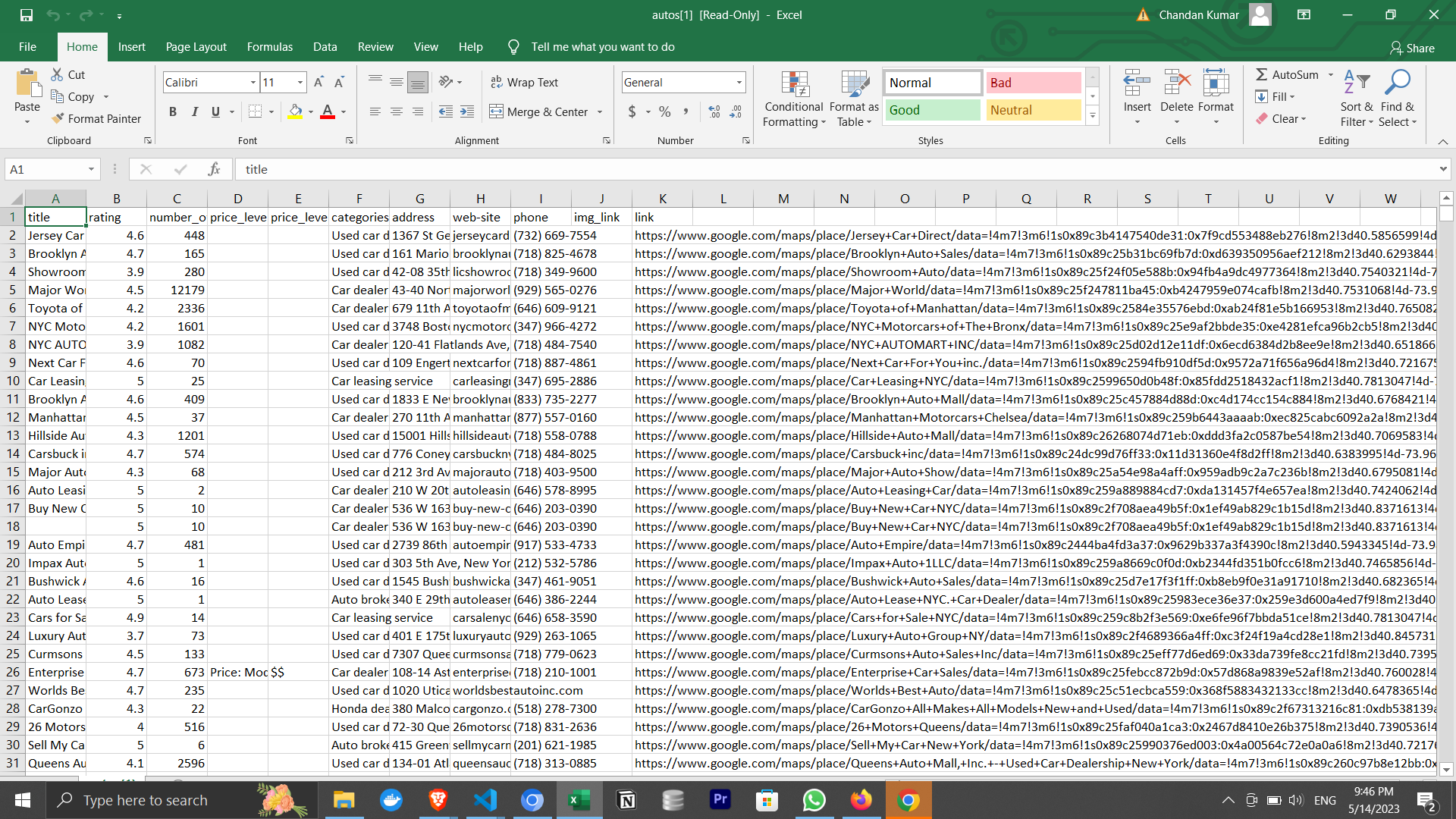
- 50+ data points — Extracted in real-time.
- Enrichment included — Get emails, social profiles, and decision-maker contacts for outreach.
- Great documentation — Part 1: How to use the tool. Part 2: Sales strategies and best practices.
In the next few minutes, you'll extract 200+ Search Results from Google Maps.
To use this tool, ensure you have:
- Google Chrome Browser
Then get started by following these steps:
1️⃣ Download and Install:
1. For Mac:
- Download the Mac Version
- We are a verified publisher with Apple, so you can install it without facing any issues.
2. For Windows:
- Download the Windows Version
- You'll see a blue popup saying Windows Defender blocked an app from an unknown publisher.
We're verified with Apple, but not yet with Windows (requires company incorporation—coming this year).
The app is safe and trusted:
- Made by Omkar Cloud, creators of Botasaurus (3.7K+ GitHub stars)
- 2,300+ stars on GitHub
- 1,000+ customers via GitHub Sponsors
- 100+ discussion threads, 150+ solved issues
You may also see a Windows Firewall popup—click Allow Access to continue.
3. For Ubuntu/Debian:
- For Most Desktop Users: Download .deb
- For Raspberry Pi and Some Cloud Servers: Download .deb for arm64
On Ubuntu 24.04 and later, you can run the app only from the terminal using the following command:
googlemapsextractor --no-sandbox 4. For Fedora/CentOS/Red Hat:
- For Most Desktop Users: Download .rpm
- For Raspberry Pi and Some Cloud Servers: Download .rpm for arm64
2️⃣ Press the Run button to get 200+ search results.
Just run one search, and your search for the best Google Maps extractor ends right here.
It takes just 5 minutes to download and run the app. You get 200 free searches every month, more than enough for most users to get detailed google maps data without paying a dime.
Note:
We respond within 1 working day. 2. Don't need a UI? Just need to access data via Python/Node.js scripts? Check out our Google Maps Extractor API (200 searches/month free). It offers a REST API interface and detailed documentation for AWS VM installation.
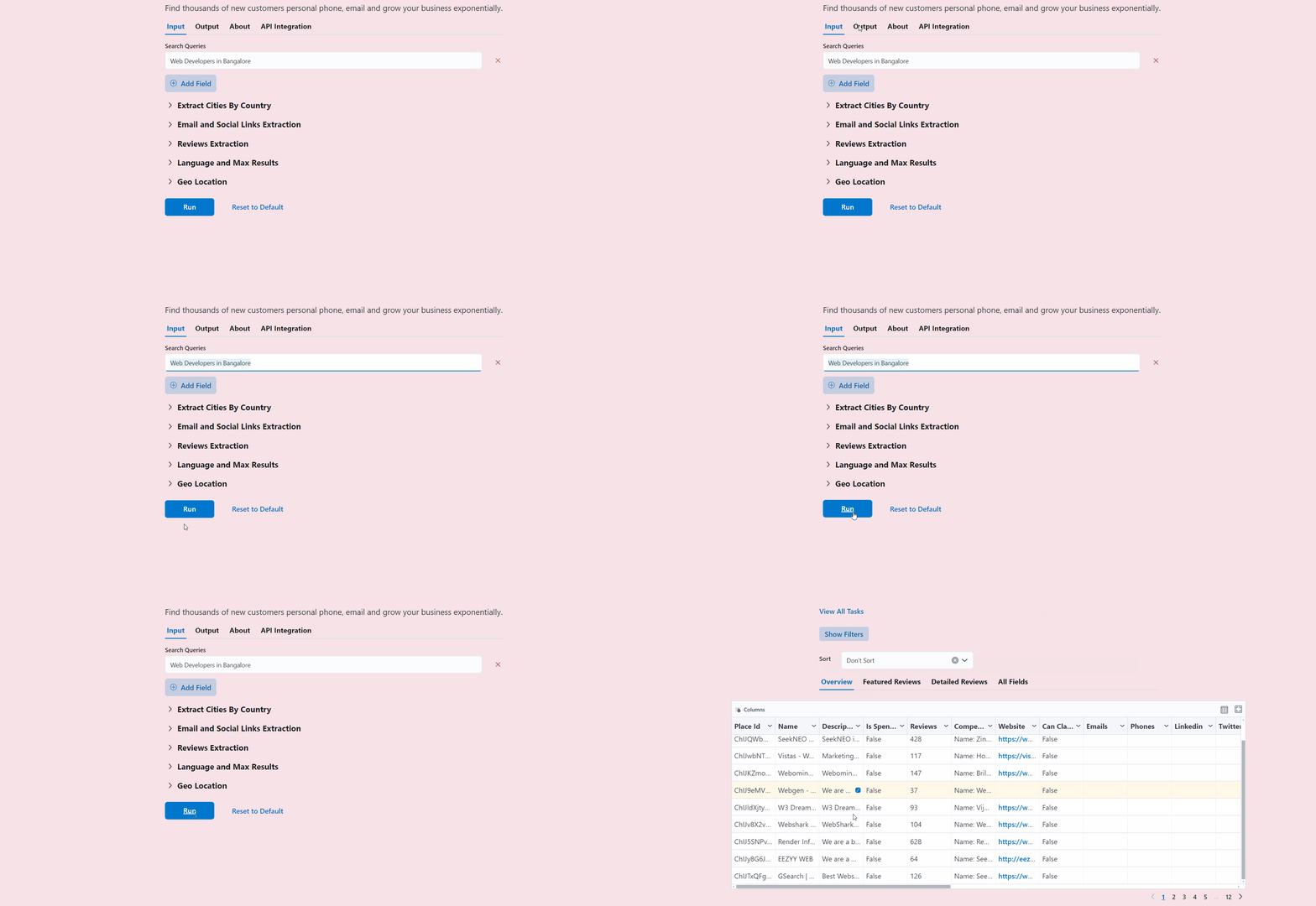
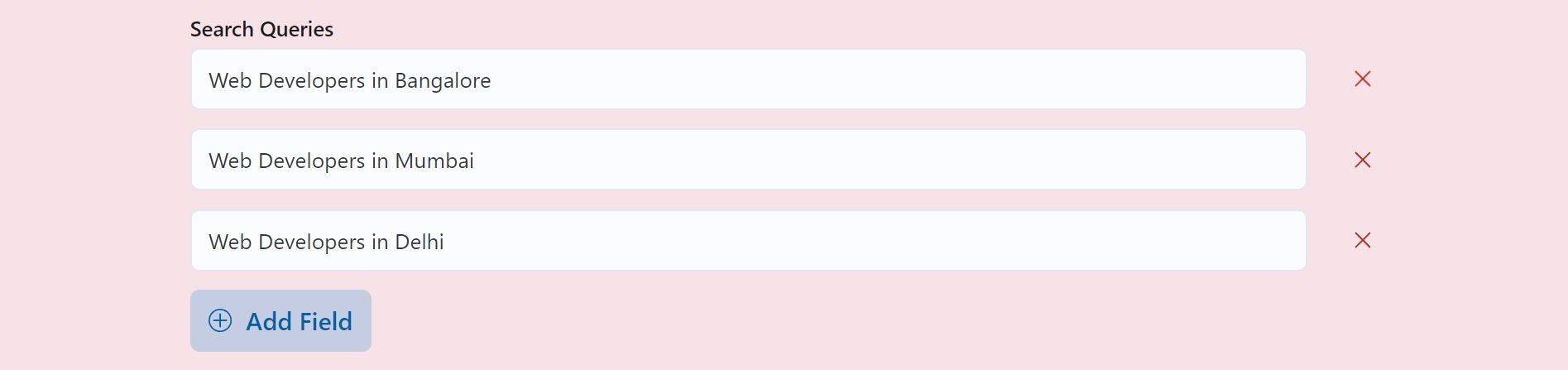
- Enter your search queries.
- Now, simply press the Run button.

- Get the results in about 2 minutes.
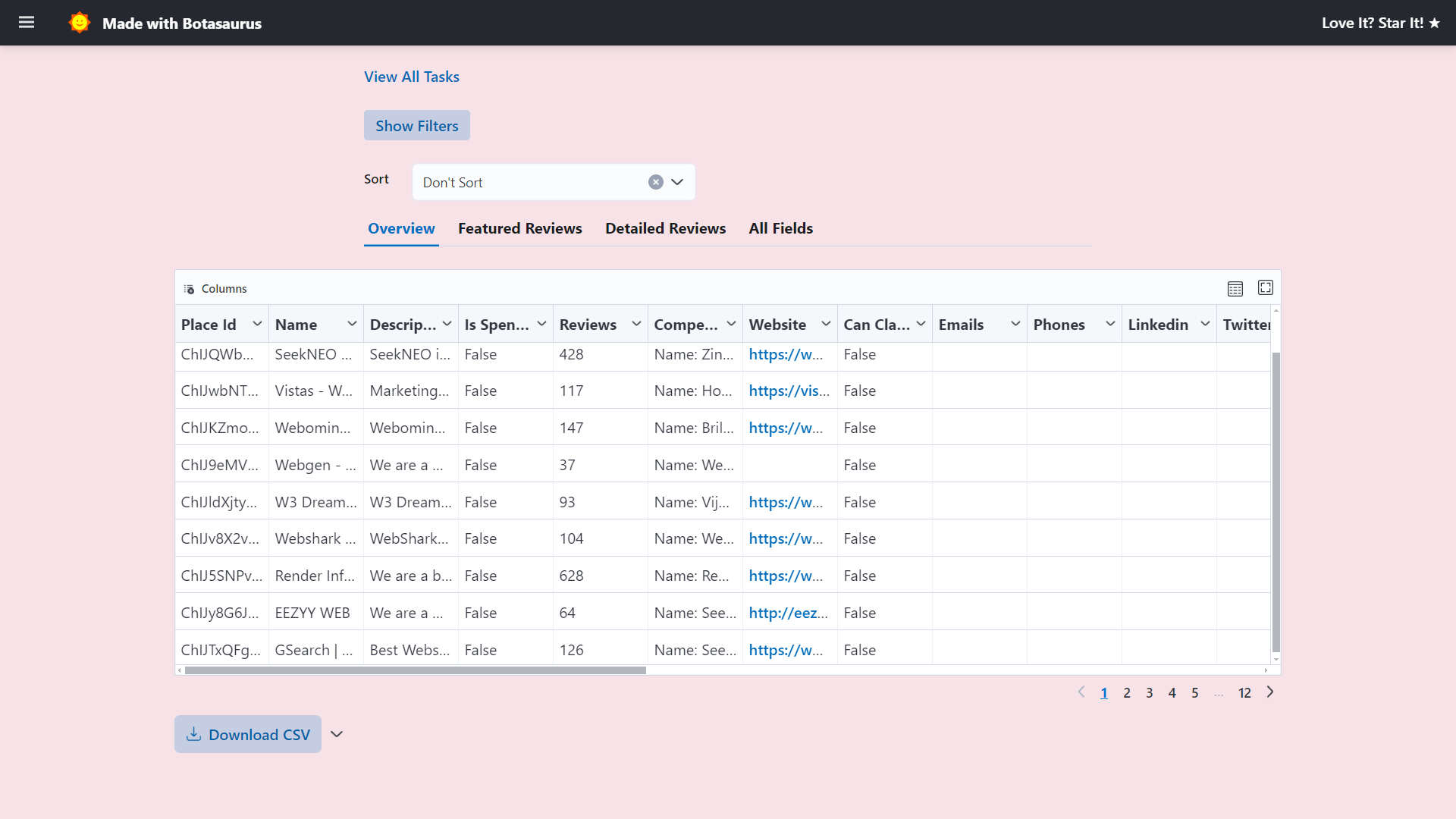
Mainly, there are 3 pages in the UI Dashboard:
- Home Page ('/')
- Output Page ('/output')
- Results Page ('/output/1')
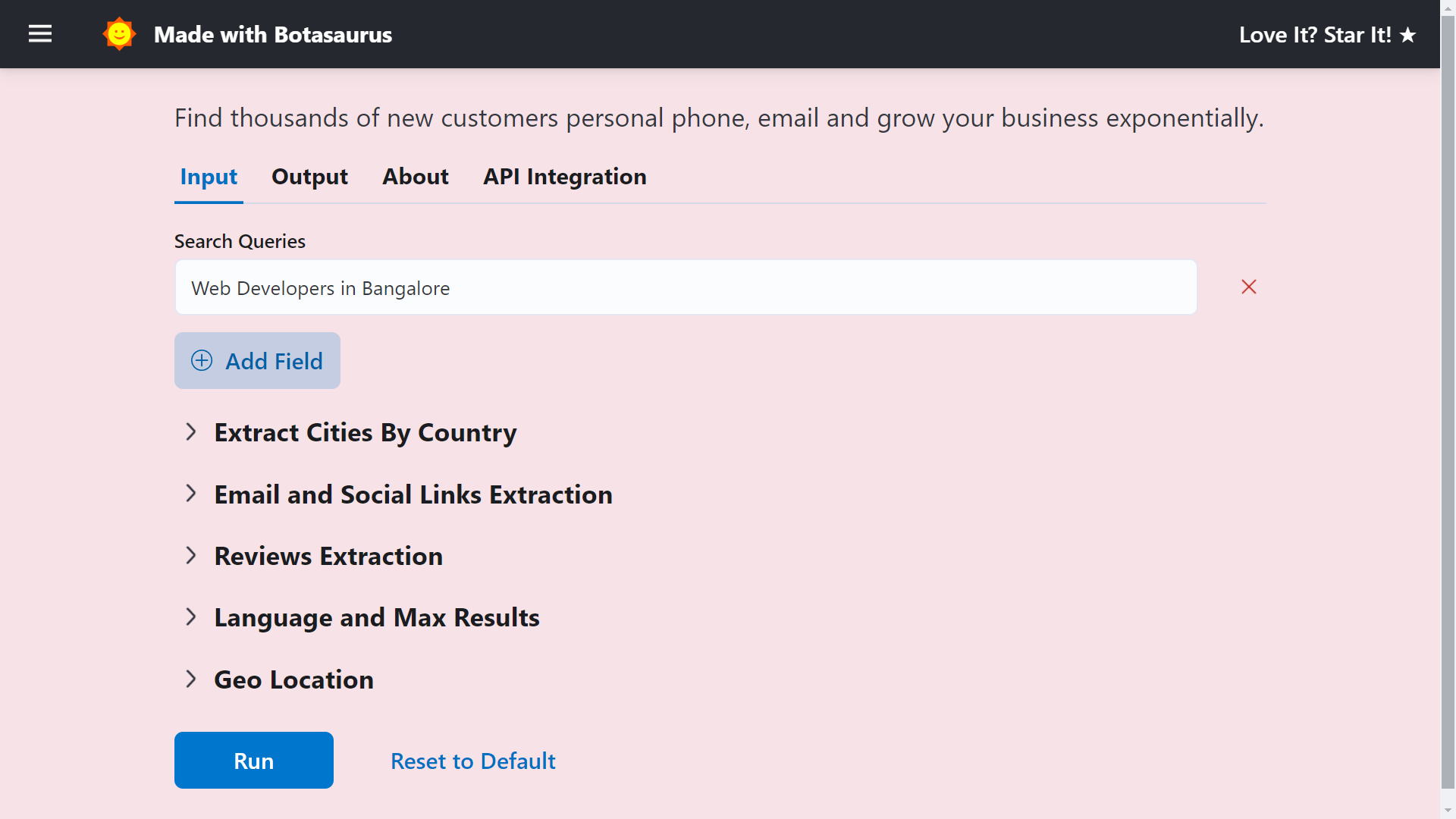
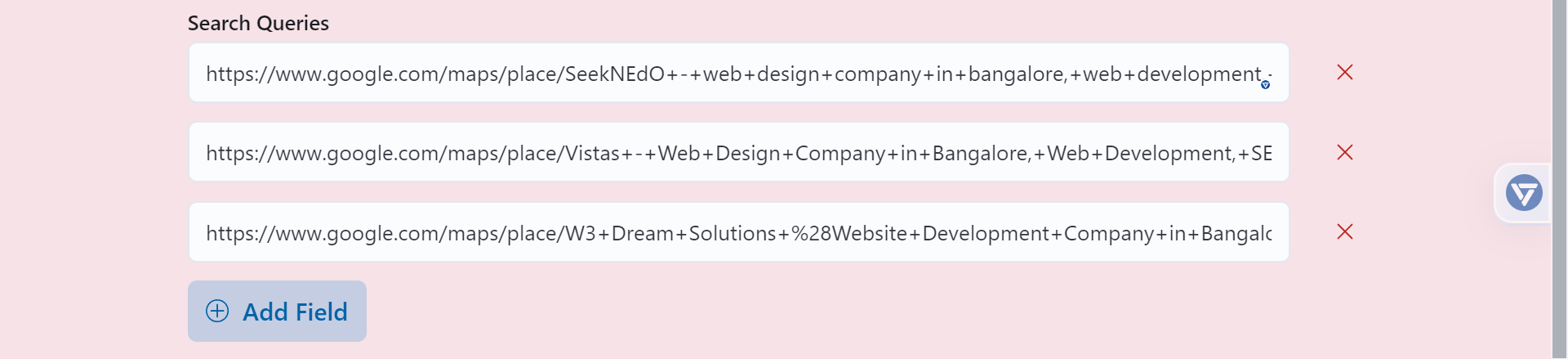
You can input your queries here and search by:
-
List of queries
-
List of links
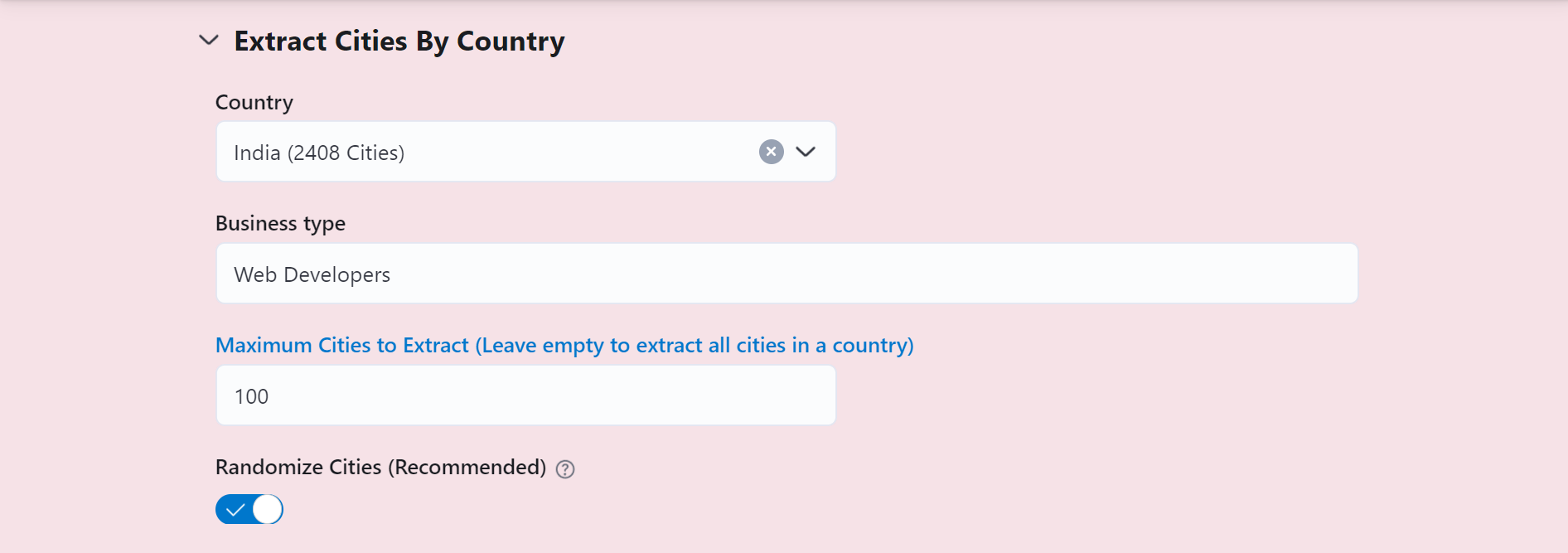
-
Scrape data for a specific type of business across all cities in a country.
-
Scrape Reviews

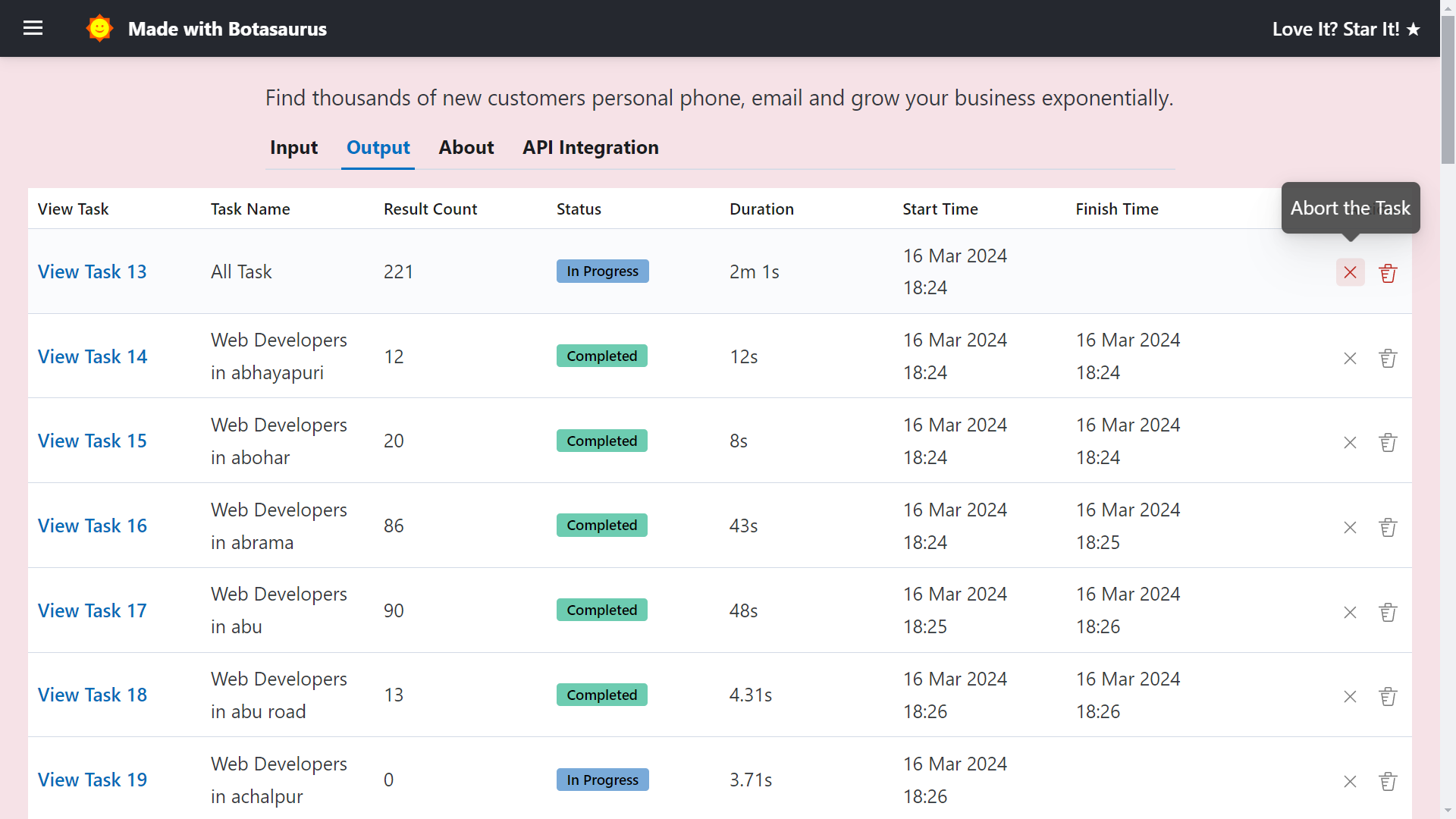
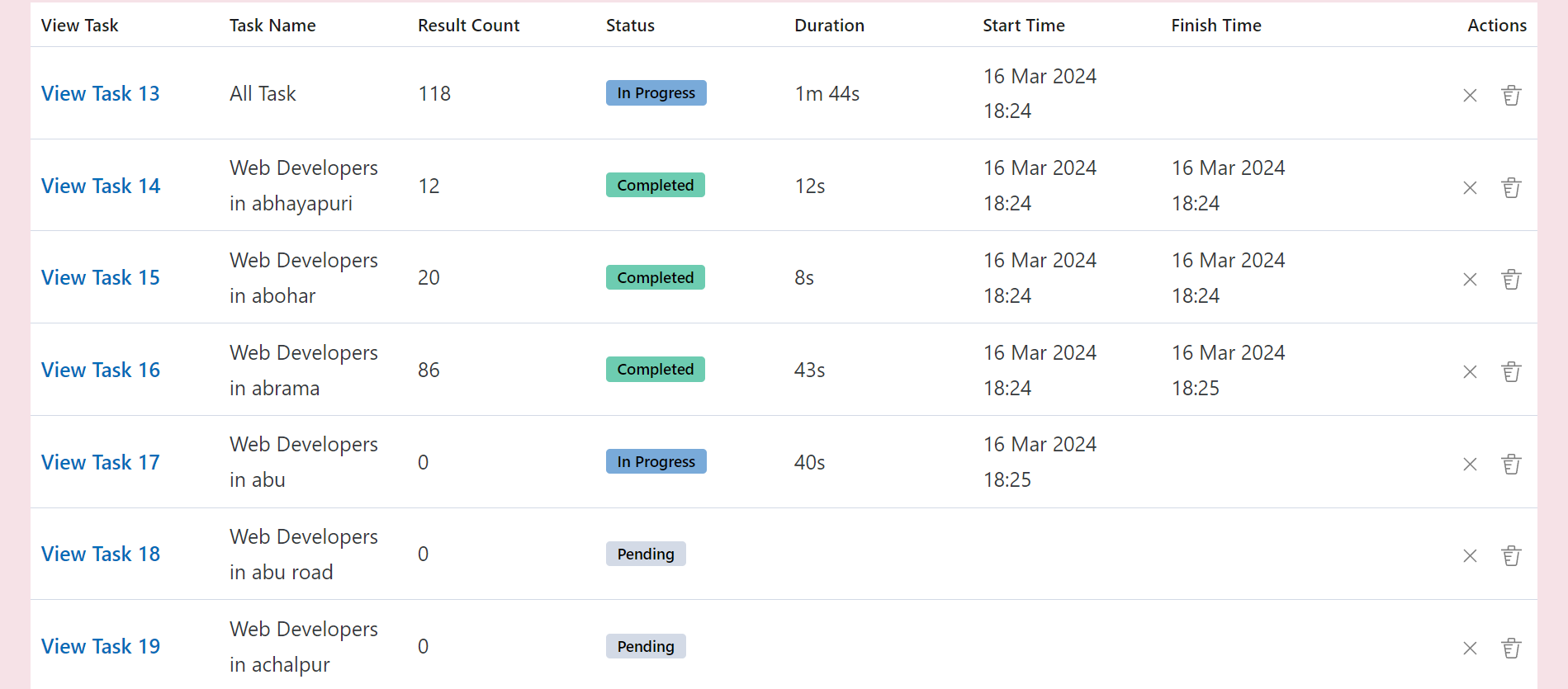
The Output page helps you manage your tasks. You can use it to:
-
See tasks and their status (pending, in progress, or completed).
-
Abort or delete any task.

-
Additionally, whenever you run a query, a task named "All Task" will be created for it, which combines results from multiple queries.
For example, if you search for "Web Developers" in "Cupertino, California" and "Redwood City, California", the "All Task" will show you the combined results for both queries.
This is the most important page where you can view, sort, filter, or download the results of the task.
Sorting
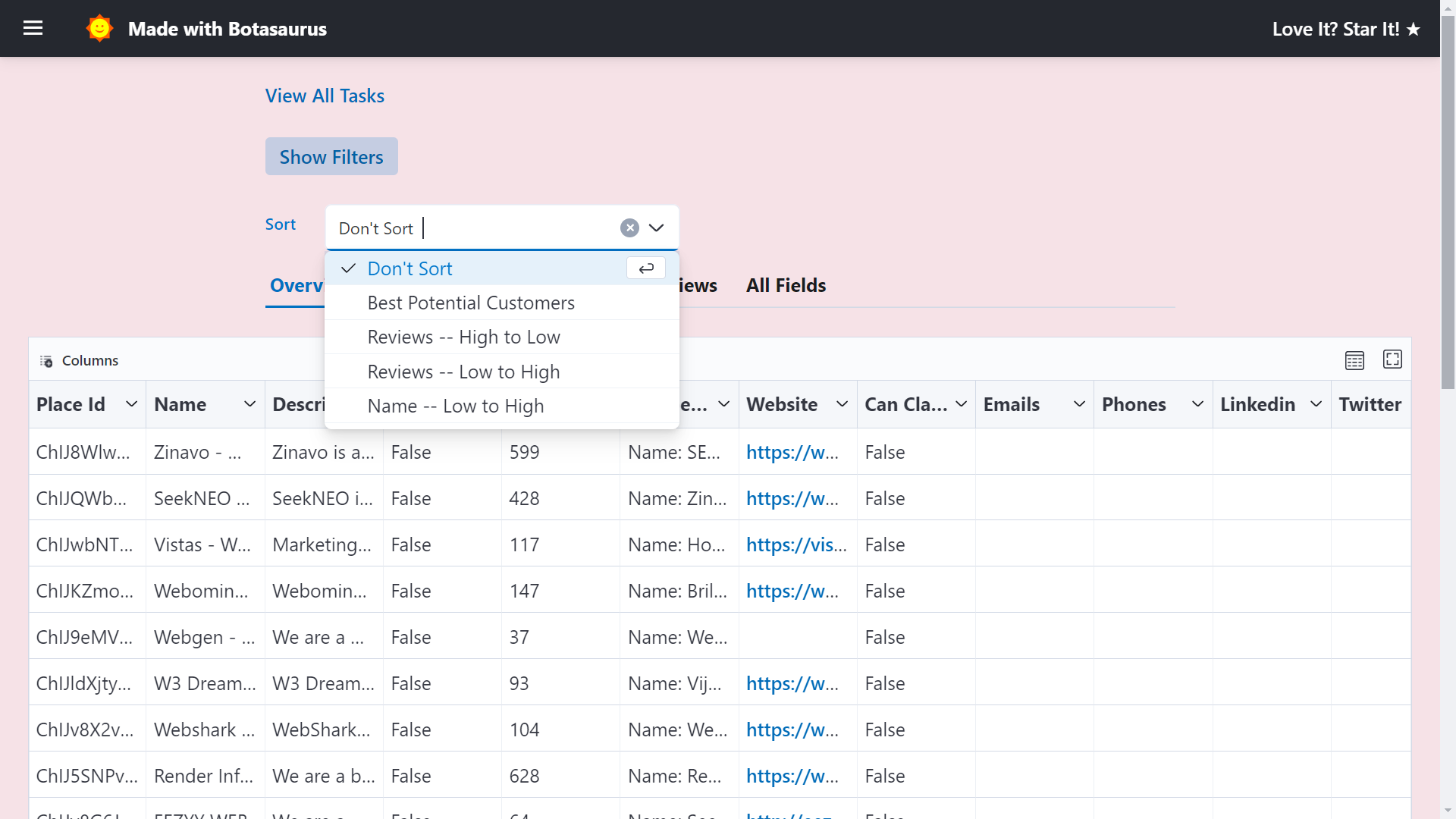
By default, we sort the listings using "Tech Savvy, High Earners" order, which is as follows:
- Reviews [Businesses with more reviews come first]
- Website [Businesses with websites come first]
- Is Spending On Ads [Businesses already investing in ads are more likely to invest in your product, so they appear at the very top.]
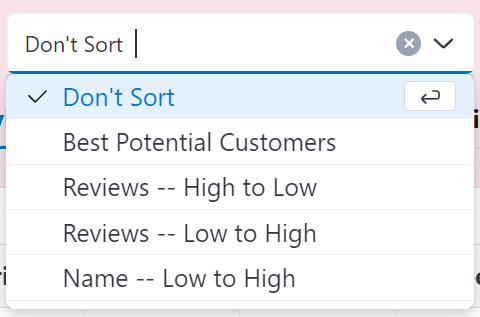
You can also sort by other criteria, such as name or reviews.
Filters
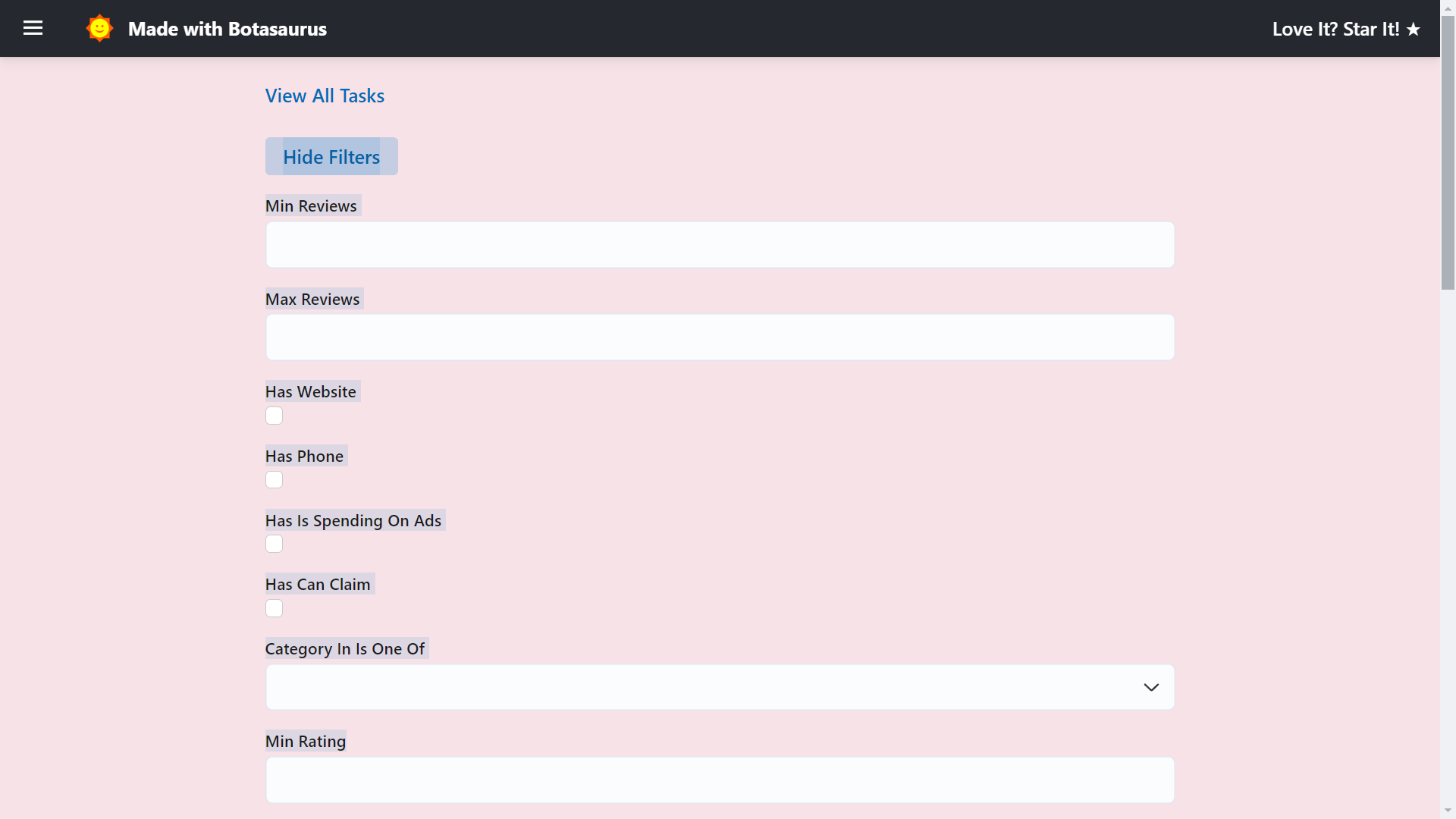
To find the exact results you're looking for, click the "Show Filters" button and apply the desired filters.
Export
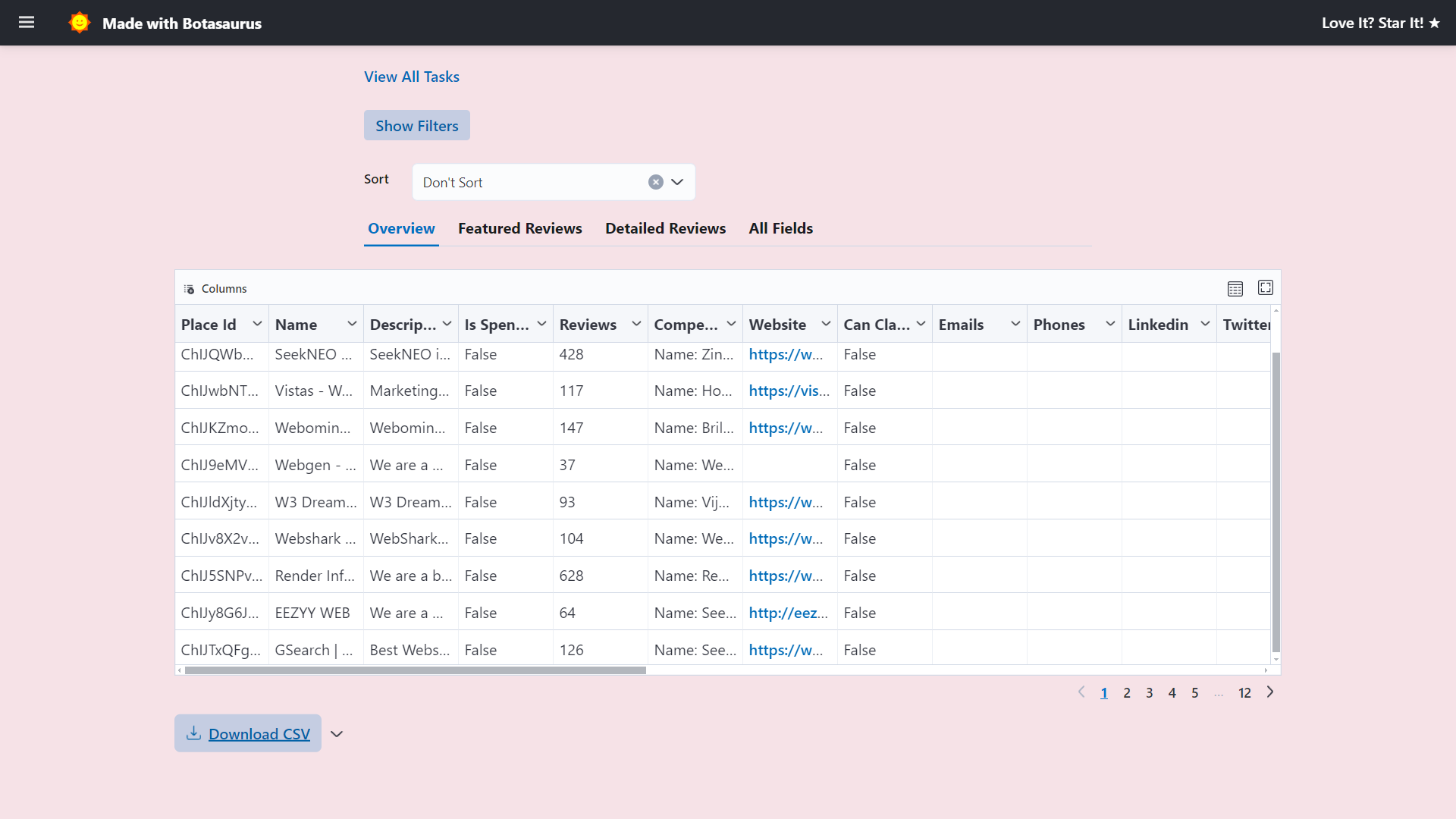
Download results in various formats (CSV, JSON, Excel) using the export button.
There are 5 kinds of search strategies:
- Fast (Default)
- Fastest
- Detailed
- By Zoom Level (15, 16, 17, 18)
- By Geolocation
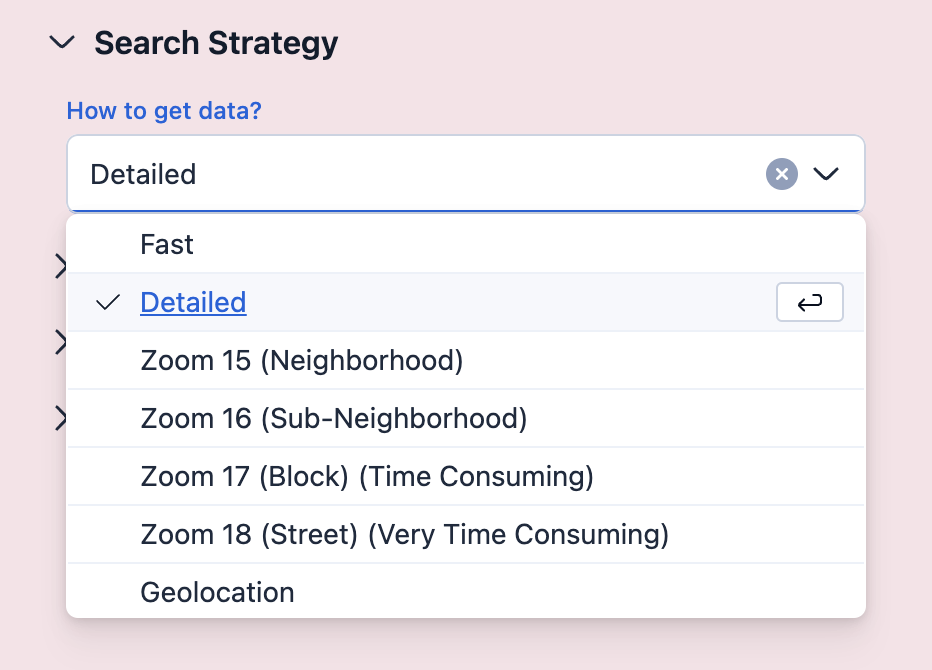
Let's see when to use which strategy:
Fast (Default):
- Returns 120–1600 results per city.
- Completes in 1–10 minutes per city.
- When to use:
- Best for country-level extraction (completes in 1–2 days).
Fastest:
- Slightly faster than Fast mode (~30 seconds per city), but returns ~30–40 fewer results.
- When to use:
- When speed is the top priority and a small reduction in results is acceptable.
Detailed:
- Returns more results than Fast mode, but takes significantly longer.
- When to use:
- Best for single-city or state level extraction where thoroughness matters.
⚠️ When not to use:- Not recommended for country-level extraction due to high time requirements.
- Tip: Set "Max Results" to 1000 per city, otherwise large cities like New York can take 2+ hours.
By Zoom Level (15, 16, 17, 18):
- Various Zoom Level sizes are given below:
- Zoom 15: Neighborhood Level
- Zoom 16: Sub-Neighborhood Level
- Zoom 17: Block Level (Time consuming)
- Zoom 18: Street Level (Very time consuming)
- When to use:
- When you want the absolute highest results. Use Zoom 18. It can take 3-4 hours, but you will have thousands of results for big cities like New York City.
⚠️ When not to use:- Not recommended for country level extraction. It can take 3-4 hours for a single city.
By Geolocation:
- Search a specific latitude/longitude or inside a polygon.
- When to use:
- Getting results that are only in a specific area, but not outside it.
The Geolocation search strategy lets you search for businesses in a specific area of a city. Good for businesses in a specific area, but not outside it.
Real-World Example: Web Developer Targeting Restaurants
Suppose you are a web developer, specializing in making websites for restaurants. Here's a strategy to get customers:
- Find restaurants in a specific neighborhood — e.g., Chinatown, San Francisco.
- Study top restaurants — Identify what successful Chinatown restaurants are doing that drives more customers to them.
- Personalize your pitch — When you contact owners, you can:
- Highlight specific tactics their nearby competitors are using on their website to attract more customers
- Suggest improvements based on what's working for their competitors
Why this works: Business owners are interested in what their local competitors are doing. This approach helps you come across as knowledgeable about their market.
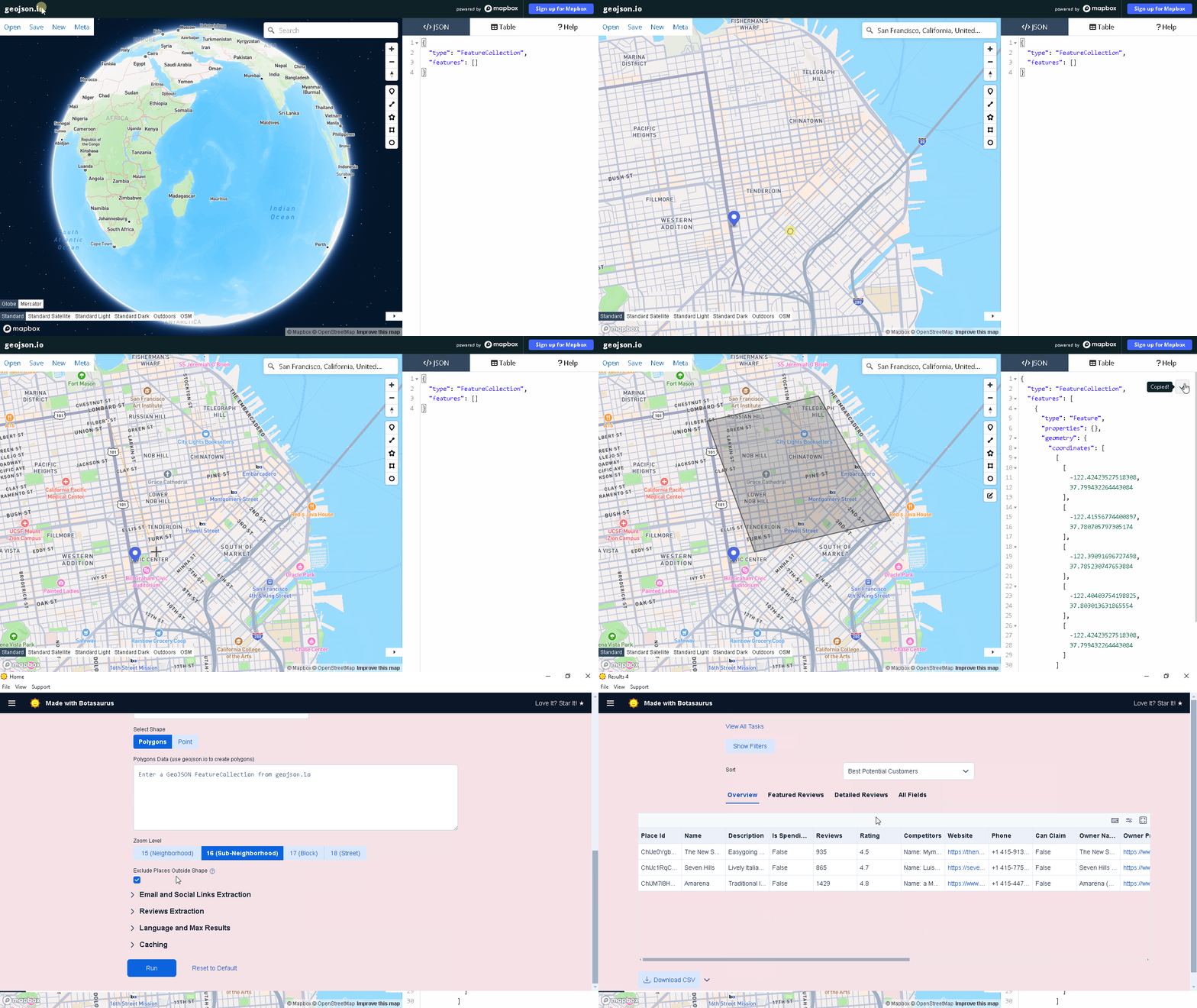
- Visit geojson.io
- Search for your desired city or neighborhood (e.g., "San Francisco")
- Draw the search area using the polygon/circle tool
Tips:
- Press Enter to save your drawing.
- Left Click on drawing to delete it.
- Draw as many shapes as needed to cover your area
- Copy and paste the GeoJSON from geojson.io into the text area of Polygons Data.
- Press Run to start the task.
Click on the Abort Icon to abort the task.
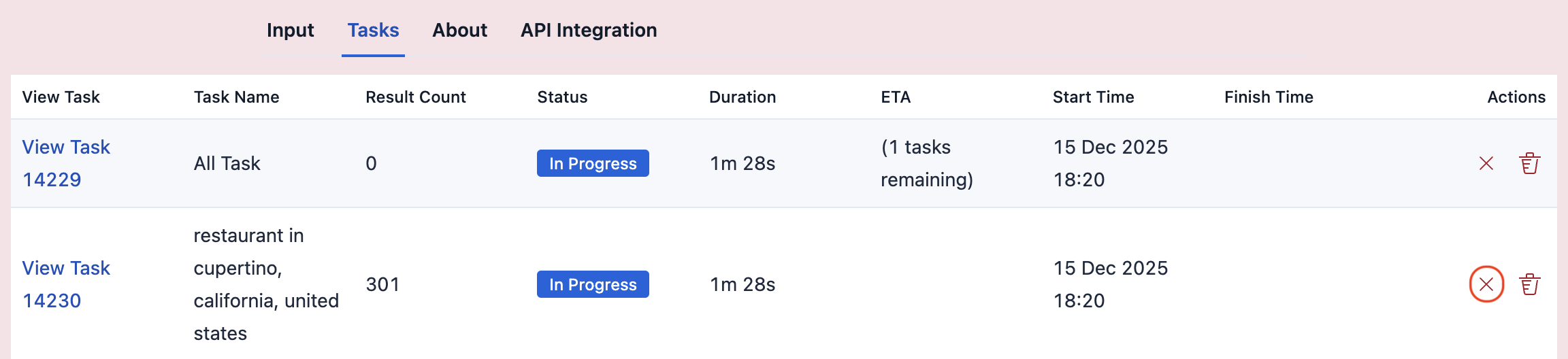
Note:
- Aborting an All Task will abort its child tasks.
- If you close the application while a child task is in progress:
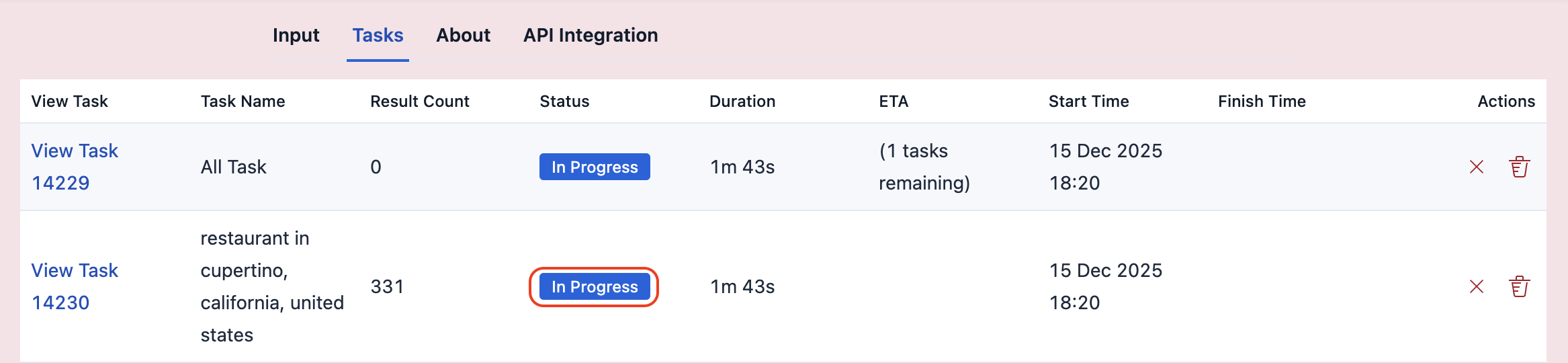
That in-progress task will lose all progress and start from 0 when you reopen the app.
Use the Country Level Data feature, with default Search Strategy "Fast".
It can take 2-3 days to complete for countries with tens of thousands of cities, like the US.
❓ I'm an AI research student. I need all coffee shops in San Francisco for my recommendation AI. How can I get this data?
This is the kind of use case our tool was built for—helping students access data for their research projects.
Use the Zoom 18 search strategy for San Francisco. Let it run overnight. You'll have tens of thousands of results, which is perfect for your research project. There's no cost, as you get 200 free searches each month.
-
Finding customers for your startup. Very common use case.
-
Hiring Top Talent
- Example: To hire a good salesperson, search for "Sales Training" in a specific country and contact the training centers for candidate recommendations.
- Benefits:
- Much higher quality candidates compared to online job portals
- Saves a lot of time that would otherwise be spent screening and interviewing a much larger pool of candidates
- We've done this ourselves as well.
-
Discovering the Best Service Providers
- Find top-rated service providers in your area for specific needs.
- Examples:
- Search for "Yoga Classes" in your city to find the highest-rated yoga classes for health and long life.
- Search for "Library" in your city to find the best place to focus on your work.
- Search for "Restaurant" in your city to find the tastiest food options.
- Search for "Computer Repair" in your city to find the most reputable and reliable computer repair shops.
- The list goes on...
This tool can help you save time in various aspects of your personal and professional life.
We're a data company with 20+ tools for OCR, data conversion, and developer APIs. Some things we are proud of:
- Built Botasaurus, an open-source automation framework with 3.7K+ GitHub stars
- Sponsored by 1000+ developers on GitHub
❓ Why should I use your Product? There are 10s of Google Maps Scrapers on the Internet, some by brands bigger than yours.
For big brands, this is just one of many tools. For us, it is our core product. We've put in thousands of development hours perfecting it, and we're extremely proud of it.
Coming to Hard Facts:
- 📊 Tens of thousands of results per city with Zoom 18. Only 1-2 other brands can do this.
- 🔑 Unlimited searches for a lifetime. Other websites charge $28 for just 50 searches. Our free plan gives 200 searches, 4x more than them.
- ⚡ Faster performance with lower bandwidth usage.
- 🖥️ Easy to use — just open, enter query, start seeing results in a few seconds.
- 📁 50+ data points extracted, most in the market.
- 💰 One-time payment, no subscriptions. Run on unlimited devices. Lifetime updates. You OWN the software.
- 🛡️ 90-day no-questions-asked 2-click refund guarantee. No other brand offers this.
A Solid Product doesn't need elaborate explanations, it speaks for itself. Try it, and see it for yourself.
The key is to start with customers who:
- have money, and
- are willing to spend it on solutions that make their lives easier.
These are the richest cities, tech-hubs in your target country. Choose them because they earn more, so they buy more easily.
We recommend following these steps:
- First choose your target country.
- Then choose the richest cities in that country.
- Use Zoom 18 Search Strategy for maximum results.
- Reach out via cold calls or personalized emails—show how your product/service solves their problems.
Examples:
- If your chosen country is US -> Start with San Francisco, Los Angeles, New York City. Australia -> Start with Sydney Switzerland -> Start with Zurich
Note: Don't start by targeting full country data. You'll have a lower conversion rate and lower revenue per customer.
Your own country, because you're more comfortable talking to people there.
Once your product is perfected, and is creating good value for your customers, you can start focusing on US, as they tend to be more open to trying new products and services.
The Enrichment API turns Google Maps business data into sales-ready contacts.
You've got businesses from Google Maps. Now you need to actually reach them. That's where enrichment comes in:
-
Website Contacts Enrichment
- Get emails and social profiles from websites.
- AI ranks the best email for sales outreach.
- Verify email deliverability with MillionVerifier or ZeroBounce.
- Place Sales Summary—AI-generated business context tailored to YOUR product. Recommended for cold emailing or calling, as it enables you to deliver a tailored pitch for the highest chance of conversion, rather than generic outreach.
- Phone Carrier Info—know if it’s a landline or mobile. Must for cold calling, so you don’t waste time on landlines.
-
Apollo Leads Enrichment
- Find decision-makers (CEO, Founder, etc.) at any business via apollo.io. Apollo is the highest-rated lead generation tool on G2 with 8,500+ reviews.
- Get their name, title, verified work email, LinkedIn, phone number, and company data.
Bottom line: Same leads, same sales—but with enrichment, your conversion rate multiplies. That's more customers from the same effort.
Start enriching for free—100 credits free/month. No credit card needed.
-
Web Developer → Search "real estate agency" in "San Francisco", filter 50+ reviews, no website. Offer "done in 7 days" website for $1000 + $40/mo hosting.
-
Google Ads Agency → Target Gyms/Yoga Studios with high reviews but no website (successful but technically novice). Offer to run Google Maps Ads to bring 20 new members/month. Gym owners love anything that brings foot traffic.
-
Dental Software → Find Dentists with 50+ reviews, no website. Visit during non-peak hours, demo your product, and offer 6 months free trial. They'll pay $40-60/month when it saves their receptionist 10+ hrs/week.
There are 3 parts to making sales:
Going into sales without learning is like going to battle with sticks. You won't survive.
Read sales books—they'll save you time and help you avoid common mistakes. For cold outreach specifically, read "The Cold Email Manifesto". It's practical, and it works.
Filter your leads — Only contact businesses most likely to buy:
- Reviews: 75-200 (established, but small enough to care)
- Rating: 4+ stars (you're the best of the best—obviously you'll only talk to the best)
Use Enrichment — Enrich your data to save research time and increase your conversion rate:
- Social Links & Emails → Get the emails for sales outreach
- Email Verification → Ensure deliverability
- Place Sales Summary → Personalize your pitch
- Phone Carrier Info → Know if it's a landline or mobile
Sort by reviews — Bigger businesses first. They pay more.
Mark your best leads — In Excel, highlight businesses most likely to benefit from your service with a green background.
For Cold Calling:
- Read "The Cold Email Manifesto" first—it applies to calls too
- Use Phone Carrier Info Enrichment to skip landlines
- Call during industry non-peak hours to reach owners directly
- Use Place Sales Summary to personalize your pitch
- Get a dedicated phone number, protects your personal number
For Cold Emailing:
- Use AI-Recommended Emails + Email Verification Enrichment
- Use Place Sales Summary to personalize each email
- PERSONALIZE! PERSONALIZE! PERSONALIZE! (takes 15-20 minutes per email, but converts way better)
We recommend cold calling over cold email, here's why:
- Simpler — Just pick up the phone. No complex email sequences.
- Faster feedback, faster improvement — Rejections tell you exactly what to fix for the next call.
- Less competition — Most people do cold email. Fewer calls = more attention = higher close rate.
If you're new to sales, start with cold calling—it's simpler, faster, and converts better than email. As a bonus, you'll learn faster due to instant feedback.
You're an introvert, and calling feels scary. You're right—it is scary. People will hang up on you and rudely reject you.
But think about it: you've done harder things before. Haven't you?
Compared to those, calling is a piece of cake. People way less smart than you have closed deals. You'll totally crush it.
Try it for 2-3 days—if it doesn't work, you can always switch to email.
Most founders quit after 3-4 rejections. You should not.
If someone rejects you, they are unwise and making a mistake. It's their fault, not yours.
And you're a diamond 😎. Only Jewelers recognize diamonds, not blacksmiths.
So, keep going. Also, in worst cases, expect 40-50 connected calls (~2-4 days of calling) to close 1 deal. That's normal.
This is the most important FAQ, so be sure to read it again and put it into practice.
The free version allows 200 searches per month. For unlimited searches, consider upgrading to the Pro Version:
-
Unlimited searches with a one-time purchase.
-
50+ data points extracted in real-time. Click to see all
- PLACE_ID
- KGMID (Knowledge Graph Machine ID) - unique id for each business on Google Maps. PLACE_ID can be null, but KGMID can never be null. Use this as the unique identifier.
- CID
- DATA_ID
- NAME
- DESCRIPTION
- LINK
- MAIN_CATEGORY
- CATEGORIES
- WEBSITE
- PHONE
- PHONE_INTERNATIONAL
- ADDRESS
- DETAILED_ADDRESS
- COORDINATES
- PLUS_CODE
- TIME_ZONE
- RATING
- REVIEWS
- REVIEWS_PER_RATING
- REVIEWS_LINK
- REVIEW_KEYWORDS
- FEATURED_REVIEWS
- YOUTUBE
- GITHUB
- SNAPCHAT
- TIKTOK
- OWNER
- OWNER_POSTS
- CAN_CLAIM
- IS_SPENDING_ON_ADS
- STATUS
- IS_TEMPORARILY_CLOSED
- IS_PERMANENTLY_CLOSED
- FEATURED_IMAGE
- FEATURED_IMAGES
- IMAGE_COUNT
- IMAGES
- WORKDAY_TIMING
- CLOSED_ON
- HOURS
- MOST_POPULAR_TIMES
- POPULAR_TIMES
- MENU
- RESERVATIONS
- ORDER_ONLINE_LINKS
- PRICE_RANGE
- ABOUT
- ON_SITE_PLACES
- GAS_PRICES
- CUSTOMER_UPDATES
- FEATURED_QUESTION
- COMPETITORS
- LOCATION_SUMMARY
- IS_RENTAL [Determines if the place is a rental or a normal business]
- PLACE_ID
- KGMID (Knowledge Graph Machine ID) - unique id for each business on Google Maps. PLACE_ID can be null, but KGMID can never be null. Use this as the unique identifier.- CID
- DATA_ID
- NAME
- DESCRIPTION
- LINK
- MAIN_CATEGORY
- CATEGORIES
- HOTEL_STARS
- PRICE
- WEBSITE
- PHONE
- PHONE_INTERNATIONAL
- ADDRESS
- DETAILED_ADDRESS
- COORDINATES
- PLUS_CODE
- TIME_ZONE
- RATING
- REVIEWS
- REVIEWS_PER_RATING
- REVIEWS_LINK
- REVIEW_KEYWORDS
- FEATURED_REVIEWS
- FEATURED_PARTNER_REVIEWS
- YOUTUBE
- GITHUB
- SNAPCHAT
- TIKTOK
- OWNER
- OWNER_POSTS
- CAN_CLAIM
- IS_SPENDING_ON_ADS
- STATUS
- IS_TEMPORARILY_CLOSED
- IS_PERMANENTLY_CLOSED
- FEATURED_IMAGE
- FEATURED_IMAGES
- IMAGE_COUNT
- IMAGES
- SLEEPS
- BEDROOMS
- BEDS
- BATHROOMS
- MIN_NIGHTS
- AMENITIES
- CHECKIN_DATE
- CHECKOUT_DATE
- CHECKIN_TIME
- CHECKOUT_TIME
- BOOKING_PLATFORMS
- ADDITIONAL_RESULTS_FROM_WEB
- ABOUT
- ON_SITE_PLACES
- CUSTOMER_UPDATES
- FEATURED_QUESTION
- COMPETITORS
- LOCATION_SUMMARY
- NEARBY_RENTALS
- NEARBY_HOTELS
-
One-time payment of $28 with lifetime updates and WhatsApp support.
-
Best of all? Zero risk, as we offer a generous 90-day, no-questions-asked refund guarantee.
1000+ people have purchased the Pro Version.
Get the pro version, only when you exceed the free plan limit of 200 searches per month, because why pay when you don't need to, by following these steps:
-
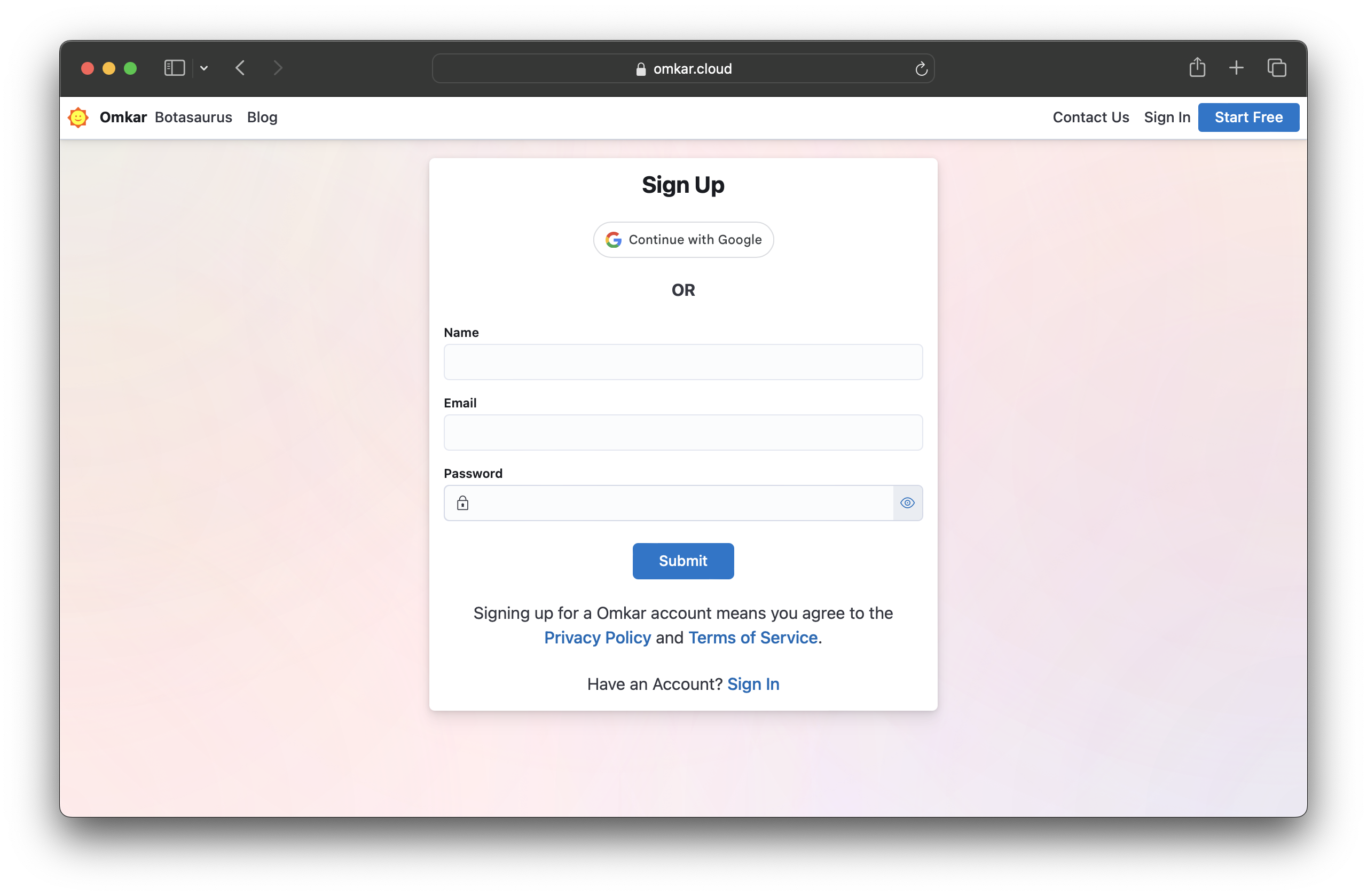
Create an account on Omkar Cloud by visiting this link.
-
Go to the Google Maps Extractor Pricing Page and make a one-time payment of $28 using PayPal or a credit/debit card.
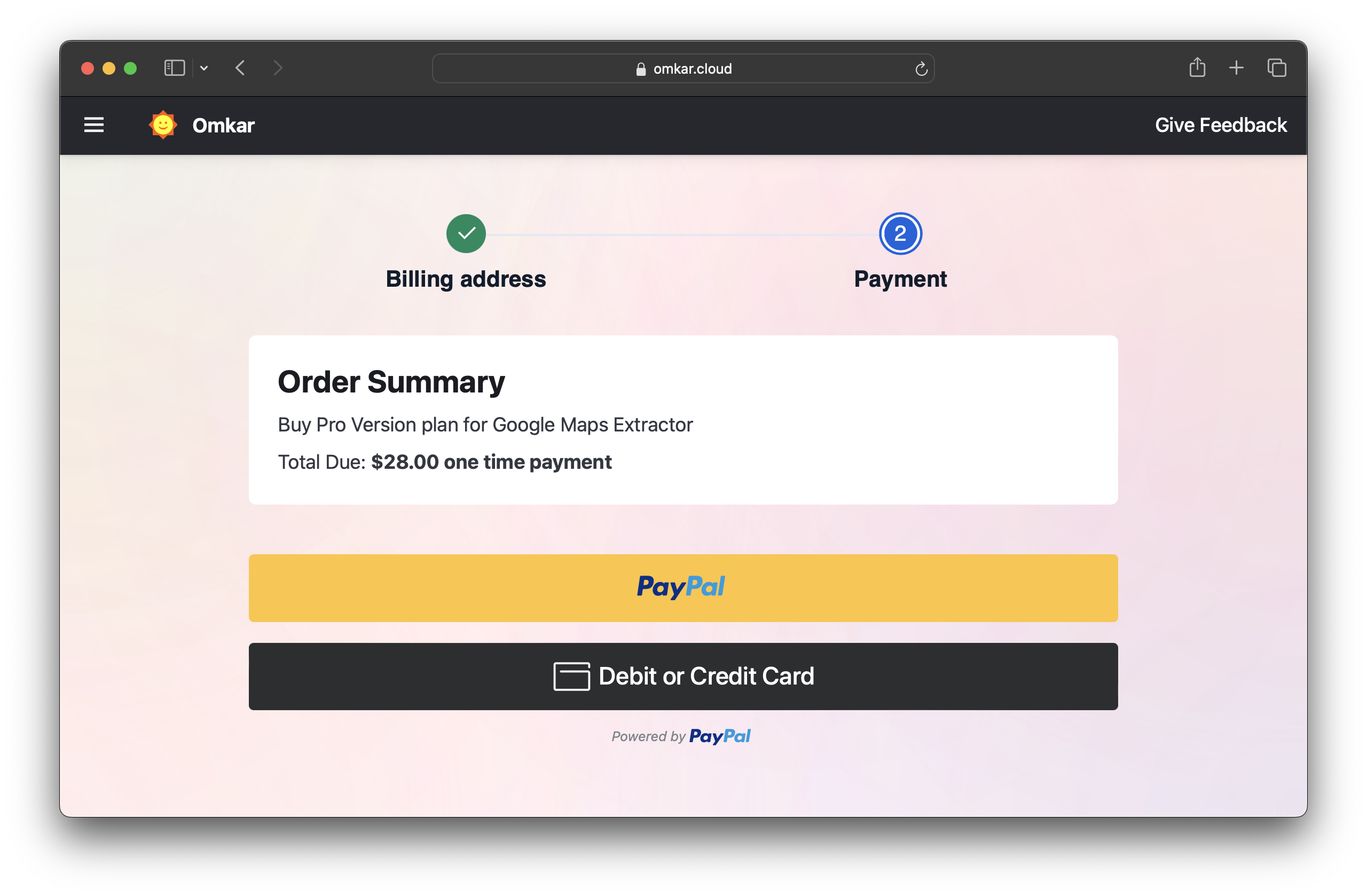
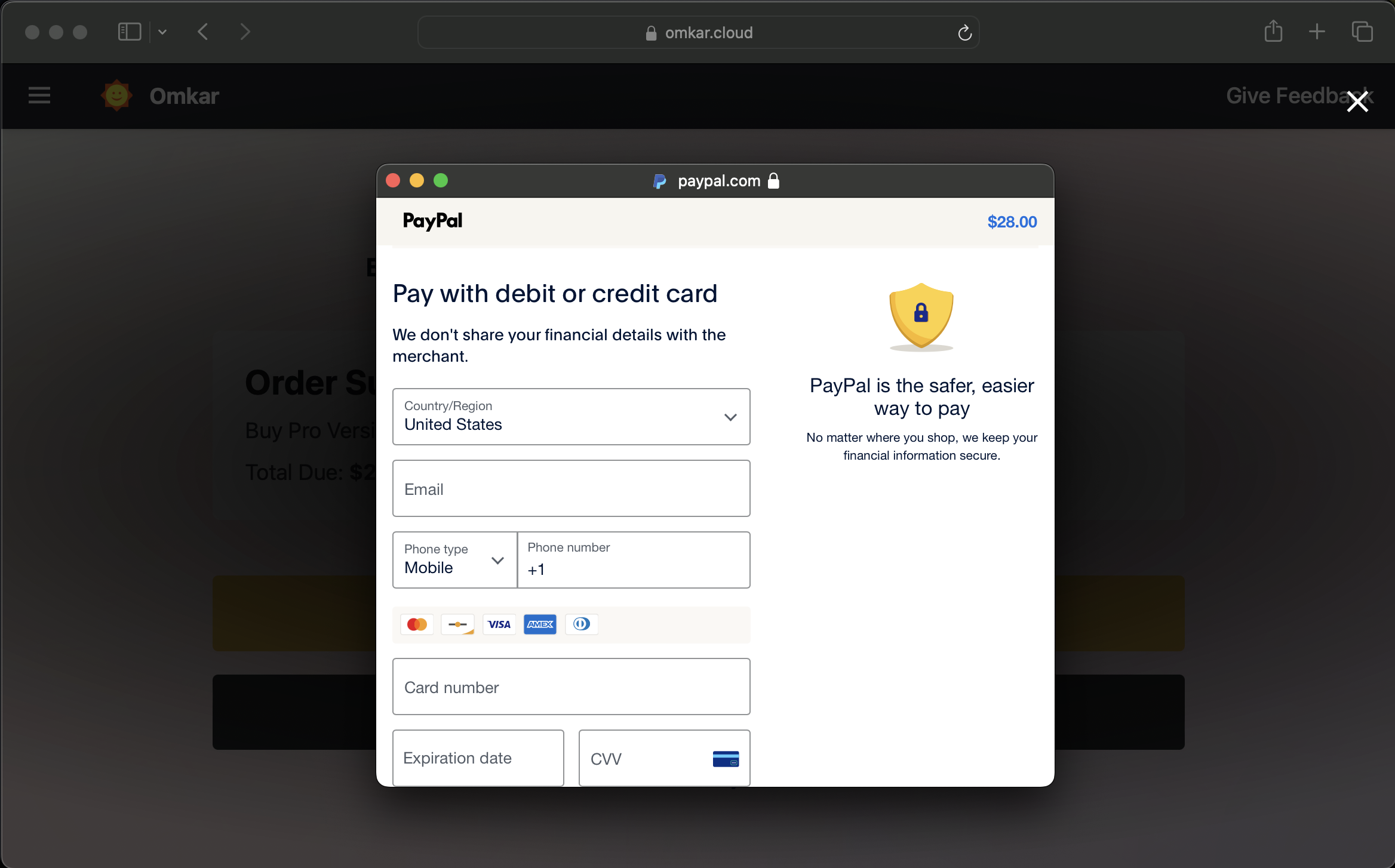
💳 Note: Your card details are handled securely by PayPal and never shared with us.
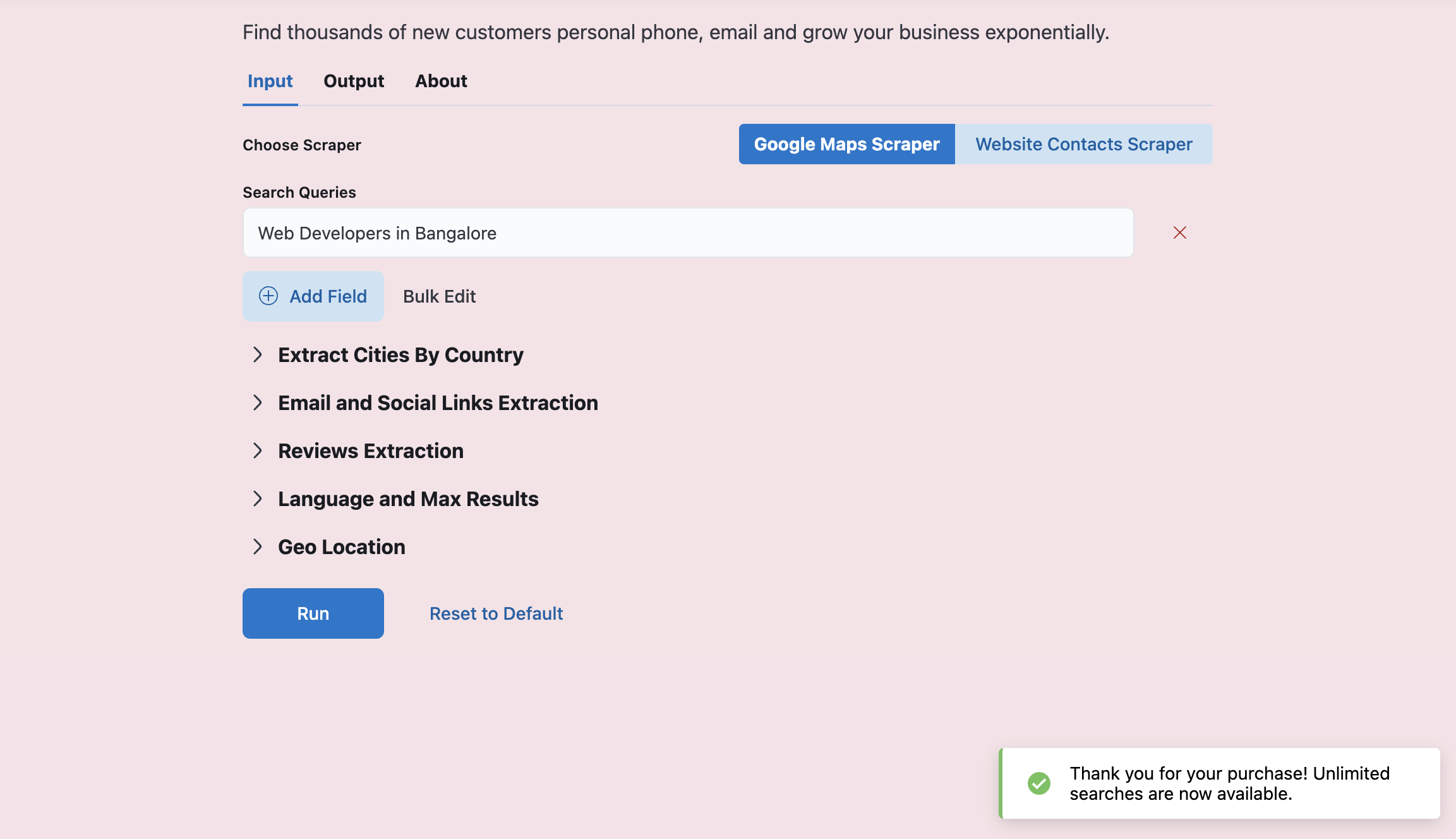
After payment, you'll see a link. Visiting the link will activate the Pro Version for a lifetime.
We offer a 90-day refund guarantee. If the product doesn't meet your needs within that time, you can request a refund through a simple 2-click process.
The risk is on us, not you, because we're confident in what we've created!
Follow these steps:
-
Go to Transactions Page
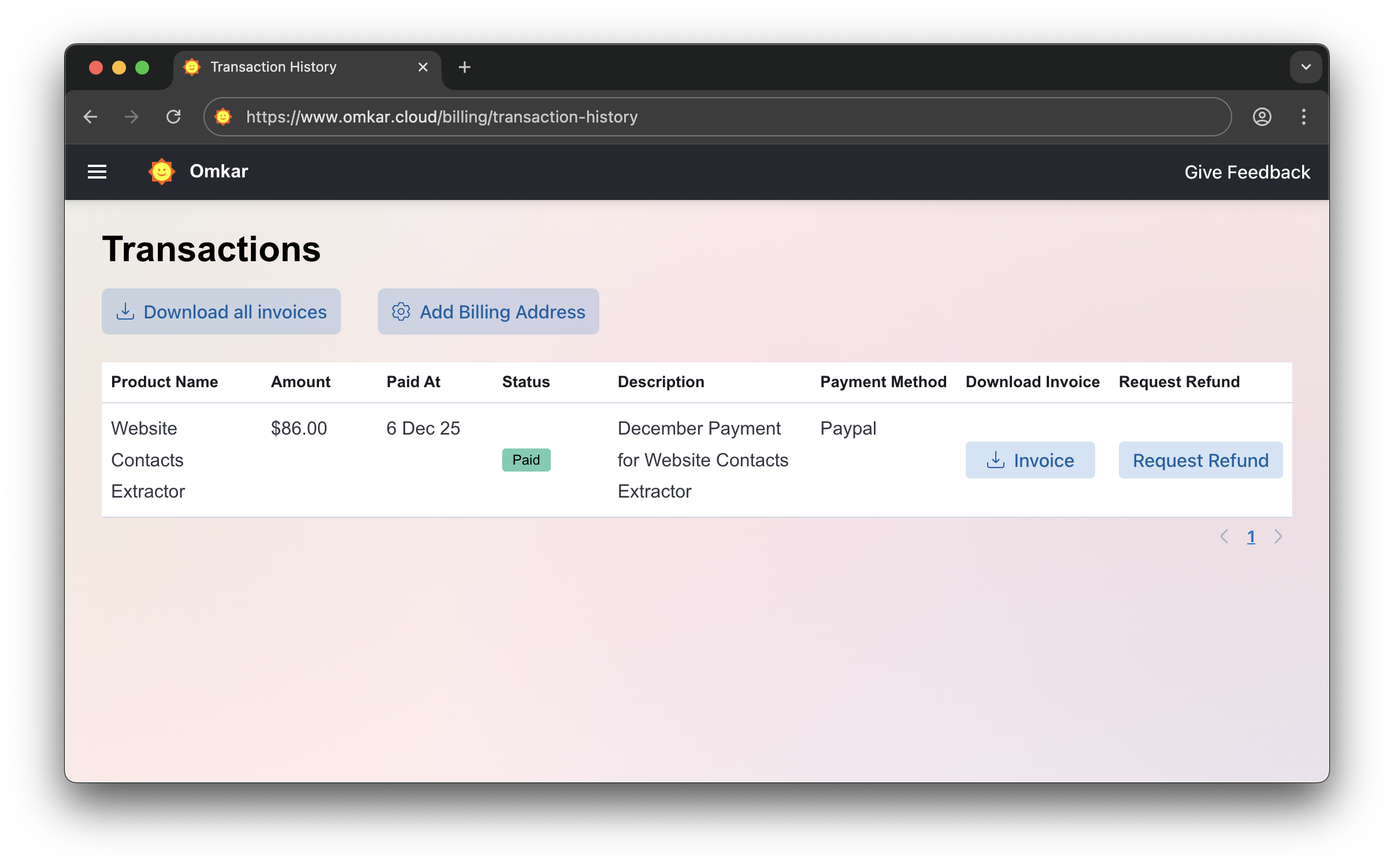
-
Click "Request Refund"
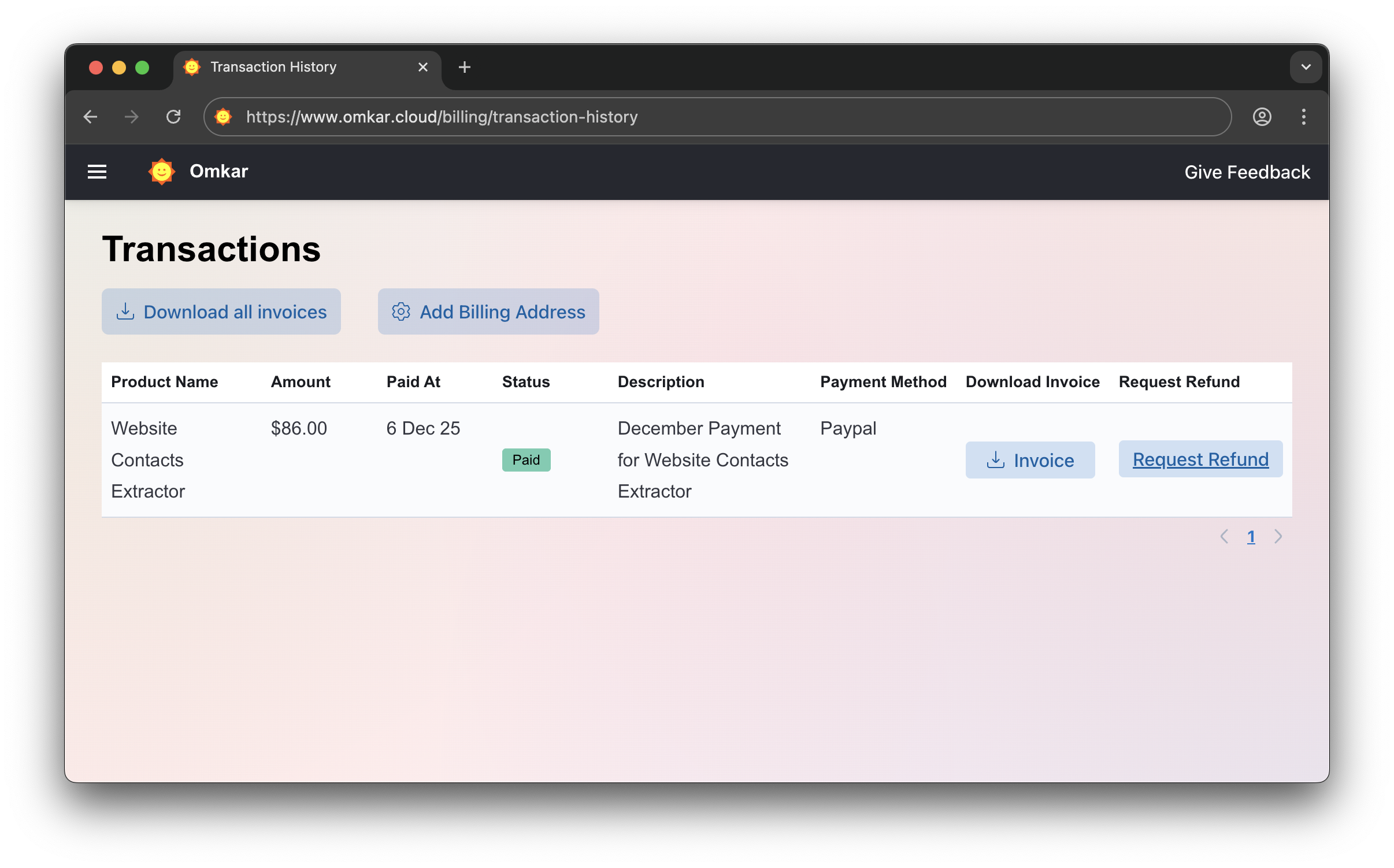
-
Confirm by clicking Request Refund again. Amount will be refunded in 1-2 business days. We’ll email you updates.
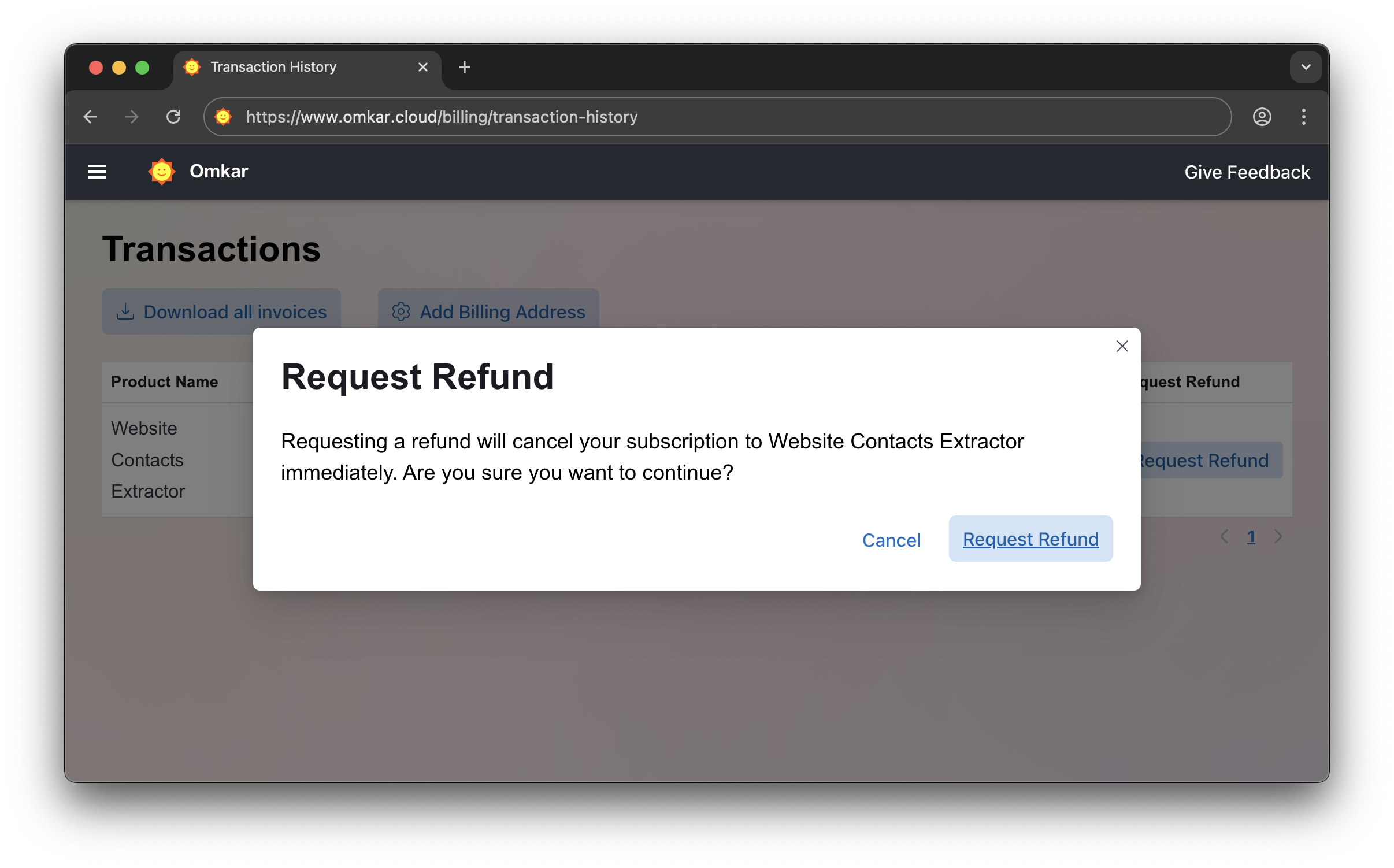
No emails. No explanations. Simple 2-click process.
No catch. It is a simple 2-click process, exactly as described above.
If you are a developer and need to get results programmatically, we offer a dedicated Google Maps Extractor API. It's perfect for integrating Google Maps data directly into your applications or running automated jobs on virtual machines.
The API includes all the features of our pro desktop app, including Unlimited searches and Unlimited devices, plus additional benefits:
- REST API interface
- Detailed documentation for AWS VM installation
The API is available for $16/month, and you can try it free at Google Maps Extractor API.
-
TripAdvisor Scraper: Tripadvisor is the best platform if your target is to find restaurants/hotels. It gives websites + email addresses of the businesses. Try it for free here.
-
Discover more tools: Visit omkar.cloud/tools to explore additional tools. All have free plans available.
We used Botasaurus Desktop, which powers the Google Maps Extractor.
Botasaurus is a web scraping framework that makes life a lot easier for web scrapers.
It handled the hardest parts of our extractor, such as:
- Building a desktop app for Windows, Mac, and Linux.
- Creating a fantastic UI dashboard with task management features.
- Sorting, filtering, and exporting data as CSV, JSON, Excel, etc.
- Caching, parallel, and asynchronous scraping.
If you're a web scraper, I really recommend learning about Botasaurus Desktop here 🚀.
Learning Botasaurus Desktop takes about 25 minutes. If you do web scraping, it can save you thousands of hours over your career.

❓ While a task is in progress, "All Task" shows around 80K results, but after completion it drops to 70K. Why?
We remove duplicates at the end of all tasks, so expect the final count to be lower than what you see during progress.
Google lists the same places across multiple cities, so expect results to drop by 20% to 40% for country-level extraction.
❓ In the exported file, the characters are in English instead of Japanese/Korean/Hindi. How can I preserve the original language when exporting?
When exporting, any non-English characters are converted to English. For example, "しんちゃん" is converted to "Shinchan."
We do this because Excel can't render non-English characters properly.
If you want to retain the original characters and avoid converting them to English, simply uncheck the English conversion checkbox:
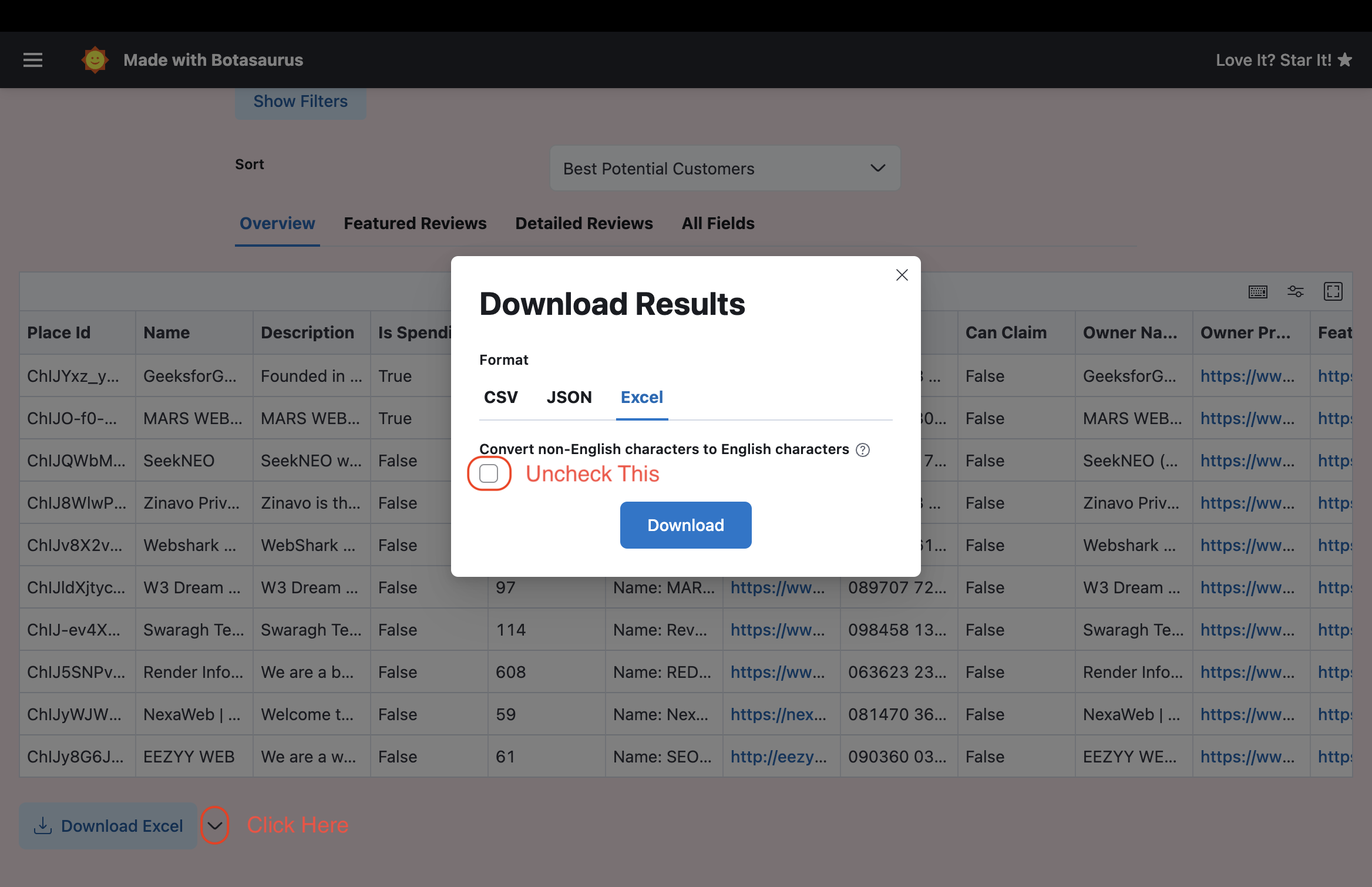
In case you are unable to view the non-English characters properly in Excel, then the easiest solution is to upload the file to Google Sheets, which renders the characters properly.
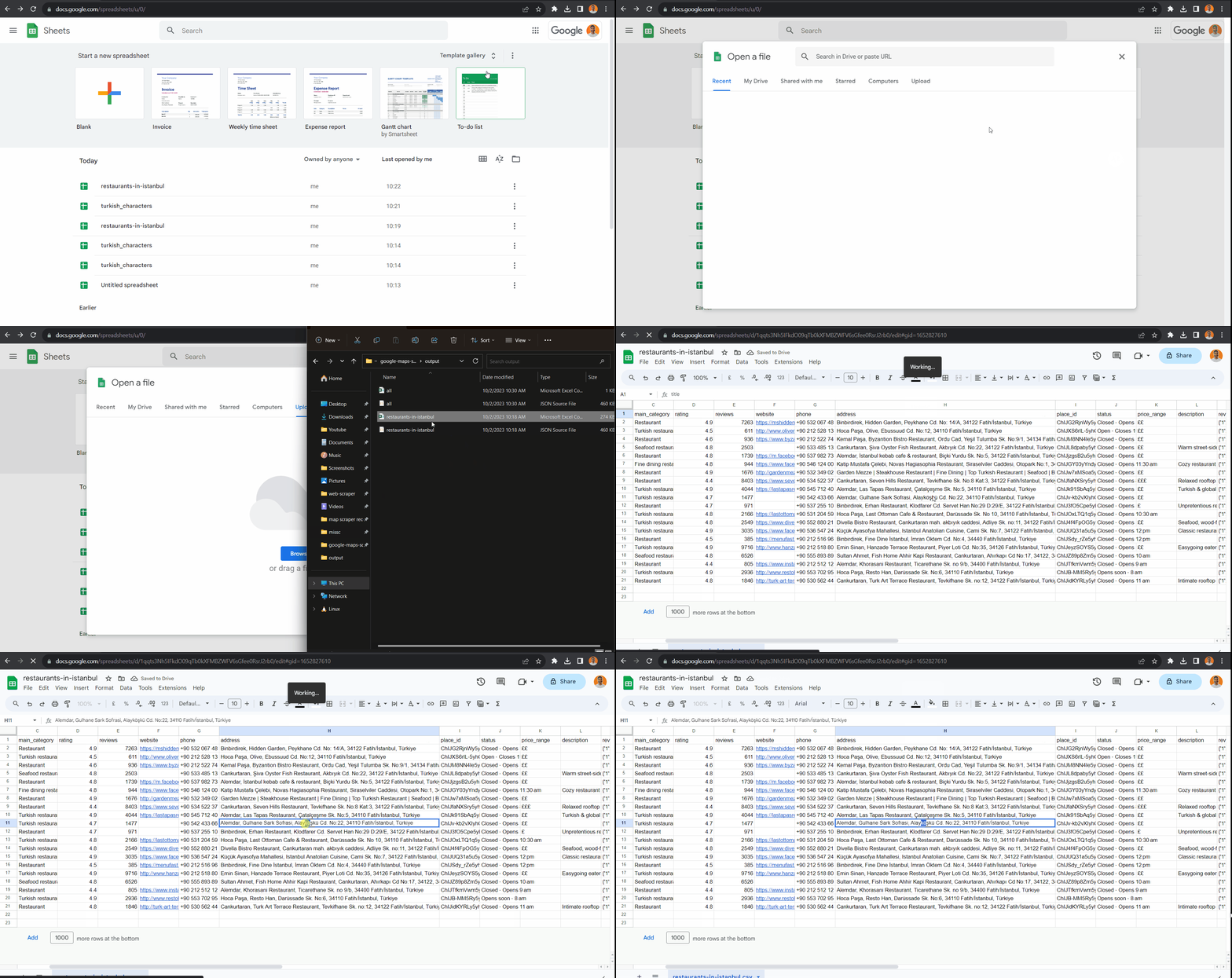
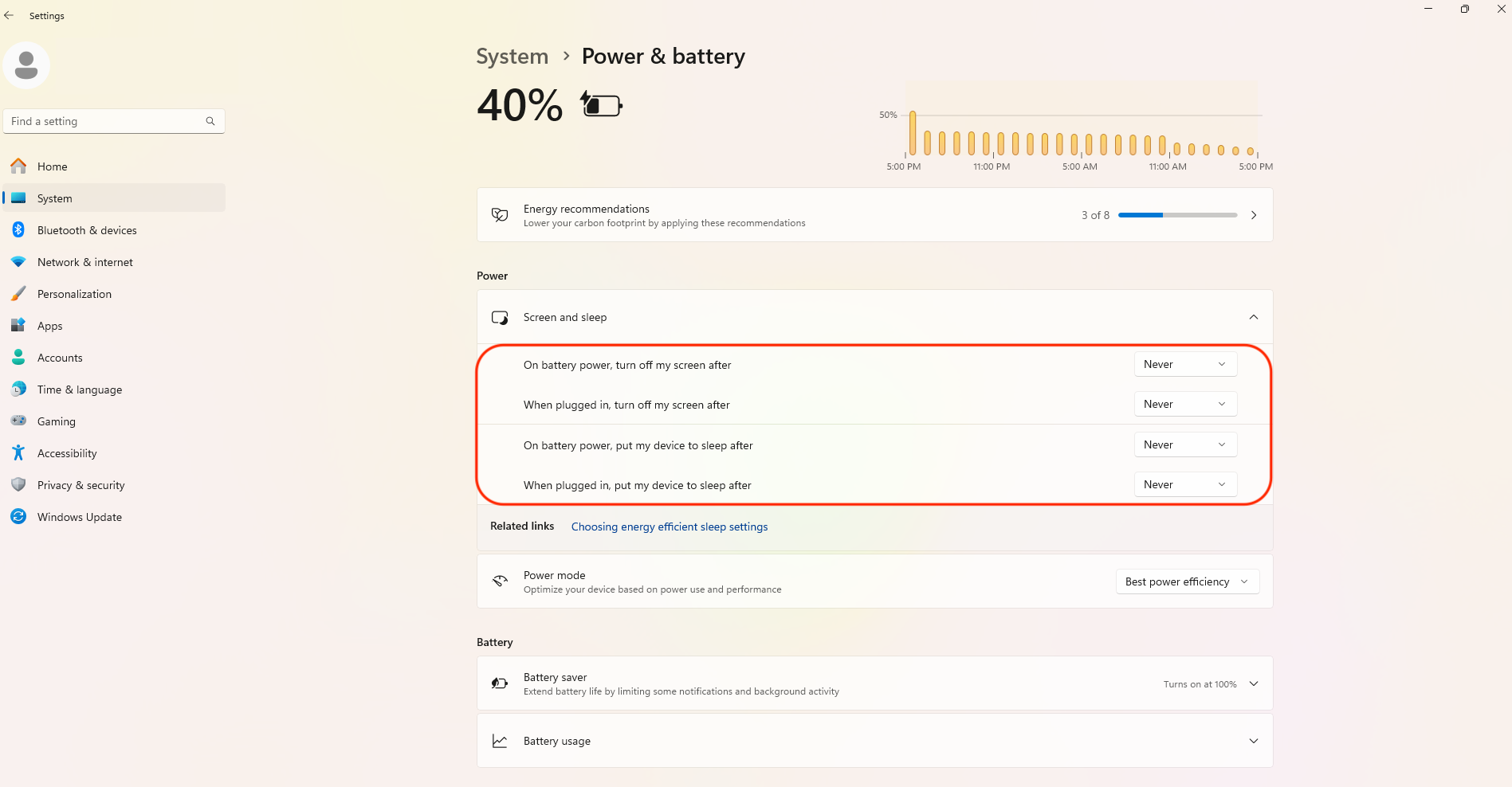
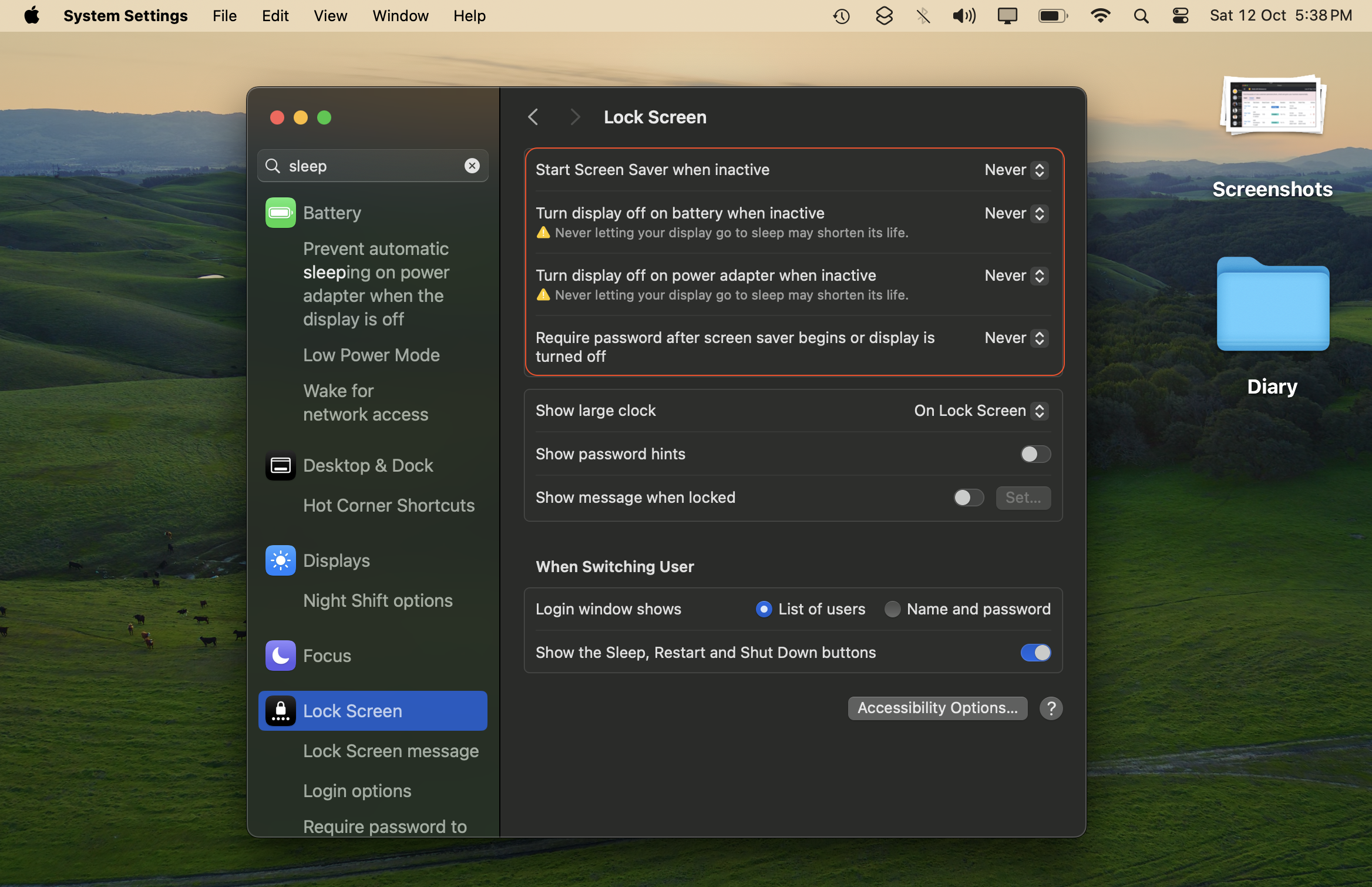
- Disable Auto Sleep Mode Auto sleep mode will prevent the tool from running and cause tasks to fail. Here's how to turn it off:
-
On Windows: Go to Start > Settings > System > Power & battery > System > Screen & Sleep. Set the following settings to "Never"
-
On Mac: Open Settings > Lock Screen, then set the following settings to "Never."
-
Linux?:
You're awesome at computers, so go ahead and figure it out! ;)
- Ensure you maintain a stable Internet connection, as switching connections will cause currently running tasks to fail.
This is a known issue specific to macOS. We expect it to be fixed by December 2026.
To resolve the problem:
- Close this app
- or restart your computer.
After that, Google Chrome will launch normally.
If you need full country data—say all "Restaurants in US" (29.5K cities)—it can take 10–12 days on your system.
With our Done For You service, we refine your search queries for higher-converting customers and deliver in 1-2 days.
Pricing: $180/100K results.
Why use this service?
- Saves extraction time (10-12 days reduced to 1-2 days).
- We help refine queries to target relevant businesses.
- 90-day refund guarantee.
Email us and let us know what you sell and who you're looking for.
Yes, we do big data projects for businesses.
- We work with data daily and have built tools like this product.
- 90-day refund guarantee.
You can email us here to inquire about your project.
Let us know! We consider feature requests and can suggest alternatives if we can't implement them.
We have the most awesome support team in the 🌌 Milky Way galaxy! Just message us and we will solve your query ✅ within 1 working day.


We've poured thousands of hours into building this—so you can find customers and grow your business.
If this tool has been helpful, please give us a star ⭐ on GitHub. You have a big heart ❤️—it takes just one click, and you'll be doing us a great favor.

Made with ❤️ using Botasaurus Web Scraping Framework
If you are a student or a person just starting your business, and the Pro Version is not in your budget, you can let us know via WhatsApp or Email and we will provide you with the Pro Version. Don't hesitate—it will take 5 minutes to WhatsApp/Email, and it will make us happy 😊 to help you.