
Visualise, Query, and Automate Your Cisco ACI Fabric — Without Writing API Calls.










Docs · Quickstart · Releases · Discussions · Report a bug
Anyone who has operated a Cisco ACI fabric long enough ends up with the same pile of tooling around APIC.
A folder full of moquery commands. A Postman collection nobody maintains anymore. Python scripts that manually build /api/mo/... URLs. Screenshots from Visore tabs saved “just in case.” Spreadsheets for bulk changes. Shell history full of copied queries.
The reality is that most ACI operational workflows still live outside APIC itself.
Fabrik brings those workflows into a single place.
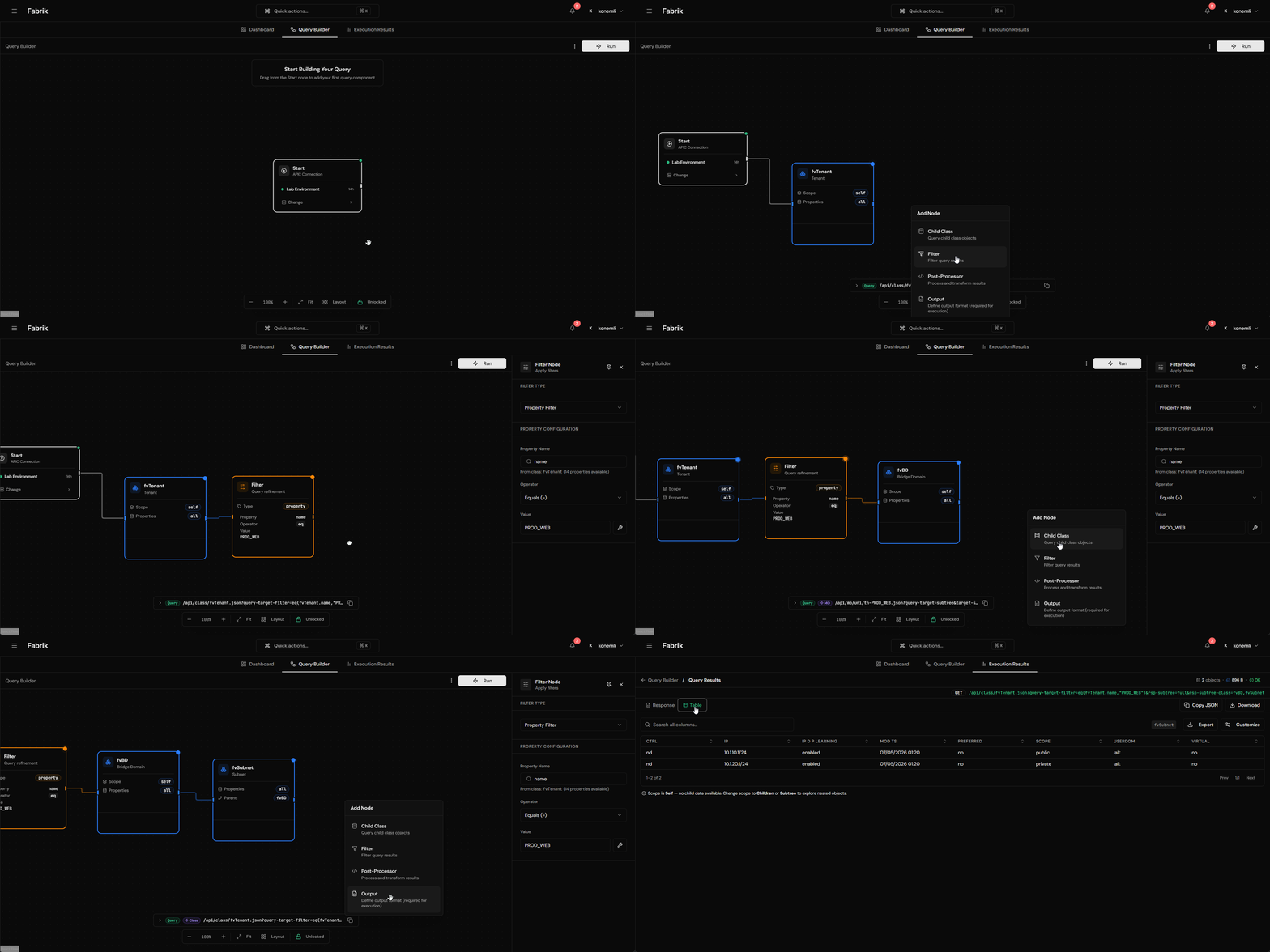
- Visual query builder. Draw a query on a React Flow canvas: drag classes, attach filters, connect parents to children. Fabrik turns the diagram into the right APIC REST call and shows the result as a table you can export.
- A library you can share. Save the queries that work, tag them, give them to your team. New hires stop reinventing the BGP-peer query on day three.
- Time Machine. Snapshot anything you can query. Diff two snapshots side by side, or follow one DN across weeks. Useful when someone asks "did this BD always have this subnet?".
- AWX automation, with guardrails. Build a request from a structured table (each column validated against live APIC data), then hand it to AWX as a job or workflow. AWX pulls playbooks from your own Git (GitLab / GitHub / Gitea); Fabrik never touches your repo.
- MIM browser. The full ACI Managed Information Model (17,500+ classes), searchable by name, label, description, DN pattern, or property. Optional AI assist suggests classes from a plain-English description and validates every suggestion against the live MIM before showing it.
The pieces are designed to work together. A query you save in the Library can become the input source for an automation request. A Time Machine snapshot can be the basis for a diff that triggers an alert. A class lookup on the MIM browser is one click from a new query on the canvas.
You need Docker 24+ and Docker Compose v2. That's it.
mkdir fabrik && cd fabrik
curl -fLo docker-compose.yml https://github.com/onemli/fabrik/releases/latest/download/docker-compose.release.yml
curl -fLo .env.example       https://github.com/onemli/fabrik/releases/latest/download/env.example
cp .env.example .env
Open .env and fill in the four things you have to fill in:
DJANGO_SECRET_KEYandENCRYPTION_KEY: generate fresh values, don't leave the placeholdersPOSTGRES_PASSWORD, plus the same password insideDATABASE_URLon the line belowNEO4J_PASSWORDALLOWED_HOSTSandCORS_ALLOWED_ORIGINS: the hostname you'll actually reach Fabrik at
Then bring it up:
docker compose pull
docker compose up -d
docker compose exec backend python manage.py createsuperuser
Open http://<your-host> (port 80 by default), sign in with the superuser, and head to Settings → MIM Management to import the ACI schema for your APIC version. The import runs in the background and takes around 25 minutes the first time. Once it's done, the canvas knows every class in the fabric.
Everything beyond this (TLS, reverse proxy, backup, upgrade paths, sizing for larger fabrics) is on docs.fabrikops.com.

| Layer | Stack |
|---|---|
| Frontend | React 19, Vite, React Flow, Zustand, TanStack Query, Tailwind |
| Backend | Django 6, DRF, Channels, Daphne ASGI |
| Workers | Celery worker + beat |
| Graph | Neo4j 5.26 (ACI MIM only) |
| Relational | PostgreSQL 17 |
| Cache, broker, channel layer | Redis 8 |
| Optional | AWX / Ansible Tower for automation; LDAP for SSO; SMTP for notifications |
Fabrik is in active development with a stable core that runs in production. Breaking changes are flagged in the changelog and called out in release notes. Bug reports and ideas are welcome.
- Report a bug: GitHub Issues
- Request a feature: GitHub Discussions
- Security disclosure: SECURITY.md
- Release history: CHANGELOG.md
Apache License 2.0. See LICENSE.
Cisco, ACI, APIC, and AWX are trademarks of their respective owners. Fabrik is an independent open-source project and is not affiliated with or endorsed by Cisco Systems.