


A sawtooth rag, on the web. Shapes text into alternating long/short lines — the kind of typographic rhythm that reads as design, not accident.
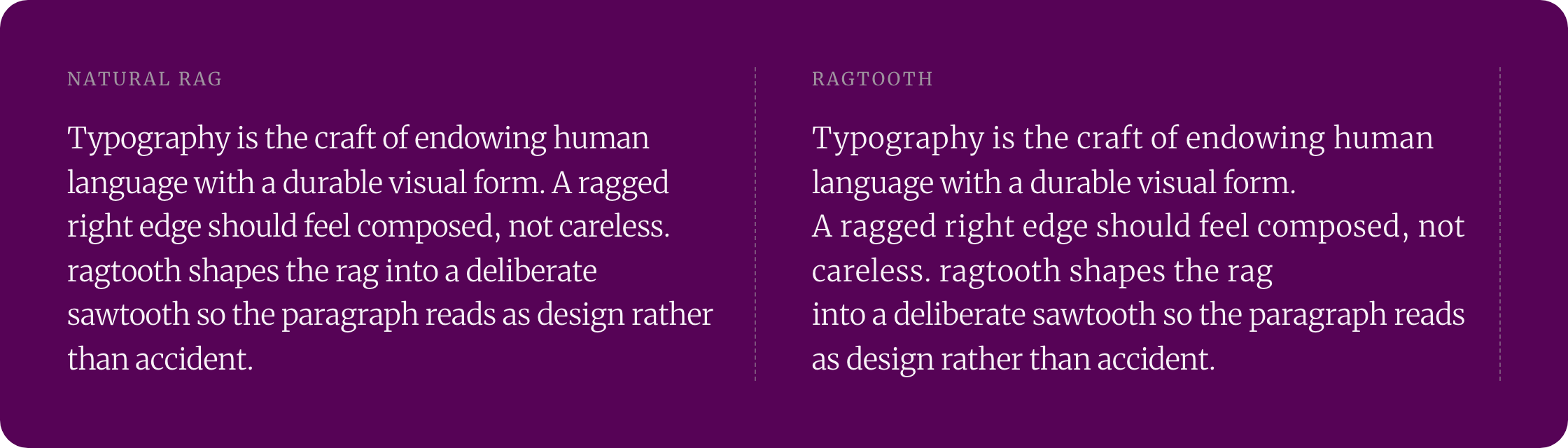
The rag is the uneven right edge of unjustified text. Left to the browser it falls where it falls. Ragtooth measures each natural line and reshapes that edge into a deliberate, repeating zig-zag — short line, full line, short line — so the paragraph looks composed instead of accidental.
ragtooth.com · npm · GitHub
TypeScript · Zero dependencies · ~3.4 kB min+gzip · React + Vanilla JS · no-build <script> embed
Before you use it. Ragtooth sets its own line breaks in the browser, so a paragraph usually gains a line or two (0–28% taller in our measurements), and server-rendered text is re-broken once after the page loads (and again when web fonts finish loading), a small layout shift (CLS 0.022 for one 150-word paragraph in our test). It suits left-aligned body copy at reading sizes; at display sizes the pattern can invert. Drag the sliders at ragtooth.com to see it on your own terms.
npm install @overpunch/ragtoothimport { RagText } from '@overpunch/ragtooth'
<RagText sawDepth={120} sawPeriod={2}>
Your paragraph text here...
</RagText>RagText renders a <p> by default and forwards every standard HTML attribute, so className, style, id, aria-*, and data-* pass straight through — no wrapper element needed:
<RagText as="h2" className="lede" sawDepth={40}>
  A heading with a shaped rag
</RagText>| Prop | Type | Default | Description |
|---|---|---|---|
as |
ElementType |
"p" |
The element to render. |
children |
ReactNode |
— | The text to shape. String children are re-measured automatically when they change — no key prop required. For JSX children that change, pass a key. |
(all RagOptions) |
— | — | sawDepth, sawPeriod, sawPhase, sawAlign, maxTracking, resize — see Options. |
| (any HTML attribute) | — | — | className, style, id, aria-*, data-*, etc. are forwarded to the rendered element. |
import { useRag } from '@overpunch/ragtooth'

const { ref } = useRag({ sawDepth: 120, sawPeriod: 2 })

<p ref={ref}>Your paragraph text here...</p>
useRag returns { ref } — destructure it and attach ref to any block element. Re-runs on resize automatically.
HTML from a CMS or Markdown renderer works through the hook. Pass the HTML string as the second argument (contentKey) so new content is re-measured:
"use client"
import { useRag } from '@overpunch/ragtooth'

export function ArticleBody({ html }: { html: string }) {
  const { ref } = useRag({ sawDepth: 120 }, html)
  return <div ref={ref as React.RefObject<HTMLDivElement>} dangerouslySetInnerHTML={{ __html: html }} />
}
Every <p>, <li>, heading and <blockquote> inside the container is ragged on its own; links, <em> and <strong> keep their attributes. (Covered by a test in src/__tests__/react.test.tsx.) One hook on the article container is enough; you don't need one per paragraph.
In the App Router, fetch in a server component and pass the HTML down:
// app/posts/[slug]/page.tsx (server component)
import { ArticleBody } from './ArticleBody' // the "use client" component above

export default async function Post({ params }: { params: Promise<{ slug: string }> }) {
  const { slug } = await params
  const { html } = await getPost(slug) // your CMS call
  return <ArticleBody html={html} />
}
The server HTML is painted with the browser's own rag first; the hook re-breaks it when the component hydrates, which is the layout shift quantified under Measured.
import { applyRag, removeRag } from '@overpunch/ragtooth'

const el = document.querySelector('p')
const originalHTML = el.innerHTML

// Apply the rag
applyRag(el, originalHTML, { sawDepth: 120, sawPeriod: 2 })

// Remove it (restores original HTML)
removeRag(el, originalHTML)
To re-run when the column changes width (the React hook and the embed do this for you):
let lastWidth = 0
new ResizeObserver(([entry]) => {
  const width = Math.round(entry.contentRect.width)
  if (width !== lastWidth) { lastWidth = width; applyRag(el, originalHTML, { sawDepth: 120 }) }
}).observe(el)
Wait for fonts before measuring:
const originalHTML = el.innerHTML
await document.fonts.ready
applyRag(el, originalHTML, { sawDepth: 120 })
Capture originalHTML before any mutation so the fonts.ready call receives clean HTML, not the previously-instrumented markup.
Without React installed, import from @overpunch/ragtooth/core instead (same functions, no React import).
As an ES module from a CDN (dist/core.js has no imports):
<script type="module">
  import { applyRag } from 'https://cdn.jsdelivr.net/npm/@overpunch/ragtooth@1/dist/core.js'
  await document.fonts.ready
  document.querySelectorAll('.prose p').forEach((p) => applyRag(p, p.innerHTML, { sawDepth: 120 }))
</script>
Or with the drop-in script (the same one the Webflow integration uses), which rags every element marked data-ragtooth once fonts are ready, re-runs on resize, and picks up elements added later:
<script src="https://cdn.jsdelivr.net/npm/@overpunch/ragtooth@1/dist/ragtooth.webflow.min.js"></script>

<p data-ragtooth data-rt-saw-depth="120" data-rt-saw-period="2">Your paragraph text here...</p>
Options map to data-rt-saw-depth, data-rt-saw-period, data-rt-saw-phase, data-rt-saw-align, data-rt-max-tracking, and data-rt-resize="false". Both snippets were checked against the local dist/ build by scripts/measure.mjs.
Ragtooth measures every word's width (wrapping each word in a span), then sets its own line breaks by adding up those widths:
- Long lines — fill up to the container's content width
- Short lines — every
sawPeriod-th line breaks earlier, atcontent width − sawDepth - Tracking — each line except a paragraph's last is filled out with
letter-spacing, up tomaxTracking - No widows — the last two words of each block stay together
Each line is then locked (white-space: nowrap, a <br> after it). Because Ragtooth chooses the breaks, they differ from the browser's: a paragraph usually gains a line or more (0–28% taller in our measurements). Words still break after hyphens; a single word wider than the column wraps only if your CSS allows breaking inside words (overflow-wrap).
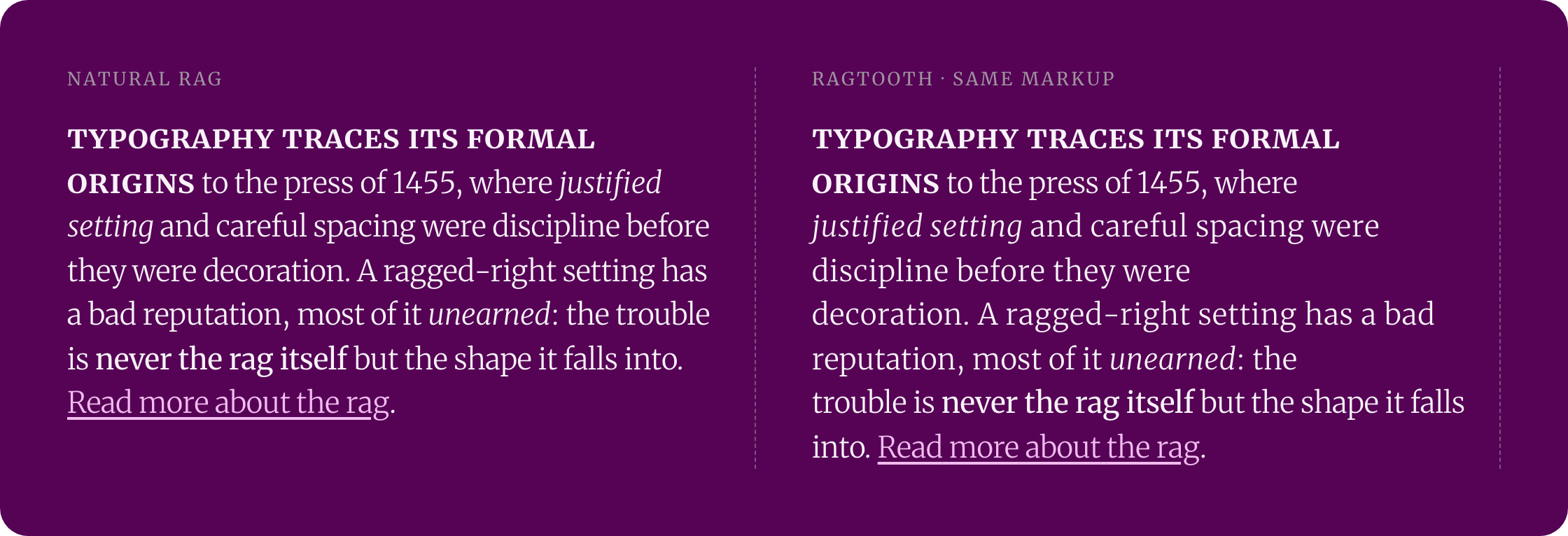
Markup: inline elements (<em>, <a>, <strong>…), your own <br> and images, and the spaces between elements are kept, and the original elements are reused, so event listeners on them (React's included) keep working. An element that runs across a line break is split into one copy per line (a link over two lines becomes two links; only the first keeps its id). getCleanHTML() returns the original markup. Nested blocks are handled: in <li><p>…</p></li> the <p> is ragged.
Limits:
- Ragtooth makes ragged text, so
text-align: justifyis overridden, andwhite-space: preis not supported. - At large sizes (few words per line) the pattern can invert: a long line can't always be longer than a short one.
- Lines are measured with the fonts loaded at the time. The React hook re-runs after
document.fonts.ready; with the vanilla API, callapplyRagagain once fonts load.
ResizeObserver (React hook, Webflow embed) re-runs on any container width change, and when the element's font size changes at the same width (text-only zoom, a responsive font-size). Calling applyRag again is safe — it resets to the original content before re-measuring, so repeated calls (e.g. on resize) never compound, even if you pass the element's current, already-ragged innerHTML.
text-wrap: balance evens out line lengths and text-wrap: pretty avoids a very short last line. Both make the rag smoother. Neither can make it alternate on purpose, which is what ragtooth does.
For styling or debugging, a ragged block looks like this (classes are exported as RAG_CLASSES):
<p>
  <span class="rag-line" style="display: inline-block; white-space: nowrap; letter-spacing: …px">
    <span class="rag-word">Typography</span> <span class="rag-word">is</span> …
    <span class="rag-line-info" style="display: none" aria-hidden="true" data-ideal-width="…" data-line-width="…"></span>
  </span><br class="rag-break" aria-hidden="true">
  …
</p>
The last line has no letter-spacing and no rag-line-info.
node scripts/measure.mjs sets a ~150-word paragraph at 18px/1.5 in four fonts (Merriweather, Georgia, Arial, Times New Roman) and four column widths (300, 420, 560, 720 px), 16 paragraphs per setting, in headless Chromium on macOS:
| Natural rag | Default (sawDepth: 80) |
Recommended (sawDepth: 120) |
|
|---|---|---|---|
| Mean step between consecutive line ends | 12.8–35.6 px | 77.1–92.9 px | 115.2–131.7 px |
| Paragraph height vs. natural | — | +0–20% | +0–28% |
| Short lines not shorter than a long neighbour | — | 2 (Merriweather at 300 and 420 px) | 0 |
| Lines wider than the column | — | 0 | 0 |
Time for one applyRag call plus the layout it causes (Merriweather, 560 px, median of 7 runs, two script runs): 1.5 ms for 100 words, 6.3–6.7 ms for 500, 23–25 ms for 2,000. One call handles every block in the element, so a whole article costs about what its word count suggests.
Layout shift: a painted 150-word paragraph with a 300 px block under it, ragged afterwards in an 800×900 viewport, scored CLS 0.022. The shift is the paragraph's extra height, so it grows with the content below it in the viewport. Ragtooth has no built-in way to hide that; if it matters, rag below the fold or reserve the extra height. Each resize re-runs it, one run per animation frame at most in the hook and embed.
Ragtooth shapes the visual edge of a paragraph; the reading order, words, and text content are unchanged. A few things worth knowing because the effect works by mutating the DOM:
- Word wrapping. Each word is wrapped in an inline
<span>; the spaces between words are kept, so the text reads as before. Injected line breaks arearia-hidden, but copied text includes a line break at each line end (a 15-line paragraph copied with 14). - Links. A link that wraps across lines becomes one link per line, which a screen reader announces separately. Keep links short, or leave such text unragged.
- Letter-spacing. Every line but the last is filled out with
letter-spacingup tomaxTracking. KeepmaxTrackingmodest (the0.7default is conservative) so spacing stays within comfortable reading limits — this respects WCAG 1.4.12 Text Spacing, which expects text to remain readable when users override spacing. Ragtooth doesn't detect such an override: a user stylesheet that setsletter-spacing/word-spacingwith!important(the 1.4.12 values) after the rag has run widened locked lines past the column by 167 px in our test, and callingapplyRagagain brought that to 0. - Zoom. Full-page zoom changes the container's width and text-only zoom changes its font size; the React hook and the embed re-run on both. (With text 1.5× larger at the same width and no re-run, locked lines overflowed by 262 px.) With the vanilla API, call
applyRagagain yourself. - Reset for export.
getCleanHTML(el)returns the markup with every injected span removed — use it before serialising, copying, or persisting content so you store clean HTML, not instrumented markup. - Best on body copy. Like all rag shaping, it reads best on left-aligned, unjustified prose. It is decorative: if
letter-spacingis set very high it can hurt legibility, so tunesawDepth/maxTrackingto taste.
- Browsers — any evergreen browser. Relies on
ResizeObserveranddocument.fonts.ready, both supported in Chrome/Edge 64+, Firefox 69+, and Safari 11.1+. - SSR — the core guards on
typeof windowand no-ops on the server; the React entry points need a browser (see Next.js). - React — optional peer dependency,
react/react-dom>=17. The main entry also exports the hook and component, so it importsreact; without React installed, import the vanilla API from@overpunch/ragtooth/core. - Size — zero runtime dependencies. Min+gzip: 3.4 kB for the vanilla core (
/core), 4.3 kB for the main entry with the React hook and component (React not included), 4.4 kB for the no-build embed script. Measured by minifyingdist/with esbuild and compressing withgzip -9.
Recommended starting point: sawDepth: 120, sawPeriod: 2 for body copy at a comfortable measure (~60–75 characters), then tune sawDepth up for a more dramatic zig-zag or down for a subtler one. Leave the rest at their defaults to begin with.
| Option | Type | Default | Description |
|---|---|---|---|
sawDepth |
RagValue |
80 |
How far short lines are pulled in from full width. Higher = more pronounced sawtooth. |
sawPeriod |
number |
2 |
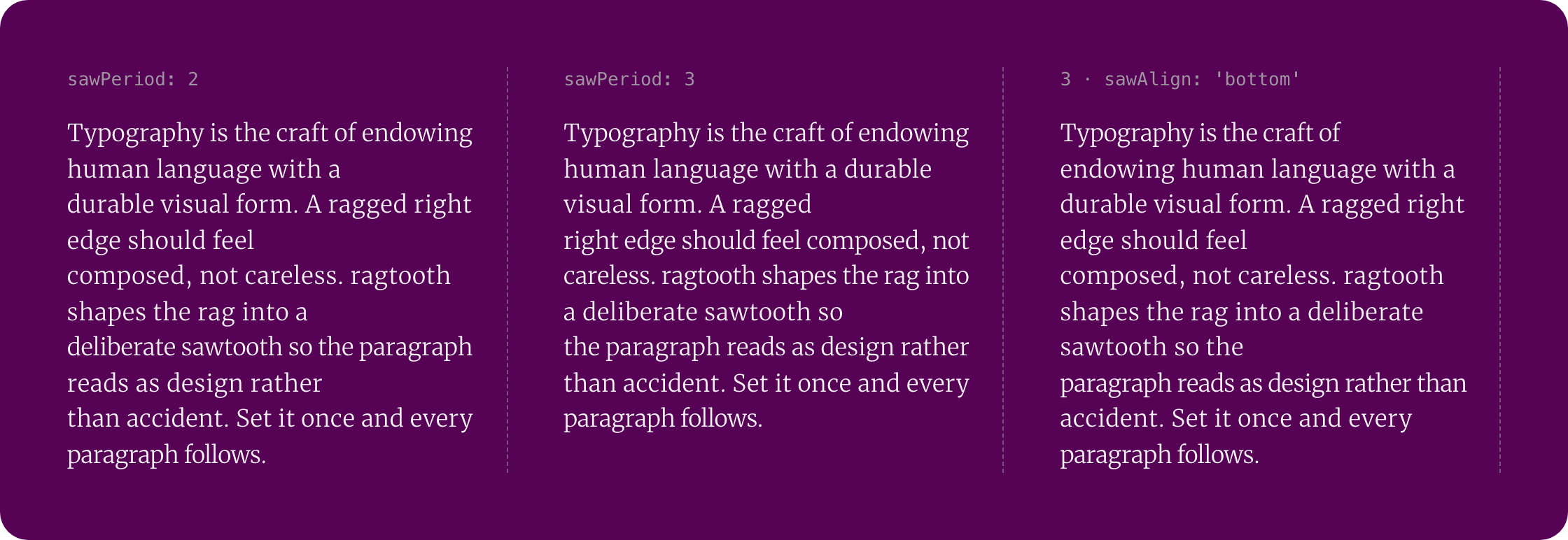
Lines per saw cycle. 2 = alternating long/short. 3 = two long, one short. 4 = three long, one short. |
sawPhase |
number |
sawPeriod |
Which line in each cycle is shortened (1-indexed). Default = last line. |
sawAlign |
'top' | 'bottom' |
'top' |
Whether the cycle is anchored from the top or bottom of the block. 'bottom' counts the cycle from the last line, so the lines just before the end are never the shortened ones. |
maxTracking |
RagValue |
0.7 |
Maximum letter-spacing any line can receive. Prevents grotesque stretching on very short lines. |
resize |
boolean |
true |
Whether to re-run when the container resizes. Set to false for static contexts. |
ragDifference |
number |
— | Deprecated alias for sawDepth (warns once). |
All size options (sawDepth, maxTracking) accept a RagValue — a number or a CSS-like string:
| Input | Resolves to |
|---|---|
80 |
80px |
"80px" |
80px |
"20%" |
20% of container width |
"2em" |
2× the element's computed font-size |
"1rem" |
1× the root font-size |
"5ch" |
5× the width of the "0" glyph |
// Count the cycle from the end, so the closing lines aren't the shortened ones
applyRag(el, el.innerHTML, {
  sawDepth: 100,
  sawPeriod: 3,
  sawAlign: 'bottom',
})
// Period of 3 from the bottom: lines count as [short, full, full] per group
// → the penultimate line is never shortened (the last line holds whatever words remain)// sawPeriod: 3, sawPhase: 2
// → pattern per 3-line group: [full, SHORT, full]
applyRag(el, el.innerHTML, { sawPeriod: 3, sawPhase: 2 })import { applyRag, removeRag, getCleanHTML } from '@overpunch/ragtooth'
import type { RagOptions, RagValue } from '@overpunch/ragtooth'
const options: RagOptions = {
sawDepth: '15%',
sawPeriod: 3,
sawAlign: 'bottom',
maxTracking: '0.05em',
}| Export | Description |
|---|---|
applyRag(el, originalHTML, options?) |
Applies the sawtooth rag to el. |
removeRag(el, originalHTML) |
Restores el to its original HTML. |
getCleanHTML(el) |
Returns the element's current HTML with all injected spans removed. |
useRag(options?, contentKey?) |
React hook — returns { ref }. Attach ref to any block element. Measures and re-runs on resize. Pass a string as contentKey (e.g. the HTML or text) to re-measure when the content changes. |
RagText |
React component wrapper around useRag. |
RagOptions |
TypeScript interface for all options. |
RagValue |
Type for size options (number | string). |
RAG_CLASSES |
Object of CSS class names injected by the algorithm (rag-word, rag-line, etc.). |
RagText and useRag require a browser environment. Add "use client" to any component that uses them:
"use client"
import { RagText } from '@overpunch/ragtooth'git clone https://github.com/over-punch/Ragtooth.git
cd Ragtooth
npm install
npm run build # bundle to dist/ (Vite, ESM + CJS + .d.ts)
npm test # run the unit tests (Vitest, happy-dom)
npm run typecheck # tsc --noEmit
npm run capture # regenerate the README images (assets/hero.png, markup.png, period.png)
node scripts/measure.mjs # re-run the measurements quoted in this README (after npm run build && npm run build:webflow)The source is organised the same way as the rest of the type-tools suite:
src/core/— the framework-agnostic algorithm (adjust.ts), options resolver (resolve.ts), and shared types. No React imports.src/react/— theuseRaghook andRagTextcomponent.src/__tests__/— Vitest unit tests for the core, resolver, types, and React layers.
Issues and PRs are welcome at github.com/over-punch/Ragtooth.
package.json at the repo root lists next as a devDependency. This is a Vercel detection workaround — not a real dependency of the npm package. Vercel's build system inspects the root package.json to detect the framework; without next present it falls back to a static build and skips the Next.js pipeline, breaking the /site subdirectory deploy.
The package itself has zero runtime dependencies. Do not remove this entry.