


Paragraph text enters from randomised letter-spacing and transitions to optical equilibrium. A page-load animation that feels typographic rather than decorative — lines staggered, motion purposeful. Like watching a compositor tune a paragraph. Respects prefers-reduced-motion.
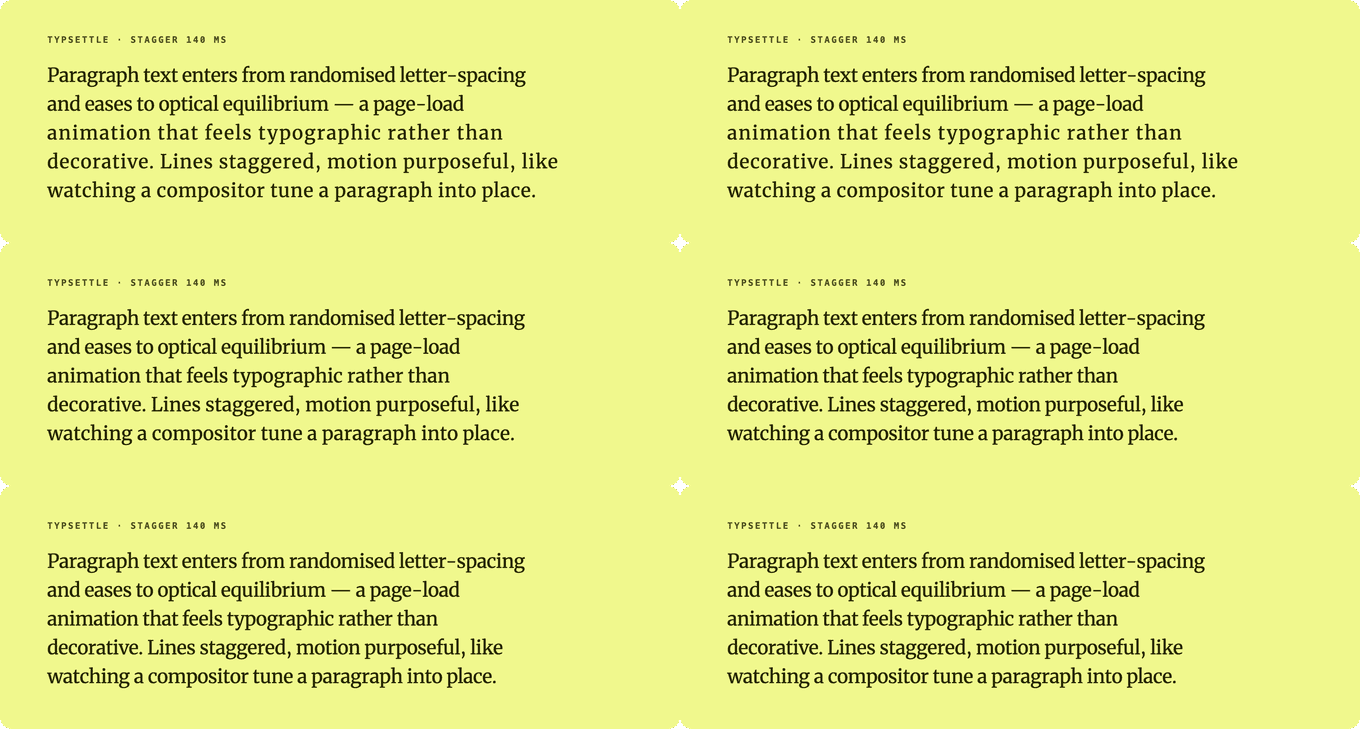
Each line starts at a random tracking offset and eases to its settled spacing, staggered line by line. (live demo)
typsettle.com · npm · GitHub
TypeScript · Zero runtime dependencies (5.1 kB gzip for /core, 6.6 kB with the React bindings) · React, vanilla JS, Webflow and Framer
npm install @overpunch/typsettleOne script tag from jsDelivr, then mark any element with data-typsettle. It runs once the DOM is parsed and web fonts have loaded, and re-runs when the element's width changes.
<!-- Webflow: Site Settings → Custom Code → Footer, or an Embed element -->
<script src="https://cdn.jsdelivr.net/npm/@overpunch/typsettle/dist/typsettle.webflow.min.js"></script>

<h1 data-typsettle data-ts-stagger="80">Your headline</h1>
<p data-typsettle data-ts-spread="0.03" data-ts-duration="1000">Your paragraph text here...</p>
Every option has a data-ts-* attribute: data-ts-spread, data-ts-duration, data-ts-easing, data-ts-stagger, data-ts-active, data-ts-target-tracking, data-ts-direction, data-ts-intersect, data-ts-quiet-replay and data-ts-line-detection (see Options). Numbers are plain (data-ts-spread="0.04" is em, durations are ms), switches take true or false (data-ts-intersect="true"), and data-ts-target-tracking takes a number or auto. window.Typsettle.restart() replays every marked element, restart(el) one of them; init() (or init(container)) picks up elements added later, and destroy(el) stops managing an element and restores its original markup.
The script URL has no version, so it always loads the latest release. Pin one (https://cdn.jsdelivr.net/npm/@overpunch/typsettle@1.1.1/dist/typsettle.webflow.min.js) if you want to choose when updates reach your site.
Framer: a code component lives in src/framer/Typsettle.tsx. Paste it into Framer (Insert → Code → New Component); it loads the core from a CDN, so there is nothing to install.
Next.js App Router: this library uses browser APIs. Add
"use client"to any component file that imports from it.
Leave room on the right. With the default
direction: 'expand', lines start wider than the column and can run past it for a moment (25 px in the measurement under Performance & accessibility). On a full-width element that can mean a brief horizontal scrollbar on mobile: give the element a parent withoverflow-x: clip, or usedirection: 'compress'.
'use client'

import { SettleText } from '@overpunch/typsettle'

<SettleText spread={0.04} duration={800} stagger={80}>
  Your paragraph text here...
</SettleText>'use client'
import { useSettle } from '@overpunch/typsettle'
// Inside a React component:
const { ref, replay } = useSettle({ spread: 0.04, duration: 800, stagger: 80 })
return <p ref={ref}>Your paragraph text here...</p>The hook returns a replay function so you can re-run the settle on demand — here, a complete component with a replay button:
'use client'

import { useSettle } from '@overpunch/typsettle'

export function SettlingParagraph() {
  const { ref, replay } = useSettle({ spread: 0.04, duration: 800, stagger: 80 })
  return (
    <>
      <p ref={ref}>
        Paragraph text enters from randomised letter-spacing and eases to
        optical equilibrium.
      </p>
      <button onClick={replay}>Replay</button>
    </>
  )
}import { applySettle, removeSettle, replaySettle, getCleanHTML } from '@overpunch/typsettle'
const el = document.querySelector('p')
const original = getCleanHTML(el)
applySettle(el, original, { spread: 0.04, duration: 800, stagger: 80 })
// Re-run after custom fonts load — line detection uses BCR, which gives wrong
// line groups if the font hasn't swapped in yet. applySettle resets to original first,
// so re-calling it is safe:
document.fonts.ready.then(() => {
applySettle(el, original, { spread: 0.04, duration: 800, stagger: 80 })
})
// The line spans remain in the DOM after the animation completes.
// Call removeSettle to restore original markup (e.g. before re-running):
// removeSettle(el, original)
// Replay the settle animation on a previously-settled element:
// replaySettle(el)SettleText also takes className, style and any other HTML attribute, and its children can include inline elements (<em>, <a>, …). It re-runs when the children change.
With next/font or any other web font there is nothing extra to do in React: the hook (and so SettleText) re-runs once document.fonts.ready resolves, and again whenever the element's width changes.
import type { SettleOptions } from '@overpunch/typsettle'

const opts: SettleOptions = { spread: 0.04, duration: 800, stagger: 80, active: true }The animation is client-only by design — it reads live browser layout to detect line breaks, so it never runs on the server. Render your text normally (it ships as plain markup, fully indexable and accessible), and the settle wraps and animates it after mount:
- No hydration mismatch. The server emits your original paragraph markup; line-wrapping and the random per-line offsets are applied client-side in a layout effect, after React has hydrated. There is nothing random in the server output to mismatch.
"use client"required. Any file importing from this package must be a Client Component in the App Router (the package toucheswindow,requestAnimationFrame, andmatchMedia).- Settled is the resting state. If JS never runs, or
prefers-reduced-motion: reduceis set, the reader simply sees the paragraph at its natural spacing — the animation degrades to nothing, not to broken markup.
| Option | Default | Description |
|---|---|---|
spread |
0.04 |
Max initial letter-spacing offset in em. Each line gets a random value in [-spread, +spread] |
duration |
800 |
CSS transition duration in ms |
easing |
'cubic-bezier(0.25, 0.1, 0.25, 1)' |
CSS easing string |
stagger |
0 |
Delay between lines in ms. 0 settles all lines together; 80 gives a cascading effect |
active |
true |
Set false to skip the animation entirely (e.g. for conditional disabling) |
targetTracking |
0 |
Extra letter-spacing (em) each line settles to, on top of the element's own. 0 = natural spacing. 'auto' evens out optical density: dense lines settle slightly looser and sparse lines slightly tighter (±0.05em). A positive amount is limited to the room each line has, so the settled text never overflows |
direction |
'expand' |
'expand' starts each line looser (by up to spread) and settles in; 'compress' starts each line tighter and settles out (see the picture below) |
intersect |
false |
Replay the animation each time the element scrolls into view |
quietReplay |
false |
When true, a replay keeps the existing lines and offsets each one from its settled spacing, then eases back (staggered when stagger is set; all at once when it is 0), instead of rebuilding the element |
lineDetection |
'bcr' |
'bcr' reads actual browser layout — ground truth, works with any font and inline HTML. 'canvas' uses @chenglou/pretext for arithmetic line breaking with no forced reflow on resize (npm install @chenglou/pretext). Falls back to 'bcr' while pretext loads |
as |
'p' |
HTML element to render, e.g. 'h1', 'div'. (React component only) |
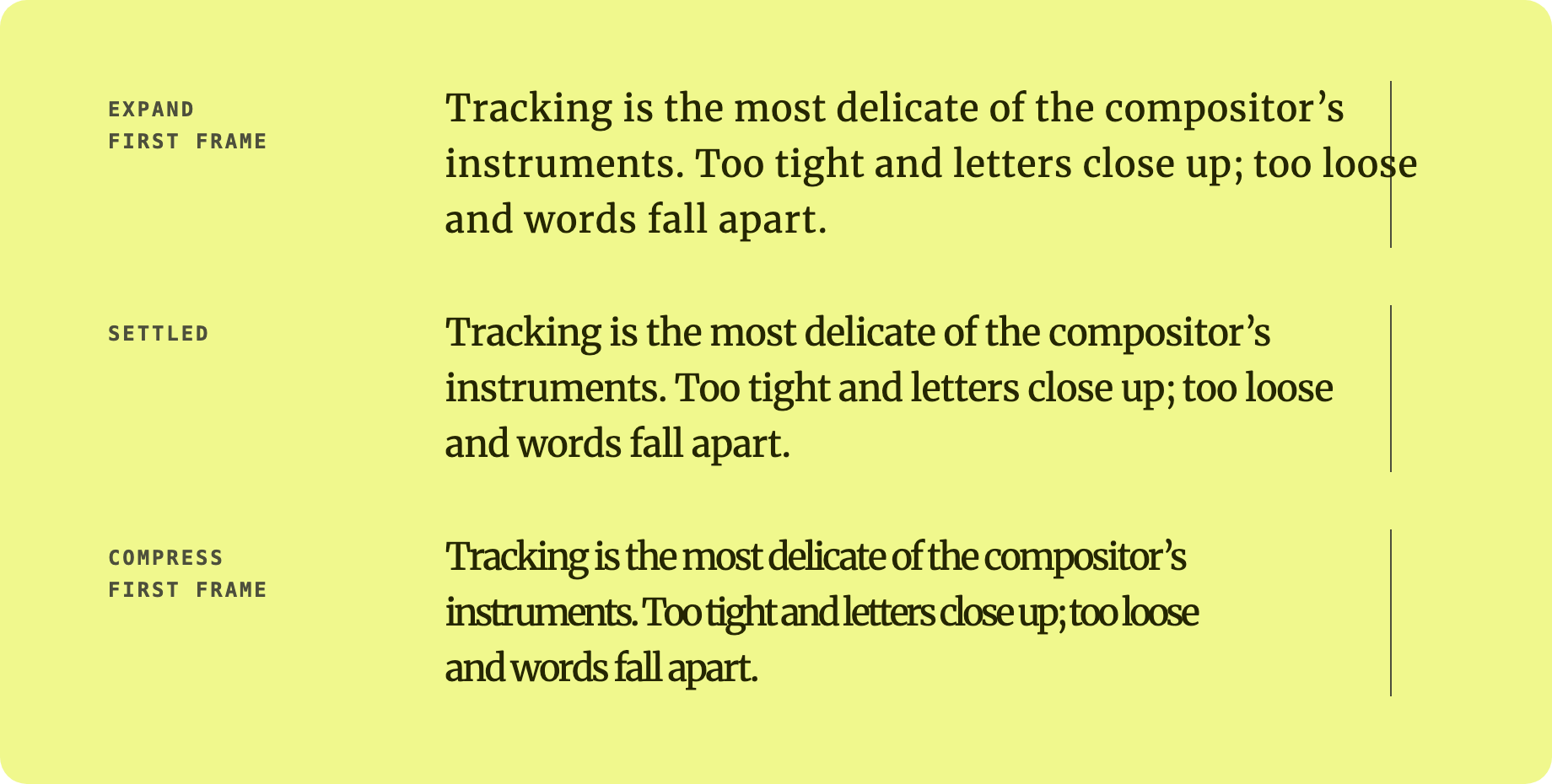
First frame of each direction (spread 0.08, 22 px Merriweather), against the settled text. The vertical rule is the column's right edge.
Starting points (the demo site's presets): Subtle — spread: 0.01, duration: 1500, stagger: 100, easing: 'ease-out'; Dramatic — spread: 0.08, duration: 350, stagger: 15. Add intersect: true to replay each time the element scrolls into view.
Measured in headless Chromium with npm run capture (a 5-line paragraph, 26 px Merriweather in a 660 px column, spread: 0.04, duration: 800, stagger: 80):
- No layout shift. The summed
layout-shiftscore over the whole animation was 0, and the paragraph's height was 195 px before, during and after. Letter-spacing changes inside lines that are locked withnowrap, so no line re-wraps and nothing below the paragraph moves. - Horizontal overshoot with
expand. On the first frame the widest line ran 25 px past the column (at most aboutspreadem per character). Give the element some room on the right, or a parent withoverflow-x: clip, or usedirection: 'compress', whose lines start shorter than the column. - Cheap to start.
applySettletook 1–5 ms for that paragraph (wrapping, line grouping and starting the transitions). The motion itself is one CSS transition per line; there is no JavaScript running per frame. - No hidden text, no flash of invisible text. The text is never hidden: before the script runs, readers (and crawlers) see the paragraph at its natural spacing, and the animation starts from there.
- Motion preferences. Nothing animates under
prefers-reduced-motion: reduceor on slow-refresh screens such as e-ink (update: slow); the original markup is shown untouched. - Screen readers. The words stay in the DOM, in order, with no
aria-hiddenoraria-labelon the text; only the line-end<br>the effect inserts is hidden from assistive technology. The one caveat is markup that runs across a line break, such as a link, which becomes one copy per line (see Markup below).
Bundle sizes are from npm run build (vite, gzip): dist/core.js 5.1 kB, dist/index.js 1.5 kB on top of it for the React hook and component.
| Function | Description |
|---|---|
applySettle(element, originalHTML, options) |
Wrap lines and run the settle animation |
removeSettle(element, originalHTML) |
Restore the element to its original markup |
replaySettle(element, originalHTML?, options?) |
Replay the settle animation on a previously-settled element (the element's own original is used when originalHTML is omitted). Returns a function that cancels pending staggered replays |
getCleanHTML(element) |
Return the element's inner HTML with any Typsettle spans stripped |
useSettle(options) returns { ref, replay }:
| Key | Type | Description |
|---|---|---|
ref |
React.RefObject |
Attach to the element you want to animate |
replay |
() => void |
Call to replay the settle animation imperatively |
Accepts all SettleOptions plus:
| Prop | Type | Description |
|---|---|---|
as |
string |
HTML element to render (default 'p') |
onReady |
(replay: () => void) => void |
Called when the component mounts, with a replay function to run the animation again |
| Export | Description |
|---|---|
SETTLE_CLASSES |
CSS class names injected into the generated markup (settle-word, settle-line, settle-probe) — target these to style the wrapped spans. |
Each visual line is wrapped in a <span>. Each line is set to its start spacing (its settled spacing plus a random offset up to spread em: looser for expand, tighter for compress) with transitions off, the browser computes that state, then a CSS transition is switched on and the settled spacing set — so the animation runs however applySettle is called (from a task, a promise, a frame). Stagger is a per-span transition-delay of i × stagger ms. The settled spacing is the element's own letter-spacing, so your tracking is kept.
The line spans stay in the DOM after the transition. Call removeSettle(el) to restore the original markup. The animation is skipped (the original content is shown, untouched) if prefers-reduced-motion: reduce is set, on slow-refresh displays such as e-ink (update: slow), or if active is false.
Line break safety: each run starts from the original content, wraps every word in a plain inline span (spaces between words stay in the text flow, so the layout is the browser's own), groups the words into lines, then locks each line with white-space: nowrap. Lines keep exactly the words the browser put on them, including a word the browser breaks at a hyphen or with overflow-wrap; CJK and Thai break between characters. Justified text stays justified and text-indent applies to the first line only. With expand, lines are wider than their settled width while they animate, so they can briefly extend past the column (by up to spread em per character).
Markup: inline elements, your own <br>, images and the spaces between elements are kept, and the original elements are reused, so event listeners on them (React's included) keep working. An element that runs across a line break becomes one copy per line (a link over two lines becomes two links; only the first keeps its id). getCleanHTML() returns the original markup. Copied text includes a line break at each line end.
Limits: lines are locked at the width they had when the effect ran, with the fonts loaded then. The React hook and the Webflow embed re-run on resize and font load; with the vanilla API, call applySettle again after a resize or once fonts have loaded. Automatic hyphenation (hyphens: auto) can't happen inside a locked line, so such a word moves whole to the next line.
React is optional. The main entry also exports the React hook and component, so it imports react; without React installed, import the vanilla API from @overpunch/typsettle/core.
npm install
npm run test:run   # vitest (happy-dom)
npm run build      # dist/ (ESM, CJS, types)
npm run capture    # regenerate the README images and print the measurements above (needs ffmpeg and Playwright)
The demo site lives in site/ (Next.js): cd site && npm install && npx next build.
package.json at the repo root lists next as a devDependency. This is a Vercel detection workaround — not a real dependency of the npm package. Vercel's build system inspects the root package.json to detect the framework; without next present it falls back to a static build and skips the Next.js pipeline, breaking the /site subdirectory deploy.
The package itself has zero runtime dependencies. Do not remove this entry.
- Variable font axis settle — settle
wdthorwghtinstead of (or alongside) letter-spacing, for fonts where axis variation reads more clearly at large sizes - Random seed — accept a
seedoption for deterministic random offsets, so repeated runs and snapshot tests reproduce the same starting state (the offsets are applied client-side after hydration, so this is for reproducibility, not for resolving any SSR mismatch — see SSR & Next.js)