


Simple solution to call Windows prompt for credentials through PowerShell command Get-Credential. Result of command above will be exported in xml using Windows Data Protection API (Export-Clixml PowerShell command).
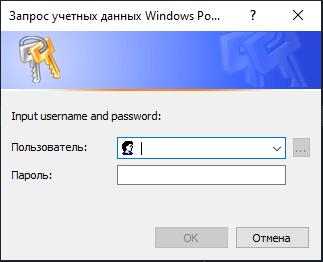
You can store your credentials and reuse it in scripts by CredentialManager.read(...).
Very handy when you just need to store credentials for different services and call them based on different <cred_name>.
from clixmlcreds import Credential, CredentialManager


cred_name: str = 'Name_of_secret_xml_file'  # cred name without file extension


if not Credential.exists(name=cred_name):
    CredentialManager.write(
        cred_name=cred_name,
        username='Your_username',
        prompt_message='Input username and password:'
    )
cred = CredentialManager.read(cred_name=cred_name)
username = cred.username
password = cred.get_password() # return unsecure password stringThe default secrets storage is the corresponding folder inside the package. All credentials are hashed and stored in this folder as a <cred_name>.xml file.
You can change this behavior using:
from pathlib import Path
from clixmlcreds import CredentialManager


CredentialManager.path = Path('your_own_secrets_storage_folder')