GPTReactor is a demonstration project that uses GPT4 Turbo (with or without Vision) to evolve a React UI using natural language instructions and images. The project aims to explore the potential of AI in automating and simplifying the process of building user interfaces. The project supports the OpenAI API via Azure OpenAI, or direct to OpenAI. Using Azure OpenAI generally allows for higher quota/throughput. It also works with any local/open source llms accesible via the OpenAI API format.
There are two top folders in the repository: /code-gen and /web-app. /web-app contains a React project, a simple web app built using Vite using React + Typescript using SWC (superfast web compiler). /code-gen contains python scripts that can be used to alter that React web app code with GPT.
-
First, ensure that you have the latest versions of Node.js and Python installed on your system. You can download them from their official websites:
-
Install Yarn, a package manager for your code. You can install Yarn globally on your system using the following command in your terminal:
npm install --global yarn- Clone the GPTReactor project from GitHub:
git clone https://github.com/pgazmuri/GPTReactor- Navigate to the
/web-appdirectory in the GPTReactor project:
cd GPTReactor/web-app- Install the web project dependencies:
yarn install- Start the web project:
npm run devGPTReactor's basic empty web application should now be running. You can view the application by opening your web browser and navigating to the URL provided in your terminal. It's recommended to leave the app running while using GPTReactor. Next, we will setup the python code-gen project.
Open a second terminal and navigate to the GPTReactor/code-gen directory. Run the following command to install the Python dependencies:
pip install -r requirements.txtYou are now ready to run GPTReactor. Try the following script:
python .\cg_orchestrate_update.py --user_request "Add a calculator page to the application."You should see something like the following:
Filtered File from GPT output:

python ./cg_update_fix.py --user_request "Add a navigation link to the Calculator page in the sidebarItems array, using CalculatorIcon for the icon and 'Calculator' as the text." --code_path ../web-app/src/components/Sidebar.tsx
python ./cg_new_file.py --user_request "Create Calculator page component with a basic structure, including placeholders for display and buttons." --code_path ../web-app/src/pages/Calculator.tsx
python ./cg_update_fix.py --user_request "Import Calculator component and add a route for '/calculator' that renders the Calculator component." --code_path ../web-app/src/App.tsx
python ./cg_update_fix.py --user_request "Implement the calculator's UI including a display area and buttons for digits 0-9, addition, subtraction, multiplication, division, and an equals button in a grid layout." --code_path ../web-app/src/pages/Calculator.tsx


Do you wish to execute the orchestration command? (y/n):
Entering 'y' will invoke the commands suggested by the orchestrator.
The first time you run any command that invokes GPT, you will be asked for your connection information. It will be stored in /code-gen/config.json.
GPTReactor uses a collection of Python scripts in /code-gen to perform various actions that contribute to the generation of the React UI in /web-app. File-level actions include:
- File Creation: cg_new_file.py action generates a file from a UI Comp image, a description, or both.
- Fix Error: cg_error_fix.py action rectifies errors in a file.
- Component/File Update: cg_update_fix.py action updates a component or file as per the user's request.
- Comparison/Update: cg_comparison_fix.py action compares code output to a UI comp and updates the component file to match the comp more accurately.
Each File-level action utilizes extensive prompts and multiple GPT calls. Relevant stack information is included and injected into prompts to provide the model with grounding and context, enabling it to perform the task correctly using the current stack's conventions. The prompts are in text files called "prompt_coder", "prompt_orchestrator", and "prompt_taskmaker", where they can be further customized to reflect the software stack. A file called cgconfig.json contains details about the web-app project that is useful in helping us inject the right filepaths and file contents into the prompts.
Each file-level action internally triggers multiple GPT calls:
- The first call prompts GPT to identify which file(s) contents should be included in the “instruct” call prompt, given the user_request and a listing of availble code files.
- The next call is the “instruct” call, prompting GPT to provide a detailed set of steps to alter a given file, given a set of available commands. This call is run at a high temperature for creativity.
- The next call again prompts GPT to identify which file(s) contents should be included in the “code” call prompt, based on the instructions retrieved in step 2 and a listing of available code files.
- The next call is the “code” call, which is prompted to generate code based on the instructions retrieved in step 2. This call is run at a low temperature to provide higher quality and consistent code.
- A fourth call prompts GPT to validate whether the output from the "code" call is a complete file, or needs to be merged with the file on disk.
- If step 5 determines that we need to merge, we pass the existing and updated file contents to a final call, prompting GPT to output merged file contents. These contents are then written to disk at the code_path provided.
The cg_orchestrate_update.py script in GPTReactor coordinates changes across multiple files. It first builds a prompt for the GPT model using various inputs such as a --screenshot_url (optional), a --comp_path (UI mockup - optional), a --user_request, and typescript build output of the current web-app code base. The prompt is then sent to the GPT model, which returns a set of instructions. These instructions are parsed and filtered to extract the commands provided by the GPT model. These commands, once confirmed by the user, are then executed to perform the necessary updates to the files (pass --skip_confirm if you wish to skip confirmation). If you do not provide a --screenshot_url or --comp_path, the vision model will not be used.
Note: The web app must be running for --screenshot_url argument to work properly.
If there are any errors in the typescript build output after the command execution, the script builds a new orchestrator prompt that includes a request to fix the errors. This prompt is sent to the GPT model, which returns a set of instructions to fix the errors.
An example user_registration.png UI comp is provided:
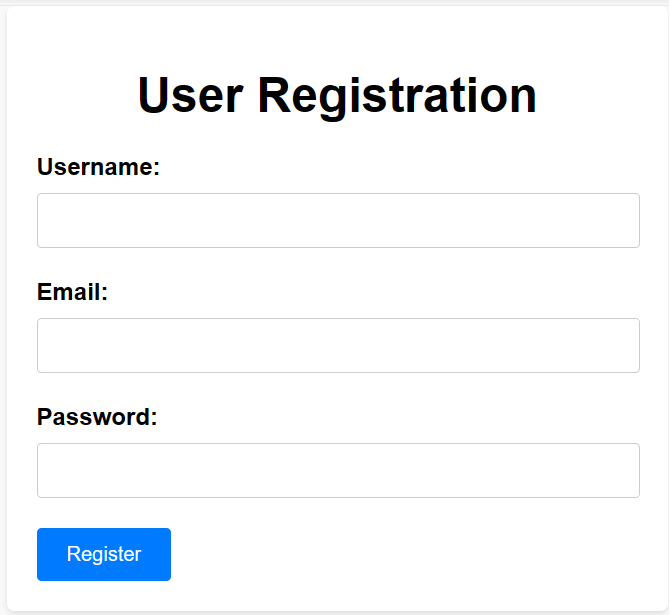
This comp path can be passed to the orchestrate or comparison scripts, so you can try something like this:
python cg_orchestrate_update.py --user_request "Build a user registration page based on the provided comp. When the form is submitted, update the name and email in the userstore. Use the route /register and add a sidebar menu item." --comp_path ./examples/user_registration.pngThe output from one run of this command when tested yielded the following UI:
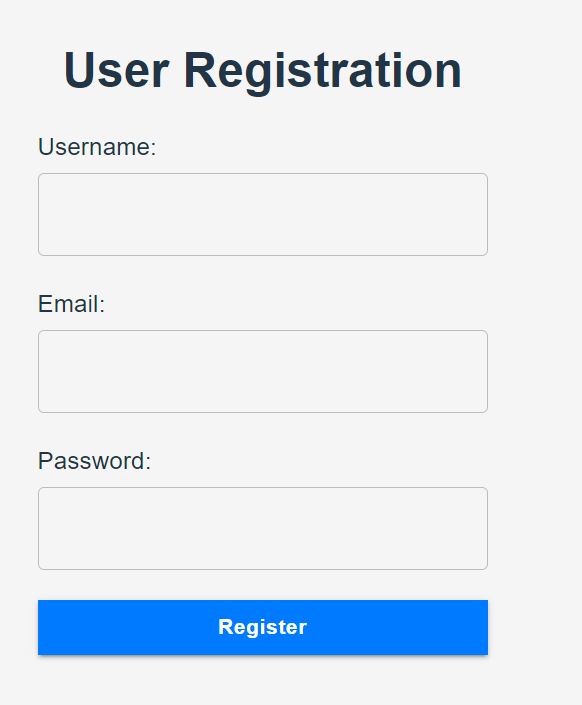
As you can see, the form matches the comp relatively closely, but is not a perfect match. There are limitations to this approach and to GPT4's ability to "see" and match a comp exactly.
If successful, submitting the registration form and then going to the home page, you should see your name displayed, showing that redux store integration was completed as part of the task.
If you want to update the page after it's created, you can pass a screenshot_url to "show" GPT what the current code is displaying (replace the --screenshot_url argument with your currently running dev url):
python cg_orchestrate_update.py --user_request "Update the user registration page to ensure the form is left aligned and to better match the comp" --comp_path ./examples/user_registration.png --screenshot_url http://localhost:5173/registerNext, you can try using the example comp image for a report UI:
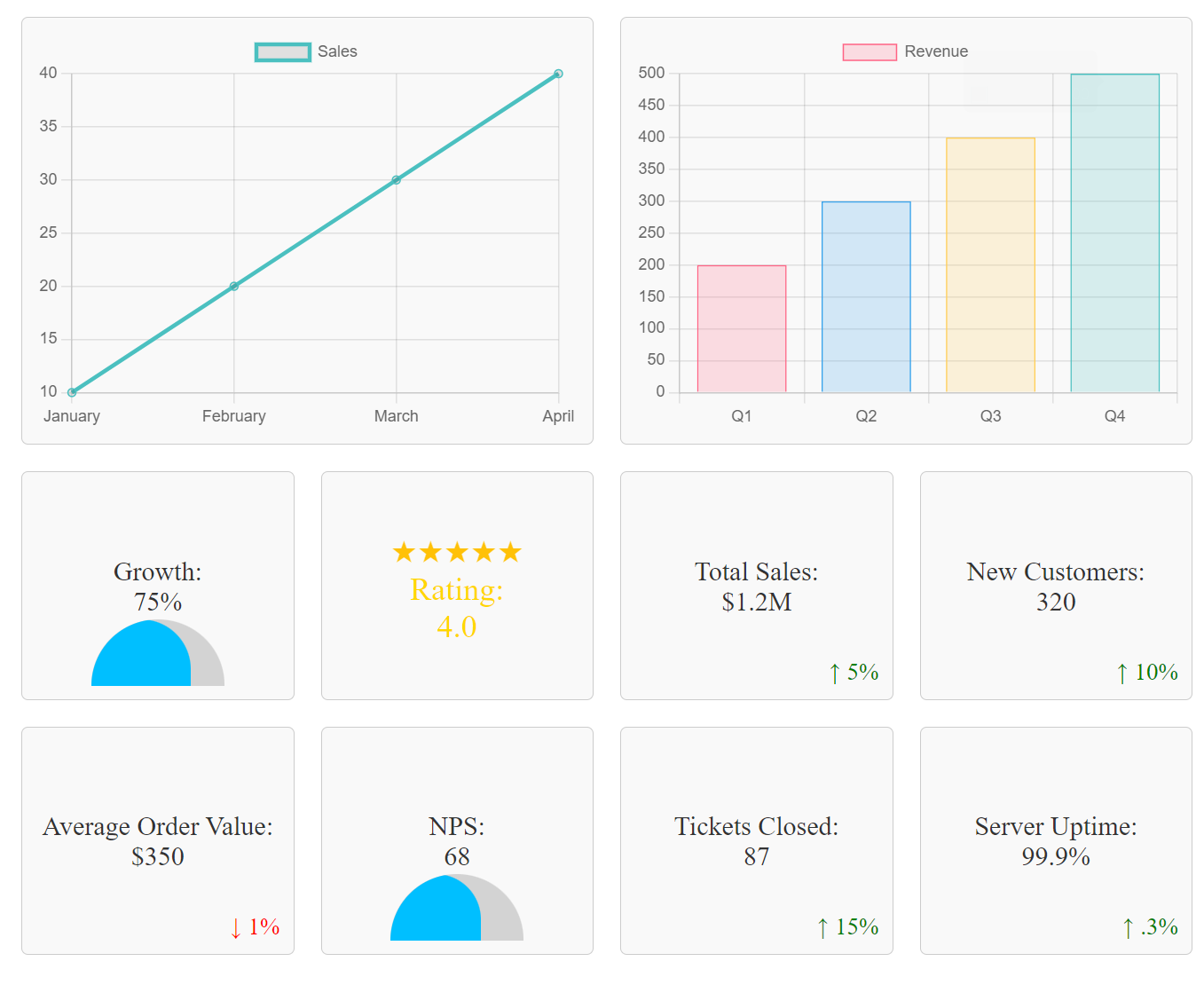
Here's how we use a report mockup image to generate code for a report page:
python cg_orchestrate_update.py --user_request "Build a report page to match the comp. The route should be /reports. Mock the data in a reportStore. Add a link to the sidebar." --comp_path ./examples/report.pngThe output from one run of this command was the following, you can see the logical structure of the commands and how the comp path is passed on to create the reports page:
python ./cg_new_file.py --user_request "Create a report store file named reportStore.ts in the store directory. Add mock data that includes various metrics to be displayed on the report page, such as bar chart data, pie chart data, and statistics." --code_path ../web-app/src/store/reportStore.ts
python ./cg_new_file.py --user_request "Create a Reports page component named Reports.tsx in the pages directory. This component should include placeholders for the different charts and metrics that will match the comp as closely as possible, utilizing inline styles and MUI components where helpful." --code_path ../web-app/src/pages/Reports/Reports.tsx --comp_path ./examples/report.png
python ./cg_update_fix.py --user_request "Add a new Route within the Router component in App.tsx for the Reports page. The path should be '/reports' and the element should be the newly created Reports component." --code_path ../web-app/src/App.tsx
python ./cg_update_fix.py --user_request "Add a new sidebar item for the Reports page with a corresponding icon and text, 'Reports'. The path should be '/reports'." --code_path ../web-app/src/components/Sidebar.tsx
If the output still needs improvement (and it often does):
python cg_orchestrate_update.py --user_request "Update the report page to better match the comp. update the mock data in reportstore if needed." --comp_path ./examples/report.png --screenshot_url http://localhost:5173/reportsAgain, be sure to replace the screenshot url with your currently running dev url.
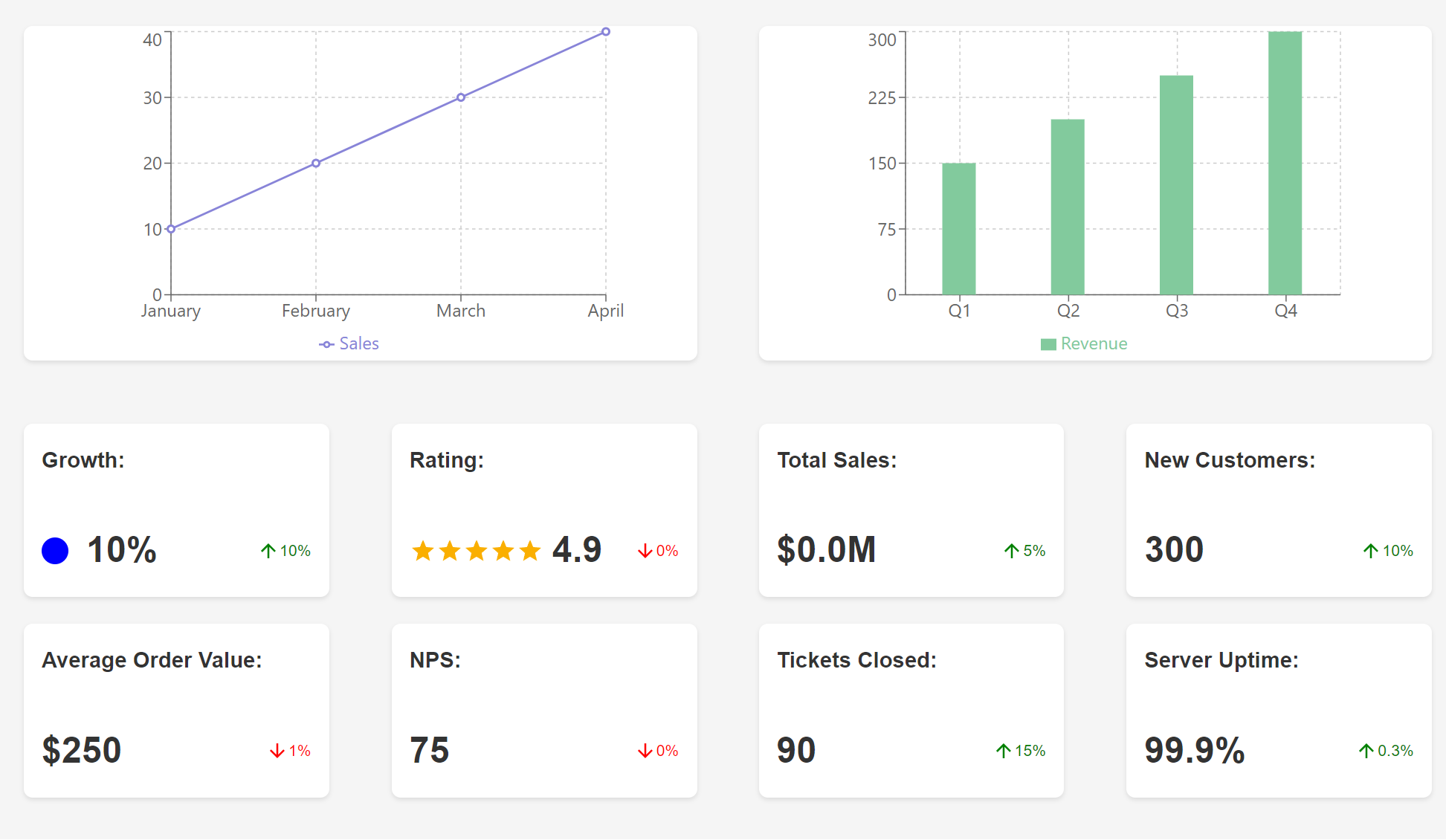
The output from one run of this command, followed by a few rounds of update commands, yielded the following UI:
To fix compilation errors:
python cg_orchestrate_update.py --user_request "Just fix the errors and make it work."Though it would help, this call doesn’t need to include details about compile time errors, as typescript build output is included in the context of all orchestration requests.
Why didn't you use LangChan/Semantic Kernel/Prompt Flow, etc...?
I intentionally wanted the python code to be as simple as possible for transparency/ease of understanding by React devs and others not familiar with these frameworks. I myself am not particularly familiar with python and it's conventions, but chose python as it's the default stack for AI, benefiting from the most comprehensive ecosystem while keeping the solution 'agnostic' in terms of potential stacks and languages that it can operate against. Consequently, the current set of scripts could be easily ported to Typescript to better fit within the React ecosystem. That said, there is plenty of room for improvement, as not much thought has gone into architecture, this project is an exploration and demonstration, not a production system. I welcome input from the community here.
This demonstration project is just that, a demonstration. GPT compute is sufficiently expensive that performing proper evaluation at scale to validate improvements is cost prohibitive. At the same time, there is plenty of low-hanging fruit in terms of potential improvements and optimizations. If you are willing to try this tool, I want to hear from you! The more feedback I can get, the more people experiment with improved prompts, the faster we can improve the capabilities of GPTReactor. If there is any interest in further refining this tool, I would recommend:
- Improve prompts with additional examples ⬅️ low hanging fruit 🍇🍊🍋
- Improve logging and error handling
- Clean up console output to be more useful
- Set up an evaluation pipeline to properly evaluate prompt effectiveness (this is costly)
- Generally test various use cases and review completions to understand failure modes and potential mitigations
- Generally improve the base React app stack to include a more complete set of non-functional and cross-functional conventions/libraries
- Extend to support full stack integration of some kind, make more configurable and test against other stacks/languages
- Rearchitect entirely fronm the ground up based on everything learned 😀