Before submitting
Area
apps/swift-ios on t3code/rebuild-mobile-app-swift (closest template option: apps/mobile).
Problem or use case
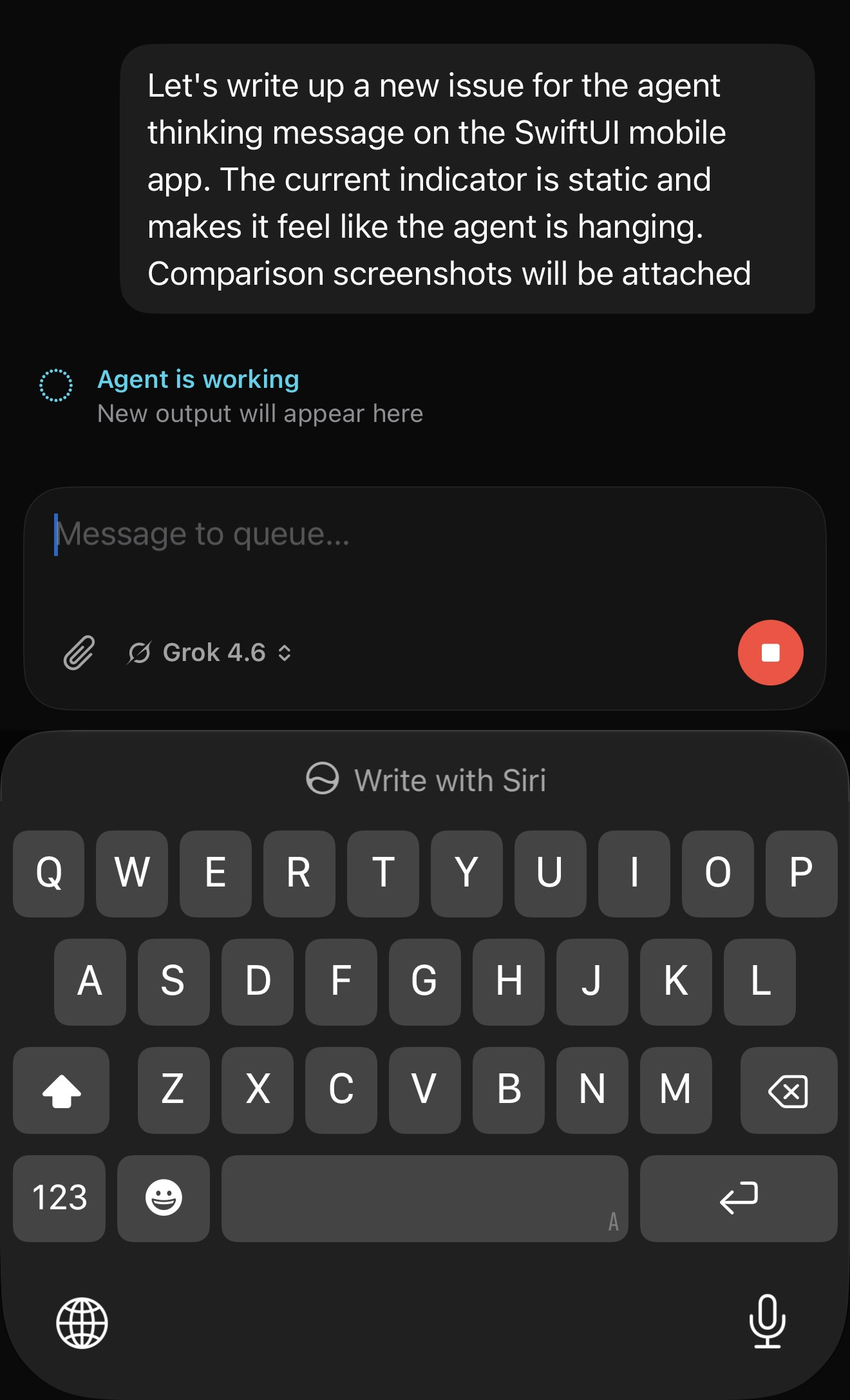
While a turn is in progress, the SwiftUI thread shows a static thinking / working message: a frozen circle.dotted glyph plus copy like Agent is working, with New output will appear here.
Because nothing moves, long reasoning or tool gaps feel like the agent has hung. The row is technically correct — the thread is still live — but it reads as a stalled state.
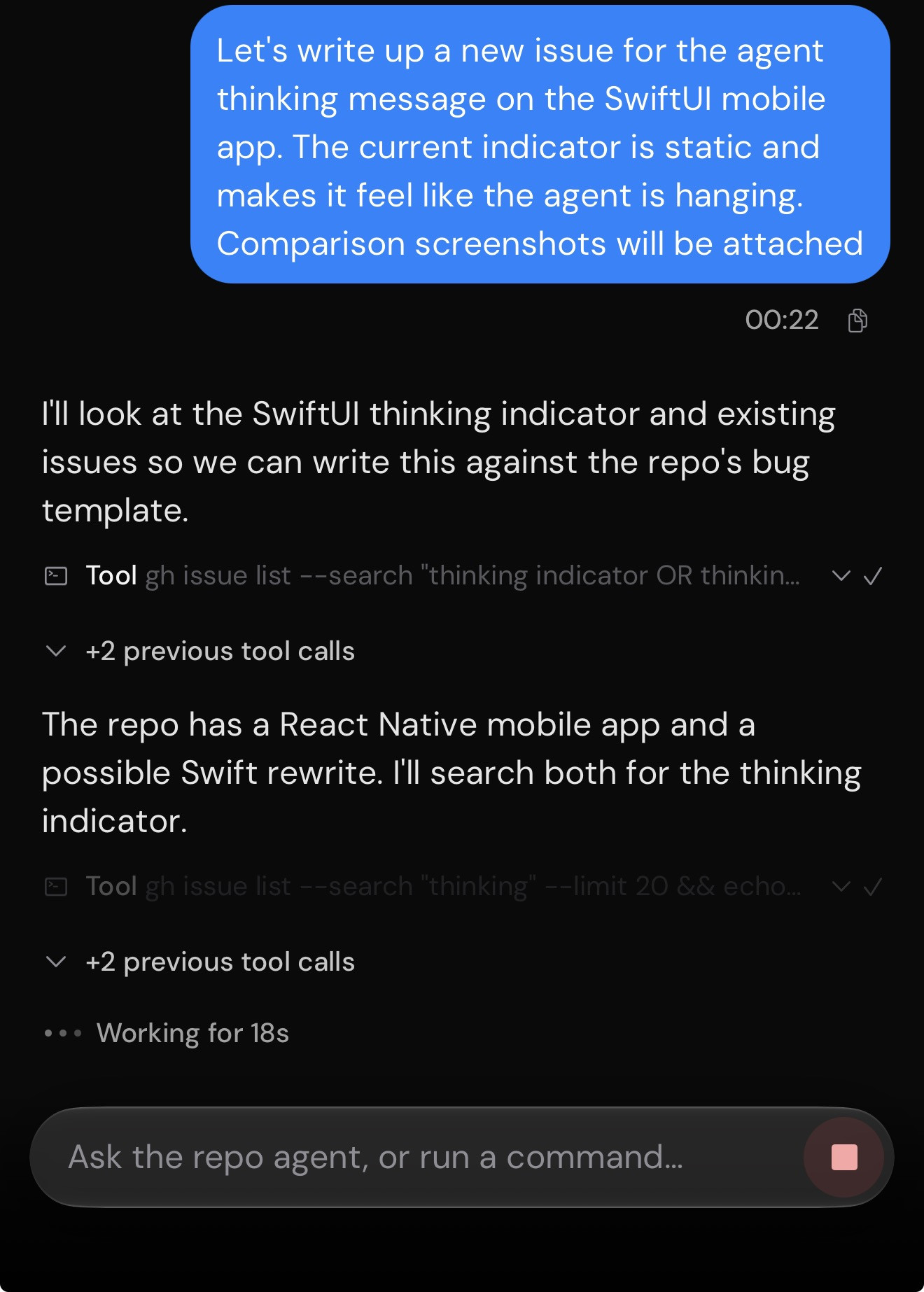
The web client already has a live treatment for the same gap: three dots plus Working for 18s. That is the reference.
The same static circle.dotted treatment also appears on streaming assistant messages (Working) and as the thread header status icon.
Closest existing issue is #4962, which is about the RN client looking idle while subagents work. This is the native SwiftUI thinking row looking frozen even when the parent turn is clearly in progress.
Proposed solution
Match the web/RN in-thread working row so the SwiftUI transcript is obviously in progress:
- Replace the static
circle.dotted + Agent is working / New output will appear here card with the live ••• Working for {duration} treatment.
- Keep variant copy for subagents / background / monitoring if those states still need a distinct label.
- Apply the same live treatment to the streaming
Working label so the two states don't disagree.
Why this matters
People spend a lot of time watching this row during long turns. A frozen indicator makes them stop the run, resend, or assume the client died, even when the agent is fine. The web row already proves a cheap elapsed-time cue is enough.
Smallest useful scope
Update FeatureThreadWorkingIndicator in apps/swift-ios/Features/Chat/ThreadDetailView.swift (the transcript row with thread-working-indicator). Leave header chrome and list-row status for a follow-up if needed.
Alternatives considered
- Pulsing the existing
circle.dotted via .symbolEffect. Lighter than a timer, but still doesn't match the web reference the screenshots call out.
- Replacing the row with a spinner. Heavier, and easier to read as a generic load state rather than "the agent is thinking."
Risks or tradeoffs
A 1s duration tick is fine; avoid a continuously repainting animation that pegs the GPU on high-refresh displays. Pause updates when the row is offscreen or the thread is no longer working. VoiceOver should announce the working state and elapsed time, not "animating."
References
Current — SwiftUI (IMG_1307)
Static Agent is working / New output will appear here. Feels hung.
Reference — web (IMG_1308)
Live ••• Working for 18s. Obviously in progress.
Contribution
Before submitting
Area
apps/swift-iosont3code/rebuild-mobile-app-swift(closest template option: apps/mobile).Problem or use case
While a turn is in progress, the SwiftUI thread shows a static thinking / working message: a frozen
circle.dottedglyph plus copy like Agent is working, with New output will appear here.Because nothing moves, long reasoning or tool gaps feel like the agent has hung. The row is technically correct — the thread is still live — but it reads as a stalled state.
The web client already has a live treatment for the same gap: three dots plus Working for 18s. That is the reference.
The same static
circle.dottedtreatment also appears on streaming assistant messages (Working) and as the thread header status icon.Closest existing issue is #4962, which is about the RN client looking idle while subagents work. This is the native SwiftUI thinking row looking frozen even when the parent turn is clearly in progress.
Proposed solution
Match the web/RN in-thread working row so the SwiftUI transcript is obviously in progress:
circle.dotted+ Agent is working / New output will appear here card with the live ••• Working for {duration} treatment.Workinglabel so the two states don't disagree.Why this matters
People spend a lot of time watching this row during long turns. A frozen indicator makes them stop the run, resend, or assume the client died, even when the agent is fine. The web row already proves a cheap elapsed-time cue is enough.
Smallest useful scope
Update
FeatureThreadWorkingIndicatorinapps/swift-ios/Features/Chat/ThreadDetailView.swift(the transcript row withthread-working-indicator). Leave header chrome and list-row status for a follow-up if needed.Alternatives considered
circle.dottedvia.symbolEffect. Lighter than a timer, but still doesn't match the web reference the screenshots call out.Risks or tradeoffs
A 1s duration tick is fine; avoid a continuously repainting animation that pegs the GPU on high-refresh displays. Pause updates when the row is offscreen or the thread is no longer working. VoiceOver should announce the working state and elapsed time, not "animating."
References
FeatureThreadWorkingIndicatorand the streamingWorkinglabel inapps/swift-ios/Features/Chat/ThreadDetailView.swiftont3code/rebuild-mobile-app-swift.Current — SwiftUI (
IMG_1307)Static Agent is working / New output will appear here. Feels hung.
Reference — web (
IMG_1308)Live ••• Working for 18s. Obviously in progress.
Contribution