Rate Limits
xyOps can limit how quickly jobs start, which is useful when jobs call an external API, database, deployment service, or any other resource with a throughput limit.
Rate limiting is an optional part of the existing Max Jobs Limit. It is not a separate limit type. This lets one shared pool enforce both of these rules:
- How many jobs may run at the same time.
- How many jobs may start during a fixed period of time.
This guide explains the complete behavior, including fixed windows, queues, shared capacity keys, workflows, setting changes, resets, conductor recovery, and the most important caveats.
Important
Rate limits count job starts, not individual API requests made inside a job. If one job makes several requests, account for that when choosing a rate.
Add rate and window to a Max Jobs Limit, then add enough queue capacity for jobs that need to wait:
{
	"limits": [
		{
			"enabled": true,
			"type": "job",
			"amount": 5,
			"rate": 100,
			"window": 60
		},
		{
			"enabled": true,
			"type": "queue",
			"amount": 1000
		}
	]
}
To configure this in the UI, edit the event's Max Jobs Limit. Enter the maximum number of starts in the Rate Limit field, then select Per Second, Per Minute, Per Hour, or Per Day from the window menu. Workflow Limit Nodes provide the same controls. The optional Shared Capacity Key places multiple events or workflow nodes into the same concurrency and rate pool.
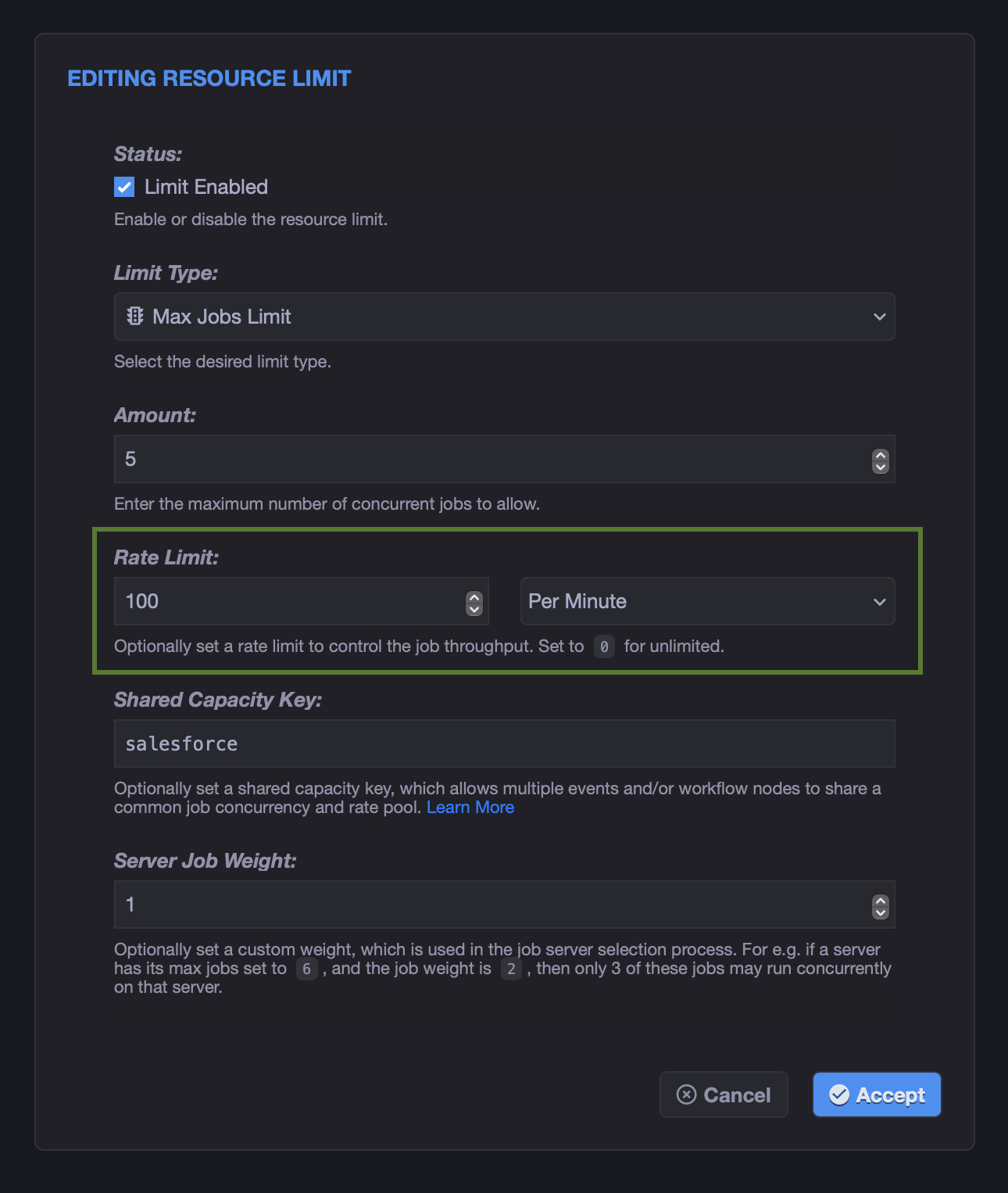
This configuration allows:
- Up to 5 jobs running concurrently.
- Up to 100 job starts during each wall-clock minute.
- Up to 1,000 additional jobs waiting in the queue.
The supported window durations are:
| Window | Meaning |
|---|---|
1 |
Per wall-clock second |
60 |
Per wall-clock minute |
3600 |
Per wall-clock hour |
86400 |
Per wall-clock day |
The rate must be a non-negative integer. A rate of 0 disables rate limiting while leaving the normal concurrency limit active.
Rate limiting uses these properties on the Max Jobs Limit:
| Property | Description |
|---|---|
amount |
Maximum number of jobs that may run concurrently in the pool. |
rate |
Maximum number of jobs that may start during one window. Set to 0 to disable rate limiting. |
window |
Fixed-window selection encoded in seconds. Must be 1, 60, 3600, or 86400. The 86400 option represents one local calendar day. |
cap_key |
Optional key that shares concurrency and rate capacity across otherwise unrelated jobs. |
The separate Max Queue limit uses its amount property to control how many jobs may wait when either concurrency or rate capacity is exhausted.
A rate slot is consumed when xyOps admits a job, selects an eligible target server, and moves the job into its start sequence. This happens before job start actions run and before the job becomes fully active.
The important consequences are:
- A queued job does not consume rate capacity while it waits.
- A job that cannot select an eligible target server does not consume rate capacity.
- Each admitted start increases the current window counter by one.
- The full rate allowance returns when the fixed window expires.
If conductor recovery finds a job interrupted specifically in the starting state, xyOps moves it back to ready and refunds its previously consumed rate slot before trying again. This prevents the recovered start attempt from being counted twice.
Every launch governed by the same Max Jobs Limit uses the same admission checks. The rate is based on job starts, regardless of how long the jobs run afterward.
xyOps uses a simple fixed-window counter for each rate-limited pool. Window boundaries are aligned to the local system time zone of the server acting as the active conductor:
| Window | Expiration Boundary |
|---|---|
1 |
The next second |
60 |
The start of the next local minute |
3600 |
The start of the next local hour |
86400 |
The start of the next local day at midnight |
The pool is created when it first needs a counter, but its expiration is set to the next applicable boundary. If the pool is first used partway through a window, it receives its full configured allowance for the remainder of that window. Starts that occurred before the pool was created are not counted.
Minute, hour, and day alignment uses this server time zone, not UTC, an event trigger's time zone, or a viewing user's browser time zone. Local calendar normalization handles time zones with fractional-hour UTC offsets, as well as local daylight saving time transitions. Conductor peers should use consistent system time-zone settings so newly created windows have the same alignment after a failover.
A per-day window is a local calendar day, not always exactly 86,400 elapsed seconds. The time between consecutive local midnights may be shorter or longer than 24 hours when daylight saving time begins or ends. This is commonly 23 or 25 hours, while regions with half-hour DST changes may produce 23.5-hour or 24.5-hour days. Regardless of the elapsed duration, the window always expires at the next local midnight on the active conductor.
For example, consider this configuration:
{
	"enabled": true,
	"type": "job",
	"amount": 5,
	"rate": 3,
	"window": 60
}
If the first job reaches the pool at 12:00:17, the initial window expires at 12:01:00:
| Time | Result | Window Count |
|---|---|---|
12:00:17 |
First job starts | 1 of 3 |
12:00:25 |
Second job starts | 2 of 3 |
12:00:50 |
Third job starts | 3 of 3 |
12:00:59 |
Another job must wait or abort | 3 of 3 |
12:01:00 |
Window expires and a full allowance becomes available | 0 of 3 |
Expired windows are removed automatically. Expired windows are removed automatically. If jobs are already waiting when the next window begins, xyOps automatically starts releasing eligible jobs using the new rate allowance.
The xyOps Dashboard includes a Rate Limit Pools viewer whenever one or more rate windows are active. The table updates in real time as jobs start, so you can watch each current count increase, compare it with the maximum count, and see the remaining time count down toward the next aligned window boundary.
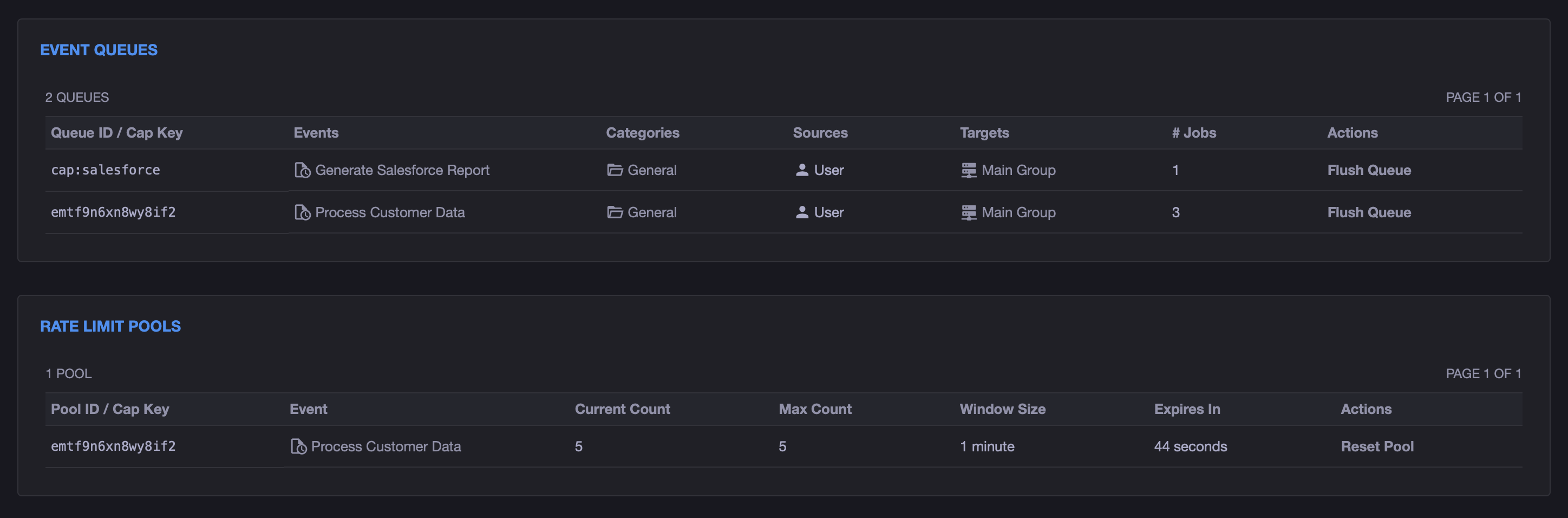
The viewer shows:
-
Pool ID / Cap Key: The effective rate-pool ID. Shared capacity pools use the
cap:CAPACITY_KEYformat. - Event: The associated event when the pool maps directly to one event. Shared capacity pools may span multiple events and workflow nodes.
- Current Count: How many job starts have consumed capacity in the current window.
- Max Count: The configured rate allowance for the window.
- Window Size: The configured second, minute, hour, or day window.
- Expires In: A live countdown to the next aligned boundary.
- Actions: Administrators can reset the individual pool without affecting other active rate pools.
The viewer shows all active rate pools across the xyOps installation. The Reset Pool action is only available to administrators. When a window expires and its pool is removed, it disappears from the viewer until another applicable job recreates it.
A fixed-window limiter can allow starts close together on opposite sides of a window boundary.
For example, with a rate of 10 per minute, the pool could use all 10 starts just before the top of a minute and then receive 10 new starts immediately after the clock reaches the next minute. That can produce up to 20 starts in a short span while still obeying the configured maximum inside each individual window.
This is normal fixed-window behavior. The current implementation does not provide a burst setting, rolling window, sliding window, or token bucket.
If the external service enforces a strict rolling quota, configure xyOps below that quota to leave safety margin. For example, an API that allows 100 requests during any rolling minute may need an xyOps rate lower than 100 per minute, depending on job behavior.
Concurrency and rate are independent gates. A job may start only when both gates have capacity.
When xyOps examines queued jobs, the number it can release is effectively limited by all of the following:
- Available concurrency slots
- Remaining rate slots
- Number of waiting jobs
- Eligible target server capacity
The tightest constraint wins.
For example, consider amount: 2, rate: 10, and window: 60:
- No more than two jobs can run at once.
- As jobs finish, new jobs can take the open concurrency slots.
- Once ten jobs have started during the current minute-long window, no more can start even if both concurrency slots are empty.
- When the rate window expires, starts may resume.
For long-running jobs, concurrency may be the effective limit most of the time. For short jobs, the rate may become the effective limit.
Rate limiting does not automatically create a queue. Add a separate Max Queue Limit when excess jobs should wait.
If the rate is exhausted:
- With available queue capacity, the job moves into the queue.
- Without a Max Queue limit, the job is aborted.
- If the configured queue is already full, the job is aborted.
When capacity becomes available, xyOps processes waiting jobs by priority and age:
- High-priority jobs are considered first.
- Remaining jobs are sorted by their start time, so the oldest are processed first.
- Multiple jobs may be released during one queue check, up to the available concurrency and rate capacity.
If the first eligible queued job cannot find an available target server, it remains at the front of the queue and later jobs continue waiting. For shared pools, it is best for members to target similarly available infrastructure.
Important
Size the queue for the number of jobs that may accumulate during a full rate window. A rate limit with a small queue can still cause excess jobs to abort.
By default, an event or workflow node scope receives its own concurrency and rate pool. A Shared Capacity Key joins otherwise unrelated jobs into one global pool.
This is useful when several events call the same external API. For example:
{
	"limits": [
		{
			"enabled": true,
			"type": "job",
			"amount": 5,
			"rate": 100,
			"window": 60,
			"cap_key": "salesforce"
		},
		{
			"enabled": true,
			"type": "queue",
			"amount": 1000
		}
	]
}
Apply the same settings to every event and workflow node that consumes this "salesforce" allowance. All matching jobs then share:
- Five concurrent job slots.
- One allowance of 100 starts per minute.
- One priority-first, oldest-first waiting queue.
Capacity keys are cluster-wide within one xyOps installation. They are not limited to a particular target server, event, category, workflow, or user.
All jobs sharing a capacity key must use compatible settings. For predictable behavior, configure every member with the same:
- Max Jobs Limit
amount. - Rate
rateandwindow, or no rate on any member. - Max Queue
amount.
xyOps emits warnings to the job meta log when it detects pool members present at the same time with differing concurrency or rate settings, or with multiple different non-zero queue amounts. These warnings help diagnose configuration mistakes, but they do not abort any jobs.
Conflicting settings are inherently ambiguous. The active window may have been created by one member, while the first waiting job may carry another member's settings. Treat the warnings as a configuration error and make every participant identical.
Each event or workflow node must carry its own copy of the limits. A capacity key joins the pools, but it does not automatically copy limit definitions from one member to another.
Without a capacity key, xyOps derives the pool identity from the job's natural execution scope:
- A normal event has its own pool.
- A top-level workflow has its own pool.
- A job launched from a workflow node is scoped to that node and its parent workflow job.
Including the parent workflow job means two separate executions of the same workflow do not automatically share a node-level pool. Use a capacity key when multiple workflow executions, nodes, workflows, or events should all share one allowance.
Editing an event changes future jobs. It does not rewrite limit settings already copied onto active or queued jobs.
An existing rate window also keeps its current maximum and expiration until it reaches its aligned boundary or an administrator resets the affected rate pool. This means a new rate or window may not take effect immediately. With the supported windows, the normal wait can last until the next local midnight for newly launched jobs, but older queued jobs can still carry their previous settings.
After a window expires, the next job that creates or renews the pool supplies the rate settings. In a queue, this may be an older job that was created before the event was edited.
Changing a capacity key has similar snapshot behavior. Existing jobs keep the key they had when they were created, while future jobs use the new key. During the transition, work may temporarily exist in both pools.
For the most predictable change:
- Pause or stop new submissions.
- Allow the old queue to drain, or explicitly handle the queued jobs.
- Update every member of a shared capacity pool together.
- Reset the affected rate pools if an immediate fresh allowance is appropriate.
- Resume submissions.
Administrators can reset one rate pool from the Dashboard or reset every active rate pool from the System page.
To reset one pool:
- Open the Dashboard.
- Locate the pool under Rate Limit Pools.
- Click Reset Pool and confirm the operation.
Only the selected pool is cleared. Other active rate pools keep their current counts and expiration times.
To reset all pools:
- Open System in the Admin section.
- Click Reset Stats....
- Select Rate Limit Windows.
- Click Reset Now.
This clears every active rate window in the xyOps installation.
Resetting does not shift the normal wall-clock boundaries. For example, if a per-minute pool is reset and recreated at 12:34:45, its new window expires at 12:35:00, not 12:35:45.
Warning
Resetting immediately restores the full rate allowance for the selected pool, or for every pool when using the System page. Queued jobs may begin launching on the next scheduler tick, so the reset can create a sudden burst against external services.
Resetting windows does not:
- Change event or workflow configuration.
- Rewrite limits stored on active or queued jobs.
- Remove jobs from queues.
- Reset concurrency counts.
If old queued jobs remain, the next window may still use the settings stored on the first applicable queued job.
The active conductor owns the live rate counters and synchronizes them to its conductor peers with the rest of the master state. This allows a peer taking over conductor duties to continue with the replicated windows.
Rate window state is also included in the conductor's graceful-shutdown recovery file. On restart, interrupted jobs in the starting state are returned to ready, and their consumed rate slots are refunded before they are started again.
Rate windows are operational in-memory state, not a durable transactional quota ledger. If all usable conductor and recovery state is lost in an abrupt outage, pools may begin with fresh windows after recovery. Leave appropriate safety margin when the external service requires strict accounting across failures.
Capacity keys coordinate jobs inside one xyOps installation. Two independent xyOps installations do not share rate counters, even if they use the same capacity-key text.
Start with the external service's documented quota, then account for how much work each job performs.
If every job makes exactly one request, the job start rate can be close to the request quota, with some safety margin for fixed-window boundaries and other callers.
If each job may make several requests, use a conservative calculation:
safe job rate = external request allowance / maximum requests per job
For example, if an API allows 600 requests per minute and each job may make up to 5 requests:
safe job rate = 600 / 5 = 120 jobs per minute
Reduce the result further if other applications share the external quota or if the service uses a rolling window.
Rate limiting job starts does not control the spacing of requests inside each job. If a single job sends a rapid batch of requests, implement request-level throttling inside that job as well.
{
	"limits": [
		{
			"enabled": true,
			"type": "job",
			"amount": 1,
			"rate": 2,
			"window": 1
		},
		{
			"enabled": true,
			"type": "queue",
			"amount": 100
		}
	]
}
Only one job may run at a time, and no more than two may start during one fixed second.
{
	"limits": [
		{
			"enabled": true,
			"type": "job",
			"amount": 10,
			"rate": 1000,
			"window": 3600,
			"cap_key": "vendor-import-api"
		},
		{
			"enabled": true,
			"type": "queue",
			"amount": 5000
		}
	]
}
Every event and workflow node using vendor-import-api shares ten concurrent jobs and 1,000 starts per wall-clock hour, aligned to the active conductor's local time.
Add or increase the Max Queue limit. A rate limit does not implicitly enable queuing, and a full queue causes additional jobs to abort.
The current window or existing queued jobs may still contain the old settings. Wait for the window and queue to drain, reset the affected pool from the Dashboard, or carefully use the global Rate Limit Windows reset on the System page.
Check the job meta logs for warnings about differing concurrency, rate, or queue settings. Confirm that every event and workflow node using the capacity key has identical limits.
This is expected fixed-window behavior, especially immediately before and after an aligned boundary such as the top of a minute, the top of an hour, or local midnight. Reduce the configured rate to provide safety margin for a service that enforces a rolling quota.
Resetting restores the selected pool's full allowance immediately. A global reset restores every pool. Queued jobs are reconsidered on the next scheduler tick, subject to concurrency and target server capacity.
The v1 rate limiter intentionally uses a small and predictable fixed-window design. It does not currently provide:
- Rolling or sliding windows.
- Token-bucket behavior.
- A configurable burst property.
- Custom window durations or user-selectable boundary offsets.
- Request-level throttling inside a job.
- Shared counters between independent xyOps installations.