
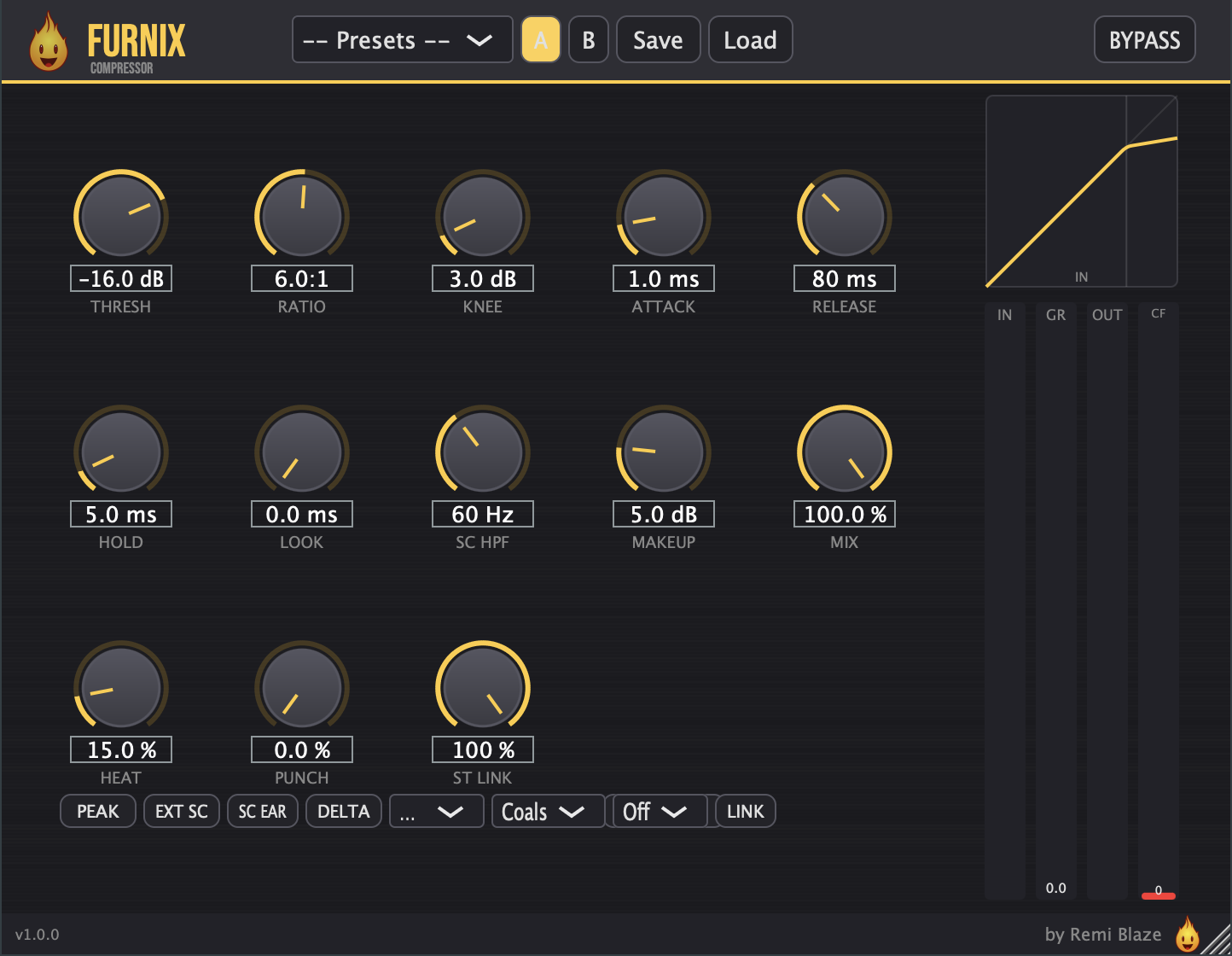
A feed-forward compressor with a dark industrial UI, built for tech house, techno, and electronic music.
Furnix pairs a full-featured dynamics engine — peak/RMS detection, lookahead, sidechain filtering, and built-in saturation — with a brushed-metal, ember-orange interface and live gain-reduction metering.
Fully signed and notarized for macOS as AU, VST3, and Standalone.
- Go to the latest release.
- Download
Furnix_Installer.pkg. - Double-click it and follow the installer. Because it's signed & notarized by Apple, it installs cleanly — no security warnings, no right-click, no "Open Anyway."
- Restart your DAW and rescan plug-ins.
Full guide: remiblaze.com/support.
Compression
- Threshold — level where compression begins (−60 to 0 dB)
- Ratio — compression amount (1:1 to 20:1)
- Knee — soft-knee width for the compression bend (0 to 30 dB)
- Attack — how fast compression reacts (0.1 to 100 ms)
- Release — how fast compression recovers (10 to 1000 ms)
- Hold — minimum gain-reduction hold time before release (0 to 50 ms)
- Lookahead — anticipate transients for cleaner catches (0 to 5 ms, latency-compensated)
- Auto Makeup — automatic level compensation as you compress
- Makeup Gain — manual output compensation (0 to 24 dB)
- RMS Mode — switch detection between peak and RMS response
- Grid Sync — tempo-synced release (Off, 1/4, 1/8, 1/8T, 1/16, 1/8., Auto)
Sidechain
- SC HPF — high-pass the detector so bass doesn't trigger the compressor (20 to 500 Hz)
- SC Tilt — detector filter mode (HPF or mid-focus Tilt)
- External SC — key the compressor from an external sidechain input
- SC Listen — monitor the sidechain/detector signal
- Stereo Link — blend independent to fully linked stereo detection (0 to 100%)
Character
- Saturation Mode — three flavours: Coals (soft tanh), Flame (cubic), Blast (asymmetric), oversampled 4× for clean drive
- Heat — drive amount into the saturation stage (0 to 100%)
- Heat Link — adaptive drive that follows gain reduction
- Punch — reinject transient energy back into the compressed signal (0 to 100%)
Output & Monitoring
- Mix — dry/wet blend for parallel compression (0 to 100%)
- Delta — hear only what the compressor is doing to the signal
- Bypass — instant A/B
- Real-time metering — gain reduction plus stereo input and output levels
- Feed-forward detection with selectable peak or RMS response and true lookahead (buffered, reported to the host for latency compensation)
- Sidechain filtering — high-pass or tilt EQ on the detector path, with external-sidechain keying and detector listen
- 4× oversampled saturation stage to keep drive clean and alias-free
- −0.1 dBFS soft-clip ceiling at the output plus a DC blocker on the wet path
- NaN/Inf guards on all recursive filter and envelope state for stable, glitch-free playback
- macOS 15.0 or later
- Apple Silicon or Intel Mac (Universal Binary)
- Any AU or VST3 host (your DAW of choice)
| Preset | Threshold | Ratio | Attack | Release | Best For |
|---|---|---|---|---|---|
| Init | −18 dB | 3.5:1 | 5 ms | 80 ms | Clean starting point |
| Gentle Glue | −18 dB | 2:1 | 30 ms | 200 ms | Subtle bus glue |
| Vocal Control | −22 dB | 3.5:1 | 15 ms | 150 ms | Vocal leveling |
| Drum Bus Punch | −16 dB | 6:1 | 1 ms | 80 ms | Punchy drums |
| Sidechain Pump | −24 dB | 8:1 | 0.5 ms | 300 ms | Pumping effect |
| Bass Tamer | −20 dB | 5:1 | 20 ms | 120 ms | Bass control |
| Parallel Crush | −30 dB | 12:1 | 0.5 ms | 50 ms | Heavy parallel |
| Mix Bus Glue | −14 dB | 2.5:1 | 25 ms | 250 ms | Master bus |
| Transient Snap | −18 dB | 4:1 | 0.1 ms | 40 ms | Transient shaping |
| Kick Tighten | −22 dB | 7:1 | 0.5 ms | 60 ms | Kick control |
| Remi Blaze Heat | −21 dB | 5:1 | 3 ms | 65 ms | Signature saturated tone |
| Remi Blaze Squeeze | −26 dB | 10:1 | 2 ms | 80 ms | Signature aggressive squeeze |
| Sub-Lock Glue | −18 dB | 2:1 | 30 ms | 80 ms | Locked low-end glue |
| Warehouse Heat | −20 dB | 8:1 | 10 ms | 80 ms | Driven techno bus |
| Percolator Perc | −16 dB | 4:1 | 1.5 ms | 80 ms | Percussion movement |
| Ghost Vocal Clamp | −22 dB | 10:1 | 0.5 ms | 50 ms | Tight vocal clamp |
Found a UI glitch, resize bug, or DAW-specific quirk? Open an issue on the Issues tab with your macOS version, DAW + version, and steps to reproduce.
- Developer: Remi Blaze.
- Framework: JUCE.
- License: free under a proprietary Freeware License (see also our terms). Reverse-engineering, repackaging, binary redistribution, or reselling the compiled installer is strictly prohibited.
All product names, company names, and logos mentioned herein are trademarks or registered trademarks of their respective owners. Any such references are used for descriptive or compatibility purposes only and do not imply affiliation with, endorsement by, or sponsorship from their owners.
VST is a trademark of Steinberg Media Technologies GmbH, registered in Europe and other countries.
Apple, macOS, Audio Units (AU), and Apple Silicon are trademarks of Apple Inc., registered in the U.S. and other countries.