
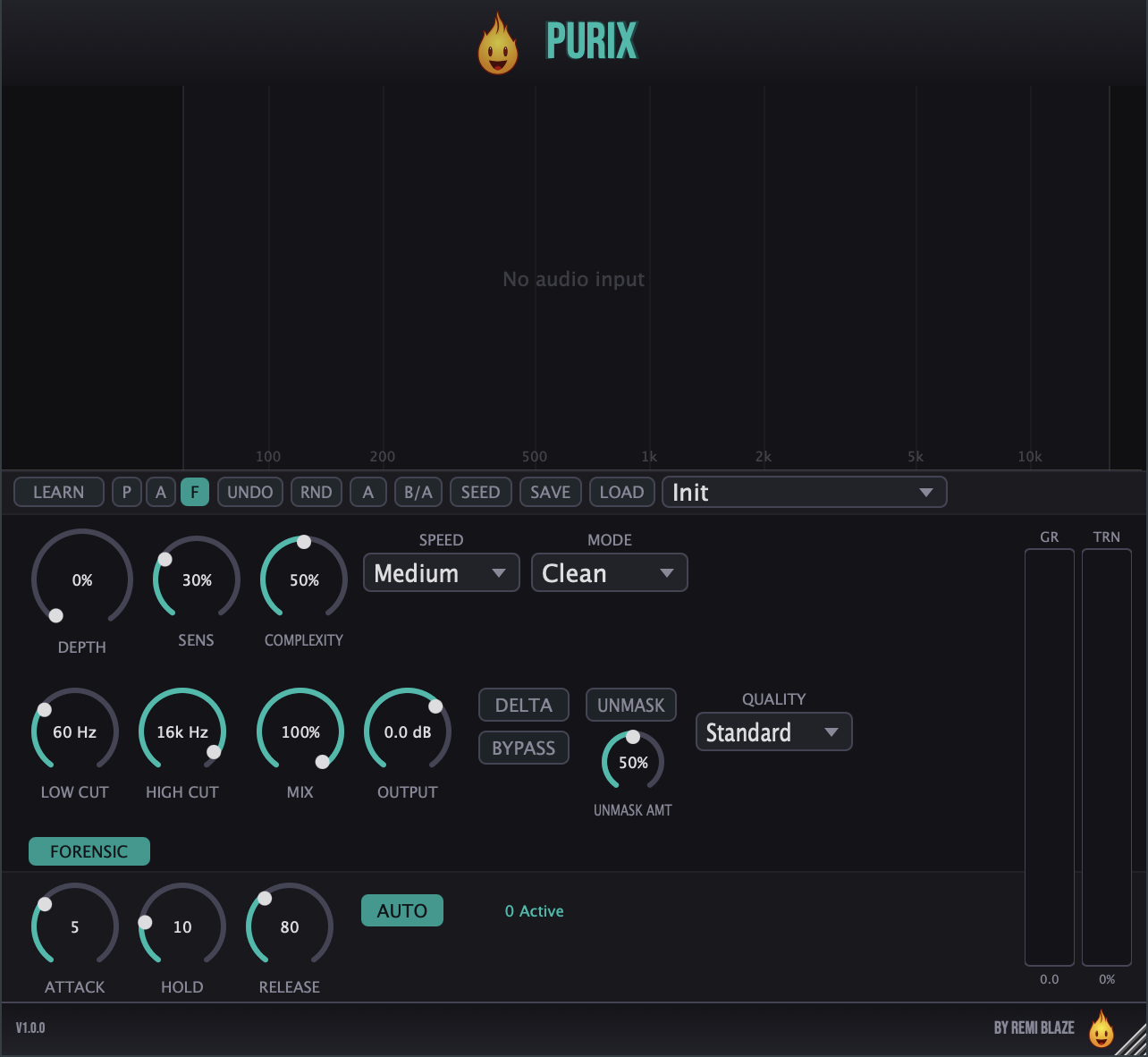
Clean up harsh peaks, muddy buildup, and boxy resonances automatically — without touching your source tone.
Purix analyzes your audio in real time with FFT-based spectral detection, finds problematic resonances as they happen, and applies fast per-bin dynamic gain reduction exactly where and when they occur. When the resonance subsides, the reduction releases.
Fully signed and notarized for macOS as AU, VST3, and Standalone.
- Go to the latest release.
- Download
Purix_Installer.pkg. - Double-click it and follow the installer. Because it's signed & notarized by Apple, it installs cleanly — no security warnings, no right-click, no "Open Anyway."
- Restart your DAW and rescan plug-ins.
Full guide: remiblaze.com/support.
Detection
- Depth — Amount of dynamic gain reduction applied to flagged resonances (0–100%).
- Sensitivity — How far above the surrounding spectrum a peak must rise before it's treated as a resonance (0–100%).
- Mode — Five detection profiles: Clean, Vocal, Drum, Master, and Harmonic (pitch-tracking).
- Speed — Slow / Medium / Fast detection response.
- Complexity — Controls how aggressively the detector reacts across the spectrum (0–100%).
Envelope
- Attack — 0.1–50 ms.
- Hold — 0–500 ms.
- Release — 5–1000 ms.
- Auto Hold — Automatically scales hold time per frequency.
Filtering & Tone
- Low Cut — Restricts processing to above 20–2000 Hz.
- High Cut — Restricts processing to below 2000–20000 Hz.
- Harmonic Count — Number of harmonics tracked in Harmonic mode (5–40).
- De-Esser Link — Ties sibilance handling into detection.
Output
- Mix — Dry/wet blend (0–100%) for parallel cleanup.
- Output — Level trim (−12 to +6 dB).
- Auto Makeup — Automatic level compensation for the applied reduction (0–100%).
Workflow
- Delta — Monitor only what Purix is removing.
- Unmask + Unmask Amount — Sidechain-driven spectral ducking to reduce frequency masking (dedicated sidechain input).
- Learn / Cleanse — Analyzes incoming audio and sets parameters for you.
- A/B — Toggle between two full parameter states.
- Before/After — Freeze the spectrum for direct visual comparison.
- Frequency Solo — Audition any band from the spectrum display.
- Cleanup Seed — Encode and share your settings as a short code.
- MIDI Pitch Override — Feed MIDI notes for exact harmonic tracking.
- Bypass — One-click A/B against the unprocessed signal.
- Overlap-add FFT engine — 75% overlap for smooth spectral processing.
- Per-bin dynamic reduction — Independent attack/release smoothing on every frequency bin, measured against a rolling time-average and local spectral average.
- Yin pitch detection — Harmonic mode uses autocorrelation to find the fundamental and place suppression between harmonics.
- Quality modes — Eco / Standard / High trade CPU for FFT resolution; latency is reported to the host per mode.
- Oversampling and an output DC blocker for clean, artifact-free results.
- Universal Binary — Native on Apple Silicon and Intel.
- macOS 15.0 or later
- Apple Silicon or Intel Mac (Universal Binary)
- Any AU or VST3 host (your DAW of choice)
| # | Preset | Best For |
|---|---|---|
| 1 | Init | Clean starting point |
| 2 | Gentle Cleanup | Subtle broadband tidy-up |
| 3 | Vocal De-Harsh | Taming harsh vocals |
| 4 | Vocal De-Ess | Sibilance control |
| 5 | Drum De-Box | Removing boxy drum tone |
| 6 | Drum De-Ring | Killing drum ring |
| 7 | Guitar Tamer | Smoothing guitar resonances |
| 8 | Bass Cleanup | Low-end resonance control |
| 9 | Mix Bus Polish | Gentle bus refinement |
| 10 | Master Smooth | Transparent master cleanup |
| 11 | Harmonic Vocal Clean | Pitch-tracked vocal cleanup |
| 12 | Harmonic Deep Clean | Aggressive harmonic cleanup |
| 13 | Harmonic Instrument | Solo instrument cleanup |
| 14 | Remi Blaze Purix | Signature setting |
| 15 | The Mud-Killer | Clearing low-mid mud |
| 16 | Sibilance Surgeon | Precision de-essing |
| 17 | FM Lead Tamer | Taming bright FM leads |
| 18 | Master Glue | Cohesive master bus |
| 19 | Sub-Stabilizer | Controlling sub-bass resonance |
Found a UI glitch, resize bug, or DAW-specific quirk? Open an issue on the Issues tab with your macOS version, DAW + version, and steps to reproduce.
- Developer: Remi Blaze.
- Framework: JUCE.
- License: free under a proprietary Freeware License (see also our terms). Reverse-engineering, repackaging, binary redistribution, or reselling the compiled installer is strictly prohibited.
All product names, company names, and logos mentioned herein are trademarks or registered trademarks of their respective owners. Any such references are used for descriptive or compatibility purposes only and do not imply affiliation with, endorsement by, or sponsorship from their owners.
VST is a trademark of Steinberg Media Technologies GmbH, registered in Europe and other countries.
Apple, macOS, Audio Units (AU), and Apple Silicon are trademarks of Apple Inc., registered in the U.S. and other countries.