
pixi-tiledmap is a complete Tiled map runtime for PixiJS v8 - a high-performance renderer for Tiled Map Editor maps (.tmj / .tmx) with built-in parsing, runtime editing, procedural generation, and Tiled JSON export, built for TypeScript and JavaScript.
Load .tmj and .tmx maps, render batched GPU tiles, edit and generate maps at runtime, and export them back to Tiled JSON, all with no additional runtime dependencies beyond PixiJS.







Showcase · Map viewer · Quick Start · Performance · API Reference · Documentation

The showcase running live: in this frame, 7,891 quads in one animated packed tile layer at 144 fps, with 13.2k setTile calls per second.
npm install pixi-tiledmap pixi.jsRegister the loader extension once, then load .tmj (JSON) or .tmx (XML) files through Assets:
import { Application, extensions, Assets } from 'pixi.js';
import { tiledMapLoader } from 'pixi-tiledmap';

extensions.add(tiledMapLoader);

const app = new Application();
await app.init({ width: 800, height: 600 });
document.body.appendChild(app.canvas);

const { container } = await Assets.load('assets/map.tmj');
app.stage.addChild(container);
Note
The loader auto-detects the format by file extension: .tmj → JSON, .tmx → XML.
PixiJS caches the loaded asset, so repeated loads of one URL return the same
container, not a copy. See Asset Loading and Lifecycle
before rendering one map more than once or managing loaded textures yourself.
Choose pixi-tiledmap when Tiled is your map editor and you want the whole path from map file to rendered, editable, exportable map handled for you.
Static tiles are batched into PixiJS meshes, tile layers are render groups that a moving camera does not re-upload, and compatible runtime edits update their buffers in place instead of rebuilding a layer. The library supports every Tiled layer type and orientation, animated tiles, objects and templates, parallax scrolling, and infinite maps. The Performance section explains the design and records the measurements behind it.
The package ships its own TMJ and TMX parsers, comprehensive TypeScript types, procedural map tools, and Tiled JSON export. It has no additional runtime dependencies beyond PixiJS, which is supplied as a peer dependency.
pixi-tiledmap is listed in Tiled's own support documentation among the libraries that read the TMX/TMJ formats.
@pixi/tilemap describes itself as a "low-level, optimized rectangular tilemap implementation": it draws tiles into a grid quickly, and leaves Tiled's file formats and map model to you.
pixi-tiledmap starts one level up, at the Tiled map itself - tilesets, every layer type and orientation, objects, templates, infinite maps, parallax, and animation - and makes that model editable, generatable, and exportable at runtime. The two sit at different levels rather than competing for the same job.
Reach for pixi-tiledmap when PixiJS v8 is your renderer and you would rather have Tiled's semantics handled for you than implement them - especially with large maps, runtime tile changes, procedurally generated maps, or round-trip export.
You probably do not need it when you only want to draw arbitrary rectangular sprites on a grid and never touch a .tmx or .tmj file.
- Showcase (pictured above) - seven scenes rendered by the library: packed tiles animated quad by quad, parallax worlds, falling blocks that become map tiles, an isometric heightfield, hexagonal biome waves, Conway's Game of Life, and a liquid-atlas terrain flight. The scenes include runtime editing at about 10k
setTilecalls per second. - Map viewer - a curated catalog of
.tmxmaps behind a searchable picker, with a pan/zoom camera, the layer tree, a tile grid overlay, a hovered-tile inspector, and an FPS counter. You can also upload your own.tmxor.tmjmap and share it with a generated link.
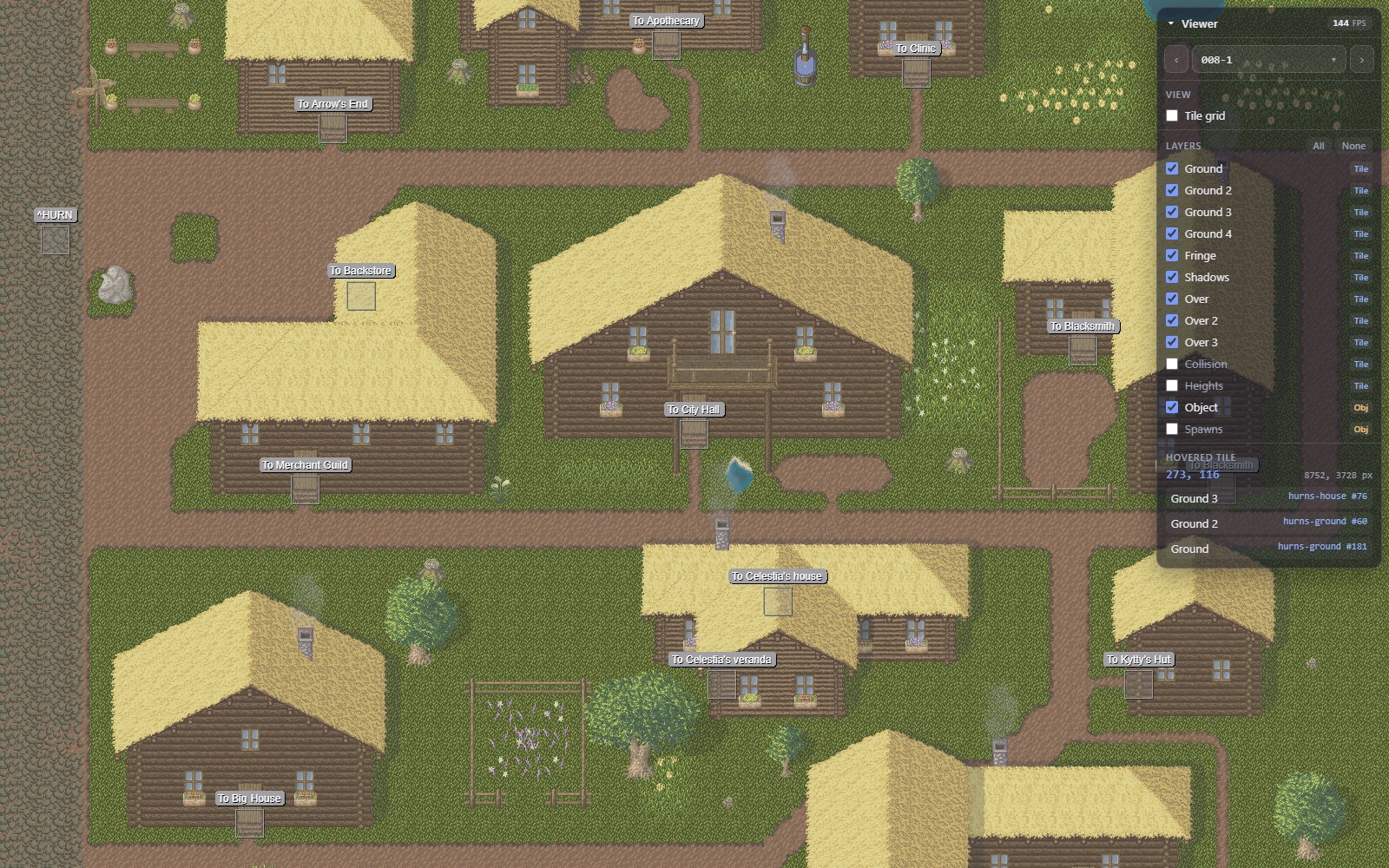
What the library does with a Tiled map, including where it stops:
| Tiled feature | Support |
|---|---|
| TMJ and TMX maps | Yes |
| External TSJ / TSX tilesets, TJ / TX object templates | Yes, resolved automatically |
| Tile, image, object, and group layers | Yes |
| Orthogonal, isometric, staggered, hexagonal, Tiled 1.12 oblique | Yes |
| Infinite (chunked) maps | Yes |
| Animated tiles | Yes |
| Flip and rotation flags, tile offsets, tint, runtime alpha, render size and fill mode, color keys | Yes |
| Nested parallax factors, map parallax origin, blend modes, all four render orders | Yes |
| Image-collection tilesets | Yes |
| Runtime tile editing | Yes, in place where the edit allows it |
| Procedural map generation | Yes |
| Export to TMJ and TSJ | Yes, round-trip verified |
| gzip / zlib compressed tile data | Yes, through parseMapAsync / exportMapAsync only |
| zstd compressed tile data | No |
| Wang sets and terrains, including the pre-1.5 TMX form | Parsed and exposed on ResolvedTileset; editor-only metadata with no rendering behaviour |
| Hexagonal tile turns (diagonal-flip bit as 60°, extra bit as 120°) | Rendered as sprites rather than packed quads |
What the table does not show:
- Batched tile rendering - static tiles use batchable PixiJS meshes while animated tiles retain per-tile playback; render order remains correct when tiles overhang their cells
- Runtime editing and generation - edit loaded maps in place or build maps procedurally; compatible edits update packed mesh buffers instead of rebuilding a layer
- Objects and templates - render shapes, text, and animated tile objects in Tiled draw order, with automatic object-template inheritance and GID remapping
- Tiled JSON export - write loaded or generated maps as TMJ and standalone tilesets as TSJ; preserve tile-layer encodings, with gzip/zlib compression through
exportMapAsync; see Writing Maps Back Out for round-trip guarantees and runtime-only exclusions - Data-only tools -
parseMap, export, procedural-map, lookup, and map-geometry APIs bundle without PixiJS; XML parsing uses PixiJS'DOMAdapter, but no renderer is needed - TypeScript-first packaging - comprehensive Tiled types, ESM and CJS builds, tree-shakable modules, and no additional runtime dependencies beyond the PixiJS peer dependency
The renderer gets the most attention in this library, because a Tiled map is usually the largest thing on screen.
At a glance. A static 256x256 layer drawn from one tileset image reaches the GPU as a few meshes rather than 65,536 display objects. Moving the camera over it costs a transform update, not a pass over its quads. Editing one tile rewrites one quad's buffers, not the layer. An animated layer costs a single ticker listener regardless of how many tiles move. An infinite map resolves a coordinate to its chunk in about 32ns at 1024 chunks in the recorded benchmark. A consumer that only parses or generates maps bundles no renderer at all.
The rest of this section is how that is done, and what it was measured against.
- Static tiles are batched, not one sprite each. A tile layer packs its static tiles into batchable PixiJS
Meshchildren grouped by texture source and runtime alpha, so an ordinary layer ends up with one mesh per texture and alpha instead of one display object per tile. Grouping never changes what is drawn on top: a tile joins an existing mesh only when nothing it overlaps is drawn above that mesh. Packed meshes hold16000quads by default (tileMeshBatchSize), which stays below 16-bit index limits while keeping the render object count low, and their quad indices are cached per quad count and shared between mesh instances. - Tile edits write buffers, not layers.
setTileandclearTilerewrite the affected quad in the existing mesh geometry, skip the upload when its rect and UVs are unchanged, and reuse slots freed by earlier clears before growing batch capacity. Only the cases listed under Runtime Editing and Procedural Maps rebuild a tile layer. - Moving the camera does not touch the tiles. Tile and object layers are PixiJS render groups, so panning, zooming, or
applyParallaxupdates one transform per layer instead of making PixiJS re-transform every batched quad on the CPU each frame; that took about 4-6ms per frame for a panning256x256map with four layers on a desktop CPU, and a fraction of a millisecond as render groups (npm run measure:camera). Layers that use a Tiled blend mode other thannormalstay plain containers, because PixiJS does not apply blend modes to render groups. - One ticker listener per layer. A tile layer advances all of its animated tile visuals from a single
Ticker.sharedlistener instead of PixiJS' per-spriteautoUpdate: connecting4096sprites individually cost more than creating them, about 55ms of the 64ms an animated64x64layer took to build, so building such a layer is now about 8x faster. - Lookups are indexed. An infinite layer resolves a coordinate to its chunk through a chunk grid built once per layer, about
32ns instead of780ns at1024chunks, andTiledMapresolves a tile layer through a cached index, so an edit does not walk other layers' render children. Layer construction and editing avoid per-tile allocations such as string cell keys and UV corner arrays. - Nothing ships that a map does not use. There is no external tilemap dependency and no additional runtime dependency beyond PixiJS; PixiJS' advanced blend modes are imported on demand for the maps that use them; and
parseMap, map export, procedural maps, lookups, and map geometry are free ofpixi.js, so a data-only consumer bundles no renderer.
npm run bench measures the renderer hot paths: layer construction, one animated layer tick, and runtime editing across map sizes, occupancy, and operation mixes. docs/BENCHMARKS.md records the current baseline, explains how packed layers and incremental editing work, and lists the edits that still rebuild a layer. Those numbers are machine-specific - compare a change against a baseline measured on the same machine in the same session.
Animated tiles are deliberately still sprites. npm run measure:animated prices the two shapes in PixiJS itself in headless Chrome: on an RTX 3080 the difference between packed animated quads and one AnimatedSprite per tile is a rounding error in a 16ms frame below about a thousand simultaneously animated tiles, and reaches roughly 8 percent of a frame budget at 16384 of them. Until a map needs that, animated tiles keep their per-sprite playback control and the packed path stays simple.
If you want the best runtime behavior in your game/application:
- Prefer
.tmjfor the fastest parse path when authoring allows it. - Preload map, tileset, and image assets with
Assetsbefore scene transitions. - Reuse
TiledMapinstances for frequently revisited scenes when possible. - Move the camera by transforming the
TiledMapor a container above it; tile and object layers are render groups, so that stays cheap on mobile CPUs. A blend mode you set on the map or an ancestor is not applied inside those layers; setisRenderGroup = falseon the layers that need it. - Keep large worlds in infinite/chunked maps to avoid over-allocating one giant layer.
- Avoid unnecessary texture churn; pass stable texture maps into
TiledMapoptions. - Keep the default
tileMeshBatchSizeunless you are profiling a GPU/driver that prefers smaller meshes; the default keeps packed meshes below 16-bit index limits while reducing render object count. - Object layers show each named shape's name as in the Tiled editor, one
Texttexture per label. For layers with many named objects, such as collision layers, passobjectStyle: { showLabels: false }, and considerscreenSpace: falseif the map zooms continuously. - Treat
TileLayerRenderer.childrenas renderer internals. Static map tiles are packed intoMeshchildren, not oneSpriteper tile. - Display objects you add to a
TileLayerRenderer(for example a player walking on that layer) survive tile edits and layer rebuilds and keep their position relative to the tiles. Tiles sit below children you add, unless you insert yours below them withaddChildAt. Destroying the map with its children, or unloading it, destroys them too.
Everything above is the short version. The rest of this file is reference material, mapped here so you can jump straight to what you need.
In this README
- Requirements - supported PixiJS and runtime versions
- Asset Loading and Lifecycle - paths and formats, the PixiJS asset cache, renderer options, and the direct pipeline
- Internal Model - what a resolved map holds and how to reach it
- Manual Construction - building a
TiledMapwithout the loader - Runtime Editing and Procedural Maps -
setTileandclearTile, generating maps, and which edits rebuild a layer - Writing Maps Back Out - TMJ and TSJ export, round-trip guarantees, and compression
- Inspecting a Map Without Rendering It - lookups and map geometry with no renderer involved
- API Reference - exports, the
TiledMapcontainer, object templates, and low-level packing - Migration from v1 - what changed and what to rename
- Development - building and testing the package itself
Deeper dives
docs/ARCHITECTURE.md- module map, data flow, and the constraints that keep the parser free of PixiJSdocs/BENCHMARKS.md- the recorded baseline, how packed layers and incremental editing work, and the edits that still rebuild a layerdocs/TESTING.md- how the suite is organised and what to write for a changedocs/QUALITY.md- CI, releases, and the quality gate
pixi.js>=8.10.0as a peer dependency- A runtime with the Compression Streams API for gzip/zlib tile data (
parseMapAsync,exportMapAsync); every current browser and Node 18+ provides it
The loader detects .tmj as JSON and .tmx as XML. Image paths inside external
TSJ/TSX tilesets resolve relative to the tileset file, matching Tiled's path
semantics even when tilesets live in a nested directory. External tileset paths
inside object templates likewise resolve relative to the template file so template
tile GIDs map correctly.
Important
PixiJS caches loaded assets, so loading the same map URL again returns the
same container, not a copy. To render one map twice (for example below
and above the player), construct separate TiledMaps with layerFilter, as
shown in the TiledMap container section. Once the
container has been destroyed, the next Assets.load returns a freshly built
one from the cached map data and textures; the rebuild happens synchronously
the first time container is read. That rebuild reuses the loaded textures,
so do not destroy the container with { textureSource: true } if you load the
map again. Assets.unload(url) destroys the current container and its
children, including display objects you added to its layers; remove those
first if you still need them. Textures and GIF sources stay in the Assets
cache.
Warning
GIF sprites created by the map never destroy their GifSource, not even with
destroy(true), because other maps may share it. Call source.destroy()
yourself to free one. A clone() of such a sprite is a plain PixiJS
GifSprite: clone.destroy(true) does destroy the shared source, so destroy
clones without arguments.
Supply renderer options through PixiJS asset metadata:
const { container } = await Assets.load({
  src: 'assets/map.tmj',
  data: {
    mapOptions: {
      tileMeshBatchSize: 16_000,
      layerFilter: (layer) => layer.visible
    }
  }
});
The loader switches every texture it loads to nearest scaling, so pixel-art
tiles stay sharp and neighbouring atlas cells do not bleed into visible lines
when the map is zoomed. The textures are shared through the Assets cache, so
this applies to other users of the same images too. Pass scaleMode: 'linear'
for smooth filtering, or scaleMode: null to leave each texture as it is:
const { container } = await Assets.load({
  src: 'assets/map.tmj',
  data: { scaleMode: 'linear' }
});
Antialiasing is a renderer setting; pass antialias: false to
Application.init for crisp tile edges.
Call the same asset pipeline directly when custom fetch or asset-loading adapters
are needed. The returned container is typed as TiledMap, so its layer,
parallax, and tile-editing APIs are available without a cast:
import { loadTiledMapAsset } from 'pixi-tiledmap';

const { container } = await loadTiledMapAsset('assets/map.tmj', {
  mapOptions: {
    tileSpritePadding: 0.01,
    tileMeshBatchSize: 16_000,
    layerFilter: (layer) => layer.visible
  }
});

container.applyParallax(cameraX, cameraY);
container.setTile('details', 10, 6, { tileset: 'dungeon', tileId: 42 });The library keeps three concepts separate:
- Tiled map data: TMJ JSON or TMX XML in the shape Tiled writes.
- Resolved map IR: normalized data with Tiled-compatible defaults applied, external tilesets supplied, templates merged, GIDs decoded, and layer data decoded.
- PixiJS rendering: a
TiledMapcontainer built from a resolved map, texture maps, layer tree rendering, packed tile meshes, tile visuals for object/animated cases, and map geometry.
The asset loader runs the complete pipeline for .tmj and .tmx files. Manual construction gives you the same pieces directly: parse to a resolved map, load textures, then construct TiledMap.
Procedural construction starts at the same Resolved map IR boundary. Maps created with createMap render through the same TiledMap container and support the same runtime editing methods as loaded maps.
TMJ/JSON maps may omit fields whose values match Tiled defaults. parseMap and parseMapAsync normalize those omissions when building the resolved map: map defaults such as orientation, renderorder, infinite, and parallax origins; layer defaults such as opacity, visible, offsets, parallax, and properties; object defaults such as empty name / type, zero size, zero rotation, and visible state; and tileset defaults such as margin, spacing, computed columns, tile offset, render size, fill mode, object alignment, and properties.
If you prefer to parse and build the display tree yourself:
import { parseMap, TiledMap } from 'pixi-tiledmap';
import type { TiledMapData } from 'pixi-tiledmap';
import { Assets, type Texture } from 'pixi.js';

const response = await fetch('assets/map.tmj');
const data: TiledMapData = await response.json();

const mapData = parseMap(data);

const tilesetTextures = new Map<string, Texture>();
for (const ts of mapData.tilesets) {
  if (ts.image) {
    // Image paths are relative to the map file; the map key stays unchanged.
    tilesetTextures.set(ts.image, await Assets.load(`assets/${ts.image}`));
  }
}

const container = new TiledMap(mapData, { tilesetTextures });
app.stage.addChild(container);
For image layers, image-collection tilesets, and animated GIF sources, pass the corresponding texture maps through TiledMapOptions. The asset loader fills these maps automatically.
A map whose layers use advanced blend modes (overlay, darken, ...) needs PixiJS' advanced blend modes registered before it renders. The asset loader takes care of that; when constructing the map yourself, await loadMapBlendModes(mapData) before new TiledMap(...). It resolves at once for maps that do not need it.
Use setTile, getTile, and clearTile to update rendered tile layers by layer name or numeric layer id:
// Load save data and swap a chest tile.
map.setTile('chests', 12, 8, { tileset: 'dungeon', tileId: save.chestOpen ? 5 : 4 });
For static packed tiles, edits that stay on the same texture source and alpha group update the existing packed mesh geometry buffers in place. Unchanged rect/UV edits skip buffer uploads.
Painting a static tile into an empty cell is incremental as well: clearing a tile degenerates its quad and returns that slot to the layer, and a later insert reuses a freed slot before it grows batch capacity geometrically. Repeated clear/set cycles therefore reuse existing capacity and leave mesh count and buffer size unchanged. Switching an existing tile to a different texture source or alpha group works the same way: its quad is cleared and inserted into a batch of the new group. This applies to orthogonal maps whose tile quads stay inside their own grid cell, which is the common case; the renderer verifies that per tile. The default sub-pixel tileSpritePadding seam is allowed; a padding large enough to overlap neighbours visibly is not.
The following edits rebuild the affected tile layer, because their result cannot be reproduced by writing a single quad in place:
- inserting into a cell, or switching an existing tile to a different texture source or alpha group, on an isometric, staggered, or hexagonal map, or in any layer whose tiles overhang their grid cell (via
tileoffset, a tile larger than the grid, or atileSpritePaddingabove0.125px), where the draw order of overlapping quads is significant - changing between packed tiles and sprite-backed tiles: animated tiles, GIFs, and tiles a hexagonal map turns by 60 or 120 degrees
- inserting a tile whose tileset texture is not available
See docs/BENCHMARKS.md for how incremental editing works and what it costs.
Use createMap for generated maps. It returns the same resolved map shape as parseMap, so the rendered result supports the same editing API:
import { createMap, TiledMap } from 'pixi-tiledmap';

const generated = createMap({
  width: 40,
  height: 24,
  tilewidth: 16,
  tileheight: 16,
  tilesets: [
    {
      name: 'dungeon',
      image: 'dungeon.png',
      imagewidth: 256,
      tilewidth: 16,
      tileheight: 16,
      tilecount: 128,
    },
  ],
  layers: [
    {
      name: 'floor',
      tiles: floorTiles.map((tileId) => ({ tileset: 'dungeon', tileId })),
    },
    {
      name: 'details',
      tiles: new Array(40 * 24).fill(null),
    },
  ],
});

const map = new TiledMap(generated, { tilesetTextures });
map.setTile('details', 10, 6, { tileset: 'dungeon', tileId: 42 });
For isometric, staggered, hexagonal, and oblique maps, set orientation. Staggered and hexagonal maps also take staggeraxis, staggerindex, and (hexagonal only) hexsidelength, and oblique maps skewx / skewy, as in a Tiled map file:
const hexMap = createMap({
  orientation: 'hexagonal',
  width: 20,
  height: 12,
  tilewidth: 60,
  tileheight: 70,
  hexsidelength: 35,
  staggeraxis: 'y',
  staggerindex: 'odd',
  // tilesets, layers ...
});
Tile objects accept the same tile input as tile layer cells, so the library derives the GID and tileset index rather than making you restate them:
layers: [
  {
    type: 'objectgroup',
    name: 'actors',
    objects: [
      // The tileset is named, so this keeps working if the tilesets are reordered.
      { id: 1, name: 'koopa', x: 32, y: 48, tile: { tileset: 'enemies', tileId: 12 } },
    ],
  },
],exportMap is the inverse of parseMap: it turns a resolved map back into Tiled JSON, so a generated map can be saved as a .tmj and opened in Tiled. Parsing an exported map returns a map deep-equal to the one you exported.
import { exportMap, parseMap } from 'pixi-tiledmap';

const tmj = exportMap(generated);
await writeFile('level.tmj', JSON.stringify(tmj, null, 2));
A tileset is written as an external { firstgid, source } reference when it has a source - as every externally-resolved tileset does - and embedded otherwise. Pass tilesetSources to externalise embedded tilesets by name:
const tmj = exportMap(generated, {
  tilesetSources: { dungeon: 'tilesets/dungeon.tsj' },
  encoding: 'base64', // 'csv' writes a plain GID array; default: each layer's own encoding
});
Each tile layer remembers whether it was base64 and how it was compressed, and createTileLayer accepts the same encoding / compression options. exportMap keeps the encoding but cannot compress; exportMapAsync also writes gzip or zlib through the Compression Streams API, so its output parses back with parseMapAsync to exactly the same map:
import { exportMapAsync } from 'pixi-tiledmap';

const kept = await exportMapAsync(parsed); // each layer keeps its compression
const gzipped = await exportMapAsync(generated, { compression: 'gzip' }); // or pick one; null for none
exportTileset writes a tileset the same way. By default it produces embedded map data; { standalone: true } produces a .tsj file, which carries type: 'tileset' and no firstgid, because the first global id belongs to the map that references the tileset, not to the file:
import { exportTileset } from 'pixi-tiledmap';

const ground = generated.tilesets.find((tileset) => tileset.name === 'dungeon')!;
await writeFile(
  'tilesets/dungeon.tsj',
  JSON.stringify(exportTileset(ground, { standalone: true, tiledversion: '1.11.2' }), null, 2)
);
That file reads straight back through ParseOptions.externalTilesets, which is typed TiledTilesetFile (a tileset without a firstgid), so a .tsj read from disk needs no cast:
import type { TiledTilesetFile } from 'pixi-tiledmap';

const dungeon: TiledTilesetFile = JSON.parse(await readFile('tilesets/dungeon.tsj', 'utf8'));
const map = parseMap(tmj, { externalTilesets: new Map([['tilesets/dungeon.tsj', dungeon]]) });
Two caveats worth knowing, since both are silent:
ResolvedTile.alphais a runtime render property with no place in the Tiled format, so it is not written. A GID carries no opacity.exportMapwrites compressed layers as uncompressed base64, since the Compression Streams API has no synchronous form. UseexportMapAsyncto keep the compression. zstd is neither read nor written.
nextlayerid and nextobjectid are kept from the parsed map and only ever raised, so ids of layers and objects deleted in Tiled are not handed out again.
findLayer, getProperty, and tileAt work on the resolved map itself, so tools that transform a map before rendering do not need a TiledMap container. They are pure - no PixiJS, no DOM.
import { findLayer, getProperty, tileAt } from 'pixi-tiledmap';

const spawns = findLayer(mapData, 'spawns'); // searches nested group layers too
const theme = getProperty(mapData, 'theme', 'string'); // string | undefined

// Camera maths stays with you: convert a pointer event to the map container's local space first.
const local = map.toLocal(event.global);
const cell = tileAt(mapData, local.x, local.y); // null outside the map, never clamped
tileAt supports every orientation. Note that isometric maps extend to the left of the origin, so valid points there have negative x; TiledMap's bounds start there too.
tileAt only returns cells inside the map's width x height grid. Infinite maps can have chunks outside that range, including negative coordinates; use pixelToTile, which is unbounded, for those.
| Export | Description |
|---|---|
tiledMapLoader |
PixiJS LoadParser extension - register with extensions.add() |
loadTiledMapAsset(url, options?) |
Load, resolve, texture, and render a TMJ/TMX map with optional renderer settings |
loadMapBlendModes(map) |
Load PixiJS' advanced blend modes if the map's layers use any; resolves at once otherwise |
TiledMapAsset |
Loaded mapData plus a TiledMap container, rebuilt after destroy |
TiledMap |
Container subclass that renders a resolved map |
TileLayerRenderer |
Packed mesh-backed Container for a single tile layer |
ImageLayerRenderer |
Container for a single image layer |
ObjectLayerRenderer |
Container for a single object layer |
GroupLayerRenderer |
Container for a group layer (recursive) |
PackedTileLayerRenderer |
Packed mesh base used by TileLayerRenderer, with a low-level addTextureRect() seam |
TileSetRenderer |
Texture manager for a tileset |
createLayerRenderer(layer, tilesets, ctx, imageTextures, imageGifSources?, layerFilter?, objectStyle?) |
Build the renderer for one resolved layer, as TiledMap does when ctx carries mapHeight and the map's pixel size |
createMap(options) |
Create a resolved map procedurally |
createTileset(options) |
Create a resolved tileset |
createTileLayer(options, tilesets?) |
Create a resolved tile layer |
createImageLayer(options) |
Create a resolved image layer |
createObjectLayer(options, tilesets?) |
Create a resolved object layer |
createGroupLayer(options, tilesets?) |
Create a resolved group layer |
parseMap(data, options?) |
Synchronous Tiled JSON → resolved IR; options supplies external tilesets and templates |
parseMapAsync(data, options?) |
Async variant (required for gzip/zlib compressed data) |
parseTmx(xml) |
Parse TMX XML string → TiledMap data (same shape as JSON) |
parseTsx(xml) |
Parse TSX XML string → TiledTileset data (firstgid is 0; the map's reference supplies the real value) |
parseTx(xml) |
Parse TX XML string → TiledObjectTemplate data |
decodeLayerData(data, encoding?, compression?) |
Decode CSV or uncompressed base64 tile data into raw GIDs |
decodeLayerDataAsync(data, encoding?, compression?) |
Async variant that also decodes gzip/zlib |
decodeGid(raw) |
Decode a raw GID into tile ID + flip flags |
encodeGid(tile) |
Pack a resolved tile back into a raw GID - the inverse of decodeGid |
exportMap(map, options?) |
Resolved IR → Tiled JSON - the inverse of parseMap; keeps each layer's encoding but never compresses |
exportMapAsync(map, options?) |
Like exportMap, and also writes gzip/zlib compressed tile data - the inverse of parseMapAsync |
exportTileset(tileset, options?) |
Resolved tileset → embedded tileset data, or a standalone .tsj with { standalone: true } |
findLayer(map, name) |
Find a resolved layer by name, including inside group layers |
findLayerById(map, id) |
Find a resolved layer by its Tiled id |
walkLayers(map) |
Iterate the layer tree depth-first, group layers included |
getProperty(holder, name, type?) |
Read a Tiled custom property off a map, layer, object, or tileset; pass the Tiled type to narrow the result |
tileAt(map, x, y) |
Map-space point → tile cell, or null outside the map |
tileToPixel(col, row, ctx) |
Tile cell → map-space position of its image box, for every orientation; returns one reused object, so copy x/y before the next call |
pixelToTile(x, y, ctx) |
Unbounded map-space point → tile cell - the inverse of tileToPixel |
FLIPPED_HORIZONTALLY_FLAG, FLIPPED_VERTICALLY_FLAG, FLIPPED_DIAGONALLY_FLAG, ROTATED_HEXAGONAL_120_FLAG, GID_MASK |
Tiled's raw GID bits: the flip and hexagonal-turn flags, and the mask for the global tile id |
parseTmx, parseTsx, and parseTx parse XML through PixiJS' DOMAdapter, so they work in browsers, web workers, and Node. In the browser the default adapter is used automatically. In a web worker or in Node there is no global DOMParser, so configure a DOM-capable adapter once at startup before parsing:
import { DOMAdapter, WebWorkerAdapter } from 'pixi.js'

DOMAdapter.set(WebWorkerAdapter) // uses @xmldom/xmldom under the hoodPackedTileLayerRenderer.addTextureRect() is available for renderer-level integrations that need to pack an already-resolved texture rectangle without going through Tiled tile placement. It uses the same batch sizing, texture-source/alpha grouping, cached quad indices, and final MeshGeometry path as normal tile layers.
Most applications should use TiledMap and TileLayerRenderer; the low-level seam exists for renderer extensions and focused tests.
// Only needed for advanced blend modes (overlay, darken, ...); the asset
// loader does this itself. Without it the first frames blend normally.
await loadMapBlendModes(resolvedMap);

const map = new TiledMap(resolvedMap, {
  tilesetTextures, // Map<imagePath, Texture>
  imageLayerTextures, // Map<imagePath, Texture>
  tileImageTextures, // Map<imagePath, Texture> (image-collection tiles)
  tileImageGifSources, // Map<imagePath, GifSource> (animated image-collection tiles)
  imageLayerGifSources, // Map<imagePath, GifSource> (animated image layers)
  layerFilter, // optional (layer) => boolean, for rendering selected layers
  tileSpritePadding, // optional, defaults to 0.01 to hide fractional-scale seams
  tileMeshBatchSize, // optional, defaults to 16000 quads per packed mesh
  objectStyle, // optional, how object layers draw shapes, labels and text (below)
});

map.orientation; // 'orthogonal' | 'isometric' | 'staggered' | 'hexagonal' | 'oblique'
map.mapWidth; // tile columns
map.mapHeight; // tile rows
map.tileWidth; // tile pixel width
map.tileHeight; // tile pixel height
map.getLayer('ground'); // find layer Container by name
map.getLayer('ground')!.isRenderGroup; // true: tile and object layers are render groups unless they blend

// Runtime tile editing. Layer can be a tile-layer name or numeric layer id.
map.getTile('ground', 12, 8);
map.setTile('ground', 12, 8, 42); // raw Tiled GID
map.setTile('ground', 12, 8, { tileset: 'dungeon', tileId: 4 });
map.setTile('ground', 12, 8, { tileset: 'dungeon', tileId: 4, alpha: 0.5 });
map.clearTile('ground', 12, 8);

// Parallax: call after moving your camera each frame. Layers with
// parallaxx/parallaxy < 1 move slower than the camera; layers with
// parallax 0 are pinned in screen space. Group-layer parallax composes
// multiplicatively with its children.
map.applyParallax(camera.x, camera.y);
Object layers draw shapes the way the Tiled editor does. objectStyle tunes that:
const map = new TiledMap(resolvedMap, {
  objectStyle: {
    fillAlpha: 0, // outlines only; defaults to the editor's 50/255
    showLabels: false, // name tags above named shapes (default true, as in Tiled)
    defaultColor: '#ff8800', // for layers without their own color
    screenSpace: true, // one-device-pixel outlines at any zoom (default); redraws shapes on zoom
    clipText: false, // skip the per-object mask that clips text to its box
  },
});
Text objects with kerning turned off in Tiled render without kerning: the library switches the canvas fontKerning off while PixiJS measures and draws those texts.
Tile and object layers are PixiJS render groups, so moving the map, a container above it, or a layer through applyParallax does not re-transform their tiles on the CPU. Layers whose Tiled blend mode is not normal, and the layers inside a group layer that blends, are plain containers instead, because PixiJS does not apply a render group's blend mode to its contents. For the same reason, a blend mode you set on the TiledMap or one of its ancestors does not reach into render-group layers; set isRenderGroup = false on those layers if they must blend with it. Image and group layers are always plain containers.
To split a map around a player sprite, render the same resolved map twice with different layer filters:
const isOverhead = (layer: ResolvedLayer) =>
  layer.properties.some((prop) => prop.name === 'overhead' && prop.value === true);

const belowPlayer = new TiledMap(resolvedMap, {
  tilesetTextures,
  layerFilter: (layer) => !isOverhead(layer),
});

const abovePlayer = new TiledMap(resolvedMap, {
  tilesetTextures,
  layerFilter: isOverhead,
});When loading through the asset loader, any object with a template field
is resolved automatically - referenced .tx / .tj files are fetched in
parallel and merged into the map before rendering.
For manual construction (parseMap / parseMapAsync), pass templates via
ParseOptions.templates:
import { parseMap, parseTx } from 'pixi-tiledmap';

const templates = new Map();
templates.set('sign.tx', parseTx(await (await fetch('sign.tx')).text()));

const mapData = parseMap(data, { externalTilesets, templates });
Template-instance merging follows Tiled semantics. Tiled writes a field on an
instance only when the instance changed it, so every field the instance
carries wins - even a zero rotation - and every other field (name, size,
rotation, opacity, visibility, text, gid, and shape) comes from the template.
As in Tiled, an empty name and a size with a zero width or height count as
unchanged and take the template's. An instance shape replaces the template shape as a whole, and
custom properties merge by name, the instance winning. If the template carries
an external-tileset reference to a tileset the map also uses, gid is
translated from the template firstgid-space to the map firstgid-space,
preserving flip flags. The tileset paths are compared normalized, and a source
still relative to the template file is resolved against the template's key.
| v1 (PixiJS v4) | v2 (PixiJS v8) |
|---|---|
PIXI.loader.add('map.tmx').load(…) |
extensions.add(tiledMapLoader); Assets.load('map.tmj') |
new PIXI.extras.TiledMap('map.tmx') |
const { container } = await Assets.load('map.tmj') |
| Global namespace mutation | Named ESM imports |
TMX XML via tmx-parser |
Built-in JSON + XML parser (no external deps) |
| Tile + image layers only | All layer types |
Working on the library needs Node ^22.22.2, ^24.15.0, or >=26, the range the build and test tooling supports. .node-version selects Node 22 for version managers, and devEngines makes npm warn on an unsupported version. Using the published package has no Node requirement beyond the requirements above.
npm install
npm run build        # ESM + CJS + types via tsdown
npm run dev          # watch mode
npm run check        # Biome lint + format
npm run typecheck    # tsc --noEmit
npm test             # Build, Vitest, and MagicLand visual regression
npm run bench        # renderer hot-path benchmarks
npm run measure:camera   # camera and parallax cost per frame in headless Chrome (after build)
npm run measure:animated # animated sprites vs. packed quads in headless Chrome
npm run quality:gate # check + typecheck + test, then the Fallow regression gate
npm test includes a headless MagicLand visual regression that renders a real TMX + GIF tileset fixture and pixel-compares it against a checked-in reference image.
docs/ARCHITECTURE.md- module map, data flow, packaging, and compatibility constraintsdocs/TESTING.md- test layout, package and visual tests, and how to test export and parsingdocs/BENCHMARKS.md- benchmark usage, the current smoke baseline, and how packed tile editing worksdocs/QUALITY.md- the quality gate, CI and npm releases, and the Fallow baselines
MIT - see LICENSE.md.