It implements custom navigation system suitable for spiders. Navigation grid builds on floors, walls, ceilings.
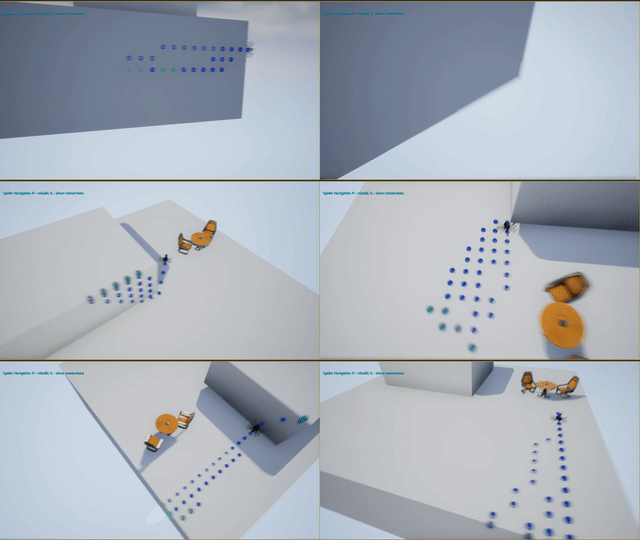
Now available on Marketplace
- Scene filled up with special actors
Tracerin specified volume with specified step. - From each tracer plugin traces to the nearest WorldStatic.
- At point of the hit it spawns actor
NavPointwith some offset. - From each
NavPointplugin check sphere collision with the othe nearestNavPoint. - Checks visibility between these two actors. If they are visible to each other - add connection. If not - add to the list of pissible neighbors.
- Iterates the list of pissible neighbors and traces in 6 directions from each of two points for possible connection through an edge.
Checks visibility between points of intersection. If a point of intersection is visible to each of two points - add a new point
NavPointEdgeand connections between them.
- Plugin implements A* to find path. Can return a normal to each navigation point.
Plugin contains auxiliary blueprints for movement on this grid:
- SpiderAIController - containts the main code of movement on the spider grid
- SpiderPawn - Simple Pawn without any code
- SpiderBB - Demo Blackboard
- SpiderBT - Demo Behaviour Tree
- SpiderAgroCheck - Behaviour Task
- SpiderCloseEnough - Behaviour Decorator
- SpiderIsAtLocation - Behaviour Decorator
- SpiderIsTargetMoved - Behaviour Decorator
- SpiderMoveToLocation - Behaviour Task
- SpiderRapidMoveTo - Behaviour Task
- Close your project in UE4
- Download plugin sources
- Copy it into your project in
Projectfolder. Make sure the path./Plugins/SpiderNavigation/SpiderNavigation.upluginis correct. - Rebuild your project. If you have non-c++ project, then add in the editor one empty c++ class and then rebuild project in VS.
- Run project. Be sure that SpiderNavigation plugin is enabled in Editor's Plugins menu.
- Switch on the view option in the
ContentpanelView Options(bottom right corner) to show plugin content. - Click on
Choose a path- a small button to left of Content path with icon of open folder. ChooseSpiderNavigation Content. - Add
DebugSpiderNavigationBP,DebugSpiderNavGridBuilderBP,SpiderPawnon the scene. - Adjust the size of the
DebugSpiderNavGridBuilderBPto match size of your level. - For
DebugSpiderNavigationBPscene instance chooseInput->Auto Receive Input:Player 0to enable hotkeys of navaigation. - Click on
Play. PressRbutton to rebuild navigation grid. PressQbutton to show navigation grid.
Plugin autosaves navigation grid. Try to click Stop and Play again. Spider pawn should follow you.
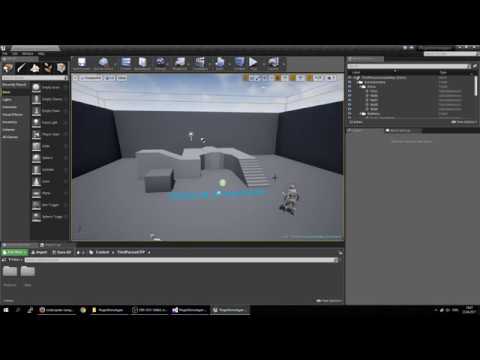
Here is a video guide:
MoveSpeed- How fast spiders moveRotationSpeed- How fast spiders rotate for each next navigation pointMustCheckTargetVisibility- Whether a spider must trace the target by the visibility channel to follow it
GridStepSize- The minimum distance between tracers. Should not be less then 40 (calculates too long)ActorsWhiteList- The list of actors which could have navigation points on thembUseActorWhiteList- Whether to useActorsWhiteListActorsBlackList- The list of actors which COULD NOT have navigation points on thembUseActorBlackList- Whether to useActorsBlackListbAutoRemoveTracers- For debug. If false then all tracers remain on the scene after grid rebuildbAutoSaveGrid- Whether to save the navigation grid after rebuildBounceNavDistance- How far put navigation point from a WorldStatic faceTraceDistanceModificator- How far to trace from tracers. Multiplier ofGridStepSizeClosePointsFilterModificator- How close navigation points can be to each other. Multiplier ofGridStepSizeConnectionSphereRadiusModificator- The radius of a sphere to find neighbors of eachNavPoint. Multiplier ofGridStepSizeTraceDistanceForEdgesModificator- How far to trace from eachNavPointto find intersection through egdes of possible neightbors. Multiplier ofGridStepSizeEgdeDeviationModificator- How far can be one trace line from other trace line near the point of intersection when checking possible neightbors. Multiplier ofGridStepSizeTracer Actor BP- For debug. Blueprint class which will be used to spawn actors on scene in specified volumeNavPointActorBP- For debug. Blueprint class which will be used to spawn Navigation PointsNavPointEgdeActorBP- For debug. Blueprint class which will be used to spawn Navigation Points on egdes when checking possible neightbors
bAutoLoadGrid- Whether to load the navigation grid on BeginPlay
-
SpiderNavGridBuilder::BuildGrid -
SpiderNavGridBuilder::DrawDebugRelations -
SpiderNavGridBuilder::SaveGrid -
SpiderNavigation::FindPath -
SpiderNavigation::LoadGrid -
SpiderNavigation::DrawDebugRelations -
SpiderNavigation::FindClosestNodeLocation -
SpiderNavigation::FindClosestNodeNormal -
SpiderNavigation::FindNextLocationAndNormal
The MIT License
Copyright (C) 2017 Roman Nix
Permission is hereby granted, free of charge, to any person obtaining a copy of this software and associated documentation files (the "Software"), to deal in the Software without restriction, including without limitation the rights to use, copy, modify, merge, publish, distribute, sublicense, and/or sell copies of the Software, and to permit persons to whom the Software is furnished to do so, subject to the following conditions:
The above copyright notice and this permission notice shall be included in all copies or substantial portions of the Software.
THE SOFTWARE IS PROVIDED "AS IS", WITHOUT WARRANTY OF ANY KIND, EXPRESS OR IMPLIED, INCLUDING BUT NOT LIMITED TO THE WARRANTIES OF MERCHANTABILITY, FITNESS FOR A PARTICULAR PURPOSE AND NONINFRINGEMENT. IN NO EVENT SHALL THE AUTHORS OR COPYRIGHT HOLDERS BE LIABLE FOR ANY CLAIM, DAMAGES OR OTHER LIABILITY, WHETHER IN AN ACTION OF CONTRACT, TORT OR OTHERWISE, ARISING FROM, OUT OF OR IN CONNECTION WITH THE SOFTWARE OR THE USE OR OTHER DEALINGS IN THE SOFTWARE.