
An agent harness for your terminal. Ready to type in 47 ms, 21 MB of memory while idle.
One small native binary. Use the Claude, ChatGPT or Copilot plan you already pay for, or any model, even local.


Website · Docs · Benchmarks · What is an agent harness? · Changelog
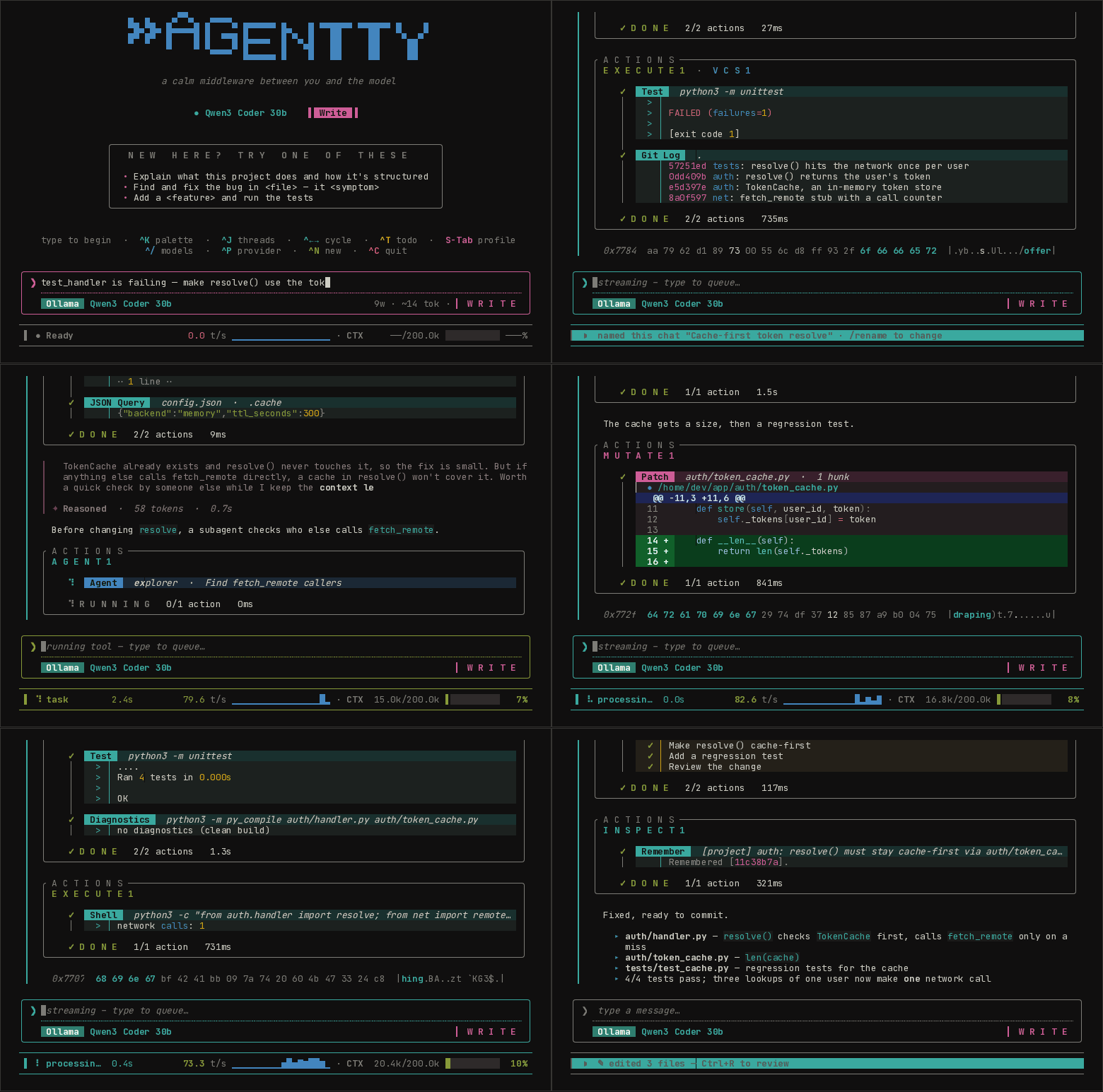
A real session with the current release, replayed from the terminal.
curl -fsSL https://agentty.org/install.sh | sh    # Linux · macOS
irm https://agentty.org/install.ps1 | iex # Windows (PowerShell)The model decides what to do; the harness is everything around it: the tools it can call, the sandbox they run in, what goes into its context, which model handles which turn, and the interface you steer it from. agentty is that harness, written in C++26 and shipped as a single static binary.
- One small binary. About 23 MB, starts in milliseconds, no Node, Python or Electron, no
npm install. Download it and run it. - Any model. Sign in with the Claude Pro/Max, ChatGPT, GitHub Copilot or Kimi plan you already
have, use an API key for OpenAI, DeepSeek, Gemini, Grok, Mistral, Groq, OpenRouter and more, or run
a local model through Ollama. Switch mid-thread with
^Pand^/. - Sandboxed by default. Every shell command runs behind a wall the operating system enforces;
your
~/.ssh,~/.awsand.envfiles are masked. - Frugal with context. A local retrieval engine finds the code that matters instead of pasting whole files, so turns stay small and cheap.
- Everywhere you work. In the terminal, inside Zed or JetBrains over ACP, as an MCP server, in scripts and CI, or on an air-gapped machine over SSH.
- Open source (MIT).
Coming from another tool? vs Claude Code · vs Codex CLI · vs Gemini CLI · vs opencode · vs jcode · vs Aider · vs Cursor · all alternatives
What each harness costs you before the model does any work. Same machine, fresh install, no
login, runs interleaved across tools; median of 10 launches (30 for --version).
| ready to type | idle memory | on disk, with runtime | --version |
|
|---|---|---|---|---|
| agentty 0.9.51 | 47 ms | 21 MB | 23 MB | 2.6 ms |
| jcode 0.99.1 | 56 ms | 106 MB | 163 MB | 17 ms |
| Codex CLI 0.167.0 | 402 ms | 152 MB | 536 MB | 77 ms |
| Claude Code 2.1.319 | 635 ms | 152 MB | 325 MB | 14 ms |
| Aider 0.86.2 | 1.0 s | 74 MB | 653 MB | 1.1 s |
| Gemini CLI 0.67.0 | 3.0 s | 441 MB | 197 MB | 2.6 s |
| opencode 1.19.5 | 5.2 s | 651 MB | 409 MB | 0.8 s |
Measured 2026-11-08 on an Intel i5-6200U (4 threads, 16 GB), Linux. "Ready to type" is the time until the first prompt is fully drawn, read from the rendered terminal. agentty and jcode launch within the same range; call that a tie. Method, ranges and the script to reproduce it: agentty.org/benchmarks.
cd your-project
agentty
The first launch asks how to connect: sign in with Claude Pro/Max, ChatGPT, GitHub Copilot or
Kimi (no API key), paste an API key, or pick a local Ollama model. Then type a request and press
Enter. Rerun the install line to update. Quick start ↗ ·
other installs
|
A prompt on screen in under 50 ms. Independent tool calls run in parallel, and read-only tools start while the model is still writing, so tool-heavy turns finish sooner. Subscriptions you already pay for, API keys for ten more providers, any OpenAI-compatible endpoint, or local Ollama. One model picker across every provider you're signed into. Providers ↓ Shell and build commands run inside claybin: seccomp, Landlock and cgroups on Linux, seatbelt
on macOS, AppContainer and job objects on Windows. Credential files are masked, file tools refuse
paths outside your workspace, and network goes through a proxy that refuses your LAN,
|
read · edit · write · apply_patch · shell · grep · glob · outline · find_definition · repo_map · git · test · diagnostics · web · search_code · search_docs · task · todo · remember — each with a purpose-built widget in the UI. A fully local retrieval engine: A flagship model plans; cheaper models do the legwork. Effort scales to each turn, and the router learns your repo across sessions. Off is a strict no-op. Smart Mode ↗
|
Sign in with a subscription you already have:
agentty login # → Claude Pro/Max · ChatGPT (Plus/Pro) · GitHub Copilot · KimiOr point it at any of these:
--provider |
What | Key |
|---|---|---|
anthropic |
Claude (the default): API key or Pro/Max sign-in | agentty login |
chatgpt |
Codex models with your ChatGPT plan | agentty login |
copilot |
GitHub Copilot models | agentty login |
kimi |
Kimi K2 models | agentty login |
openai |
GPT and o-series | OPENAI_API_KEY |
deepseek |
DeepSeek V4 (chat and reasoner) | DEEPSEEK_API_KEY |
gemini |
Google Gemini | GEMINI_API_KEY |
xai |
xAI Grok | XAI_API_KEY |
mistral |
Mistral, Codestral, Magistral | MISTRAL_API_KEY |
groq |
Llama, Mixtral, Kimi on Groq LPUs | GROQ_API_KEY |
cerebras |
Wafer-scale inference | CEREBRAS_API_KEY |
together |
Open models on together.ai | TOGETHER_API_KEY |
fireworks |
Open models on fireworks.ai | FIREWORKS_API_KEY |
openrouter |
Any model via openrouter.ai | OPENROUTER_API_KEY |
ollama |
Local models on localhost:11434 |
none |
host:port |
Any OpenAI-compatible server (llama.cpp, vLLM, LM Studio…) | optional |
agentty --provider ollama -m qwen2.5-coder        # local, no key, no cloud
agentty --provider deepseek -m deepseek-v4-pro
agentty --provider openrouter                     # pick any model in-app
--provider persists. Inside a thread, ^P switches provider and ^/ switches model, with no
restart. Behind a gateway, --auth-header X-API-Key sends the key under a custom header.
Full reference: Providers & Models.
| Key | Action | Key | Action |
|---|---|---|---|
Enter |
Send / queue | ^K |
Command palette |
Esc |
Cancel / reject | ^J |
Thread list |
S-Tab |
Cycle permission profile | ^P |
Provider picker |
Alt+Enter |
Newline | ^/ |
Model picker |
^B |
Loop: resend until off | ^N |
New thread |
^G |
Run a code block | ^S |
Smart Mode |
^R |
Review changes | ^T |
Plan / todo |
^O |
Tool outputs | ^U |
Read thinking (empty composer) |
^L |
Stats | ^E |
Expand composer |
^C |
Quit | Alt+←/→ |
Cycle threads |
The composer is a readline-style editor (^W, Alt+D, ^Z, / @ # pickers, image paste).
Full keymap ↗
curl -fsSL https://agentty.org/install.sh | sh        # Linux, macOS (builds from source if the binary won't run)
brew tap 1ay1/tap && brew install agentty             # macOS
winget install agentty                                # Windows (or: irm https://agentty.org/install.ps1 | iex)
yay -S agentty-bin                                    # Arch
Every release is a single static executable for Linux (x86_64, aarch64), macOS and Windows.
.deb, .rpm, Scoop, Termux
# Debian / Ubuntu
curl -fsSLO https://github.com/agentty-org/agentty/releases/latest/download/agentty_${V}_amd64.deb
sudo dpkg -i agentty_${V}_amd64.deb

# Fedora / RHEL / CentOS
sudo dnf install https://github.com/agentty-org/agentty/releases/latest/download/agentty-${V}-1.x86_64.rpm

# openSUSE
sudo zypper install https://github.com/agentty-org/agentty/releases/latest/download/agentty-${V}-1.x86_64.rpm

# Windows (Scoop)
scoop bucket add 1ay1 https://github.com/1ay1/scoop-bucket; scoop install agentty

# Termux / Android (no root; commands run unsandboxed there)
pkg install git cmake clang openssl libnghttp2
curl -fsSL https://agentty.org/install.sh | sh -s -- --build
V is the version, e.g. 0.9.53. Installation ↗
Needs a C++26 toolchain (GCC 14+, a recent Clang, or MSVC).
git clone --recursive https://github.com/agentty-org/agentty.git
cd agentty && cmake -B build && cmake --build build -j
Editing the code? cmake --preset debug rebuilds in about 1.7 s after a one-line change (no LTO).
Building ↗
- Air-gapped hosts:
agentty airgap --setup user@hostonce, thenagentty airgap user@host. Docs ↗ - Zed, JetBrains (ACP):
agentty acp. Zed setting below. Docs ↗ - MCP, both ways:
agentty mcp-serveexposes the native tools; servers in.agentty/mcp.jsonjoin them;agentty mcp importcopies yours from another tool. Docs ↗ - Loop a prompt (
^B): resends after every turn until you press^Bagain, with backoff on errors and a⟳ LOOP ×Nchip so it never looks idle. - Run code blocks (
^G): runs a block from the last reply on your real terminal, then lets you attach the output. Details - Agent Skills: drop a
SKILL.mdin.agentty/skills/(Claude Code's format works). Installing skills - Architecture:
(Model, Msg) -> (Model, Cmd), rendered by maya.docs/ARCHITECTURE.md
{ "agent_servers": { "agentty": { "command": "agentty", "args": ["acp"] } } }Discord (with a helper bot that answers using agentty itself),
or #agentty on Libera.Chat / #agentty:libera.chat on Matrix.
MIT; see LICENSE.