

Portfolio intelligence for builders. Scans your git repos, ranks where attention should go next, and proposes concrete tasks — with evidence you can inspect.
abel-ferreira is a local-first CLI for people who maintain many repositories and keep asking the same question:
What should I work on next?
It creates a separate decision repo that:
- scans your project repos for signals like activity, TODO/FIXME markers, workflows, and deadlines
- ranks which repo deserves attention now
- proposes a concrete next task
- lets you explicitly accept, postpone, dismiss, or complete that proposal
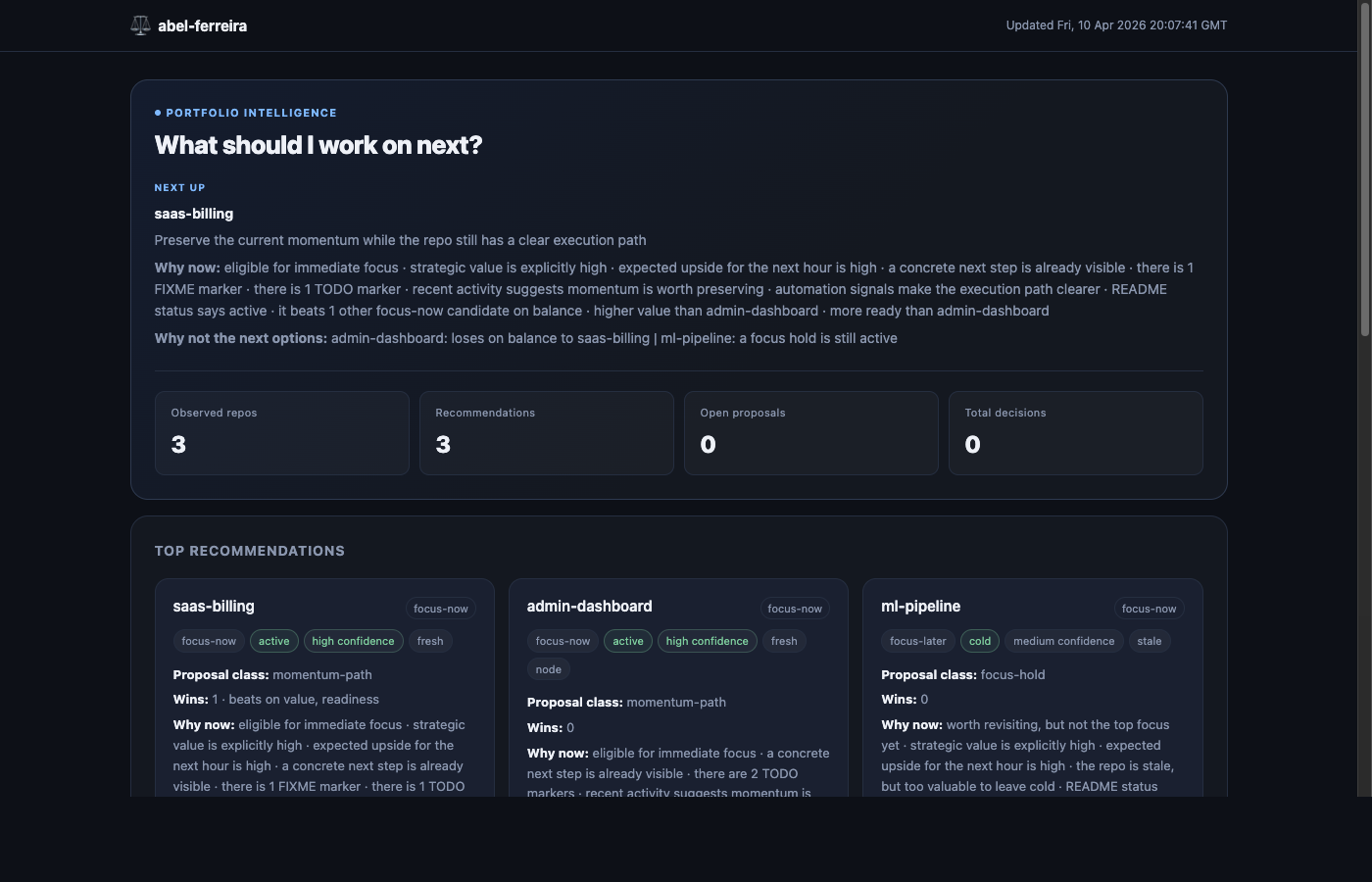
- publishes a static dashboard you can inspect or share
If you only remember one thing: this is not a project manager. It is a decision loop for multi-repo builders.
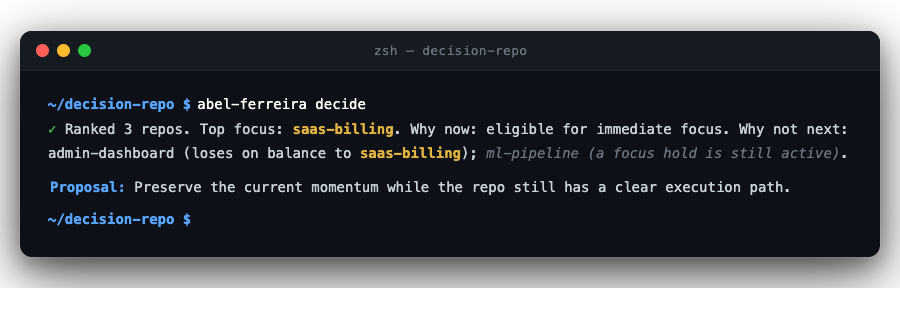
abel-ferreira decide — ranked recommendations in the terminal
Dashboard published to GitHub Pages
- Bun ≥ 1.3.0
ghCLI — optional, required only for--remoteflags and theonApproveGitHub hook
# Install globally
bun add -g abel-ferreira

# Verify
abel-ferreira --help

# Or run without installing
bunx abel-ferreira --helpA complete walkthrough from zero to a published dashboard.
The decision repo is a dedicated directory that stores your portfolio state, snapshots, and the generated dashboard. It is separate from your actual project repos.
mkdir my-decisions
cd my-decisions
abel-ferreira init --repos ../projects
init does three things:
- Creates the scaffold (
abel-ferreira.config.json,state/,snapshots/,site/) - Runs
git initso the repo is version-controlled from the start - Writes the
--repospath as a root inabel-ferreira.config.json
If you omit --repos, the config is created with an empty roots array. You can add roots manually before running scan.
Open abel-ferreira.config.json in the decision repo directory. This is the only config file — everything is controlled from here.
{
  "version": 1,
  "scan": {
    "roots": ["../projects", "../experiments"]
  },
  "decision": {
    "repos": {}
  },
  "hooks": {},
  "paths": {
    "observedCurrent": "state/observed/current.json",
    "derivedCurrent": "state/derived/current.json",
    "approvedCurrent": "state/approved/current.json",
    "snapshotsDir": "snapshots",
    "siteDir": "site"
  }
}
Each path in scan.roots is a directory that contains git repositories. scan walks each root recursively and discovers any directory that contains a .git folder.
Paths are resolved relative to the decision repo directory.
abel-ferreira scanReads commit activity, README/CLAUDE.md signals, TODO/FIXME counts, and workflow presence across all repos discovered under the configured roots. Writes the result to state/observed/current.json.
abel-ferreira decideReads state/observed/current.json, applies your config context, runs the ranking engine, and writes ranked recommendations to state/derived/current.json.
The terminal output shows:
- Top focus repo and why
- Why the next candidate was not ranked first
- Number of proposals suppressed by open decisions
- Number of repos with low-confidence signals
To get better rankings, add context in the decision.repos section of the config. See Config reference.
After decide, the output shows a proposal title and a proposal ID. The proposal ID looks like my-repo:focus-todo.
# Find the proposal ID in the terminal output from decide, or in:
# state/derived/current.json → recommendations[].proposalId

abel-ferreira task my-repo:focus-todo --accept
This records your decision in state/approved/current.json.
What "accepted" means: the proposal is now tracked as an open decision. It will no longer appear in the decide output — the engine considers it already handled until you mark it --complete or --dismiss. This prevents the same repo from being ranked every time you run decide while you are actively working on it.
To see all open decisions at any time:
abel-ferreira status Open decisions (1)
✓ my-repo accepted focus-todo since 2026-04-10
Pending proposals (2)
· other-repo suggested momentum-path
· another-repo suggested define-next-task
Lifecycle:
--accept→ suppresses re-ranking until completed or dismissed--complete→ marks the work done; moves to "recently closed"--dismiss→ closes without completing--postpone <date>→ snoozes until the given date, then resurfaces automatically
abel-ferreira saveStages state/ and snapshots/, commits with a timestamped message, and pushes to the configured remote. If no remote is configured, you will get a clear error.
To set up a remote before saving:
git remote add origin git@github.com:yourname/my-decisions.git
git push -u origin main# Generate dashboard locally
abel-ferreira publish
# Deploy to GitHub Pages
abel-ferreira publish --remoteThe local dashboard is written to site/index.html inside the decision repo. Open it directly in a browser — it has no server requirement.
For GitHub Pages deployment, see GitHub Pages setup.
The intended day-to-day loop is:
init -> scan -> decide -> task -> status -> save -> publish
Creates a decision repo scaffold in the current directory (or a named subdirectory).
abel-ferreira init
abel-ferreira init --repos ../projects
abel-ferreira init my-decisions --repos ../projects
| Flag | Description |
|---|---|
--repos <path> |
Adds this path as a root in the generated config |
What it creates:
abel-ferreira.config.json
state/
  observed/
  derived/
  approved/
snapshots/
site/
Also runs git init in the target directory.
Walks all configured roots and collects observed state from each git repo found.
abel-ferreira scan
Signals collected per repo:
- Commit frequency (30-day and 90-day windows)
- README headline and status field
- CLAUDE.md status and tech stack fields
- TODO/FIXME counts
- Presence of GitHub Actions workflows
- Days since last commit
Output: state/observed/current.json (and a timestamped copy in snapshots/).
Reads observed state, applies config context, ranks repos, and produces proposals.
abel-ferreira decide
Output: state/derived/current.json.
The engine also auto-ages proposals for repos that no longer appear in observed state, marking them as outdated.
Records a decision on a proposal.
abel-ferreira task my-repo:focus-todo --accept
abel-ferreira task my-repo:focus-todo --accept --remote
abel-ferreira task my-repo:deadline --dismiss
abel-ferreira task my-repo:focus-todo --postpone 2026-06-01
abel-ferreira task my-repo:focus-todo --complete
| Flag | Description |
|---|---|
--accept |
Accept the proposal — suppresses re-ranking until completed or dismissed |
--dismiss |
Dismiss the proposal |
--postpone <date> |
Snooze until the given ISO date (e.g. 2026-06-01) |
--complete |
Mark the work done |
--remote |
On --accept: also create a GitHub issue in the decision repo (requires gh) |
The proposal ID is shown in the decide output and in state/derived/current.json under recommendations[].proposalId.
Proposal lifecycle:
suggested → accepted → completed
                     → dismissed
                     → postponed → (auto-resurfaces after expiry) → suggested
                     → outdated  (repo removed from configured roots)
Output: state/approved/current.json.
Show the current decision dashboard — open decisions, pending proposals, and recently closed.
abel-ferreira status
  Open decisions (2)

  ✓ saas-billing         accepted        momentum-path    since 2026-04-10
  ⏸ ml-pipeline          postponed       define-next-task until 2026-09-01

  Pending proposals (1)

  · other-repo           suggested       focus-todo

  Recently closed (1)

  ✗ admin-dashboard      completed       define-next-task 2026-04-09
- Open decisions — proposals you have accepted or postponed. These are suppressed in
decideoutput. - Pending proposals — proposals suggested by the last
deciderun that you have not yet acted on. - Recently closed — last 5 completed, dismissed, or outdated proposals.
Stages and commits state/ and snapshots/, then pushes to the configured remote.
abel-ferreira save
Commit message format: chore: abel-ferreira snapshot <ISO timestamp>
Nothing happens if there are no changes. If the remote is not configured, returns a clear error with the command to fix it.
Generates a static HTML dashboard from current state and optionally deploys it.
abel-ferreira publish
abel-ferreira publish --remote
| Flag | Description |
|---|---|
--remote |
Deploy to GitHub Pages via force-push to gh-pages branch (requires gh) |
Local output: site/index.html inside the decision repo.
Full abel-ferreira.config.json with all fields:
{
  "version": 1,
  "scan": {
    "roots": ["../projects", "../experiments"]
  },
  "decision": {
    "repos": {
      "my-product": {
        "strategicValue": 5,
        "expectedUpside": 4,
        "nextTaskKnown": true,
        "projectRole": "bet",
        "dependsOn": ["core-lib"]
      },
      "core-lib": {
        "strategicValue": 3
      },
      "legacy-tool": {
        "projectRole": "archive"
      },
      "client-work": {
        "deadline": "2026-06-01",
        "riskIfIgnored": 4
      }
    }
  },
  "hooks": {
    "onApprove": "gh issue create --title \"$ABEL_TITLE\" --repo \"$ABEL_REPO_NAME\""
  },
  "paths": {
    "observedCurrent": "state/observed/current.json",
    "derivedCurrent": "state/derived/current.json",
    "approvedCurrent": "state/approved/current.json",
    "snapshotsDir": "snapshots",
    "siteDir": "site"
  }
}Array of directory paths, each resolved relative to the decision repo. scan walks each root and discovers all subdirectories containing a .git folder.
Optional per-repo context that improves ranking. Keys are repo names (directory basenames). All fields are optional — repos without context are still scanned and ranked, but with lower confidence.
| Field | Type | Description |
|---|---|---|
strategicValue |
1–5 | How important this repo is to your goals |
expectedUpside |
1–5 | Upside if you focus here in the next session |
riskIfIgnored |
1–5 | Cost of neglecting this repo |
manualPriority |
1–5 | Override signal weight directly |
resumeCost |
1–5 | Cost of context-switching into this repo |
nextTaskKnown |
bool | You already know the next concrete step |
deadline |
ISO date | Hard deadline for this repo (YYYY-MM-DD) |
blocked |
bool | Blocked by an external dependency |
doNotFocusBefore |
ISO date | Hold focus until this date |
projectRole |
string | bet / maintenance / cash-cow / archive |
dependsOn |
string[] | Repos this one depends on — affects readiness scoring |
See Hooks.
All paths are resolved relative to the decision repo. The defaults shown above are used if a field is omitted. You rarely need to change these.
Declare inter-repo dependencies to let the ranking engine account for blocking relationships:
{
  "decision": {
    "repos": {
      "core-lib": {},
      "main-product": { "strategicValue": 5, "dependsOn": ["core-lib"] }
    }
  }
}
Two effects apply automatically:
- Downstream penalty — if
core-libhas low readiness,main-product's readiness drops andwhyNotNowexplains why. - Upstream boost — if
main-productis high-value,core-lib's value rises andwhyNowsurfaces"unblocking this enables: main-product".
Unresolvable keys and dependency cycles are silently ignored.
ghCLI installed and authenticated (gh auth login)- The decision repo must be a public GitHub repository (or GitHub Pages must be enabled on a private repo with the appropriate plan)
- Push access to the repo
- Renders the dashboard to
site/index.html - Takes the
site/directory tree as a git tree object - Creates a standalone commit from that tree
- Force-pushes the commit to the
gh-pagesbranch onorigin
No separate branch checkout is needed. The force-push keeps the gh-pages branch as a single-commit history.
- Go to your decision repo on GitHub
- Navigate to Settings → Pages
- Under Source, select Deploy from a branch
- Select the
gh-pagesbranch, root (/) - Click Save
After the first publish --remote, the dashboard is live at https://<username>.github.io/<repo-name>/.
For automated daily updates, use the GitHub Actions workflow. See Automation.
Hooks run a shell command automatically when a proposal is accepted. Configure them in abel-ferreira.config.json:
{
  "hooks": {
    "onApprove": "<shell command>"
  }
}Context is injected as environment variables into the hook process:
| Variable | Value |
|---|---|
$ABEL_REPO_NAME |
Repo name (directory basename) |
$ABEL_REPO_PATH |
Absolute path to the repo on disk |
$ABEL_TITLE |
Proposal title |
$ABEL_PROPOSAL_CLASS |
e.g. focus-fixme, focus-todo, deadline |
$ABEL_WHY_NOW |
Joined reasons from the ranking engine |
- Fires only on
acceptedtransitions (not on dismiss, postpone, or complete) - Times out after 30 seconds (SIGTERM)
- If the hook fails, the decision record is preserved but
ok: falseis returned — scripts and CI will see the failure - In TTY environments, stdout/stderr are inherited (you see the hook output). In non-TTY (CI), stderr is captured and attached to the error message.
{
  "hooks": {
    "onApprove": "gh issue create --title \"$ABEL_TITLE\" --repo \"$ABEL_REPO_NAME\" --body \"$ABEL_WHY_NOW\""
  }
}
Running this:
abel-ferreira task my-repo:focus-todo --accept
# → records decision
# → runs gh issue create with title and body from the proposal
# → output: "Hook ran successfully."{
"hooks": {
"onApprove": "curl -s -X POST https://ntfy.sh/my-topic -d \"Accepted: $ABEL_TITLE ($ABEL_REPO_NAME)\""
}
}Copy examples/abel-ferreira.yml from this repo into .github/workflows/ of your decision repo.
name: abel-ferreira

on:
  schedule:
    - cron: "0 7 * * *"   # daily at 07:00 UTC
  push:
    branches: [main]
  workflow_dispatch:
    inputs:
      skip_decide:
        description: "Skip decide step (only rebuild dashboard)"
        required: false
        default: "false"

permissions:
  contents: write
  pages: write
  id-token: write

jobs:
  scan-decide-publish:
    runs-on: ubuntu-latest
    steps:
      - uses: actions/checkout@v4
        with:
          fetch-depth: 0   # full history required for commit activity signals

      - uses: oven-sh/setup-bun@v2
        with:
          bun-version: latest

      - run: bun install
      - run: bun run src/cli.ts scan
      - run: bun run src/cli.ts decide
      - run: bun run src/cli.ts publish

      - name: Commit snapshots
        run: |
          git config user.name "abel-ferreira bot"
          git config user.email "abel-ferreira@users.noreply.github.com"
          git add state/ snapshots/ site/ || true
          git diff --cached --quiet || git commit -m "chore: abel-ferreira snapshot $(date -u +%Y-%m-%dT%H:%MZ)"
          git push

      - uses: actions/upload-pages-artifact@v3
        with:
          path: site/

  deploy:
    needs: scan-decide-publish
    runs-on: ubuntu-latest
    environment:
      name: github-pages
      url: ${{ steps.deployment.outputs.page_url }}
    steps:
      - uses: actions/deploy-pages@v4
The automation runs scan → decide → publish and commits snapshots. It does not accept proposals — that always requires a human decision.
Before enabling, go to Settings → Pages in your decision repo and set Source to GitHub Actions.
Trust over magic. Every recommendation shows its evidence. Nothing is a black box.
Evidence over vibes. Scores are derived from observable signals — commit activity, structured context, deadlines, and values you set explicitly.
Approval before action. Nothing is actionable without an explicit human decision. The engine proposes; you decide.
Boring by default. No auto-execution, no unsupervised agents, no surprises.
Useful without integrations. Works with any git repo on disk. No API keys, no cloud accounts, no webhooks required.
git clone https://github.com/scka-de/abel-ferreira.git
cd abel-ferreira

bun install

bun run src/cli.ts --help   # run CLI from source
bun test                    # run test suite
bun run typecheck           # TypeScript check