



Air Notepad is an experimental project that uses computer vision and machine learning to let users draw or write on a virtual notepad using hand gestures captured through a camera.
This project is less about app development and more about exploring gesture recognition, real-time ML inference, and human-computer interaction using AI.
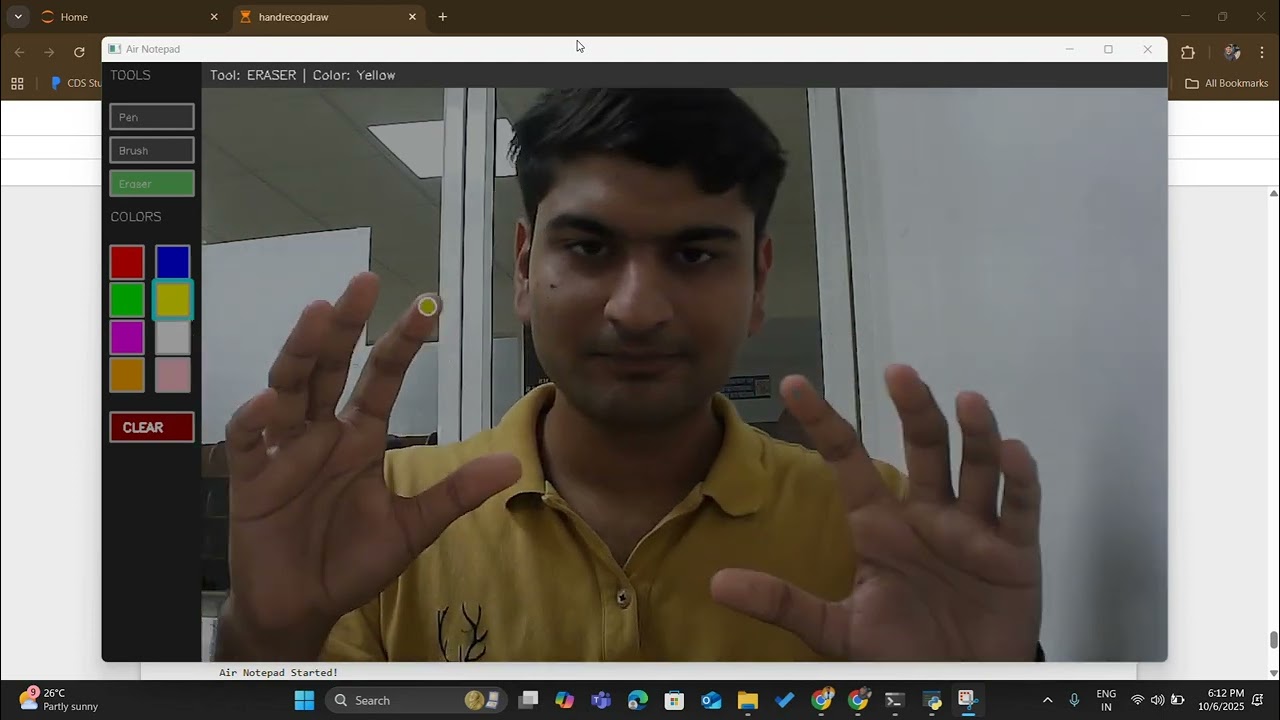
- Track hand landmarks using MediaPipe Hand Landmarker model (via Hugging Face)
- Process the detected keypoints with OpenCV and NumPy
- Convert movements into strokes on a virtual whiteboard
- Explore handwriting-to-text possibilities as a next step
👉 The main focus: understanding how raw landmark data can be transformed into structured signals for drawing and interaction.
🖊️ Multiple Drawing Tools: Pen, Brush, and Eraser with adjustable thickness
🎨 Color Palette: 8 vibrant colors (Red, Blue, Green, Yellow, Purple, White, Orange, Pink)
👐 Dual-Hand Control:
_> Left hand for menu navigation and tool selection
_> Right hand for drawing
🎯 Gesture-Based Interface: Intuitive pinch and point gestures
🖥️ Large Canvas: HD resolution (1280x720) for comfortable drawing
🧹 Quick Clear: One-tap canvas clearing
💾 Real-time Hand Tracking: Smooth and responsive gesture recognition
📊 Visual Feedback: Color-coded cursors and status indicators
- Model & Tracking: MediaPipe Hand Landmarker
- Processing & Visualization: Python, OpenCV, NumPy
- Prototyping: Jupyter Notebook (for experimentation and visualization)
- (Optional UI): Flutter/Dart – used for demo, not the core focus
Air Notepad uses MediaPipe's Hand Landmarker model to track your hand movements in real-time:
- Hand Detection: MediaPipe identifies and tracks 21 hand landmarks per hand
- Gesture Recognition: Custom algorithms detect specific gestures:
- Pinch Gesture: Thumb and index finger touching (for selection)
- Extended Index Finger: Drawing mode activation
- Coordinate Mapping: Hand landmarks are mapped to screen coordinates
- Smoothing Algorithm: Weighted averaging reduces jitter for stable drawing
- Canvas Rendering: OpenCV draws lines and shapes on a virtual canvas
-
Left Hand (Menu Control):
- Make a pinch gesture (thumb + index finger) to select tools and colors
- Yellow cursor indicates position
- Bright yellow when pinching
-
Right Hand (Drawing):
- Extend your index finger to draw on the canvas
- Green cursor when ready to draw
- Gray cursor when hand detected but not in drawing mode
- Python 3.8 or higher
- Webcam (built-in or external)
- Operating System: Windows, macOS, or Linux
- Good lighting conditions for optimal hand tracking
git clone https://github.com/sharmavaibhav31/air-notepad.git
cd air-notepadpip install opencv-python mediapipe numpyOr if a requirements.txt file is available:
pip install -r requirements.txtFor Jupyter Notebook:
jupyter notebook
# Open and run the notebook cells
For Python Script:
python air_notepad.py- Position yourself comfortably in front of your webcam
- Ensure good lighting for better hand detection
- Keep both hands visible in the camera frame
- The menu will appear on the left side of the screen
| Gesture | Action |
|---|---|
| Pinch (Thumb + Index) | Select tools, colors, or clear canvas |
| Yellow Cursor | Shows hand position |
| Bright Yellow | Active selection mode |
| Gesture | Action |
|---|---|
| Extended Index Finger | Draw on canvas |
| Green Cursor | Ready to draw |
| Gray Cursor | Hand detected, not drawing |
| Tool | Description | Thickness | Use Case |
|---|---|---|---|
| 🖊️ Pen | Fine lines | 3px | Precise writing and details |
| 🖌️ Brush | Thicker strokes | 8px | Artistic drawing |
| 🧹 Eraser | Large eraser | 20px | Quick corrections |
Red • Blue • Green • Yellow • Purple • White • Orange • Pink
q: Quit the application
- Figuring out how to preprocess hand landmark data effectively
- Handling noise and instability in real-time tracking
- Iterating through multiple approaches for smoother stroke rendering
- Understanding the gap between ML model outputs and usable application logic
💡 Every iteration improved stability and accuracy, giving me hands-on insight into bridging ML models with real-world applications.
Camera Feed → MediaPipe Hand Detection → Landmark Extraction →
Gesture Recognition → Coordinate Smoothing → Canvas Drawing
- Smoothing: Weighted moving average with configurable factor (default: 0.3)
- Pinch Detection: Euclidean distance threshold between thumb and index finger
- Drawing Mode: Finger extension detection using relative Y-coordinates
- Dual-hand tracking with max 2 hands
- Confidence thresholds: Detection (0.8), Tracking (0.8)
- Frame-by-frame processing with minimal latency
- Efficient NumPy array operations for canvas manipulation
air-notepad/
├── air_notepad.py              # Main application script
├── air_notepad.ipynb           # Jupyter notebook for experimentation
├── requirements.txt            # Python dependencies
├── README.md                   # Project documentation
└── LICENSE                     # MIT License
- Ensure your webcam is properly connected
- Try changing the camera index:
cap = cv2.VideoCapture(1)(or 2, 3, etc.) - Check if other applications are using the camera
- Improve Lighting: Use bright, even lighting
- Move Closer: Stay within 1-3 feet of the camera
- Show Full Hand: Ensure entire hand is visible
- Adjust Confidence: Lower
min_detection_confidenceto 0.5-0.7
- Close other camera-using applications
- Reduce canvas resolution in code
- Update graphics drivers
- Lower MediaPipe confidence thresholds
- Use a more powerful computer
- Increase
smooth_factorvalue (0.3 → 0.5) - Improve lighting conditions
- Stay still relative to camera
- Ensure stable webcam mounting
- MediaPipe may confuse left/right hands in certain positions
- Try repositioning hands or adjusting camera angle
- Ensure hands don't overlap in camera view
- Train a lightweight handwriting recognition model on top of stroke data
- Extend to a desktop application with enhanced accuracy
- Add more intuitive gestures (e.g., undo, erase, change color)
- Research into multi-modal AI combining gesture + voice commands
- Save & Export: Save drawings as PNG/JPEG images
- Undo/Redo: Multi-level action history
- Shape Recognition: Convert freehand shapes to perfect geometric forms
- Text Mode: Handwriting-to-text conversion using OCR
- Multi-user Collaboration: Network-based shared canvas
- Custom Gestures: User-defined gesture mappings
- 3D Drawing: Depth-based drawing with stereo cameras
Contributions are welcome! This project is experimental and open to improvements.
- Fork the repository
- Create a feature branch
git checkout -b feature/AmazingFeature
- Commit your changes
git commit -m 'Add some AmazingFeature' - Push to the branch
git push origin feature/AmazingFeature
- Open a Pull Request
- Performance optimization
- New gesture recognition patterns
- UI/UX improvements
- Documentation and tutorials
- Bug fixes and testing
- New features from Future Scope
This project is licensed under the MIT License - see the LICENSE file for details.
You are free to:
- ✅ Use commercially
- ✅ Modify
- ✅ Distribute
- ✅ Use privately
Vaibhav Sharma
- GitHub: @sharmavaibhav31
- Project: Air Notepad
- YouTube: Demo Video
- MediaPipe - Google's powerful ML framework for hand tracking and pose estimation
- OpenCV - The go-to computer vision library that made real-time processing possible
- NumPy - Essential for efficient array operations and mathematical computations
- Hugging Face - For hosting and providing easy access to ML models
- The open-source community for inspiration and resources on gesture-based interfaces
- MediaPipe Hand Landmarks Documentation
- OpenCV Python Tutorials
- Research papers on gesture recognition and HCI
⭐ If you found this project interesting or helpful, please consider giving it a star!
💬 Questions or suggestions? Feel free to open an issue or reach out.
Made with ❤️, Python, and lots of hand-waving