Telegram bot for HateSpeech detection, the bot can delete hateful and abusive comments and messages and warn the users about their behaviour, however if the user keeps using hateful speech or abusive language the bot bans the user for a short duration as a warning.
- Search
profanitatoron telegram search bar - Click
Profanitatorbot, this opens a chat with the bot - Click on the bot name, this opens the bots additional settings
- Click the three dots at the top and invite the bot to the desired group
To install this project on your local machine click on the Code button and download the zip folder from the options provided
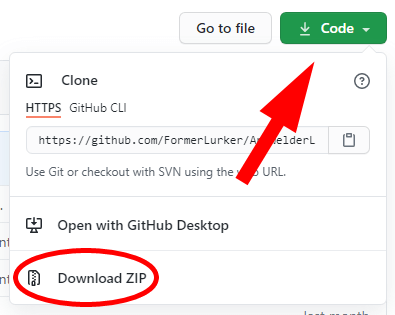
Unzip the folder at your desired location and open the folder in an IDE of your choice like VS Code or Atom
Open Command Prompt or Windows Powershell and navigate to the project folder run the following command
npm installTo get the bot online, run the following command after the previous steps are finished
npm run startWait for the message DB Connection Successful, Once that is done, the bot will now be online in all the groups and can be tested!