

Making automated testing a piece of cake 🍰 — Generate comprehensive unit tests directly from your debugger using AI.
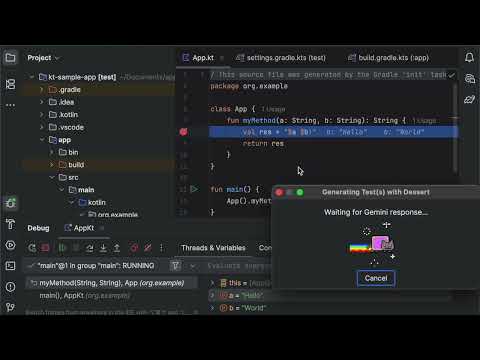
Traditional test writing is time-consuming and often disconnected from real runtime behavior. Dessert changes this by implementing a sophisticated approach that captures comprehensive context from your debugging session and uses Retrieval Augmented Generation (RAG) to produce tests that reflect actual runtime scenarios rather than theoretical edge cases.
- 🔍 Debugger Integration: Generate tests directly from debugger variables and stack frames
- 🤖 Multi-AI Support: Works with OpenAI, Google Gemini, and Anthropic Claude
- 🌐 Multi-Language: Supports Java, Kotlin, and Scala
- 🏗️ Build System Aware: Automatically detects Gradle, Maven, SBT, and Bazel projects
- 📁 Smart File Management: Creates or extends existing test files intelligently
- 🎯 Context-Aware: Captures method signatures, variables, and build configurations
- IntelliJ IDEA 2025.1 or later
- Android Studio 2025.1 or later
- API key for one of the supported AI providers (OpenAI, Gemini, or Claude)
- Download the plugin from the JetBrains Plugin Repository
- Install via File → Settings → Plugins → Install Plugin from Disk
- Restart IntelliJ IDEA (or Android Studio)
Set the following environment variables before starting IntelliJ IDEA (or Android Studio):
Required: Your AI provider API key
export DESSERT_API_KEY=your_api_key_here
Optional: AI provider (default: gemini)
export DESSERT_AI_PROVIDER=gemini # Options: openai, claude, gemini
Optional: Model name (uses provider defaults if not specified)
export DESSERT_MODEL_NAME=gemini-2.5-flash
Default Models:
- OpenAI:
o4-mini - Claude:
claude-3-7-sonnet-latest - Gemini:
gemini-2.5-flash
- Set a breakpoint in your code and start debugging
- Pause execution at the desired location
- Right-click in the debugger variables panel
- Select "Generate Test with Dessert" from the context menu
- Wait for AI to analyze your code and generate tests
- Review the generated test file that opens automatically
Build Systems:
- Gradle (build.gradle / build.gradle.kts)
- Maven (pom.xml)
- SBT (build.sbt)
- Bazel (WORKSPACE, BUILD files)
Languages:
- Java (.java files)
- Kotlin (.kt files) - including Kotlin Multiplatform
- Scala (.scala files)
- Capture Context: Extracts current stack frame, variables, method signatures, and build configuration
- AI Analysis: Sends captured data to your chosen AI provider with optimized prompts
- Test Generation: AI generates comprehensive unit tests following best practices
- File Management: Creates new test files or extends existing ones in the appropriate test directory
- IDE Integration: Opens generated tests in the editor for immediate review
Dessert intelligently places test files based on your project structure:
- Standard Projects:
src/test/{language}/generated/ - Kotlin Multiplatform:
shared/src/{sourceSet}Test/kotlin/generated/ - Bazel Projects: Alongside source files with appropriate BUILD targets
OpenAI models
export DESSERT_MODEL_NAME=gpt-4export DESSERT_MODEL_NAME=gpt-3.5-turbo
Claude models
export DESSERT_MODEL_NAME=claude-3-opus-20240229export DESSERT_MODEL_NAME=claude-3-sonnet-20240229
Gemini models
export DESSERT_MODEL_NAME=gemini-proexport DESSERT_MODEL_NAME=gemini-2.5-flash
Plugin not appearing in context menu?
- Ensure you're debugging and execution is paused
- Check that you're right-clicking in the debugger variables panel
API errors?
- Verify your API key is correctly set
- Check your internet connection
- Ensure your AI provider account has sufficient credits
Test files not opening?
- Check IDE permissions for file creation
- Verify project structure is supported
We welcome contributions! Please see our GitHub repository for:
- 🐛 Bug reports
- 💡 Feature requests
- 🔧 Pull requests
- 📖 Documentation improvements
- Clone the repository
- Open in IntelliJ IDEA (or Android Studio)
- Configure Gradle JVM to Java 17+
- Run
./gradlew runIdeto test the plugin
This project is licensed under the MIT License - see the LICENSE file for details.
Michael Solovev - smijsm@gmail.com
Happy Testing! 🧪✨