
Annual daylight results for Honeybee models in about a second, on your computer's GPU.


Foton computes daylight autonomy (DA), useful daylight illuminance (UDI), spatial daylight autonomy (sDA) and daylight factor for Honeybee models. It does the expensive ray tracing on the GPU, so a full year of hourly results for a typical model takes about a second. You keep your Honeybee model and your Ladybug result components. Only the slow step changes.
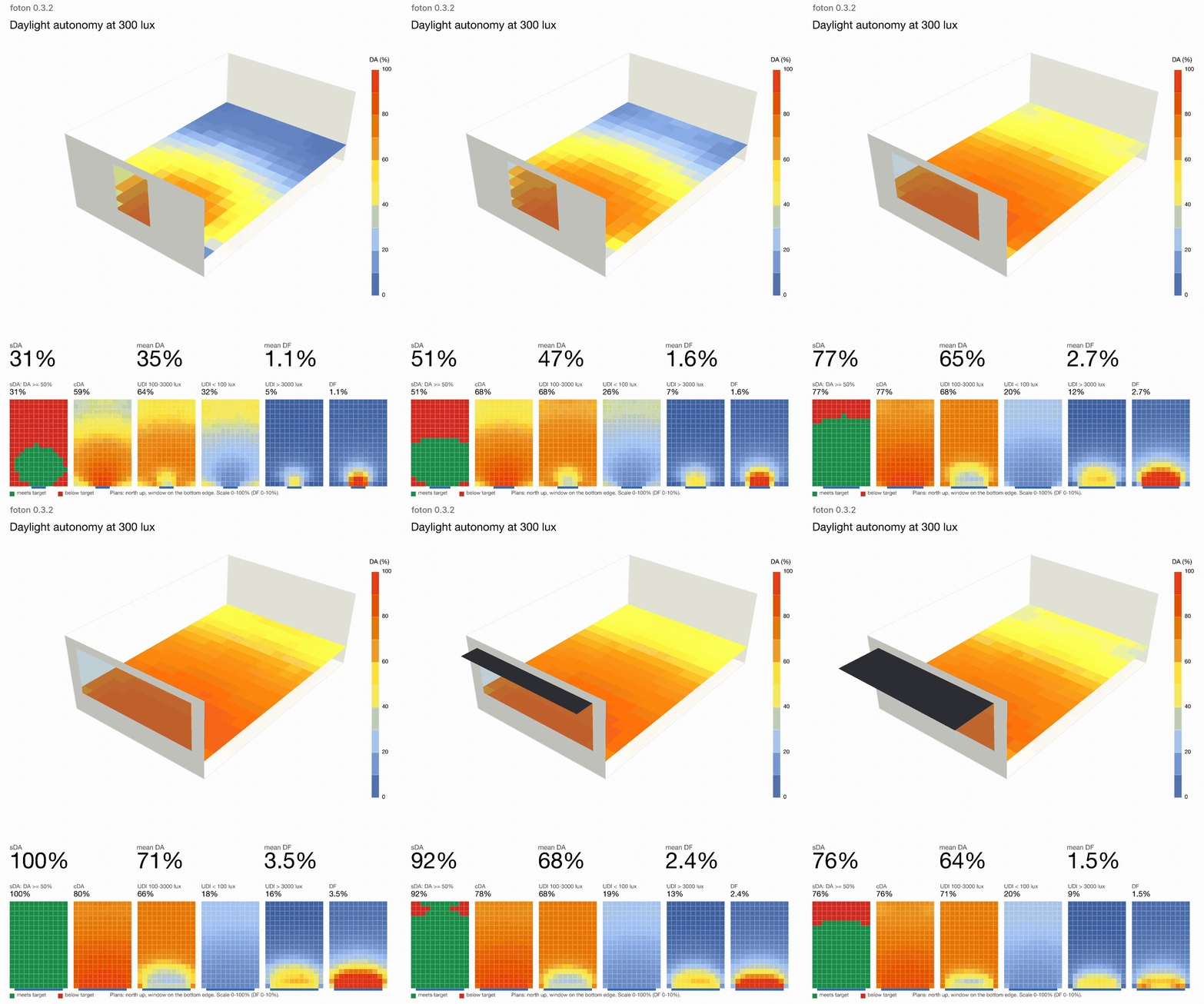
Live mode in Grasshopper (new in 0.3.2). Each time the window changes, Foton reruns the annual study and every metric updates in about a third of a second.
- Teachers and students who want daylight results to update while they move a wall, a window or a shading fin.
- Designers comparing many early options, where waiting minutes per run means testing fewer ideas.
- Researchers who need thousands of annual runs for a parameter study.
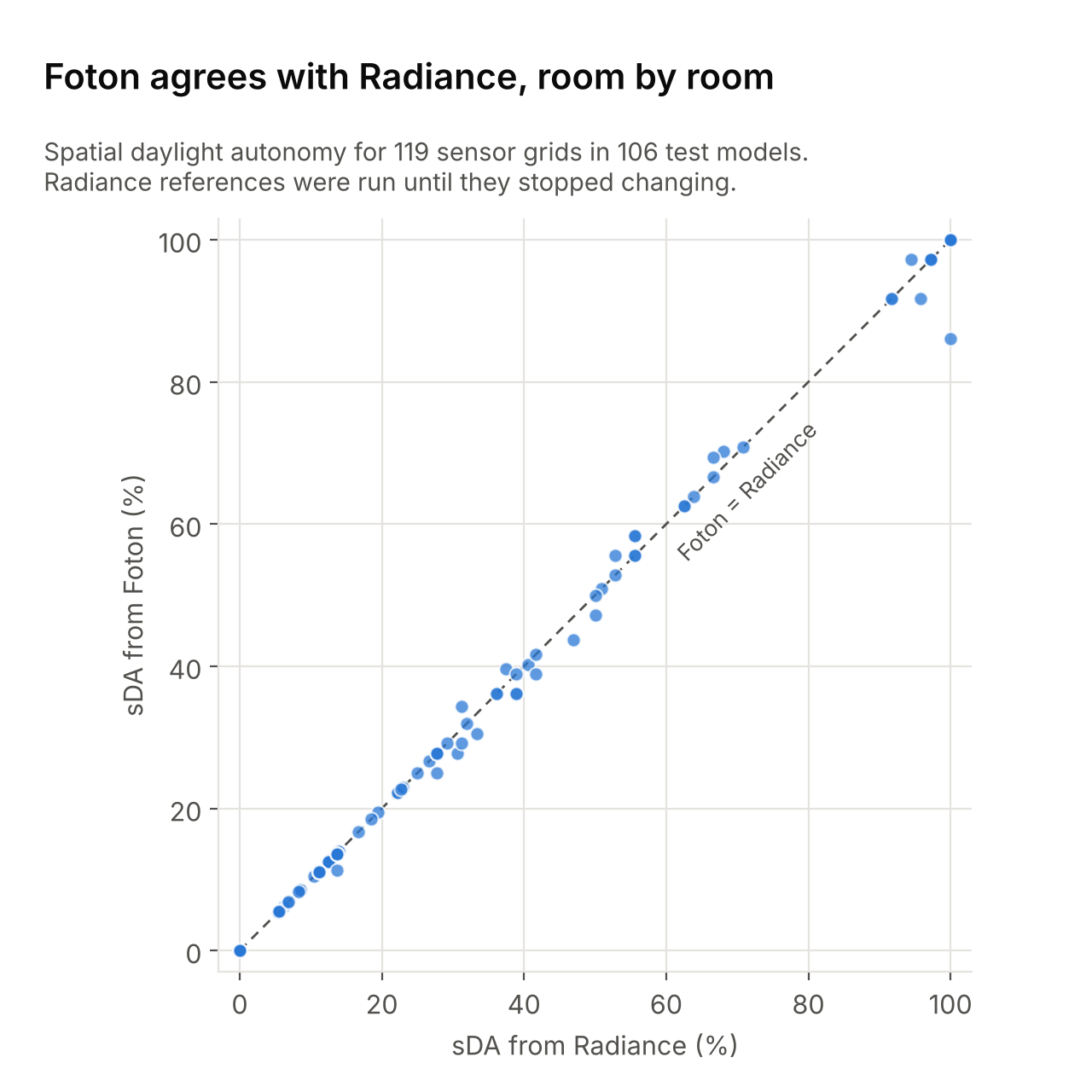
On a typical room Foton's daylight autonomy is within 0.2 percentage points of converged Radiance. Details are under Accuracy and Speed below.
pip install "foton-daylight[honeybee]"That is all an annual study needs: from version 0.3.2, Radiance does not have to be installed.
from foton.honeybee import run_annual_daylight

run = run_annual_daylight(
    model="my_building.hbjson",   # any Honeybee model with sensor grids
    wea="my_city.epw",            # any EnergyPlus weather file
    output_folder="foton-results",
)

for grid in run.grids:
    print(f"{grid.identifier}: sDA {grid.sda:.0f} %, mean DA {grid.da.mean():.0f} %")
The foton-results folder has the same layout as a Honeybee annual daylight
run, so Honeybee's own metric and visualisation components can read it. To
check which GPU Foton will use, run foton-honeybee capabilities.
In Rhino 8 and Grasshopper: type PackageManager in Rhino, search for
foton and install it. You can also download foton-grasshopper-<version>.zip
from the releases page. The
components appear on the HB-Foton tab. Set install_ on Foton Settings to
True and it installs the rest, including its own Python if you don't have one.
The Grasshopper quickstart
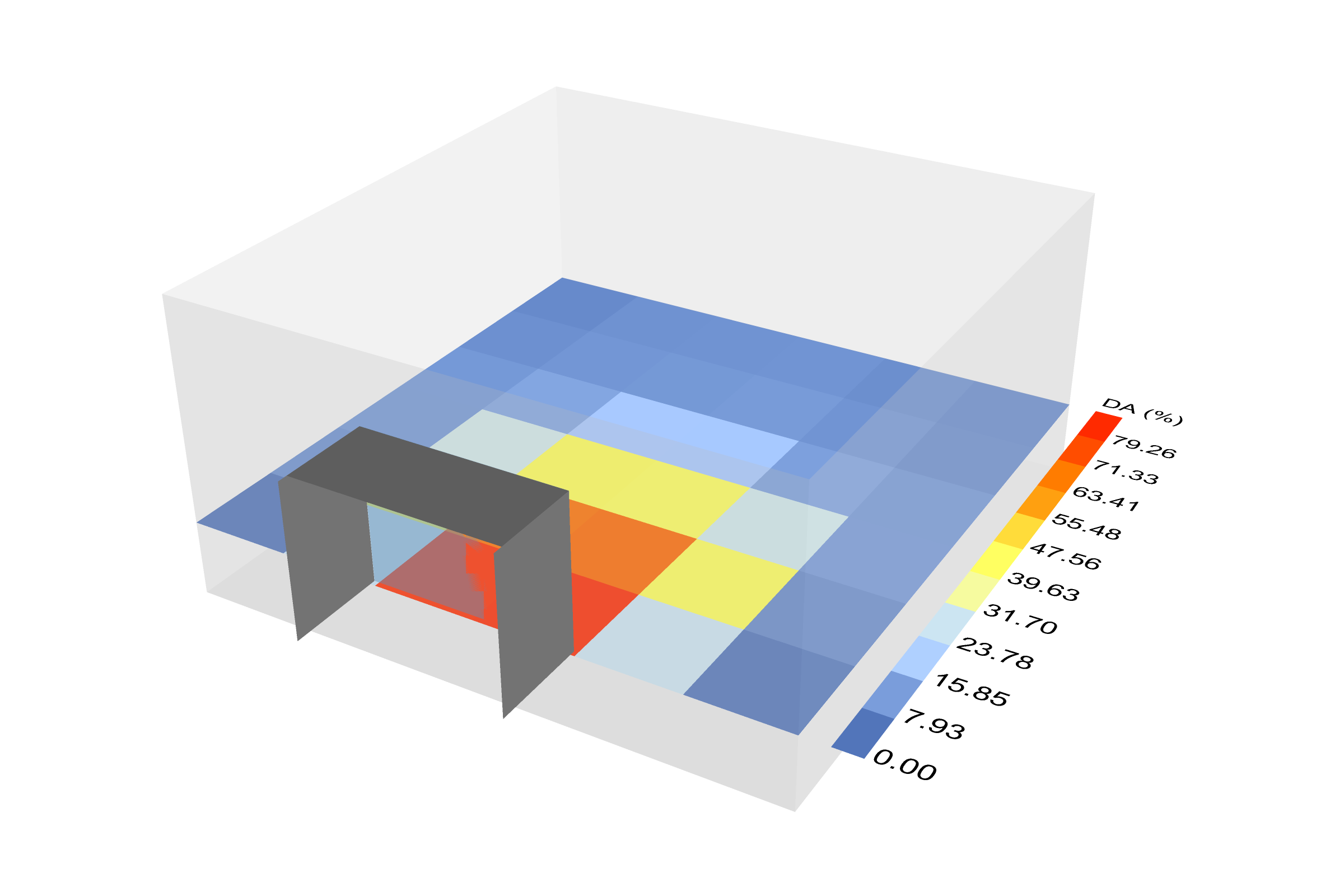
walks through it with screenshots. It takes about five minutes. Foton's results go straight into Ladybug's own
components, such as the spatial heatmap below.
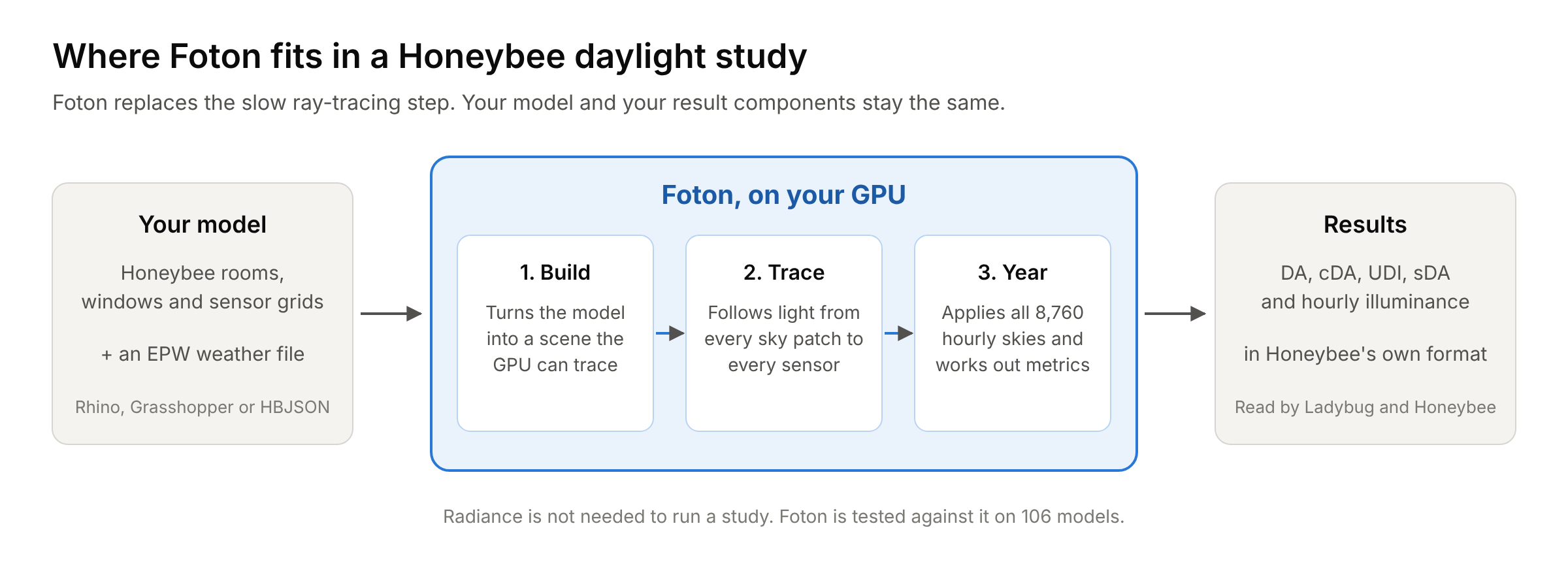
Foton uses the same daylight-coefficient method as Radiance's matrix workflow. It traces, once, how much light from each patch of the sky reaches each sensor. It then combines those coefficients with the 8,760 hourly skies of a weather file. Foton does both steps on the GPU: Metal on Apple silicon, Vulkan on Windows and Linux. A slower CPU version gives the same answer on any machine. More in architecture.
Foton is checked against Radiance 5.4a on 106 test models, each at two sky resolutions: 212 cases with 234 sensor grids. The Radiance results are repeated with more rays until they stop changing, so they serve as the correct answer. Metal and Vulkan give the same figures to two decimal places.
| Compared with Radiance | Typical grid (median) | 95 % of grids within |
|---|---|---|
| Daylight reaching the sensors from the sky, total difference | 0.5 % | 1.2 % |
| Annual hourly illuminance, total difference | 0.1 % | 0.6 % |
| Annual hourly illuminance, hour-by-hour scatter (CV(RMSE)) | 2.4 % | 7.1 % |
| Daylight autonomy (DA), average error per grid | 0.2 pp | 0.5 pp |
| Useful daylight illuminance (UDI), average error per grid | 0.2 pp | 0.6 pp |
| Spatial daylight autonomy (sDA) | 0 pp | 2.8 pp (one sensor in 36) |
pp means percentage points. 204 of the 212 cases pass every check. The eight that don't are rooms lit only through glass from another room, plus one very bright deep room where Radiance itself changes by 3.6 % between 8 and 12 bounces. They are explained in the accuracy notes. Raw results: Metal, Vulkan.
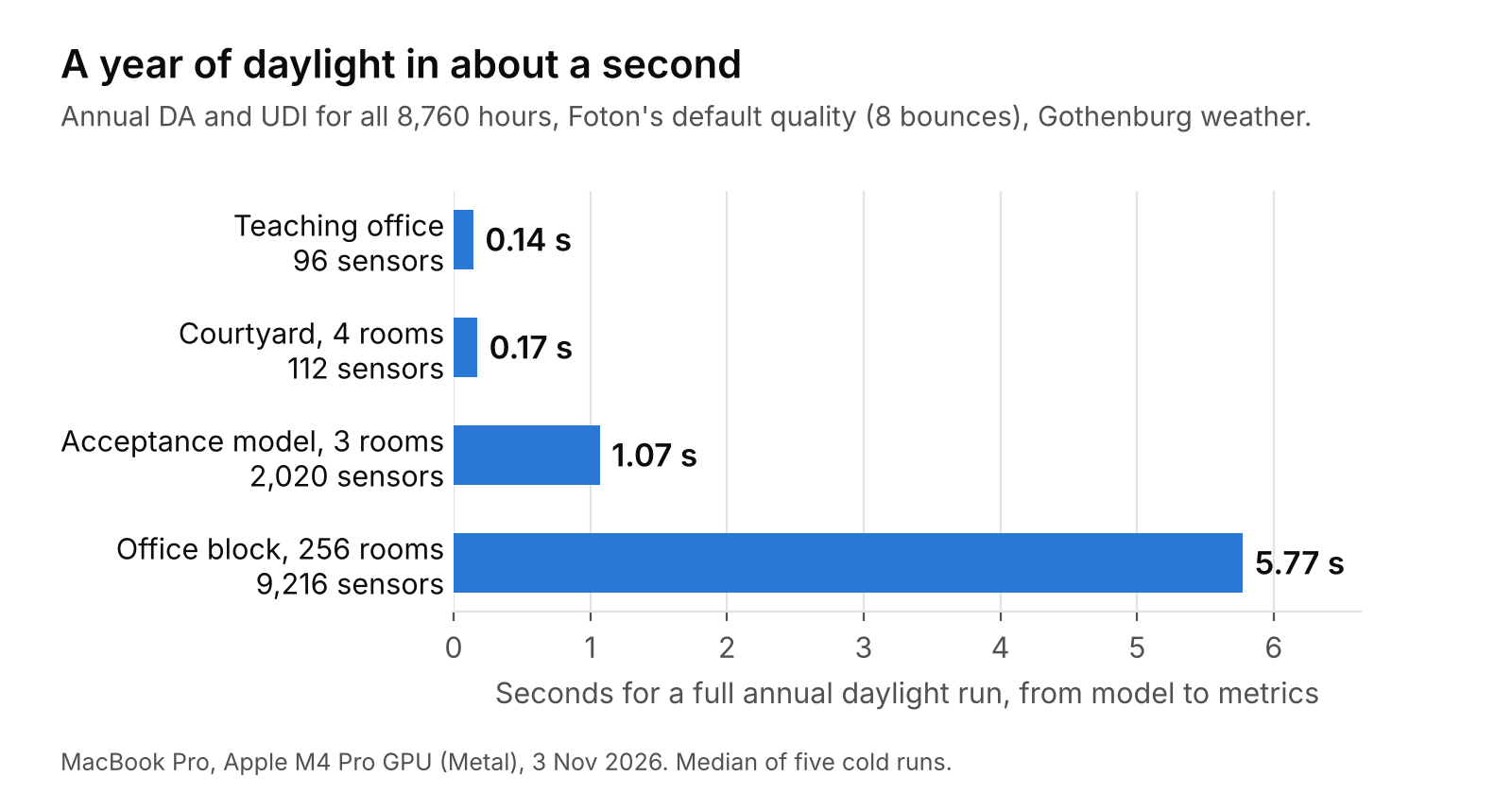
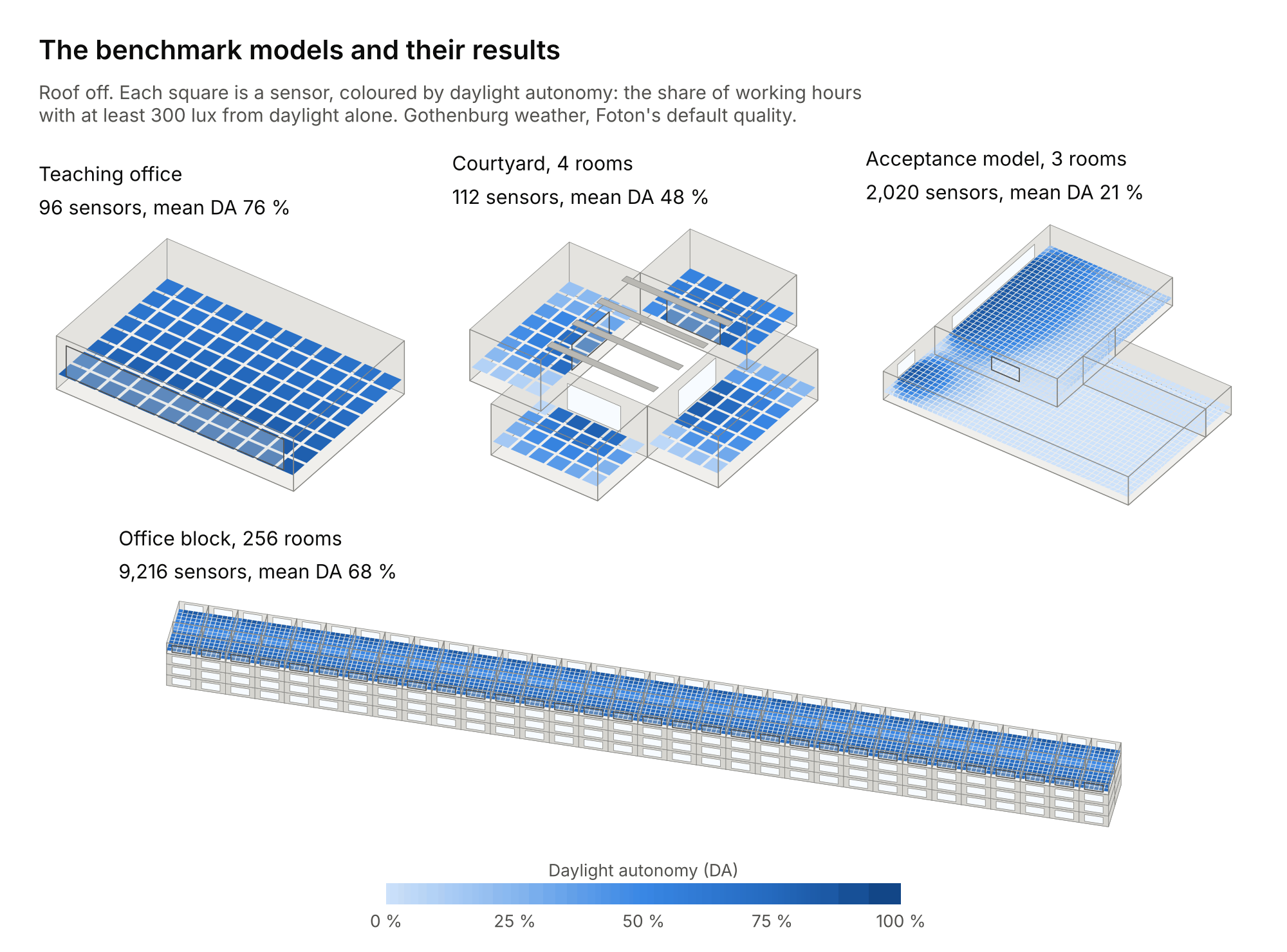
Measured on 4 November 2026 on a MacBook Pro (Apple M4 Pro, 24 GB), using Metal and Foton 0.3.2 (commit a5ca9d7) at its default final quality (8 bounces, 256 direct and 65,536 indirect samples, 146-patch sky, Gothenburg weather). An annual run starts from a model Foton has not seen before: loading it, building the GPU scene, tracing, and writing DA and UDI for all 8,760 hours. The Grasshopper round trip adds writing the HBJSON, starting Foton and reading the results back. Annual times are the median of 5 runs and round trips the median of 3.
| Model | Rooms | Sensors | Annual run | Grasshopper round trip |
|---|---|---|---|---|
| Teaching office | 1 | 96 | 0.16 s | 0.59 s |
| Courtyard with four rooms | 4 | 112 | 0.18 s | – |
| Acceptance model | 3 | 2,020 | 1.05 s | 1.56 s |
| Four-storey office block | 256 | 9,216 | 6.10 s | 6.93 s |
Raw data: apple-m4-pro-672fe35d. Other machines: results by machine.
- Annual DA, continuous DA, UDI (low, useful, high) and sDA, plus daylight factor
- Hourly illuminance for every sensor, in Honeybee's result format
- Its own annual sky model (Perez all-weather), so Radiance is not needed
- Diffuse surfaces with several light bounces, thin glass, and shading devices
- 146-patch (Tregenza) and 578-patch (Reinhart) skies
previewandfinalquality settings- Metal (macOS), Vulkan (Windows, Linux) and a CPU fallback that gives the same answer
- A Python API, a command-line tool and four Grasshopper components
Foton covers ordinary architectural daylighting: matte surfaces, ordinary glazing, shading devices and building-scale sensor grids. Use Radiance for:
- glossy or mirror-like materials, and other Radiance material types
- complex fenestration (BSDF), prismatic films and other light-redirecting systems
- glare, annual sunlight exposure (ASE) and dynamic shading
- certification or compliance reports
One known difference: Foton treats the sun as part of its sky patch, as
Radiance's rfluxmtx method does, rather than tracing it as a separate disc.
On south-facing rooms in Phoenix, Seattle and Gothenburg this changed DA by
about 1 percentage point
(measured).
- Installation: supported GPUs and platforms
- Grasshopper quickstart
- Python API
- How it works
- Accuracy notes and plan
- Reproducing the benchmarks
- Validation models
- FAQ
- Changelog

An interactive notebook that runs Foton on a free Colab T4 GPU: shape a building, set each façade's windows, overhangs and a neighbour, and see the daylight factor and annual daylight autonomy on every floor in about a second. Choose Runtime → Change runtime type → T4 GPU, then Run all. See notebooks/daylight_studio.ipynb.
A clone of this repository also includes a one-minute animated teaching demo that runs live on your GPU. It needs Node.js 20 or newer:
pip install -e ".[viewer]"
cd viewer && npm ci && npm run dev:demo
Then open http://127.0.0.1:5173/demo.html. See the
demo guide.
Foton is young (version 0.3) and still changing. The accuracy figures above hold for the kinds of rooms in the test set. They are not a claim that Foton matches Radiance on any model. Please open an issue if you find a model where the two disagree.
This project is basically an exercise in using LLMs to create reimplementations within a tight scope against a deterministic target. In this case, we wanted to have fast GPU based daylighting calculations for teaching purposes, so we built it! (or asked an LLM to). The code and documentation were generated by an LLM. Radiance served as the deterministic target: every result above comes from comparing Foton with it.
If you use Foton in research, please cite it. GitHub's Cite this repository button gives the reference, from CITATION.cff.
Foton is released under the MIT License. NOTICE credits the published methods and data it builds on, and THIRD_PARTY_LICENSES.md lists the open-source libraries inside the Python package. ACKNOWLEDGEMENTS.md thanks the people and projects that made Foton possible.
Foton works alongside Ladybug Tools and is tested against Radiance. It is not affiliated with either project. The optional Honeybee packages are licensed separately under AGPL-3.0 and GPL-3.0, and Foton does not include their code.
Foton was started and is led by Sanjay Somanath at Chalmers University of Technology. Its copyright belongs to the Foton contributors; see AUTHORS.md.