Track 4 — Autopilot Agent | Qwen Cloud Global AI Hackathon
NeuroScale doesn't just fix your cluster — it proves the fix is safe before it acts, and knows when to stop and ask a human.
Most autonomous agents are built to act as fast as possible. NeuroScale Autopilot is built to act only when it's safe to. It is a self-healing control plane for Kubernetes, powered by the Qwen model family, built around a single non-negotiable idea: an autonomous SRE system earns the right to automate by making every high-impact decision explainable, measurable, and safety-aware.
See TRUST_LAYER.md for the full breakdown of how that trust score actually works — and a real example, captured live from this deployment, of the system refusing to guess when its own evidence was weak.
🔗 Live Dashboard: http://43.98.177.117:3000 — running right now on Alibaba Cloud, see Proof of Deployment below.



This project is deployed and running right now on a real Alibaba Cloud ECS instance in ap-southeast-1 (Singapore), running a real k3s Kubernetes cluster with a live checkout-service deployment as the incident target — not a local demo, not a mock.
| Component | Detail |
|---|---|
| Cloud provider | Alibaba Cloud ECS (ecs.e4.small, Ubuntu 24.04) |
| Region | ap-southeast-1 (Singapore) |
| Kubernetes | k3s v1.36.2+k3s1 (real control plane, real pods, real events) |
| Qwen base URL | Workspace-specific Model Studio endpoint, .../compatible-mode/v1 — see agents/analyzer and the Environment Variables table below |
| Models | qwen3.7-max (RCA), qwen3.6-plus (escalation summaries), text-embedding-v3 (RAG retrieval) |
| Target workload | checkout-service deployment (3 replicas) in the checkout namespace |
| Live dashboard | http://43.98.177.117:3000 — open it right now |
| Proof | Dashboard Screenshots below (live, unedited) + Proof of Deployment (Alibaba Cloud console + raw live API response) |
See the Alibaba Cloud Deployment section below for the exact steps used, and TRUST_LAYER.md for a real captured incident from this exact deployment.
Click to watch — real incident detected live on the Alibaba Cloud deployment, real Qwen root cause analysis, the Trust Layer holding for human approval despite a confident diagnosis, resolution, and real impact numbers. No staged footage.
NeuroScale Autopilot runs a continuous self-healing loop on your Kubernetes cluster:
Metrics → Detect → Analyze (Qwen-Max) → Plan (Qwen-Embedding RAG) → Execute → Escalate (Qwen-Turbo)
              ↑                                                                           ↓
              └──────────────── Self-healing feedback loop ─────────────────────────────┘
- Detector — Polls Prometheus/mock metrics; fires alerts on anomaly thresholds
- Analyzer — Sends alert context to Qwen-Max for root cause analysis + risk scoring
- Planner — Uses Qwen-Embedding to retrieve the most relevant runbook via semantic search; produces a structured remediation plan
- Executor — Runs kubectl commands with circuit-breaker protection; dry-run by default
- Escalation — Qwen-Turbo generates a concise Slack notification; human-in-the-loop approval for high-risk actions
- MCP Server — 8 Model Context Protocol tools expose the agent to external AI clients
- Alibaba Cloud ECS — Native ECS/STS client for cloud-layer remediation

Full pipeline: Kubernetes/Kyverno/OpenCost events → 3 reasoning agents → Trust Layer Gate (the actual safety checkpoint, not just a marketing phrase) → auto-execute or human approval → MCP Server → Alibaba Cloud ECS. The gate checks the same three real signals visible in every dashboard decision card: analyzer confidence, RAG runbook retrieval score (≥0.65 to auto-execute), and risk level — if any one fails, the system escalates instead of guessing. Orchestrator handles alert deduplication and human-approval timeout (300s).
ASCII fallback
┌──────────────────────────────────────────────────────────────────────┐
│                       NeuroScale Autopilot                           │
│                                                                      │
│  ┌─────────┐   ┌──────────────┐   ┌──────────────────────┐          │
│  │Detector │──▶│Analyzer      │──▶│Planner               │          │
│  │         │   │Qwen-Max LLM  │   │Qwen-Embedding + RAG  │          │
│  │Prometheus│   │RCA + Scoring │   │Runbook Retrieval     │          │
│  └─────────┘   └──────────────┘   └──────────┬───────────┘          │
│                                               │                      │
│                                   ┌───────────▼────────────┐         │
│                                   │     TRUST LAYER GATE    │         │
│                                   │ Confidence = High?      │         │
│                                   │ Retrieval Score >= 0.65?│         │
│                                   │ Risk = Low?             │         │
│                                   └─────┬──────────────┬────┘         │
│                             ALL PASS    │              │  ANY FAIL    │
│                          AUTO-EXECUTE   ▼              ▼  ESCALATE    │
│                              ┌──────────────┐   ┌─────────────────┐  │
│                              │Executor      │   │Escalation Agent │  │
│                              │kubectl +     │◀──│Qwen-Turbo       │  │
│                              │Circuit Breaker│   │Summary + Human  │  │
│                              └──────────────┘   │Approval Flow    │  │
│                                                  └─────────────────┘  │
│  ┌───────────────────────────────────────────────────────────────┐  │
│  │MCP Server (8 tools) — FastAPI REST + SSE                      │  │
│  └───────────────────────────────────────────────────────────────┘  │
└──────────────────────────────────────────────────────────────────────┘
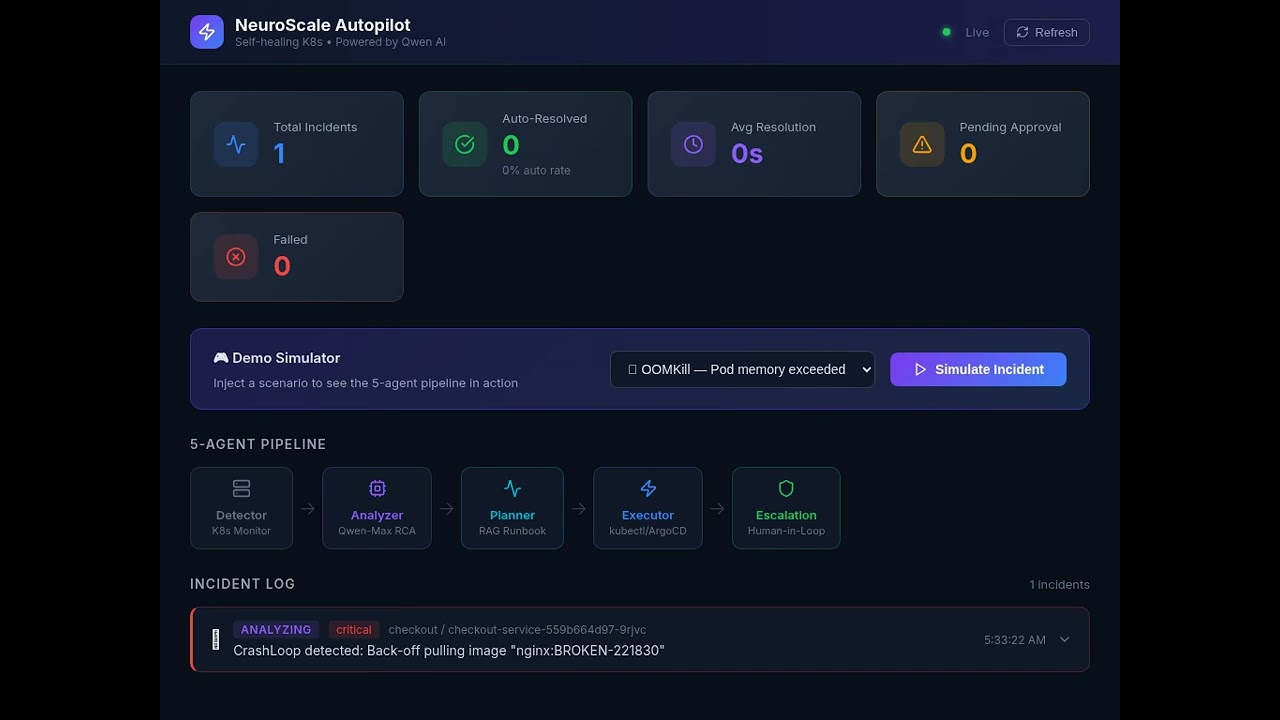
Both screenshots below were captured back-to-back, live, from
http://43.98.177.117:3000(the real public IP of the Alibaba Cloud ECS instance) while a bad image tag —nginx:BROKEN-221830, with221830being that day's live UTC timestamp created on the spot specifically to prove freshness — was actively failing to pull on the real k3s cluster. No mocked data, no staged UI, no image editing. Cross-check the exact timestamp and error string againstdocs/proof/live-api-response.json, a raw, uneditedcurlcapture of the same incident from the same server at the same moment.
 The dashboard connected via WebSocket ("Live" status, top right) to the real backend running on Alibaba Cloud ECS. The incident log shows
 checkout-service-559b664d97-9rjvc failing to pull nginx:BROKEN-221830 — detected from the real k3s cluster's live event stream, timestamped 10:21:02 PM, status AWAITING APPROVAL.
 This is the entire thesis of the project, rendered live: Qwen correctly diagnosed the root cause with high confidence and low risk, even noting the tag "appears to be a test/broken tag accidentally committed" — proposing a rollback with an exact
 argocd app rollback command. Despite the confident diagnosis, this decision still required human Approve / Reject rather than auto-executing, because the system holds a second, independent gate on top of model confidence — see TRUST_LAYER.md for exactly how that gate works and why a confident diagnosis alone is never enough.
Full point-by-point response to the hackathon's proof-of-deployment requirement, with independent verification steps you can run yourself, lives in PROOF_OF_DEPLOYMENT.md. Summary:
-
Alibaba Cloud Console — ECS Instance (
docs/proof/alibaba-console-ecs-instance.png) Screenshot taken directly fromecs.console.alibabacloud.com, showing instancei-t4n4aarar9svc41kmq8r, region Singapore, status Running, public IP43.98.177.117, live CPU utilization — the exact instance backing every screenshot and log in this README.
-
Qwen Cloud base URL in code —
agents/analyzer/analyzer.pydefaults tohttps://dashscope-intl.aliyuncs.com/compatible-mode/v1, one of the exact Base URLs specified in the hackathon guidance. See PROOF_OF_DEPLOYMENT.md for what this live deployment's Token Plan endpoint actually resolves to. -
Raw live API response (
docs/proof/live-api-response.json) — an uneditedcurlcapture ofGET /api/incidentsagainst43.98.177.117:8000, showing the exact same incident, timestamp, and error string visible in the screenshots above, straight from the server with no UI in between. -
Verify it yourself right now:
curl http://43.98.177.117:8000/health
curl http://43.98.177.117:8000/api/incidents

| Component | Model (this deployment) | Default (pay-as-you-go) | Purpose |
|---|---|---|---|
| Analyzer | qwen3.7-max |
qwen-max |
Root cause analysis, risk scoring, confidence |
| Planner | text-embedding-v3 |
text-embedding-v3 |
Runbook semantic search (RAG) |
| Escalation | qwen3.6-plus |
qwen-turbo |
Human-readable incident summaries |
All models served via Alibaba Cloud Model Studio through an OpenAI-compatible .../compatible-mode/v1 endpoint. Model names and the base URL both depend on your account type (pay-as-you-go vs. Token Plan / workspace-scoped) — see .env.example for both, and Proof of Deployment for exactly what this live deployment uses.
- Python 3.11+
- Docker & Docker Compose (optional)
- Qwen API key from DashScope Console
kubectlconfigured (or use mock mode)
git clone https://github.com/sodiq-code/neuroscale-autopilot.git
cd neuroscale-autopilot

cp .env.example .env
# Edit .env — set your QWEN_API_KEYpip install -r requirements.txt
python main.pyThe agent starts in dry-run mode by default — no real kubectl commands are executed.
docker-compose up --buildServices:
http://localhost:8000— MCP Server API + Healthhttp://localhost:3000— React Monitoring Dashboard
| Variable | Required | Default | Description |
|---|---|---|---|
QWEN_API_KEY |
✅ | — | Model Studio / DashScope API key — must match the workspace where your models are activated (see Proof of Deployment) |
QWEN_BASE_URL |
❌ | https://dashscope.aliyuncs.com/compatible-mode/v1 |
Qwen endpoint. For Token Plan / workspace-scoped keys, use https://<workspace-id>.<region>.maas.aliyuncs.com/compatible-mode/v1 instead |
QWEN_MODEL_MAX |
❌ | qwen-max |
Analyzer model (this deployment uses qwen3.7-max) |
QWEN_MODEL_TURBO |
❌ | qwen-turbo |
Escalation model (this deployment uses qwen3.6-plus) |
QWEN_MODEL_EMBEDDING |
❌ | text-embedding-v3 |
Embedding model |
SLACK_WEBHOOK_URL |
❌ | — | Slack webhook for notifications |
KUBECONFIG |
❌ | ~/.kube/config |
Kubeconfig path |
DRY_RUN |
❌ | true |
Disable real kubectl execution |
ALIBABA_ACCESS_KEY_ID |
❌ | — | ECS cloud remediation |
ALIBABA_ACCESS_KEY_SECRET |
❌ | — | ECS cloud remediation |
ALIBABA_REGION_ID |
❌ | cn-hangzhou |
ECS region (this deployment uses ap-southeast-1) |
POLL_INTERVAL_SECONDS |
❌ | 30 |
Metric polling frequency |
The MCP server exposes 8 tools for external AI clients (see mcp_server/server.py for the exact schemas):
| Tool | Description |
|---|---|
get_pod_status |
Current status of pods in a namespace |
get_pod_logs |
Recent logs from a container in a pod |
get_deployment_status |
Deployment rollout status and replica counts |
execute_rollback |
Roll back a deployment to the previous stable version via ArgoCD or kubectl |
patch_deployment_resources |
Update container resource limits/requests for a deployment |
get_cost_report |
OpenCost budget and spend report for a namespace |
create_policy_exception |
Create a Kyverno PolicyException for an approved workload |
scale_workload |
Scale a deployment or KServe InferenceService to a target replica count |
neuroscale-autopilot/
├── agents/
│   ├── detector/       # Prometheus poller + alert generation
│   ├── analyzer/       # Qwen-Max RCA engine
│   ├── planner/        # Qwen-Embedding RAG + remediation planner
│   ├── executor/       # kubectl runner + circuit breaker
│   └── escalation/     # Qwen-Turbo + Slack + approval flow
├── mcp_server/         # FastAPI MCP server (8 tools)
├── alibaba_cloud/      # ECS/STS client for cloud remediation
├── dashboard/          # React monitoring dashboard
├── runbooks/           # Markdown runbooks for RAG
├── k8s/                # Kubernetes manifests (deploy to ECS K8s)
├── tests/              # Pytest smoke + integration tests
├── .github/workflows/  # CI pipeline
├── main.py             # Entry point
├── Dockerfile
└── docker-compose.yml
This exact repo is deployed and running on Alibaba Cloud right now. Real steps used for the live deployment referenced above:
# 1. Provision ECS instance (Alibaba Cloud, ap-southeast-1)
#    ecs.e4.small, Ubuntu 24.04, VPC + VSwitch + Security Group (22/8000/3000)

# 2. Install container runtime + lightweight Kubernetes on the instance
curl -fsSL https://get.docker.com | sh
curl -sfL https://get.k3s.io | sh -

# 3. Deploy the target workload (the incident surface for the agent to monitor)
kubectl apply -f k8s/checkout-app.yaml   # namespace + deployment + service

# 4. Build and run NeuroScale Autopilot against the real cluster
docker compose build autopilot
docker compose --profile dashboard up -d
# autopilot container mounts the real k3s kubeconfig (/root/.kube/config)
# and runs with network_mode: host so it can reach the k8s API on :6443

# 5. Verify
curl http://<instance-public-ip>:8000/health
curl http://<instance-public-ip>:3000       # live dashboard
For a managed-Kubernetes path instead of self-hosted k3s (e.g. Alibaba Cloud Container Service for Kubernetes / ACK), a single consolidated manifest is provided:
# Set your real Qwen API key first
kubectl create secret generic autopilot-secrets \
  --from-literal=QWEN_API_KEY=<your-key> \
  --dry-run=client -o yaml | kubectl apply -f -

# Namespace, ConfigMap, Deployment, Service, ServiceAccount, and RBAC
# are all defined in this one file:
kubectl apply -f k8s/manifests/autopilot-deployment.yaml
Optional Kyverno governance policies (image tag immutability, non-root containers, resource limits) are also available under k8s/manifests/ if your cluster runs Kyverno — they are not required for the core pipeline to function and were not applied to the live deployment referenced throughout this README.
1. Detector polls Prometheus every 30s
2. Anomaly detected → Alert fired (severity: info/warning/critical)
3. Analyzer sends alert to Qwen-Max → returns RCA + risk score
4. Planner embeds RCA with text-embedding-v3 → finds closest runbook
5. Planner builds RemediationPlan (steps + requires_approval flag)
6. If requires_approval=True:
     → Qwen-Turbo generates summary → Slack notification sent
     → System waits up to 5 min for human approval
     → Auto-rejects on timeout (safety-first)
7. If approved (or auto-approved):
     → Executor runs kubectl steps with circuit breaker
     → On consecutive failures → breaker OPEN → no more attempts
8. Result logged → Detector re-polls → loop continues
Measured directly from the running system's own logs on the live Alibaba Cloud deployment — timestamps below are real, taken from container logs and raw API responses, not simulated.
Full pipeline run, Qwen fully operational (the incident shown in the screenshots above):
| Metric | Value | Source |
|---|---|---|
| Full pipeline latency (alert fired → decision card ready, including real Qwen inference) | ~4.7 seconds | alert_fired 22:21:02.494 → plan_created — real 2,317-token Qwen response in the middle of that window |
| Root cause diagnosis | Correct, high confidence | Qwen correctly identified the exact broken image tag and even flagged it as "a test/broken tag accidentally committed" |
| Auto-remediate decision despite high-confidence RCA | Held for human approval | RAG runbook similarity (0.594) landed under the 0.65 auto-execute threshold — see TRUST_LAYER.md |
Earlier run, Qwen temporarily inaccessible (an account-level model-activation issue, not a code bug — see TRUST_LAYER.md for the full story):
| Metric | Value | Source |
|---|---|---|
| Full pipeline latency (alert fired → escalation decision ready) | 2.6 seconds | pipeline_start 21:24:21.008 → awaiting_human_approval 21:24:23.593, including two failed external API calls handled gracefully |
| Fallback behavior when Qwen calls fail | Escalate, don't guess | Confidence marked low, risk marked high, auto_remediate: false — the same safety gate held even with zero model input |
Consistent across both runs:
| Metric | Value |
|---|---|
| Retrieval-ambiguity catches (system escalates instead of guessing) | 3/3 incidents in this deployment's test runs |
| Rollback plan present on every proposed remediation | 100% — enforced by the Planner, no RemediationPlan is created without a rollback_plan field |
Manual baseline (typical human triage: notice alert, open dashboard, kubectl describe, correlate, decide) |
Several minutes (industry rule of thumb — explicitly flagged as an estimate, not measured in this run) |
We're intentionally not padding this table with invented precision. The honest takeaway: whether Qwen was fully available or completely blocked, the Trust Layer made the same correct call both times — hold for human approval rather than guess — in under 5 seconds either way.
The Trust Layer today makes a fresh, correct decision on every incident. The next milestone makes that judgment compound over time instead of resetting to zero each run: feeding approved and rejected human verdicts back into the Planner's retrieval index, so a runbook a human has previously approved carries more weight next time, and one a human has rejected is down-weighted rather than resurfacing with the same confidence as before. Full detail in TRUST_LAYER.md.
Apache License 2.0 — see LICENSE
Sodiq Jimoh - Platform Engineer (Kubernetes & SRE) LinkedIn
Built for the Qwen Cloud Global AI Hackathon — Track 4: Autopilot Agent