
Last updated: 02/06/2022
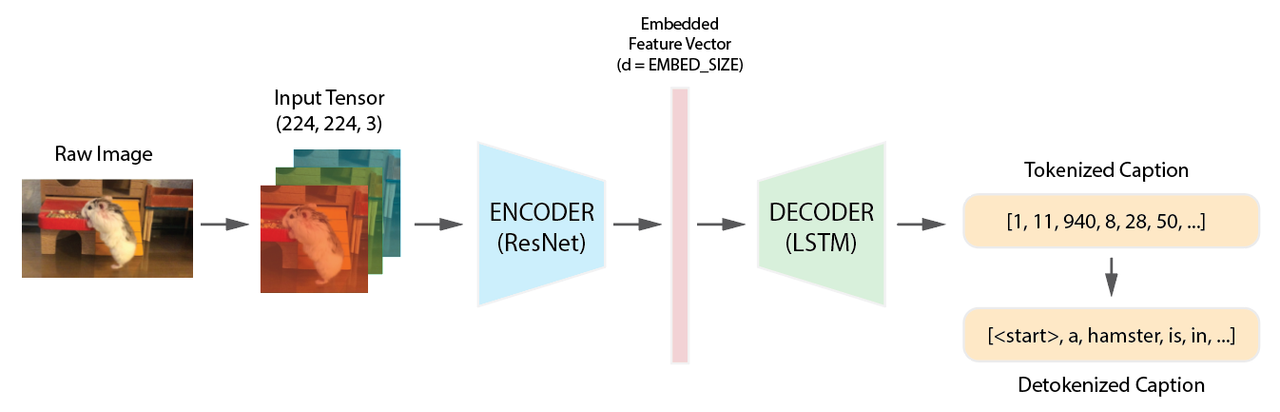
Image Captioning
This project is developed from Udacity's Computer Vision Nanodegree
- Use a hybrid CNN-RNN model to automatically generate descriptive text captions for images (MS COCO Dataset)
- Train a ResNet encoder to extract and embed the semantic features from images and an LSTM decoder to output captions
- Achieve BLEU score = 15.98 (1-gram score = 60.55) on validation dataset
- Use the model to predict captions from custom input images
- Use Vision Transformer to serve as the encoder to extract features from the images
- Use Transformer to serve as the decoder to generate captions
I use the Microsoft Common Objects in Content (MS COCO) Dataset (Ver. 2014)
Link to the MS COCO Dataset: https://cocodataset.org/#home

MS COCO Dataset (https://cocodataset.org/#home)
How to Download MS COCO Dataset
This projects use the COCO API provided by the MS COCO. Instructions in detail can be found on their websites. Here is a brief instruction:
- In your work directory, create a folder
opt - In the
optfolder, run the bash commandgit clone https://github.com/cocodataset/cocoapi.git - Download
2014 Train/Val annotations [241MB]from MS COCO download page - Extract the zip file
annotation_trainval2014.zipinto theopt/cocoapifolder - (Checkpoint) You should see a folder
annotationsinside theopt/cocoapifolder - Download
2014 Testing Image info [1MB]from MS COCO download page - Extract the zip file
image_info_test2014.zipinto theopt/cocoapifolder - (Checkpoint) You should see a file
image_info_test2014.jsoninside theopt/cocoapi/annotationsfolder - In your work directory, create a folder
images - Download
2014 Train images [83K/13GB]from MS COCO download page - Download
2014 Val images [41K/6GB]from MS COCO download page - Download
2014 Test images [41K/6GB]from MS COCO download page - Extract all 3 downloaded zip files (steps 10-12) into the
imagesfolder - (Checkpoint) You should see 3 folders (
train2014,val2014,test2014) inside theimagesfolder
The model consists of an encoder an a decoder. The encoder extract semantic information from the input image to generate a feature vector.
A hybrid ResNet-LSTM model for image captioning
I use a pre-trained ResNet-50 network to extract the features from an image. I removed the last fc layer, flattened the final output and pass through a dense layer to obtain a feature vector of size EMBED_SIZE
I use an LSTM network as the decoder. I train the model from scratch. The dimension of the hidden units of the LSTM layer is HIDDEN_SIZE, which is a hyperparameter.
VOCAB_THRESHOLD = 5
BATCH_SIZE = 32
EMBED_SIZE = 512
HIDDEN_SIZE = 512
LR = 1e-3I train the model for 5 epochs and use the loss on the validation dataset to choose the best model weights. I use the BLEU Score and the loss to evaluate the model performance.
The model achieves BLEU Score = 17.04, and an overall loss (cross entropy) of 2.3076
I used the ResNet-LSTM hybrid model to predict captions on the MS COCO Testing Data.
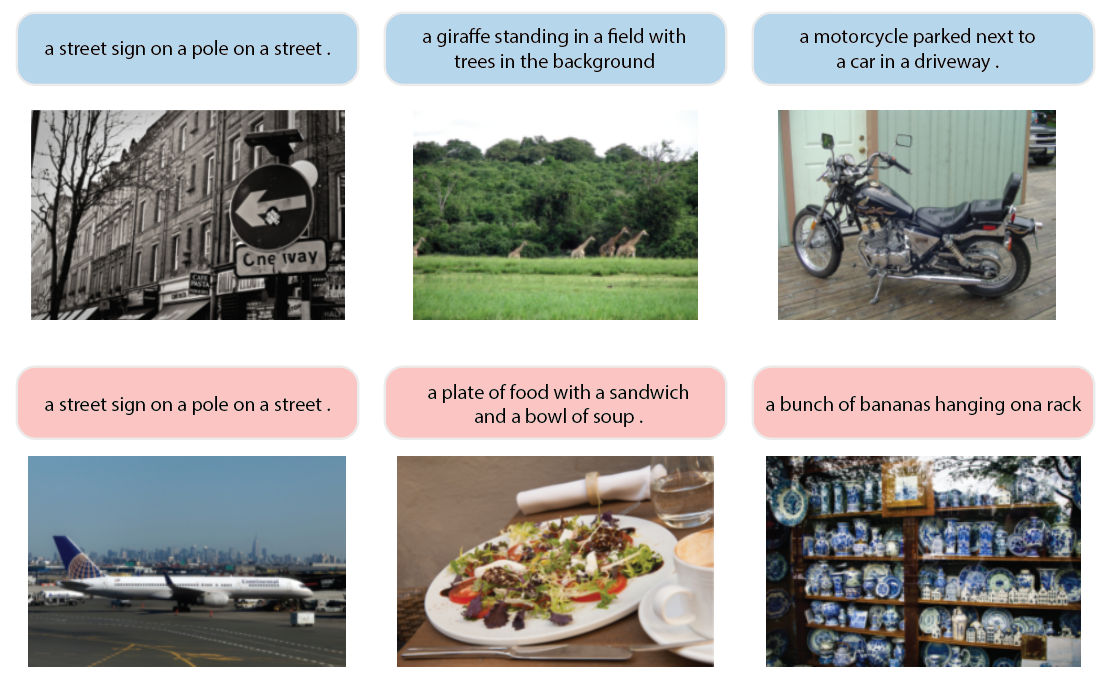
Good and bad captions generated by the model. Images are from MS COCO Test Dataset (2014).
- Udacity's Computer Vision Nanodegree
- COCO API: https://github.com/cocodataset/cocoapi
- This notebook tells how to download the COCO Dataset https://colab.research.google.com/github/rammyram/image_captioning/blob/master/Image_Captioning.ipynb
- Google's paper using LSTM for image captioning https://arxiv.org/pdf/1411.4555.pdf