



Turn the raw results of a production or repair test into a printable test protocol for one device: serial number, measured values against their limits, a clear PASS/FAIL verdict with the failed checks on top, the input files with their SHA-256 for traceability, and signature boxes. Output is a single self-contained HTML file (A4 print layout), a PDF, or normalized JSON. Several result files of the same unit — the bench test, the interface test, the boot log comparison, a pytest run — are merged into one protocol.
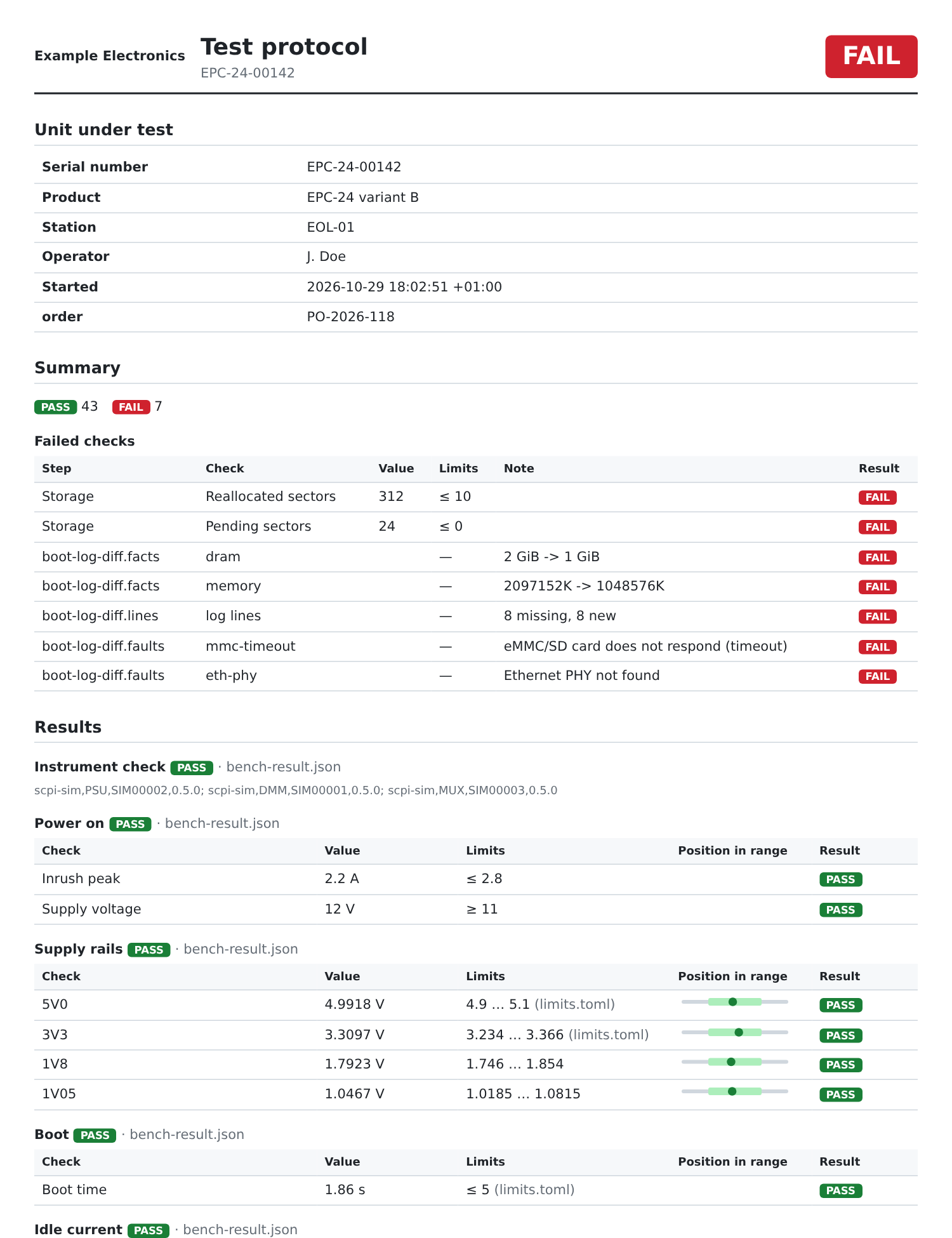
$ test-protocol examples/EPC-24-00142/* --limits examples/limits.toml
EPC-24-00142: FAIL
PASS 43  FAIL 7
  FAIL  Storage / Reallocated sectors: 312 (≤ 10)
  FAIL  Storage / Pending sectors: 24 (≤ 0)
  FAIL  boot-log-diff.facts / dram: 2 GiB -> 1 GiB
  FAIL  boot-log-diff.facts / memory: 2097152K -> 1048576K
  FAIL  boot-log-diff.lines / log lines: 8 missing, 8 new
  FAIL  boot-log-diff.faults / mmc-timeout: eMMC/SD card does not respond (timeout)
  FAIL  boot-log-diff.faults / eth-phy: Ethernet PHY not found

$ test-protocol examples/EPC-24-00142/* --limits examples/limits.toml \
    --product "EPC-24 variant B" --operator "J. Doe" --meta order=PO-2026-118 \
-o protocol.html --pdf protocol.pdfpip install test-protocol # HTML and JSON, no dependencies
pip install "test-protocol[pdf]" # adds WeasyPrint for PDF outputPython 3.10 or newer. For PDF output you need either WeasyPrint (the pdf
extra; on Windows it needs the GTK/Pango libraries, see the WeasyPrint docs)
or Chrome, Chromium or Edge, which the tool finds on its own.
The image contains WeasyPrint and its system libraries, so PDF output needs no local installation. Run it in the folder with your results:
docker run --rm --user "$(id -u):$(id -g)" -v "$PWD:/data" ghcr.io/steitec/test-protocol \
    result.json --limits limits.toml -o protocol.html --pdf protocol.pdf
--user makes the written files yours; without it the container runs as an
unprivileged user that cannot write to your folder. On Docker Desktop use
--user 0:0 instead, because it shows the folder as owned by root inside the
container and still writes the files as you on the host. The exit status is the
same as without Docker (0 PASS, 1 FAIL, 2 bad input). The image is built with
every release and tagged with the version and latest; pin the version in CI.
PDF fonts come from the image (Liberation Sans).
The format is detected from the file; --format forces it.
| Input | What becomes of it |
|---|---|
bench-automation result.json |
every step with its measurements and limits; console log and instruments as attachments |
interface-test-kit result.json |
every step with the measurements of the last attempt, "passed after retry", RMA number, profile, operator |
JUnit XML (pytest --junitxml, boot-log-diff --junit, most CI tools) |
one step per test class, one check per test case; failure text as attachment |
| CSV with one measurement per row | columns serial, step, measurement, value, unit, low, high, result (only measurement and value are required); German Excel exports with ; and decimal comma work |
test-protocol JSON (--json) |
read back unchanged |
A measurement is PASS or FAIL against its limits; one without limits and
without a result is shown as INFO and does not count. Inputs of one protocol
must have the same serial number — if they differ, the tool stops (exit 2).
A file without a serial number (JUnit, CSV) takes it from the other inputs
or from --serial.
Limits from a TOML file replace the limits in the raw data, and PASS/FAIL is evaluated again. The protocol marks such limits with the file name, and the file is listed with its SHA-256.
[[limit]]
step = "Supply rails"     # optional: only in this step
measurement = "5V0"       # matched without regard to case
low = 4.9
high = 5.1
unit = "V"

[[limit]]
measurement = "BIOS version"
expect = "5.27"           # text comparison
A limit that matches no measurement gives a warning. --require-limits fails
every measurement that has no limit at all — for a strict end-of-line test.
| Option | |
|---|---|
-o, --html FILE / --pdf FILE / --json FILE |
outputs; without any of them a summary goes to the terminal |
--limits FILE, --require-limits |
see above |
--serial, --product, --station, --operator |
header fields; they win over the inputs (the serial number must still match) |
--meta KEY=VALUE |
extra header field, e.g. order or customer (repeatable) |
--title, --company, --logo FILE |
protocol title, company name and logo (PNG, JPEG, SVG; embedded) |
--approver |
second signature box "Approved by" |
--lang en|de |
protocol in English or German (Prüfprotokoll, decimal comma) |
--pdf-engine auto|weasyprint|chrome |
auto takes WeasyPrint if installed, else the browser; TEST_PROTOCOL_BROWSER points to a browser binary |
Exit status: 0 PASS, 1 FAIL, 2 bad input or configuration — so a test
station script or a CI job can use the verdict directly.
examples/ has two units of a simulated embedded PC: one that
passes and one with a failing SSD and a broken boot. See
examples/README.md.
MIT