



Track-aware daily work planning for developers running parallel Claude Code / Codex sessions across many GitHub issues.
A daily work-planning system for developers running parallel AI sessions across many GitHub issues. It's made of three things: a pure-Python stdlib CLI, a set of YAML-frontmattered markdown files ("tracks"), and a SKILL.md that tells your AI how to use the CLI. Together they give you and your agent a shared, live picture of what's in flight — without asking you to maintain it manually.
Installs as a plugin for Claude Code and Codex (see Quick install for the exact commands), as an npm global for any editor or terminal (npm install -g @stylusnexus/work-plan), and as a VS Code extension (search "Work Plan", publisher stylusnexus).
The system derives state live from GitHub (gh), git, and your track files on every run — nothing is mirrored or cached. AI sessions get a paste-ready context block; you stay oriented even when switching between a dozen parallel workstreams.
Why it exists: born from the frustration of building detailed plans that die the moment you open a new agent session and start over. Inspired by Andrej Karpathy's notes on vibe coding and the specific pain of doing enthusiastic work on the wrong thing.
- Not a Jira / Linear / GitHub Projects replacement. It doesn't manage sprints, roadmaps, or capacity planning — it helps you and your AI agent stay oriented on GitHub issues you already have.
- Not a standalone issue tracker. GitHub is canonical;
work-planjust reads and references it. - Not zero-setup. Requires Python 3.9+, the
ghGitHub CLI (authenticated), andyq(the Go version, not the Python one). - Not a background service. No daemon, no cache, no sync loop —
git pullis the sync mechanism for shared tracks. - Not a replacement for reading your code. It tells you what to work on and where you left off — not what the code does.
Claude Code (recommended):
/plugin marketplace add stylusnexus/agent-plugins
/plugin install work-plan@stylus-nexus
Codex: codex plugin marketplace add stylusnexus/agent-plugins → codex plugin add work-plan@stylus-nexus
npm (any editor / standalone CLI):
npm install -g @stylusnexus/work-plan
VS Code extension (the visual viewer): search "Work Plan" (publisher stylusnexus) in the Extensions view, or code --install-extension stylusnexus.work-plan-viewer. It drives the CLI above — see VS Code extension.
Cursor / Copilot / direct: clone + ./install.sh (see Install).
Full multi-agent guide: the agent-plugins marketplace README. See Install below for details, the npm path, and updating.
Command names: examples below use the standalone form
/work-plan <subcommand>(whatinstall.shgives you). Installed as a plugin, commands are namespaced —/work-plan brief→/work-plan:brief,/work-plan handoff→/work-plan:handoff, and the long tail is/work-plan:run <subcommand>. On Codex, invoke via@work-plan//skills.
The five essentials you'll use 80% of the time are:
| Command | When |
|---|---|
/work-plan brief |
Morning. Multi-track snapshot — what's on your plate across every active track. Run from inside a configured repo's checkout and it auto-scopes to that repo (one-line banner; --repo=all shows everything). Add --repo=<key> to scope to a specific project. |
/work-plan handoff <track> |
End of a work block. Captures what you touched. Use --auto-next for an algorithmic priority-sorted next_up (no LLM), --set-next 1,2,3 for explicit numbers, or pair with Claude in chat for a curated pick. |
/work-plan orient <track> |
Switching context. ~15-line paste-block of priority / last session / next pick / git state — drop into a fresh Claude Code terminal. |
/work-plan reconcile <track> | --all | --repo=<key> [--draft] [--yes] |
Track frontmatter membership drifted from GitHub labels. Use on label-driven tracks only — for hand-curated tracks, use refresh-md instead. In an --all/--repo sweep it also moves issues relabeled from one track to another in the same repo. --draft previews proposed ADDs/MOVEs/FLAGs; --yes applies without prompting. --repo=<key> scopes the sweep to one repo. |
/work-plan hygiene [--repo=<key>] |
Weekly all-in-one cleanup. Runs four steps: ① refresh-md --all (pull live GitHub state into every active track's status table), ② reconcile --all (sync frontmatter membership against GitHub labels), ③ dedupe-tiers (report shared/private duplicate tracks, no deletes), ④ duplicates (flag likely-duplicate issues). --repo=<key> scopes steps ①–③ to one repo; step ④ is skipped in scoped mode. |
/work-plan in-progress <n> [--clear] |
Starting or stopping active work on an issue. Adds (or removes with --clear) the work-plan:in-progress label on GitHub. Repo-resolved from the issue number, or pass --repo=<key|slug> to disambiguate. brief/orient/the VS Code viewer also detect in-progress automatically from a hot feat/<n>-/fix/<n>- branch. |
A dozen more subcommands cover slotting new issues into tracks, closing tracks (shipped/abandoned/parked), and one-time priority-label backfill. Three capabilities worth calling out explicitly:
Shared tracks — track files can live inside your repo clone (.work-plan/<slug>.md) so teammates see the same planning state via git pull. The default is private (notes_root/<repo>/); register a local clone with init-repo --local=<path> to opt into shared mode. Pass --private to any write command to keep a specific track local. See Shared tracks.
AI-powered clustering (group) — hand a flat list of GitHub issues to your AI and get back thematic track files. Run group --milestone=X to fetch all issues in a milestone, get a clustering prompt, save the JSON answer, then group --apply creates the tracks. Pairs with auto-triage for ongoing maintenance: once tracks exist, auto-triage assigns newly-filed untracked issues back into them.
Coverage + auto-triage — coverage --repo=<key> reports how many open issues fall outside the track model (42% on a real production repo). auto-triage --repo=<key> then produces an AI prompt to assign those orphans to existing tracks. Run both periodically to keep the backlog visible.
Cross-track dependencies — set depends_on: [<track-slug>] in a track's frontmatter to declare explicit dependencies between tracks. The VS Code viewer renders these as thick amber ==> edges in the dependency graph, and the detail panel shows clickable dependency chips that navigate directly to the dependent track. Set via /work-plan set <track> depends_on=slug1,slug2 or the "Edit Track Fields" right-click menu in VS Code. Complementary to the issue-derived "owns" edges already inferred from blockers.
Beyond issue tracking, plan-status answers a different question — which of your accumulated plan/spec docs actually shipped, half-shipped, or died. It correlates each plan's declared file-manifest (Create:/Modify:/Test: paths) against git and the filesystem rather than trusting checkboxes (which are routinely left unchecked even for shipped work). Read-only by default; optionally stamp the verdict into each doc (--stamp), get an AI verdict on prose/ambiguous docs (--llm), and act on the results behind confirmation gates (--archive dead plans, --issues for partial ones). See Plan & doc liveness.
The toolkit treats GitHub as the canonical source of issue state and never tries to mirror it. Track markdown files are lightweight references — they list issue numbers and a few pieces of derived metadata (priority, milestone, next_up, depends_on, last session timestamp). The CLI re-derives everything else live from gh, git, and the markdown body.
flowchart TB
    subgraph sources["Data sources (canonical)"]
        direction LR
        gh["GitHub issues<br/>(via gh CLI)"]
        git["git state<br/>(branch, commits, modified files)"]
        md["Track markdown<br/>(YAML frontmatter + body)"]
    end

    subgraph cli["work-plan CLI (Python stdlib)"]
        direction LR
        brief["brief<br/><i>multi-track view</i>"]
        handoff["handoff<br/><i>capture session + algorithmic or LLM next_up</i>"]
        orient["orient<br/><i>paste-block context for new session</i>"]
        hygiene["hygiene<br/><i>weekly drift + dup sweep</i>"]
    end

    subgraph outputs["Outputs"]
        direction LR
        paste["Paste-ready blocks<br/>(relayed verbatim to chat)"]
        update["Updated frontmatter<br/>(next_up, session log, status table)"]
        sync["GitHub label sync<br/>(reconcile, refresh-md)"]
    end

    sources --> cli
    cli --> outputs
    update -.->|"next day"| md
Daily rhythm:
- Morning →
briefshows multi-track plate, thenorient <track>produces a ~15-line paste-block to drop into a fresh agent session. - End of work block →
handoff <track>captures what you touched. Three ways to setnext_upfor tomorrow:handoff <track> --auto-next— algorithmic (no LLM): top-3 by priority then most-recently-updated, blockers excluded. Interactive[Y/n/edit]prompt — accept, edit, or skip. (--suggest-nextis the read-only, non-interactive sibling: it prints the same suggestion as JSON and writes nothing — the feed the VS Code Suggest Next-Up (auto) picker confirms, since the TTY prompt can't run under the extension.)handoff <track> --set-next 4167,4148— explicit numbers when you know exactly which issues are next.- Free-form via Claude in your agent session, which can review project memory and write a curated list back. The two
--*-nextflags are the no-LLM paths. - For tracks where you don't want to bother curating at all, set
next_up_auto: truein the track's frontmatter —briefwill then derive the list live each invocation, ignoring whatever's stored. - Ranking presets — when
next_up_auto: trueis on, the default ranking isflow(milestone → dependency → priority → recency). Override per-track withset-next-up <track> --preset=<name>, or setnext_up_default: <name>in your config for a global fallback. Named presets:flow(the default),priority-driven(priority first, no milestone bias — good for backlogs with no milestones),backlog(oldest issues first — surfaces stalled work). Custom criterion order:set-next-up <track> --order=aging,priority,dependency. Clear a track's override with--clear. Toggle auto-derivation itself with--auto=on|off(no hand-editing frontmatter required).
- Weekly →
hygienerunsrefresh-md --all+reconcile --all+dedupe-tiers(report-only) +duplicatesin sequence to keep status icons, GitHub labels, tier dedup, and issue-dedup state honest.
When should I run
refresh-md? Any time you close or merge issues and want the track body to reflect the new state.handoffrewrites the status table for one track on every run, butbriefreads GitHub live without writing anything back — so a track you haven'thandoff'd recently stays stale on disk.refresh-md <track>(or Sync Issue States from GitHub in VS Code) fixes that on-demand;hygienesweeps all tracks weekly.
briefandorientannotate blocked issues with⊘ blocked by #N— read-only, surfaced from GitHub's native dependency edges, nothing is written back. Cross-repo blockers show asowner/repo#N; same-repo duplicates of manually-declared blockers are deduplicated.
GitHub access is read-only by default, with three explicit, opt-in write actions. Issue data always comes from read-only
ghcalls (gh issue list,gh issue view), and every routine write (frontmatter, status table, session log) goes to your local markdown files only. The three GitHub-mutating actions are all opt-in and gated:plan-status --issuescreates a GitHub issue per partial plan (gh issue create, prompts before opening);close-issue(#305) closes an issue viagh issue close— for the common case where a PR merged todevleft its issue OPEN (GitHub auto-closes only from the default branch), with the VS Code viewer firing a mandatory "Close on GitHub? — cannot be undone" modal on every close; andin-progress(#271) adds or removes thework-plan:in-progresslabel on an issue, public-repo gated via the confirm-token flow. Nothing else touches GitHub state.
By default track files live under notes_root/<repo>/ — local only, never committed. Shared tracks live inside the repo clone itself (.work-plan/<slug>.md) and travel with the repo via git pull/git push. Teammates see the same planning state without a separate notes sync.
Set up shared tracks for a repo:
# Register the local clone path in your config
/work-plan init-repo myproject --github=org/myproject --local=/path/to/clone
Once local: is set and points to a valid git repo, all new tracks for that repo go into .work-plan/ automatically.
Syncing:
git pull                          # pull teammates' track changes
git add .work-plan/ && git commit && git push  # share your own
The CLI never auto-pushes. When you create or update a shared track, it prints a reminder:
↑ shared — commit + push to share with teammates.
Storing the plan as files in the repo makes it branch-scoped — but a track's status and priorities are facts about the project, not about a code branch. On a repo with dev + main + feature branches that means cross-branch plan divergence, merge conflicts on status-table edits, and planning churn polluting feature PRs and the deploy diff.
plan-branch pins the shared tier to one canonical branch per repo, read and written through a dedicated git worktree, so the plan lives off your code branches entirely — yet the CLI and VS Code viewer always show it from any checkout.
/work-plan plan-branch init myproject        # orphan branch `work-plan/plan` + skeleton (local only)
/work-plan plan-branch status myproject      # exists? published? how many unpushed commits?
/work-plan plan-branch push myproject        # share it — gated with a confirm token on PUBLIC repos
The default branch is an orphan work-plan/plan (no shared history with your code, like gh-pages) — override with --branch=<name>. init is local only; a teammate who already published the branch is auto-connected instead of re-created. Once plan_branch is set, every shared-track write is committed onto that branch via the worktree (never your working branch), and push is the one deliberate step that shares it. push --dry-run previews exactly what would be exposed first.
Tip: exclude the plan branch from CI by adding
!work-plan/**to your workflow'son: pushbranch filter, so planning commits never trigger builds or deploys.
Opt out per-command: pass --private to route a specific track to notes_root instead:
/work-plan group --milestone='v1.0' --private   # keep clusters local
/work-plan new-track myproject exploration       # --private for one-off tracks
Multi-repo disambiguation: if the same track slug exists in two repos, qualify with @<repo> or --repo=<key>:
/work-plan slot 4234 auth-flow@myproject
/work-plan close auth-flow --repo=myprojectThe track commands above are about issues. plan-status is about documents — the plans, specs, and design docs that pile up in a repo (especially the ones planning workflows like Superpowers generate) and then quietly go to die. Months later, nobody can tell what actually got built, what's half-done, and what was abandoned.
The problem is specific and measurable: the checkboxes lie. A plan's - [ ] / - [x] boxes are supposed to track completion, but the agent executing the plan tracks progress in its own scratchpad and rarely edits the file. So boxes stay empty even when the whole feature shipped. On one real repo, 134 of 140 shipped plans showed fewer than 25% of their boxes checked — they looked abandoned; they were done.
plan-status ignores the checkboxes and reads a quieter, honest signal. A well-formed plan declares the exact files it will create, modify, and test — so every plan is really a manifest of files that should exist. The tool asks git and the filesystem: of the files this plan promised, how many now exist and were committed? That number is the real completion.
$ /work-plan plan-status --repo=myproject

# plan-status — /path/to/myproject
332 docs · 140 shipped · 20 partial · 172 manifest-less
lie-gap (shipped but <25% boxes checked): 134

## ✅ shipped (140)
  docs/plans/2026-03-16-idea-mode-ui.md
      9/9 declared files present (boxes stale)
  ...
## 🟡 partial (20)
  docs/plans/2026-05-01-v0.4.0-one-week-closeout.md
      19/40 declared files present
  ...
Each doc reaches one of these verdicts:
| Verdict | Meaning |
|---|---|
| ✅ shipped | (nearly) all declared files present — done, even if the boxes say otherwise |
| 🟡 partial | some files present — genuinely in progress; this is your to-do list |
| 💀 dead | no files, long untouched — an abandonment candidate |
| 👻 manifest-less | a prose doc with no file-manifest (e.g. a design spec) — needs a judgment call |
| 🧳 foreign | a misfiled plan whose declared files live in another repo — not this repo's work at all |
Judging the ambiguous ones (--llm). Prose specs (no manifest) and plans whose files look absent get a two-step AI pass: --llm gathers each candidate plus its git evidence and prints a prompt; you save the model's JSON verdicts to the cache; --llm --apply merges them in. The CLI never calls an LLM itself — same two-step contract as group/suggest-priorities.
Acting on the results (gated). Once you trust the verdicts:
--archivemoves 💀 dead plans intoarchive/abandoned/(history-preservinggit mv).--issuesopens a GitHub issue per 🟡 partial plan, listing its unsatisfied files.
Both are confirmation-gated and honor --draft (preview, zero side effects).
Stamping (--stamp). Add --stamp and the verdict is written into the doc itself as a small, idempotent header, so the truth lives next to the plan:
# Idea Mode UI — Implementation Plan

<!-- plan-status: BEGIN -->
> **Status:** ✅ shipped · 9/9 files · last touched 2026-03-20
<!-- plan-status: END -->
The block is derived entirely from evidence (no timestamp), so re-stamping unchanged docs produces zero diff — run it as often as you like. --draft previews exactly which docs would change and writes nothing.
Safety: read-only by default — it mutates nothing unless you pass --stamp, --archive, or --issues, and those last two prompt before acting. Git is the only local state it touches, so stamps and archives are reversible with git restore. Point it at a repo with --repo=<key> (from your config) or just run it from inside the repo. In a Claude session you don't need the flags — ask in plain language ("which plans in this repo are done vs unfinished?", "stamp the plan statuses", "archive the dead plans") and the skill maps it to the right command.
The toolkit is a Python CLI that shells out to standard tools. You need all four installed before running install.sh / install.ps1:
| Tool | Min version | Why |
|---|---|---|
| Python | 3.9+ | The CLI itself. Uses PEP 585 generics (list[dict], dict[int, str]), no 3.10+ features, no third-party libraries (stdlib only — no pip install step). |
gh |
recent | Live GitHub state queries (issues, milestones, labels). Must be authenticated: gh auth login once before first run. |
git |
any 2.x | Detects current branch, ahead-of-upstream count, modified files. |
yq (mikefarah/yq, Go-based) |
4.x | Reads + edits YAML frontmatter and config. Note: Python yq (kislyuk/yq, the jq wrapper) won't work — install the Go version. |
Install per platform (one-liners):
# macOS (Homebrew)
brew install python@3 gh git yq

# Linux (Debian/Ubuntu)
sudo apt update && sudo apt install python3 git
# gh: https://github.com/cli/cli/blob/trunk/docs/install_linux.md
# yq: sudo wget -qO /usr/local/bin/yq https://github.com/mikefarah/yq/releases/download/v4.53.2/yq_linux_amd64 && sudo chmod +x /usr/local/bin/yq

# Linux (Arch)
sudo pacman -S python github-cli git go-yq

# Windows (PowerShell with winget)
winget install Python.Python.3 GitHub.cli Git.Git MikeFarah.yq
install.sh and install.ps1 both verify all four are on PATH before doing anything else, and print install hints if any are missing.
After installing, authenticate gh once:
gh auth login # follow the prompts; needs `repo` scope to read issuesA skill has two distinct contracts: (1) the underlying CLI that does the work, and (2) the SKILL.md prompt-engineering that tells the LLM how to use it (when to relay output verbatim, how to pick next_up, etc.). The CLI is portable; the prompt-engineering is model-specific. Honest split:
| Layer | What it is | Claude Code | Codex | Cursor | GitHub Copilot |
|---|---|---|---|---|---|
| 1. Python CLI | work_plan.py + subcommands. Pure stdlib, shells out to gh/git/yq. |
✅ Proven | ✅ Proven | ✅ Direct invocation | ✅ Direct invocation |
| 2. Skill auto-discovery | LLM client reads SKILL.md frontmatter, surfaces skill on relevant prompts | ✅ Proven via ~/.claude/skills/ |
~/.agents/skills/ — unverified |
❌ No native skill system; use the Cursor shim (see below) | ❌ No native skill system; use the Copilot shim (see below) |
| 3. Instruction compliance | Model follows prompt-engineered rules (verbatim relay, Claude-driven next_up flow, two-step AI subcommands) |
✅ Tested with Opus 4.x and Sonnet 4.x |
| Tool | Install command | Then invoke as |
|---|---|---|
| npm (standalone CLI / any editor) | npm install -g @stylusnexus/work-plan (requires python3 + yq + gh already on PATH — the CLI warns on first run if any are missing). |
work-plan <subcommand> |
| Claude Code | Plugin (recommended): /plugin marketplace add stylusnexus/agent-plugins → /plugin install work-plan@stylus-nexus. Or script: ./install.sh / .\install.ps1 |
Plugin: /work-plan:brief … /work-plan:run <sub>. Script: bare /work-plan <subcommand> |
| Codex | Plugin: codex plugin marketplace add stylusnexus/agent-plugins → codex plugin add work-plan@stylus-nexus. Or script: ./install.sh --target=$HOME/.agents |
Plugin: @work-plan / /skills. Script: direct CLI |
| Cursor | Skip installer. Clone repo + copy shims/cursor/work-plan.cursorrules into your project's .cursorrules (or merge it in) |
python3 <toolkit>/skills/work-plan/work_plan.py <sub> — alias wp recommended |
| GitHub Copilot | Skip installer. Clone repo + copy shims/copilot/work-plan-copilot-instructions.md into your project's .github/copilot-instructions.md (merge if it already exists) |
Direct CLI as above |
| Any other tool | Skip installer. Just git clone. |
Direct CLI |
Shell rc alias for the direct-CLI cases:
# bash/zsh (~/.bashrc, ~/.zshrc)
alias wp="python3 /path/to/work-plan-toolkit/skills/work-plan/work_plan.py"

# PowerShell ($PROFILE)
function wp { python "C:\path\to\work-plan-toolkit\skills\work-plan\work_plan.py" @args }
To install for both Claude Code AND Codex, run the installer twice with different --target values.
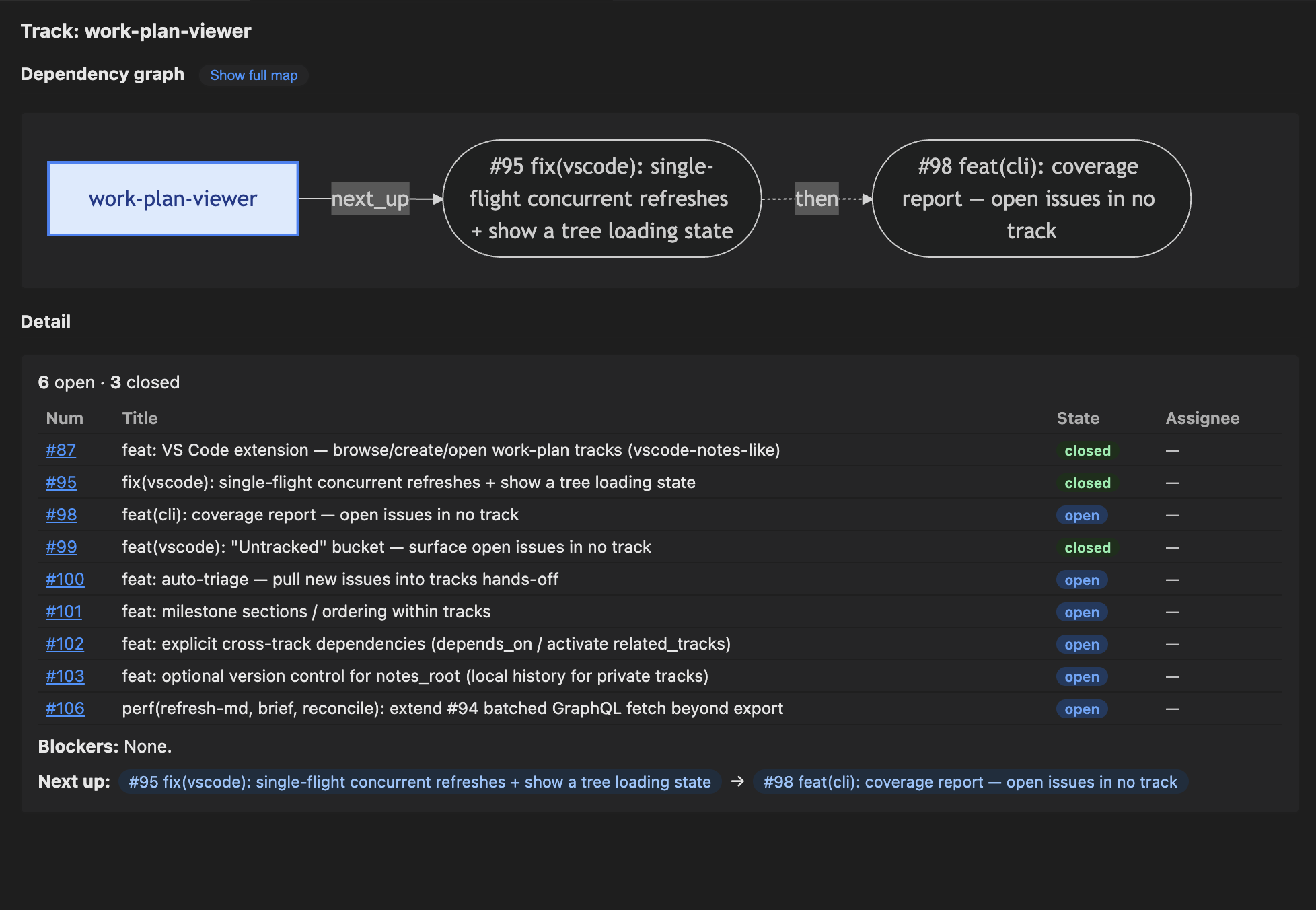
The Work Plan extension is the visual face of the CLI — a sidebar tree (repos → tracks, with per-track open/closed counts and an activity-bar badge for blocked/open status), a Mermaid dependency graph (with focus toggle and repo-scoped full map) that draws GitHub-native blocked-by edges, per-track detail with an open/closed progress bar, a one-click Plan link, a per-issue in-progress badge + toggle, expandable blocked-by / blocking dependency chips, the Untracked bucket, cross-track dependency chips, per-issue move/close buttons, keyword issue search (%wildcard% substitution, results in a dedicated tab), the daily-driver Brief / Re-orient / Handoff commands, next-up controls — a Set Next-Up button and a Set Next-Up Order… preset picker (flow / priority-driven / backlog) with the active preset shown inline, an inline active lens + sort indicator under the view title, a Plans view with confirm-gated frontmatter writes (verdict / acknowledge / drift-baseline) and a fast-fail GitHub-auth banner, and full read/write (slot/close/edit/move/new-track/push-track/…) with a public-repo confirm modal.
Install it from either registry:
- VS Code Marketplace: Extensions view → search "Work Plan" (publisher
stylusnexus), orcode --install-extension stylusnexus.work-plan-viewer. - Open VSX (VS Codium / Cursor / Windsurf): search "Work Plan", or
ovsx get stylusnexus.work-plan-viewer.
The extension shells out to the work-plan CLI, so install the CLI too (npm or any method above). If work-plan isn't on your editor's PATH — common when VS Code is launched from the Dock/Finder rather than a terminal — set workPlan.cliPath in Settings to an absolute launcher path (e.g. /path/to/work-plan-toolkit/bin/work-plan, or the npm global bin), then reload the window. Extensions auto-update from the registry.
Useful settings:
| Setting | Default | What it does |
|---|---|---|
workPlan.cliPath |
"work-plan" |
Absolute path to the CLI, if it's not on the editor's PATH |
workPlan.autoRefreshInterval |
0 (off) |
Re-poll the CLI silently in the background (seconds). Set to 30, 60, 300, or 900 if teammates are pushing shared-track changes and you want the tree to stay current without manual refresh |
workPlan.expandReposByDefault |
false |
Expand all repo groups on load (single-repo workspaces always expand) |
Shared tracks show a shared tag in the tree description so you can tell at a glance which tracks travel via git push/pull and which are local-only.
| Installed via | Update with |
|---|---|
| npm | npm install -g @stylusnexus/work-plan@latest (or npm update -g @stylusnexus/work-plan) |
| Claude Code / Codex plugin | /plugin update work-plan@stylus-nexus (Codex: codex plugin update …) |
Script (install.sh) |
git pull in the toolkit repo, then re-run ./install.sh (or .\install.ps1) |
| VS Code extension | Auto-updates; or Extensions view → update manually |
Check your version any time with work-plan --version.
For tools without a native skill system (Cursor, Copilot), shims/ contains drop-in files that give the LLM the same prompt-engineered behavior the SKILL.md provides on Claude Code: condensed CLI usage, when to relay verbatim, the two-step AI subcommand pattern, and a pointer to the full toolkit docs.
The shims are per-project — copy them into each repo where you want the work-plan tool surfaced to your agent. They don't auto-load globally.
Pick the path for your tool. All three install the same CLI + skills.
/plugin marketplace add stylusnexus/agent-plugins
/plugin install work-plan@stylus-nexus
Commands are namespaced under the plugin: /work-plan:brief, /work-plan:handoff,
/work-plan:orient, /work-plan:hygiene, /work-plan:status, and
/work-plan:run <subcommand> for everything else. Update with
/plugin update work-plan@stylus-nexus. Works in the CLI and the VS Code / JetBrains extensions.
codex plugin marketplace add stylusnexus/agent-plugins
codex plugin add work-plan@stylus-nexus
git clone <this-repo> work-plan-toolkit
cd work-plan-toolkit && ./install.sh          # macOS / Linux / WSL
# or, on Windows native PowerShell:  .\install.ps1
# or, for Codex's skills dir:        ./install.sh --target=$HOME/.agents
Gives the single bare /work-plan <subcommand> (no namespace). Re-run after git pull to refresh
(the plugin paths above update themselves).
The installer:
- Copies (not symlinks — for Windows compatibility)
skills/work-planandskills/repo-activity-summaryinto~/.claude/skills/ - Installs the
work-planlauncher (bin/work-plan+bin/work-plan.cmdon Windows) and copies the standalone dispatcher (installer/work-plan.md) into~/.claude/commands/work-plan.md(the per-verb suite is plugin-only) - Self-seeds
~/.claude/work-plan/config.ymlon first run if absent (one config home for every install mode), withnotes_rootat~/.claude/work-plan/notes - Drops a
.installed-frommarker souninstallknows what's safe to remove
External dependencies (verified by the installer): gh, git, yq, python3.
Versioning: releases use CalVer (
YYYY.MM.DD+<sha>, auto-bumped on deploy and synced into the plugin manifests) — not SemVer.
After clone, the toolkit looks like this:
work-plan-toolkit/
├── README.md
├── LICENSE
├── .gitignore
├── install.sh / install.ps1            # macOS+Linux+WSL / Windows
├── uninstall.sh / uninstall.ps1
├── skills/
│   ├── work-plan/
│   │   ├── SKILL.md
│   │   ├── work_plan.py                # CLI entry
│   │   ├── commands/                   # 24 subcommand modules
│   │   ├── lib/                        # config, frontmatter, gh, git, prompts, …
│   │   └── tests/                      # 600+ unittest cases
│   └── repo-activity-summary/
│       └── SKILL.md                    # bundled companion skill
├── commands/
│   └── work-plan.md                    # Claude Code slash command alias
├── docs/
│   └── usage-examples.md
├── shims/                              # Drop-in instruction files for non-skill-aware tools
│   ├── README.md
│   ├── cursor/work-plan.cursorrules
│   └── copilot/work-plan-copilot-instructions.md
└── notes/
    └── README.md                       # default notes_root (empty until init-repo)
After running install.sh (or install.ps1), the installer creates this in your home directory:
~/.claude/
├── skills/
│   ├── work-plan/                      # copy of toolkit's skills/work-plan/
│   │   ├── SKILL.md
│   │   ├── work_plan.py
│   │   ├── commands/
│   │   ├── lib/
│   │   ├── tests/
│   │   └── .installed-from             # marker file (toolkit absolute path)
│   └── repo-activity-summary/
│       ├── SKILL.md
│       └── .installed-from             # marker file
├── commands/
│   └── work-plan.md                    # copy of toolkit's commands/work-plan.md
└── work-plan/
    └── config.yml                      # seeded from template, notes_root resolved
                                        # to absolute toolkit path (edit this one)
Then, when you run /work-plan init-repo myproject --github=your-org/myproject, the toolkit's notes/ folder gets a per-repo subdir (under whatever notes_root resolves to):
<notes_root>/
└── myproject/                          # created by init-repo
    ├── archive/
    │   ├── shipped/.gitkeep            # close mv's shipped tracks here
    │   └── abandoned/.gitkeep          # close mv's abandoned tracks here
    └── <track-slug>.md                 # active tracks live at top level
After install, bootstrap your first repo with the init-repo subcommand:
/work-plan init-repo myproject --github=your-org/myproject --local=/path/to/checkoutThis creates <notes_root>/myproject/archive/{shipped,abandoned}/ and adds the repo block to your ~/.claude/work-plan/config.yml (idempotent; errors if the key already exists). Skip --github / --local to be prompted interactively.
You can also edit ~/.claude/work-plan/config.yml directly:
notes_root: /absolute/path/to/your/notes/    # or keep the bundled default
repos:
  myproject:
    github: your-org/myproject
    local: /path/to/local/checkout           # optional, enables in-progress detection
notes_vcs:
  auto_commit: true                          # opt-in local history for notes_root (set by `notes-vcs init`)
notes_vcs.auto_commit is added by /work-plan notes-vcs init (or enable) — when on, every track-mutating command commits notes_root so private-tier edits are undoable. Absent → off.
The active config the skill reads is ~/.claude/work-plan/config.yml — created by install.sh (or install.ps1) on first run. There's no template file in the repo to confuse with the runtime config; install just writes the right two lines directly.
After a fresh install, it looks like:
# work-plan config — created by install.sh. Edit this file to customize.
# Run /work-plan init-repo <key> --github=<org/repo> to populate repos:.
notes_root: /absolute/path/to/work-plan-toolkit/notes
repos: {}
notes_root is the absolute path of the toolkit's bundled notes/ folder, so the default works out of the box. To change it (e.g., to ~/Documents/Project Notes/), edit this file.
The bundled notes/ folder stays empty until you run /work-plan init-repo <key>, which adds a per-repo subdir + writes the repo block back into this same config file via yq.
- No credentials stored. All GitHub access goes through your existing
gh auth. This toolkit never reads, writes, or stores GitHub tokens. - Writes are local by default; every remote/GitHub write is opt-in and gated. The skill writes to
~/.claude/skills/work-plan/,~/.claude/skills/repo-activity-summary/,~/.claude/commands/work-plan.md,~/.claude/work-plan/config.yml, and yournotes_root. Repo-confined writes: theplan-statusaction flags (--stampwrites a status header into discovered plan docs;--archivegit mvs dead plans intoarchive/abandoned/; all honor--draftand prompt), and the frontmatter-only plan writersplan-confirm(verdict_override),plan-ack(acknowledged),plan-baseline(verdict_baseline) — each writes one key into a plan doc's YAML frontmatter only (never its body/checkboxes/manifest), public-repo gated. GitHub-mutating (opt-in, gated):plan-status --issuescreates an issue per partial plan;close-issuecloses an issue (gh issue close); andin-progressadds or removes thework-plan:in-progresslabel on an issue. Remote git push (opt-in, public-repo gated):plan-branch pushandpush-trackpublish the shared plan branch. Nothing else. - No telemetry, no network calls beyond
gh. All GitHub operations go throughgh(your authenticated session); no direct HTTP requests are made. - AI subcommands (
group,suggest-priorities) send issue titles to Claude via Claude Code's existing integration. Body content, code, and PR contents are NOT sent. If your repo is private and you're cautious about what reaches the model, skip these subcommands. init-repowrites to your config viayq -i. Inputs are JSON-encoded before being passed toyq, so a maliciously crafted--github=value can't break out of the YAML edit.install.sh/install.ps1only touch user-owned dirs. Nosudo, no system-wide changes, no privilege escalation.
For vulnerability reporting, threat model, and past advisories, see SECURITY.md.
See docs/usage-examples.md for end-to-end scenarios (morning brief, mid-work handoff, fresh-session orient, weekly hygiene).
| Subcommand | What it does |
|---|---|
brief [--repo=<key> | --repo=all] |
Multi-track snapshot of all active tracks across configured repos. When --repo is omitted and you're inside a configured repo's checkout, brief auto-scopes to that repo (resolved by clone path, then git remote) and prints a one-line banner; --repo=all forces the full cross-repo view. --repo=<key> filters to one project explicitly (matches the folder name under notes_root or the org/repo GitHub slug). In all cases the archived-reopen callouts are scoped to the same repo. Disable cwd auto-scope with brief_auto_scope: false in config.yml. |
which-repo [--json] |
Resolve the current directory to one configured repo — by local clone path first, then the git origin remote. Prints the matched config key + GitHub slug, or reports no match. Read-only; it's the shared resolver behind brief's cwd auto-scope and the VS Code viewer's repo auto-focus. |
handoff <track> [--auto-next | --set-next 1,2,3] |
Wrap up a work block. Writes a ### Session — <ts> entry. --auto-next suggests a priority-sorted top-3 from open issues (interactive: apply / edit / skip). --set-next 1,2,3 is the explicit form — note it writes the session entry too; for a field-only next_up change with no session log, use set next_up=…. Without either flag, just captures the session summary and reads any pre-existing next_up. |
orient [track] (alias: where-was-i) |
Read-only paste block. With a track name: ~15-line track summary (priority, last session, next pick, git state). With no track: cwd snapshot (branch, recent commits, modified files) for non-track work. Add --pick for the interactive track picker. |
slot <issue-num> [track] |
A new GitHub issue should belong to a track — adds it to the track's github.issues list. Non-interactive flags: --move/--no-move (relocate the issue off its prior track, or leave it; default no-move), --confirm=<token> (public-repo gate, see below), --expect=<fp> (compare-and-swap: the fingerprint of the track's issue list as the caller last saw it — if the on-disk list changed since, the write aborts with a {stale} JSON signal instead of clobbering; used by the viewer's assisted-slot flow, #241). The write always re-reads the file and merges onto fresh disk; for a shared-tier track on a plan_branch it fetch+rebases the worktree first and aborts with {needs_rebase} on an un-rebasable divergence. |
close <track> [--state=shipped|parked|abandoned] [--note=<text>] |
Mark track shipped, parked, or abandoned. Moves to archive/<state>/ for shipped/abandoned. Pass --state= (and an optional --note=) to run without prompts. |
refresh-md <track> | --all | --repo=<key> |
Sync issue STATE (open/closed, status labels) from GitHub into the track body's status table. Does NOT change track membership — this is the right tool for "refresh the work I just completed." For a canonical table it re-derives the whole block from live data, milestone-ordered (active milestone first; see canonicalize), so the table self-heals and stays grouped instead of decaying; narrative (non-canonical) tables are updated conservatively in place. If the live fetch comes back incomplete (GitHub timeout/permission error, or a frontmatter issue that no longer resolves), that track is skipped and left untouched rather than rewriting valid rows as (not fetched), and the command exits nonzero so sweeps can flag the degraded run. --all sweeps every active track; --repo=<key> scopes the sweep to one repo. |
hygiene [--repo=<key>] |
Weekly all-in-one: refresh-md + reconcile + dedupe-tiers (report-only) + duplicates. With --repo=<key>, steps 1–3 scope to that repo and the global duplicates step is skipped. |
dedupe-tiers [--repo=<key>] [--apply] |
Remove private track copies that a shared twin in a repo's .work-plan/ supersedes (#359). When a track is promoted to the shared tier, its private original under notes_root is sometimes left behind (bulk/manual promotion, or a failed unlink during push-track) — discover_tracks then warns exists in both shared and private on every run with no cleanup path. This removes the safe orphans and refuses any whose private copy references issue numbers the shared one lacks (no silent data loss; the invariant is issue_refs(private) ⊆ issue_refs(shared)). Covers active and archived tiers. Default is a dry-run report; --apply deletes (auto-committed to notes_root, so undoable via notes-vcs undo). --repo=<key> scopes to one repo. |
list [--all] [--sort=recent|priority] |
List active tracks (or all including parked/archived). --sort=recent orders by last_touched (most recent first); --sort=priority orders by launch_priority (P0→P3) with recency as tiebreaker. Default keeps discovery order. |
init <path> [--priority=P0..P3] [--milestone=<m>] |
Add frontmatter to a brand-new track .md file (the file must already exist). Pass --priority=/--milestone= to skip the prompts. |
init-repo <key> --github=<slug> [--local=<path>] [--update [--clear-local]] |
Bootstrap a new repo: create <notes_root>/<key>/archive/{shipped,abandoned}/ and add the repo block to your config. --github is required for an add; --local is optional. --update on an existing key changes its local/github; --update --clear-local forgets the saved local path (keeps github + other fields). --clear-local and --local are mutually exclusive. |
remove-repo <key> |
Unregister a repo: delete its block from your config. Config-only — the notes folder, any tracks, and the local clone are left untouched (a notes folder or tracks that referenced it are now orphaned and can be removed by hand). Completes the add/update/remove trio with init-repo. |
new-track <repo> <slug> [--priority=P0..P3] [--milestone=<m>] |
One-shot, non-interactive: create a new track file under notes_root for <repo> (a config key or an org/repo slug) with frontmatter. Unlike init, it makes the file for you — the headless creation path the VS Code viewer uses. |
rename-track <old-slug | old@repo> <new-slug> [--repo=<key>] [--fix-refs] [--commit] |
Rename an active track's slug: moves its .md file and updates the frontmatter track field + last_touched. Validates <new-slug> like new-track and rejects a name already taken in the same repo/tier. For shared tracks, --commit stages + commits the move (otherwise it prints a "commit to share" hint). --fix-refs rewrites sibling tracks' depends_on that reference the old slug; without it they're just warned about. Archived tracks are immutable. Public-repo gated. |
set-next-up <track> (--preset=<name> | --order=a,b,c | --clear | --auto=on|off) [--repo=<key>] [--confirm=<token>] |
Configure the ranking preset and/or auto-derivation flag for a track's next_up list. --preset sets a named preset: flow (default — milestone → dependency → priority → recency), priority-driven (priority first, ignores milestone bias, for backlogs with no milestones), backlog (oldest issues first — surfaces stalled work), or custom (requires --order). --order=a,b,c sets a custom comma-separated criterion list (milestone, dependency, priority, recency, aging). --clear reverts to the global next_up_default config or the default flow. --auto=on activates next_up_auto so brief/orient/export auto-derive the next-up list live from the ranking preset (ignoring the curated list); --auto=off clears it to revert to the curated list. --auto can be used standalone or combined with --preset/--order/--clear. Writes next_up_order and/or next_up_auto into the track's frontmatter; does NOT touch the next_up issue-list. Global default: add next_up_default: <preset> to ~/.claude/work-plan/config.yml. Public-repo gated. |
set-notes-root <path> |
Relocate where your private track notes live (updates notes_root in config). Does not move existing tracks — it warns if any would be orphaned. |
notes-vcs <init|enable|disable|status|undo> [<sha>] [--no-enable] [--json] |
Opt-in local version control for the private notes_root tier — history/undo for tracks on your machine, never pushed. init git-inits notes_root as a personal repo (baseline commit of existing tracks) and turns on auto-commit (--no-enable skips that). For safety it refuses a notes_root that already has a git remote or is a repo work-plan didn't create. When on, every track-mutating command (slot/group/handoff/close/set/…) commits only the files it changed (pre-existing uncommitted edits are left alone) as an undoable commit. The shared tier is unaffected — it's versioned by its own repo. status shows whether notes_root is a repo, whether auto-commit is on, and the last commit (--json for the machine shape the VS Code viewer polls). undo [<sha>] reverts a commit (default HEAD) — reverses the last edit. |
push-track <track|track@repo> [--repo=<key>] [--no-push] [--confirm=<token>] |
Promote a private track to the shared tier and publish it (#306). Moves the track's .md from notes_root into the repo's .work-plan/ (on its plan_branch, via a worktree), removes the private copy so it isn't duplicated, commits to the plan branch, and pushes — unless --no-push. Tier is derived from location, so this is a file move, not a frontmatter edit. Requires a local clone + a configured plan_branch (else hints plan-branch init). Pushing to a public repo makes the track world-visible → confirm-token gated. |
plan-branch <init|status|push> <repo> [--branch=<name>] [--confirm=<token>] [--dry-run] [--json] |
Set up and share a repo's canonical shared-tier plan branch. The .work-plan/ tier is pinned to ONE per-repo plan_branch, read/written through a dedicated git worktree, so planning never diverges across code branches or pollutes PR / deploy diffs. init creates that branch + a .work-plan/ skeleton (default an orphan work-plan/plan — zero shared history with code, like gh-pages; override with --branch) and records plan_branch in config — or connects to a teammate's already-published branch if one exists. init is local only (no push). status reports whether the branch exists, is published to origin, and how many commits are unpushed (--json for the machine shape). push shares it: on a public repo it prints a confirm heads-up + token and exits (re-run with --confirm=<token>); --dry-run previews the commits that would push. Requires a repo registered via init-repo with a local clone path. |
suggest-priorities --repo=<key> |
Two-step AI label backfill: CLI fetches unlabeled issues, Claude proposes priorities, --apply writes labels via gh. |
group [--milestone=X] [--label=Y] [--repo=Z] [--private] [--apply] [--limit=N] |
AI-cluster GitHub issues into thematic track files. Two-step: CLI prints prompt → you save JSON answer → --apply creates the tracks. --private routes to notes_root instead of .work-plan/. --limit controls how many issues are shown in the prompt (default 100). |
auto-triage [--repo=<key>] [--apply] [--json] [--heuristic] [--limit=N] |
AI-assign untracked open issues to existing tracks. Two-step (same pattern as group); the scan stamps a batch_id and writes a per-repo cache file. --json emits the batch (+ prompt + answers path) as one JSON object on stdout for the VS Code viewer's Suggested bucket (#241) instead of the human prompt. --heuristic (#373) skips the LLM: it scores each issue against the candidate tracks with local signals (milestone match, track-label overlap, title/scope keyword overlap) and writes the v2 answers file itself (source: "heuristic", abstain-first) — so suggestions work with no Claude session (lower-trust, offline). --apply accepts the v2 abstain-first answers shape ({version,batch_id,suggestions:[{issue,verdict,track,confidence,margin,rationale}]} — only clear-margin suggest verdicts are slotted; abstains/narrow stay untracked) as well as the legacy v1 [{track,issues}]. Run coverage first to measure the gap. --limit controls how many untracked issues are shown (default 100). |
coverage [--repo=<key>] [--list] [--limit=N] |
Report how many open issues are not in any track. --list prints titles. Read-only. |
reconcile <track> | --all | --repo=<key> [--draft] [--yes] |
Update track MEMBERSHIP (the github.issues list in frontmatter) by syncing against a GitHub label. Read-only on GitHub. Default label is track/<slug>; override per-track via github.labels: [...] in frontmatter (OR semantics). In an --all/--repo sweep it also detects MOVEs — an issue relabeled from one track to another in the same repo is moved (removed from the old track, added to the new); ambiguous targets stay as FLAGs. --draft previews the label drift (ADDs/MOVEs/FLAGs) without prompting or writing. --yes applies without prompting (non-interactive, e.g. the VS Code extension); PUBLIC-repo move destinations are skipped under --yes. --repo=<key> scopes the sweep to one repo. NOT for hand-curated tracks (it'll propose dropping curated issues every run) — use refresh-md if you only want to update issue state. When >50% of frontmatter issues lack the label, reconcile prints a hint pointing to refresh-md. |
duplicates [--repo=<key>] |
Find likely-duplicate issues by title similarity (stdlib difflib). Prints gh issue close consolidation commands. |
canonicalize <track> |
Add a canonical issue table to a track file (so refresh-md knows where to update). The table carries a Milestone column and is ordered active-milestone-first — issues in the track's milestone_alignment milestone, then other milestones grouped (blank divider row between groups), then no-milestone last — so "what's next" sits above "someday" (#101). It's one table (not per-milestone sub-tables) so refresh-md re-derives it cleanly. |
plan-status [--repo=<key>] [--json] [--stamp [--draft]] [--llm [--apply]] [--archive | --issues] [--draft] |
Reach a verdict on every plan/spec doc in a repo by correlating its declared file-manifest against git + the filesystem: ✅ shipped / 🟡 partial / 💀 dead / 👻 manifest-less / 🧳 foreign. Read-only by default. --stamp writes an idempotent status header into each doc (--draft previews); --llm runs a two-step AI verdict on prose/ambiguous docs; --archive moves dead plans to archive/abandoned/ and --issues opens issues for partial plans (both gated, both honor --draft); --json for machine output. |
plan-confirm --repo=<key> --verdict=shipped|partial|dead [--clear] [--confirm=<token>] -- <rel> |
Affirm a human verdict on ONE plan/spec doc by writing verdict_override into its YAML frontmatter only (never the body, checkboxes, manifest, or status banner). plan-status then pins that verdict over the mechanical one and silences the "shipped but boxes unchecked" lie-gap. Use when a genuinely-shipped plan is flagged only because its phase checkboxes were never ticked. <rel> is the repo-relative doc path. Public-repo gated (--confirm=<token>); --clear removes the override. |
plan-ack --repo=<key> [--clear] [--confirm=<token>] -- <rel> |
Persist a durable acknowledgment into ONE plan/spec doc's YAML frontmatter only (acknowledged: true) — a "stop flagging this" that's committed with the repo and shared with teammates, unlike the VS Code viewer's per-machine workspaceState ack. plan-status reads it back (emits acknowledged) and demotes the doc. <rel> is the repo-relative doc path. Public-repo gated (--confirm=<token>); --clear removes it. |
plan-baseline --repo=<key> [--clear] [--confirm=<token>] -- <rel> |
Stamp the current computed verdict into ONE plan/spec doc's YAML frontmatter only (verdict_baseline) as a drift tripwire. plan-status then flags drift (emits verdict_drift) when the live verdict later diverges from the baseline — catching a once-shipped plan that silently regressed (its declared files were deleted/moved), the third "started, then drifted off" signal beyond stalled + lie-gap. The value is computed authoritatively (not taken from the caller); a human verdict_override suppresses drift. Public-repo gated; --clear removes it. |
close-issue --repo=<key|slug> [--reason=completed|not_planned] [--comment=<text>] -- <number> |
gh issue close. PRs merged to dev don't auto-close issues (GitHub auto-closes only from the default branch), so done-but-OPEN issues pile up; this closes one explicitly. --reason maps to GitHub's completed/not-planned; --comment posts a closing note. The VS Code viewer gates this behind a mandatory "Close on GitHub? — cannot be undone" modal. |
in-progress <n> [--clear] [--repo=<key|slug>] [--confirm=<token>] |
work-plan:in-progress label (or removes it with --clear). Repo-resolved from the issue number; pass --repo to disambiguate. The label is auto-created on first use. Public-repo gated (--confirm=<token>). Note: brief/orient/the VS Code viewer also derive in-progress automatically from a hot feat/<n>-/fix/<n>- branch — the label is for issues with no hot branch yet. |
Run python3 ~/.claude/skills/work-plan/work_plan.py --help for the full list with examples.
Every write verb the VS Code extension drives runs without a TTY — explicit flags instead of prompts — and surfaces the public-repo heads-up as structured JSON instead of blocking on input. When a write targets a public repo (or one whose visibility gh can't determine), the command makes no change and prints {"needs_confirm": true, "reason": …, "token": …}; the caller re-invokes with --confirm=<token> to proceed. Private repos write straight through.
needs_confirm fails closed — unknown visibility prompts too. An all-private team can opt out of the unknown-visibility case (e.g. when a gh lookup flakes) by setting assume_private_when_unknown: true in ~/.claude/work-plan/config.yml; public repos always prompt regardless.
export --json is the viewer's read surface (schema 1): every frontmatter'd track plus an additive untracked list of open issues that no track references, per repo. It also emits a top-level repos list — every configured repo (folder/repo/local/has_local/visibility), tracked or not — so the viewer can show a freshly registered repo in the sidebar independent of whether it has any tracks yet.
Track ↔ plan link (#285). A track can name its plan/spec doc with a plan: <repo-relative-path> field in its frontmatter — set it with set <track> plan=docs/superpowers/plans/<file>.md (empty plan= clears it; a path that doesn't resolve in the repo checkout is saved with an advisory warning). export --json then resolves that link into a per-track plan object — {rel, resolved, verdict, glyph, files_present/declared, checkboxes_done/total, lie_gap, stalled, override} — computed by the same evaluator plan-status uses, so the badge never disagrees with the Plans view. An unresolvable link (no local clone, or the file is absent) emits {rel, resolved:false}. Only the declared link is trusted — there is no filename-to-slug guessing (which false-matches and misses). The viewer surfaces this as a one-click Plan affordance on the track detail panel.
list-open-issues --repo=<owner/name> [--exclude=<csv>] is a second viewer read surface: it emits a repo's open issues as JSON ({repo, issues:[…]}, the same per-issue shape as export). The extension's Slot command uses it to offer a pick-list instead of a typed number; --exclude drops the track's current issues so they don't reappear. Unlike export's untracked (open issues in no track), this includes issues tracked by other tracks — they're valid slot targets. Read-only.
auth-status [--json] is the viewer's auth probe: it runs gh auth status and emits {gh_present, authenticated, user, error} (exit 0 authenticated / 1 gh present but not signed in / 2 gh not found). Because every GitHub read goes through gh and the fetch helpers return empty rather than erroring, an unauthenticated session would otherwise look like an empty-but-working one. The extension calls this at activation (and after every refresh) to fast-fail with a clear "Not signed in to GitHub" banner + a Sign in path instead of rendering a misleadingly empty tree — and distinguishes "not signed in" (gh auth login) from "gh not installed" (a different fix). Read-only.
plan-status --json is the viewer's Plans view read surface: alongside each doc's verdict it now also emits manifest_last_touched (the most recent commit date across the plan's declared files), stalled, lie_gap, unchecked_items, and stall_days. The staleness window honors stall_days: in ~/.claude/work-plan/config.yml and a --stall-days=<n> flag (precedence: flag → config → default 14). The viewer consumes these to flag plans whose declared-file build has gone cold — a partial plan with no recent commit on its manifest ("stalled") — and plans scored shipped whose own phase checkboxes are mostly unticked ("lie-gap"). It also emits override (the human verdict_override, shipped/partial/dead or null, set via plan-confirm — when present the CLI pins the verdict to it and forces lie_gap false), acknowledged (the durable frontmatter ack set via plan-ack), and verdict_baseline + verdict_drift (the drift tripwire set via plan-baseline — verdict_drift is true when the live verdict no longer matches the stamped baseline, suppressed under an override). It also emits offtree_paths: declared manifest paths that resolve outside the repo (absolute, ~, ..-escape, junk /) — a read-only flag for a typo or misfiled plan that would otherwise silently drag the file score down (the 🧳 foreign verdict only fires when most paths are off-tree; this surfaces the sub-threshold ones too). Never auto-fixed — surfacing only.
The Plans view can write to plan-doc frontmatter — and only frontmatter. Right-click a plan in the viewer → Confirm Verdict… / Clear Confirmation (writes verdict_override), Acknowledge & Save to Doc / Clear Saved Acknowledgment (writes acknowledged), or Stamp Baseline — Watch for Drift / Clear Baseline (writes verdict_baseline) drives the matching CLI write behind a mandatory modal that names the exact file and states the write touches only the doc's YAML frontmatter — never its prose body, checkboxes, or declared-file manifest. These are the only viewer-initiated writes to a plan doc, each touches one frontmatter key and nothing else, and on a public repo each additionally passes through the public-repo confirm modal above. The default Acknowledge (stop flagging) remains per-machine and writes nothing to git; Acknowledge & Save to Doc is the opt-in durable, shared variant. Everything else the Plans view does (scan, local acknowledge) remains read-only on git.
python3 ~/.claude/skills/work-plan/work_plan.py --version
# work-plan 2026.04.30+a1b2c3d
The version is calver + git short SHA of the deploy commit on main. It's auto-bumped on every push to main by .github/workflows/version-bump.yml — there's no hand-maintained version constant. Re-running ./install.sh (or .\install.ps1) after a git pull refreshes the value in your installed copy. Include this string in any bug report so the maintainer knows exactly which commit you're on.
/repo-activity-summary(bundled) — Global "what's open across the whole repo" view. Use when you need a wider lens than per-track.- For non-track-bound work (you're in a directory but no track exists yet for what you're doing), run
/work-plan orientwith no track arg — it falls through to a cwd snapshot of branch + recent commits + modified files. No external skill needed.
- Derive, don't duplicate. GitHub is canonical for issue state; markdown references issues by ID. The skill queries
ghlive and synthesizes the answer rather than caching whatghalready knows. - Session-bootstrap commands output paste blocks, not data dumps.
orientreturns ~15 lines you can drop into a fresh Claude Code terminal with full context. Never bury the suggested next move under historical noise. - Track files are durable across parallel sessions. Five Claude Code terminals open on five different tracks shouldn't conflict — each session reads/writes its own track file, and the frontmatter
last_handofftimestamp lets you tell which session last touched a track. - Heuristic priority backfill is one-shot, not continuous.
suggest-prioritiesis a migration tool; once issues are labeled, GitHub stays canonical. The skill doesn't reclassify on every run.
cd skills/work-plan
python3 -m unittest discover tests
600+ tests, no external dependencies (mocks gh/git calls).
MIT — see LICENSE.
Stylus Nexus Holdings LLC · @stylusnexus