
GPT Scroll Marker - Chrome Web Store
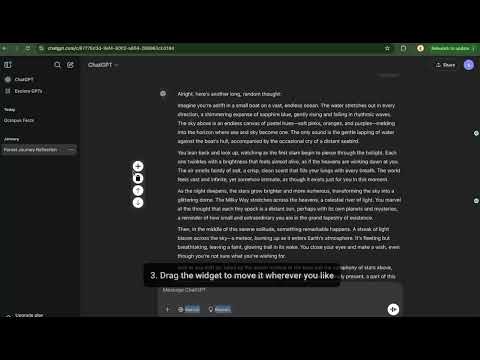
ChatGPT conversations often get lengthy, making it difficult to revisit key insights or references from past interactions. Manually scrolling back is frustrating and inefficient. This extension provides an easy way to mark important sections in your chat and instantly jump to them later, saving time and improving workflow.
- ChatGPT lacks a built in bookmarking or navigation system
- Users must manually scroll to find past messages
- Conversations reset when switching between chats, losing important references
- Inline Bookmarking – Add markers at specific messages for quick access
- One Click Navigation – Click a marker to jump instantly to the saved position
- Per Conversation Storage – Markers persist per chat session, so you don’t lose references when switching between conversations
- Per Conversation Markers
- Detects a unique URL key for each ChatGPT chat, ensuring that markers are saved only for that specific conversation
- Effortless Navigation
- Click markers to scroll instantly to saved positions
- Edit labels (up to 5 lines) for quick reference
- One-click delete mode to remove unwanted markers
- Marker Limit & Storage – Up to 20 markers per conversation and 50 stored URLs
- Automatic Repositioning – Markers automatically adjust when content changes or the window resizes
- Draggable Controls – Move the control panel anywhere on the screen
- Dark Mode Awareness – The UI adapts to GPT’s dark mode for a seamless look
- Vanilla JavaScript
- CSS